
Listen to this Post
Introduction:
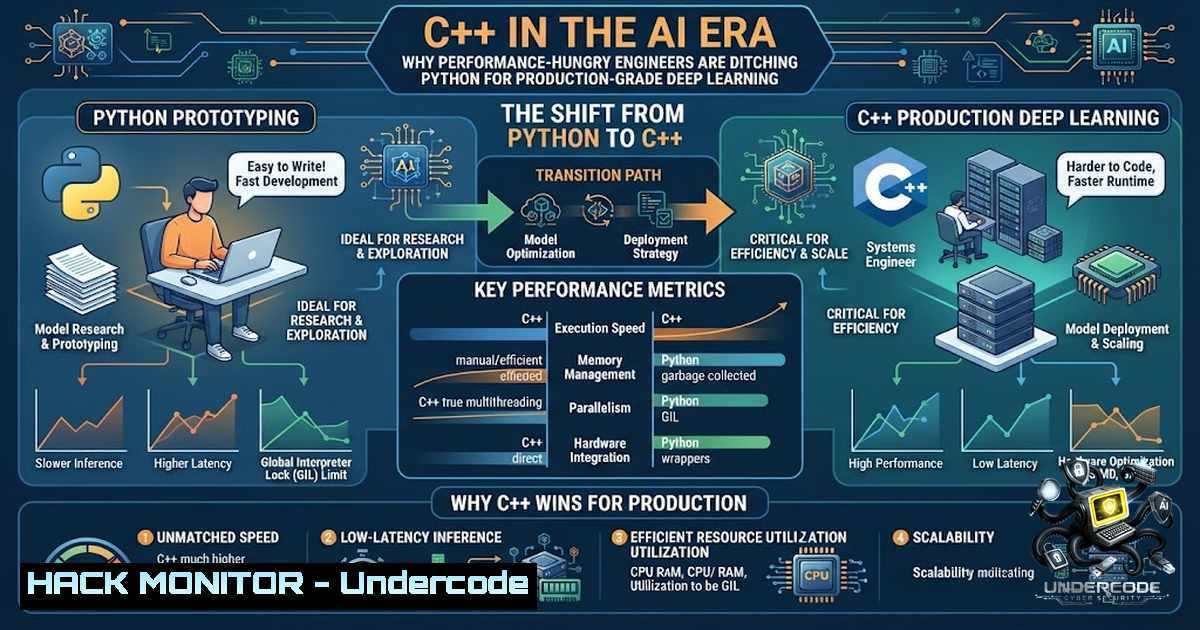
For years, Python has reigned supreme as the language of choice for artificial intelligence and deep learning, celebrated for its simplicity and the robust ecosystems of PyTorch and TensorFlow. However, as models move from research notebooks to production environments handling millions of requests per second, the overhead of Python’s interpreted nature becomes a critical bottleneck. This article explores the resurgence of C++ in AI, detailing when it is absolutely necessary, how to leverage its powerful supporting ecosystem, and the technical steps required to deploy high-performance, low-latency models in the real world.
Learning Objectives:
- Understand the specific performance and control limitations of Python that necessitate C++ for production AI systems.
- Identify the key scenarios where C++ deployment is mandatory, including low-latency inference and resource-constrained edge devices.
- Learn how to utilize the C++ AI ecosystem, including CUDA, LibTorch, ONNX, and OpenCV, to build and deploy optimized models.
- Gain practical knowledge of exporting models via TorchScript and ONNX for native deployment.
You Should Know:
- Beyond Python: The Performance Imperative in Production AI
The initial phase of any AI project is often about experimentation and speed of iteration, which is where Python excels. However, when the model is ready to serve thousands of users per second, performance becomes the paramount concern. Python’s Global Interpreter Lock (GIL) prevents true multi-threading, and its dynamic typing adds overhead that can cripple latency-sensitive applications. C++ offers deterministic performance, efficient memory management, and fine-grained control over system resources, making it the ideal choice for mission-critical deployments. The cost is not just in writing the code but in the engineering rigor required to maintain it.
Step‑by‑step guide to profiling Python vs. C++ latency:
- Profile Python Inference: Use `cProfile` and `line_profiler` to identify bottlenecks in your Python inference script.
python -m cProfile -o output.prof your_inference_script.py
- Simulate High Load: Use tools like `locust` or `wrk` to simulate concurrent users sending inference requests to your Python server.
- Profile C++ Inference: Compile your C++ application with debugging symbols (
-g) and use a profiler like `perf` or `gprof` to analyze runtime.g++ -pg -o cpp_inference cpp_inference.cpp -ltorch ./cpp_inference gprof cpp_inference gmon.out > analysis.txt
- Analyze Memory Footprint: Use `valgrind` (Linux) or Visual Studio Diagnostics (Windows) to analyze heap allocations and memory leaks in your C++ application.
- Compare Results: Document the P99 latency and memory usage. A well-optimized C++ solution often shows a 10x reduction in latency and memory footprint compared to Python.
-
When to Make the Switch: Identifying Critical Use Cases
Understanding when to invest in C++ is crucial for cost and resource management. The decision is driven by specific requirements that Python simply cannot meet. Ad bidding systems require predictions in under 50 milliseconds, making Python’s overhead unacceptable. Autonomous vehicles and robotics need deterministic execution times, which are impossible with Python’s garbage collector. Large-scale fraud detection systems processing petabytes of data need to maximize throughput per watt, a metric where C++ excels. For most research and prototyping, Python is superior; the switch to C++ is a strategic business decision to ensure a product is commercially viable.
Step‑by‑step guide to evaluating your use case:
- Define Service Level Agreements (SLAs): Document your required latency (e.g., < 30ms) and throughput (e.g., 10k req/sec).
- Test Python’s Limits: Implement a simple Python server (using Flask or FastAPI) with a dummy model load and stress-test it.
- Identify Bottlenecks: Use profiling tools to identify if the bottleneck is in the model computation (GPU/CPU) or in the Python runtime (GIL, serialization).
- Cost-Benefit Analysis: Calculate the infrastructure cost to meet your SLA using Python servers versus the development cost of rewriting in C++.
- Make a Decision: Proceed with C++ only if the infrastructure savings or the technical requirement (e.g., embedded system) outweighs the development cost.
3. The Ecosystem for C++ Deep Learning
Moving to C++ does not mean rewriting everything from scratch. A rich ecosystem exists to support the entire lifecycle of a deep learning model. The core of performance lies in CUDA, which allows direct programming of NVIDIA GPUs. LibTorch, the C++ API of PyTorch, provides a familiar interface for tensor operations and model building. OpenCV ensures efficient image and video preprocessing in native code. Finally, explainability tools like SHAP, LIME, and Grad-CAM are ported or have native implementations to help debug and build trust in the deployed model. This ecosystem allows a developer to build, train, and export a model from Python and seamlessly deploy it in C++.
Step‑by‑step guide to setting up the C++ AI environment on Linux:
1. Install NVIDIA CUDA Toolkit:
wget https://developer.download.nvidia.com/compute/cuda/12.3.0/local_installers/cuda_12.3.0_545.23.06_linux.run
sudo sh cuda_12.3.0_545.23.06_linux.run
2. Install LibTorch (PyTorch C++ API):
wget https://download.pytorch.org/libtorch/cu121/libtorch-shared-with-deps-2.1.0%2Bcu121.zip
unzip libtorch-shared-with-deps-2.1.0+cu121.zip
export CMAKE_PREFIX_PATH=${PWD}/libtorch
3. Install OpenCV:
sudo apt update && sudo apt install libopencv-dev
4. Create a CMake Project: Write a `CMakeLists.txt` file to link against `libtorch` and OpenCV.
cmake_minimum_required(VERSION 3.0 FATAL_ERROR)
project(MyAIProject)
find_package(Torch REQUIRED)
find_package(OpenCV REQUIRED)
add_executable(my_app main.cpp)
target_link_libraries(my_app "${TORCH_LIBRARIES}" "${OpenCV_LIBS}")
5. Compile and Run:
mkdir build && cd build
cmake -DCMAKE_PREFIX_PATH=/path/to/libtorch ..
make && ./my_app
4. Exporting Models from Python for Native Deployment
The common workflow is to train a model in Python and export it for C++ inference. The primary methods are TorchScript (via torch.jit) and ONNX. TorchScript captures the model’s computation graph, making it portable and runnable outside of Python. ONNX is an open standard that allows interoperability between different frameworks. Exporting a model is a critical step and requires careful handling of dynamic control flow and data types. For production, ensure the model is in evaluation mode and the input data types match what the C++ code expects. This approach separates the experimentation environment from the production runtime, allowing for rapid iteration in Python while maintaining stability in C++.
Step‑by‑step guide to exporting a PyTorch model to TorchScript:
1. Define a Model in Python:
import torch
import torch.nn as nn

class SimpleNN(nn.Module):
def <strong>init</strong>(self):
super().<strong>init</strong>()
self.fc = nn.Linear(10, 5)
def forward(self, x):
return self.fc(x)
2. Instantiate and Train the Model: Train your model and put it in evaluation mode (model.eval()).
3. Export via Tracing:
example_input = torch.randn(1, 10)
traced_script_module = torch.jit.trace(model, example_input)
traced_script_module.save("model.pt")
4. Export via Scripting (for dynamic control flow): If your model uses loops or `if` statements, use torch.jit.script.
5. Load in C++:
include <torch/script.h>
torch::jit::script::Module module;
module = torch::jit::load("model.pt");
std::vector<torch::jit::IValue> inputs;
inputs.push_back(torch::ones({1, 10}));
at::Tensor output = module.forward(inputs).toTensor();
5. Advanced Hardware Acceleration and Custom Kernels
For ultimate performance, C++ allows the use of custom CUDA kernels via `__global__` functions. These are small pieces of code that run directly on the GPU, allowing for hyper-optimized implementations of operations not covered by standard libraries. While beneficial for research on novel architectures, this approach requires deep knowledge of GPU architecture, memory coalescing, and block/thread hierarchies. For most developers, leveraging the highly optimized libraries within LibTorch and cuDNN is sufficient. However, for situations requiring extreme performance, writing a custom CUDA kernel can provide a significant edge over pre-built libraries.
Step‑by‑step guide to adding a custom CUDA kernel in C++:
1. Write a CUDA Kernel (`add_kernel.cu`):
<strong>global</strong> void add_kernel(int a, int b, int c, int N) {
int idx = blockIdx.x  blockDim.x + threadIdx.x;
if (idx < N) c[bash] = a[bash] + b[bash];
}
2. Create a Launcher Function:
void launch_add(int a, int b, int c, int N) {
int threads_per_block = 256;
int blocks = (N + threads_per_block - 1) / threads_per_block;
add_kernel<<<blocks, threads_per_block>>>(a, b, c, N);
}
3. Compile with NVCC: Integrate the `.cu` file into your CMake project using find_package(CUDA).
4. Integrate with LibTorch: Convert `torch::Tensor` to raw pointers and back using .data_ptr<float>().
5. Profile Performance: Use NVIDIA Nsight Systems to profile the kernel launch and GPU utilization.
What Undercode Say:
Key Takeaway 1: Python is for discovery; C++ is for delivery. The research phase benefits from Python’s agility, but moving to C++ is often the key to unlocking production-grade performance and reliability. This requires a shift in mindset from “fast to write” to “fast to execute”.
Key Takeaway 2: The ecosystem is mature enough to abstract away the complexity. Modern tools like LibTorch, ONNX, and OpenCV provide developers with a C++ experience that closely mirrors Python, smoothing the transition from research to deployment.
Prediction:
- +1 The demand for C++-skilled AI engineers will continue to outstrip supply, creating highly lucrative career opportunities. Those who bridge the gap between data science and software engineering will be invaluable.
- -1 The increasing use of graph compilers and Domain-Specific Languages (DSLs) like Mojo may eventually reduce the dependency on C++, though it will remain the standard for performance-critical systems for the foreseeable future.
- +1 The integration of C++ with AI will accelerate the adoption of AI in the Internet of Things (IoT) and edge computing, unlocking new capabilities in industries like healthcare, manufacturing, and agriculture.
- -1 The steep learning curve of C++ and its ecosystem can be a significant barrier to entry, potentially creating a technological divide between research teams and production engineering teams if not managed carefully.
- +1 As hardware evolves with specialized AI accelerators, C++’s low-level access will be crucial to harness their full potential, ensuring that software can fully leverage next-generation chips.
▶️ Related Video (76% Match):
🎯Let’s Practice For Free:
🎓 Live Courses & Certifications:
Join Undercode Academy for Verified Certifications
🚀 Request a Custom Project:
Secure, high-velocity infrastructure and disruptive technological engineering. Contact our engineering team for high-tier development and proprietary systems:
[email protected]
💎 Smart Architecture | 🛡️ Secure by Design | ⭐ Trusted by Thousands
IT/Security Reporter URL:
Reported By: Suphanfayong %F0%9D%97%AA%F0%9D%97%B5%F0%9D%98%86 – Hackers Feeds
Extra Hub: Undercode MoN
Basic Verification: Pass ✅


