
Listen to this Post
Introduction:
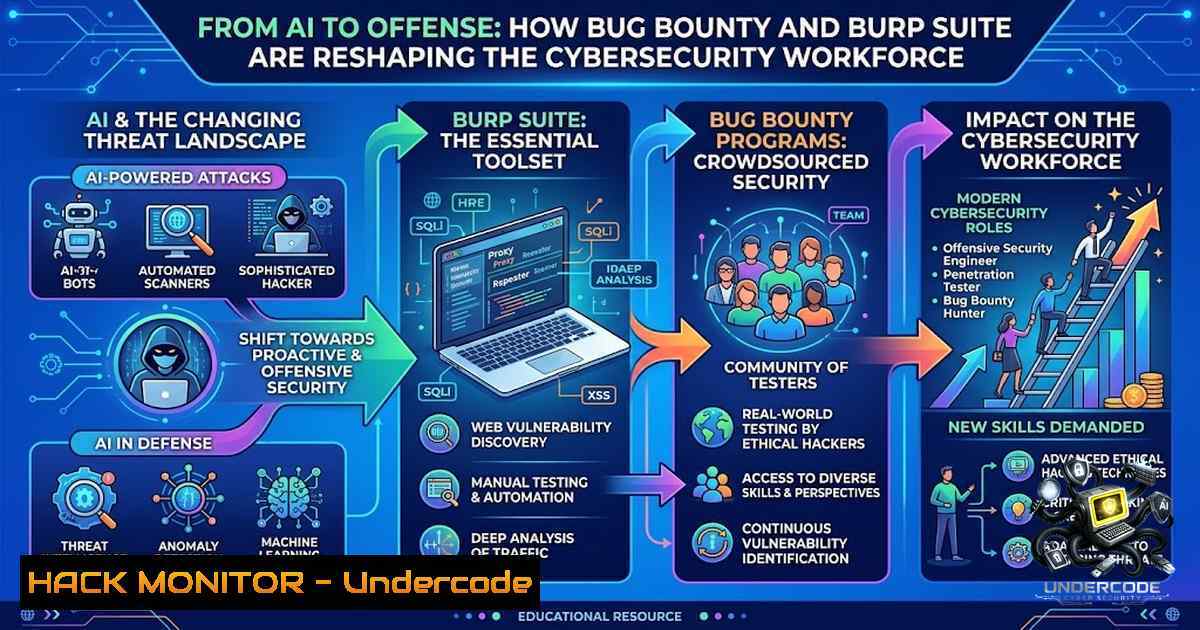
The boundaries between artificial intelligence, machine learning, and cybersecurity are dissolving faster than most professionals realize. As an AIML student recently discovered through CappricioSec University’s Bug Bounty & Burp Suite 101 course, understanding web application security, HTTP request/response structures, and vulnerability identification is no longer optional for technologists—it’s a competitive imperative. Burp Suite, a Java-based cross-platform tool, functions as an intercepting proxy that sits between the browser and target server, capturing, modifying, and replaying every data packet. This article explores how security testing tools, vulnerability exploitation techniques, and cross-domain learning are converging to create a new generation of AI-aware security professionals.
Learning Objectives & Secrets:
- Objective 1: Master Burp Suite Proxy Interception – Learn to configure browser proxy settings (127.0.0.1:8080), intercept HTTP/HTTPS traffic, and analyze raw requests and responses. Secret tip: Always install the CA certificate via `http://burp/` to intercept HTTPS traffic—without this, encrypted requests remain invisible.
- Objective 2: Automate Vulnerability Discovery with Intruder – Use Burp Intruder to automate brute-force attacks, fuzzing, and payload injection. Secret tip: Configure throttling delays between requests to avoid triggering WAF/IDS alerts and maintain stealth during active scanning.
- Objective 3: Validate Exploits with Repeater – Manually modify and resend requests to test parameter manipulation, IDOR, and business logic flaws. Secret tip: Always test with Repeater before launching automated scans—manual validation reduces false positives and increases report acceptance rates.
You Should Know:
- Setting Up Burp Suite: Proxy Configuration & Certificate Installation
Burp Suite operates as a man-in-the-middle proxy, intercepting all traffic between your browser and target applications. Proper configuration is the foundation of effective web application testing.
Step‑by‑step guide:
Linux/macOS:
 Check if Java is installed (Burp requires JDK)
java -version

Download Burp Suite Community/Professional from PortSwigger
wget https://portswigger.net/burp/releases/download?product=community&version=2025.12.5 -O burp_installer.sh

Run the installer
chmod +x burp_installer.sh
./burp_installer.sh
Windows (PowerShell):
 Check Java installation
java -version

Download Burp Suite (using Invoke-WebRequest)
Invoke-WebRequest -Uri "https://portswigger.net/burp/releases/download?product=community&version=2025.12.5" -OutFile "burp_installer.exe"
 Run the installer manually
Browser Proxy Configuration:
- Open Burp Suite → Proxy → Options → confirm proxy listener on `127.0.0.1:8080`
2. Configure browser:
- Manual method: Settings → Network → Manual proxy → HTTP Proxy:
127.0.0.1, Port: `8080`
– Extension method: Install FoxyProxy or SwitchyOmega, create a proxy profile with `127.0.0.1:8080`
3. Install CA Certificate (critical for HTTPS): Navigate to `http://burp/` in the proxied browser → download CA certificate → import into browser’s certificate store
- Test interception: Enable Intercept in Burp → browse any HTTP site → verify request appears in Burp
What this does: This establishes Burp as a transparent proxy, enabling full visibility into all HTTP/HTTPS requests and responses. Without certificate installation, HTTPS traffic remains encrypted and unmodifiable.
- Core Burp Suite Modules: Proxy, Target, Repeater, and Intruder
Each module serves a distinct purpose in the security testing workflow.
Proxy – Traffic Interception & History:
- Intercept: Toggle on/off to capture individual requests. Use `Forward` to send, `Drop` to discard
- HTTP History: Records all traffic—even non-intercepted requests—for later analysis
- WebSockets History: Captures WebSocket communication for modern application testing
Target – Site Mapping:
- Builds a visual site map of discovered endpoints and directories
- Right-click any request → `Add to scope` to focus scanning on specific targets
Repeater – Manual Request Manipulation:
- In Proxy → HTTP History, right-click a request → `Send to Repeater`
2. Navigate to Repeater tab → modify parameters, headers, or body - Click `Send` → view response in the right panel
- Iterate: modify, send, observe—perfect for testing parameter injection, path traversal, and authentication bypass
Intruder – Automated Attacks:
1. Right-click a request → `Send to Intruder`
- Positions tab: highlight payload positions with `§` symbols
- Payloads tab: load dictionaries (usernames, passwords, SQLi payloads, path traversal strings)
- Resource pool: configure throttle (delay between requests) to avoid rate-limiting and WAF detection
- Launch attack → analyze results by response length, status code, or response time
What this does: These modules transform manual testing into a semi-automated workflow. Repeater enables precise exploit validation; Intruder scales testing across hundreds or thousands of payload variations.
3. Vulnerability Scanning: Active vs. Passive
Burp Scanner automates vulnerability detection, but understanding scan types is essential.
Active Scanning:
- Sends crafted payloads to test for SQL injection, XSS, OS command injection, and more
- Enable: Right-click a request → `Do an active scan` or Dashboard → New scan → select “Active scan”
- Customize: Choose specific scan checks (SQLi, XSS, XXE, etc.) to reduce scan time
- Warning: Active scanning generates significant traffic—use throttling to avoid detection
Passive Scanning:
- Analyzes existing traffic without sending new requests
- Safer for production environments; identifies information leaks, missing security headers, and configuration issues
Scan Configuration Best Practices:
- Define scope before scanning (Target → Site map → right-click → Add to scope)
- Configure scan speed: slower scans are stealthier and more thorough
- Use custom scan checks via Burp Extender for specialized vulnerability detection
- Export reports: Target → Site map → right-click → Issues → Report issues for this host → select HTML format
What this does: Automated scanning dramatically accelerates vulnerability discovery, but always validate findings manually with Repeater before reporting.
4. API Security Testing with Burp Suite
Modern applications expose an average of 26 APIs per application. Burp Suite now offers enhanced API scanning capabilities.
Key API Testing Features:
- Upload OpenAPI (OAS) definitions directly into Burp for targeted API scanning—no need to host definition files
- Discover exposed managed APIs that attackers could access
- Scan authenticated API endpoints using OAuth2 Client Credentials flow (supported in v2025.12+)
- Test broader OAS endpoints including HTTP headers
API Authentication Configuration:
1. Project options → API → Authentication
2. Select OAuth2 → Client Credentials
- Enter client ID, client secret, and token endpoint
4. Click Test to verify token extraction
API Testing Workflow:
- Upload OAS definition or let Burp discover APIs automatically
2. Configure authentication if required
- Run targeted API scan (vs. full web application scan)
- Review findings for authentication bypass, authorization flaws, rate-limiting issues, and injection vulnerabilities
What this does: Dedicated API scanning ensures comprehensive coverage of modern microservices architectures, where traditional web application scans often miss critical endpoints.
5. Cloud Security Hardening & Configuration Checks
Security doesn’t end at the application layer. Cloud misconfigurations remain a top attack vector.
Cloud Security Checklist:
- Identity & Access Management: Enable MFA for all administrator accounts; disable root user access keys
- Storage Permissions: Scan all cloud storage (object storage, databases) to ensure no public read access
- Network Security: Restrict SSH/RDP to internal IPs only; avoid default ports
- Logging & Audit: Enable comprehensive audit logging; centralize logs for threat detection
- Backup Validation: Regularly test backup restoration
Linux System Hardening Commands:
 Audit system security
sudo lynis audit system

Restrict SSH access
sudo nano /etc/ssh/sshd_config
 Set: PermitRootLogin no, PasswordAuthentication no, Port 2222 (change default)

Check open ports
sudo netstat -tulpn | grep LISTEN

Enable firewall (UFW)
sudo ufw enable
sudo ufw allow 2222/tcp  Only if you changed SSH port
sudo ufw allow 80,443/tcp
Windows Security Commands (PowerShell):
 List all users with administrative privileges
Get-LocalGroupMember Administrators

Check firewall rules
Get-1etFirewallRule | Where-Object {$_.Enabled -eq "True"}

Audit local security policy
secedit /export /cfg C:\security_audit.txt
What this does: These baseline checks prevent common cloud and system misconfigurations that routinely lead to data breaches.
6. Bug Bounty Methodology: From Recon to Report
Successful bug bounty hunting follows a structured approach.
Phase 1: Reconnaissance
- Passive: Subdomain enumeration (Amass, Subfinder), technology fingerprinting (Wappalyzer)
- Active: Port scanning (Nmap), directory brute-forcing (ffuf, dirb)
- Tool: Burp Suite Target tab maps discovered endpoints
Phase 2: Targeted Testing
- Authentication: Test for weak passwords, session fixation, JWT misconfigurations
- Input Validation: SQL injection, XSS, OS command injection, path traversal
- Business Logic: IDOR, privilege escalation, race conditions, workflow bypass
- Use Burp: Intercept requests, modify parameters, observe responses
Phase 3: Exploitation & Validation
- Use Repeater to manually confirm each vulnerability
- Chain vulnerabilities for higher impact (e.g., XSS → session hijacking)
- Document proof-of-concept with clear steps
Phase 4: Reporting
- Include: vulnerability description, impact, reproduction steps, screenshots, and remediation recommendations
- Follow platform-specific report templates (HackerOne, Bugcrowd)
Essential Payloads for Burp Intruder:
 SQL Injection
' OR '1'='1
' UNION SELECT NULL--
'; DROP TABLE users--

XSS
<script>alert('XSS')</script>
<img src=x onerror=alert(1)>

Path Traversal
../../../../etc/passwd
......\windows\win.ini

OS Command Injection
; whoami
| id
&& ping -c 10 attacker.com
What this does: A systematic methodology increases the likelihood of finding high-impact vulnerabilities and earning consistent bounties.
What Undercode Say:
- Key Takeaway 1: Cross-domain learning—AI students mastering web security—creates uniquely valuable professionals who understand both attack vectors and defensive AI applications. The intersection of AIML and cybersecurity is where the next generation of security innovation will emerge.
-
Key Takeaway 2: Burp Suite remains the industry-standard Swiss Army knife for web application security testing. Mastery of its core modules (Proxy, Repeater, Intruder, Scanner) combined with systematic bug bounty methodology enables researchers to consistently discover and validate high-impact vulnerabilities. The tool’s cross-platform compatibility (Windows, Linux, macOS) ensures accessibility across all environments.
-
Analysis: The student’s initiative to explore beyond their core AIML domain reflects a broader industry trend: security is everyone’s responsibility. As AI systems increasingly power critical infrastructure, understanding how to test, break, and secure the underlying web applications becomes non-1egotiable. The CappricioSec University program exemplifies how specialized security training can complement formal academic paths, producing graduates who are not just AI engineers but security-aware technologists. Furthermore, Burp Suite’s evolving API scanning capabilities and OAuth2 support demonstrate the tool’s adaptation to modern architectures—a signal that security testing must keep pace with architectural shifts toward microservices and API-first design.
Prediction:
- +1 The convergence of AI and cybersecurity education will produce a new workforce capable of building AI systems with security-by-design principles, reducing vulnerability introduction at the development phase.
- +1 Burp Suite’s continued evolution—including AI-assisted Repeater, enhanced API scanning, and OAST support—will further democratize professional-grade security testing, enabling more researchers to enter the bug bounty ecosystem.
- -1 As more non-security professionals gain access to powerful testing tools like Burp Suite, the risk of unintentional system disruption or unauthorized testing increases—emphasizing the critical need for proper authorization and ethical guidelines.
- -1 Organizations that fail to adopt API-specific security testing will face increasing breach risks as attackers shift focus to exposed, poorly secured API endpoints.
- +1 The growing bug bounty economy (with five-figure bounties for advanced vulnerabilities) will incentivize deeper security research, ultimately strengthening the entire digital ecosystem.
▶️ Related Video (78% Match):
https://www.youtube.com/watch?v=6DqH7ujwZDs
🎯Let’s Practice For Free:
🎓 Live Courses & Certifications:
Join Undercode Academy for Verified Certifications
🚀 Request a Custom Project:
Secure, high-velocity infrastructure and disruptive technological engineering. Contact our engineering team for high-tier development and proprietary systems:
[email protected]
💎 Smart Architecture | 🛡️ Secure by Design | ⭐ Trusted by Thousands
IT/Security Reporter URL:
Reported By: https://lnkd.in/p/ebNPVFde – Hackers Feeds
Extra Hub: Undercode MoN
Basic Verification: Pass ✅


