Listen to this Post
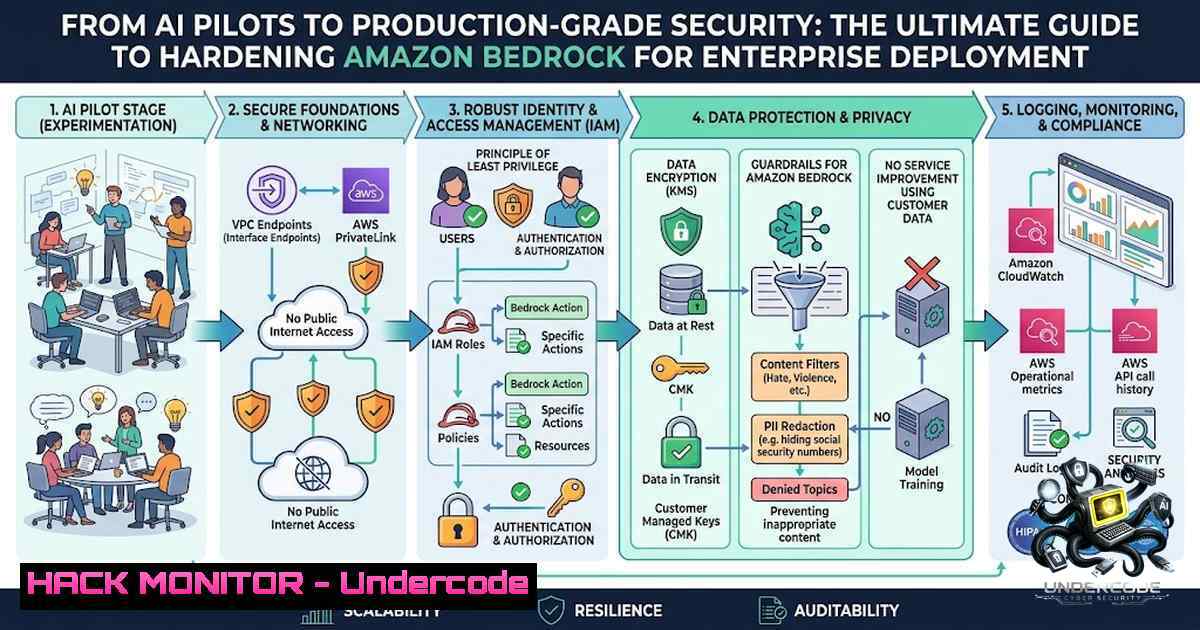
Introduction:
Generative AI has rapidly evolved from experimental proof-of-concepts to mission-critical enterprise workloads, but the real challenge is no longer selecting the right foundation model—it is securely integrating AI into production environments while maintaining governance, compliance, and operational efficiency. Amazon Bedrock has emerged as the leading fully managed service for building and scaling generative AI applications, yet many organizations underestimate the security complexities of moving from pilot to production. This article provides a comprehensive, step-by-step guide to hardening Amazon Bedrock deployments across identity, network, data, observability, and DevSecOps domains.
Learning Objectives:
- Implement least-privilege IAM policies and Bedrock API key governance to prevent privilege escalation and unauthorized model access
- Configure VPC private endpoints and network isolation to ensure Bedrock API calls never traverse the public internet
- Deploy Amazon Bedrock Guardrails with content filtering, PII redaction, and prompt attack prevention for responsible AI safeguards
- Encrypt all Bedrock data at rest and in transit using customer-managed KMS keys for compliance with HIPAA, GDPR, and SOC 2
- Establish comprehensive monitoring and auditing with CloudTrail, CloudWatch, and GuardDuty AI Protection
- Integrate Bedrock security into CI/CD pipelines with infrastructure-as-code and automated security scanning
You Should Know:
- Identity and Access Management: Locking Down Bedrock Permissions
The foundation of any secure Bedrock deployment begins with IAM. The single most critical mistake organizations make is attaching overly permissive policies like `AmazonBedrockFullAccess` or using wildcard actions such as bedrock:. A compromised IAM key with broad Bedrock permissions can expose an organization to LLMjacking attacks costing up to $18,000 per day per region.
Step-by-Step Guide to Bedrock IAM Hardening:
Step 1: Adopt Least-Privilege IAM Policies
Instead of managed policies, create custom policies that grant only the specific actions required. For an application that only invokes model inference, restrict to:
{
"Version": "2012-10-17",
"Statement": [
{
"Effect": "Allow",
"Action": [
"bedrock:InvokeModel",
"bedrock:InvokeModelWithResponseStream"
],
"Resource": "arn:aws:bedrock:us-east-1::foundation-model/anthropic.claude-3-sonnet-20240229"
}
]
}
This policy grants invocation permissions only to a specific model in a specific region—no wildcards, no unnecessary actions.
Step 2: Secure Bedrock API Keys
Bedrock API keys are created using `CreateServiceSpecificCredential` and can be long-lived with no expiration. Always enforce key expiration and rotate keys regularly. Each IAM user can have up to two API keys to enable rotation without downtime. Never embed API keys in code, CI/CD pipelines, or collaboration platforms.
Step 3: Enforce MFA for API Operations
Add MFA conditions to your IAM policies to require multi-factor authentication when calling Bedrock API operations:
"Condition": {
"BoolIfExists": {
"aws:MultiFactorAuthPresent": "true"
}
}
Step 4: Use Service Control Policies (SCPs) at the Organization Level
Block Bedrock access in non-production organizational units (OUs) and enforce org-level content guardrails. SCPs ensure insecure configurations become impossible to deploy, not just discouraged.
- Network Isolation: Keeping Bedrock Traffic Off the Public Internet
For sensitive workloads, ensuring Bedrock API calls and batch inference data never traverse the public internet is non-1egotiable.
Step-by-Step Guide to VPC Private Connectivity:
Step 1: Create VPC Interface Endpoints for Bedrock
Navigate to VPC > Endpoints > Create Endpoint. Select AWS services and choose:
– `com.amazonaws.
– `com.amazonaws.
Enable Private DNS Name to keep calls on the AWS network.
Step 2: Configure S3 VPC Gateway Endpoint for Batch Data
For batch inference input/output data stored in S3, create an S3 VPC gateway endpoint and restrict bucket policies by VPC endpoint ID using the condition aws:sourceVpce.
Step 3: Deploy Lambda Functions in Private Subnets
Ensure Lambda functions invoking Bedrock run in private subnets with no public IP addresses. Traffic flows through VPC endpoints, eliminating the need for NAT gateways for Bedrock or S3 access.
Step 4: Enable VPC Flow Logs
Capture all network traffic metadata for forensic analysis and security monitoring.
Step 5: Configure Bedrock AgentCore Gateway for Private Resource Access
For AI agents that need to reach internal APIs and databases, configure Amazon Bedrock AgentCore Gateway with Resource Gateway—a managed construct that provisions Elastic Network Interfaces (ENIs) directly inside your VPC. This keeps all agent-to-tool communication within the AWS network backbone.
- Amazon Bedrock Guardrails: Building Your AI Safety Perimeter
Amazon Bedrock Guardrails provides powerful tools for implementing responsible AI safeguards. However, improper configuration can lead to throttling errors, increased costs, and poor latency.
Step-by-Step Guide to Guardrails Configuration:
Step 1: Select the Right Guardrail Policies
For production deployments, enable:
- Content Policy: Blocks harmful content across hate speech, insults, sexual content, violence, and misconduct—recommended for all production deployments
- Prompt Attack Prevention: Detects jailbreak attempts, prompt injection, and prompt leakage attacks
- Sensitive Information Policy: Masks or removes PII, hardcoded AWS access keys, database connection strings, and private keys
- Topic Policy: Enforces custom Responsible AI policies and organizational guidelines
Step 2: Configure Filter Strengths
Amazon Bedrock Guardrails offers four filter strength levels: NONE, LOW, MEDIUM, and HIGH. Start with MEDIUM for production and tune based on false positive rates.
Step 3: Implement Contextual Grounding for RAG Workloads
Validate whether responses are supported by trusted reference materials to reduce hallucinations.
Step 4: Apply Guardrails at the Gateway Boundary
With Amazon Bedrock AgentCore Policy support for Guardrails (announced June 2026), enable real-time evaluation of agent actions and tool calls at the gateway boundary, blocking prompt injection and sensitive information leakage outside the agent’s code.
Step 5: Monitor Guardrail Activity
Track Guardrail-related actions in CloudTrail including CreateGuardrail, UpdateGuardrail, DeleteGuardrail, AttachGuardrail, and DetachGuardrail.
AWS CLI Command to Create a Guardrail:
aws bedrock create-guardrail \
--1ame "production-guardrail" \
--description "Production safety guardrail with PII redaction" \
--content-policy-config '{"filtersConfig":[{"type":"HATE","inputStrength":"MEDIUM","outputStrength":"MEDIUM"}]}' \
--sensitive-information-policy-config '{"piiEntitiesConfig":[{"type":"EMAIL","action":"REDACT"}]}' \
--region us-east-1
- Data Encryption: Protecting Data at Rest and in Transit
Amazon Bedrock automatically encrypts data at rest using AWS-owned keys at no charge. However, for regulated industries, customer-managed KMS keys (CMKs) provide full control over the encryption lifecycle.
Step-by-Step Guide to KMS Encryption for Bedrock:
Step 1: Create a Customer-Managed KMS Key
aws kms create-key --description "CMK for Amazon Bedrock encryption" --region us-east-1
aws kms create-alias --alias-1ame alias/bedrock-cmk --target-key-id <key-id>
Step 2: Encrypt Knowledge Base Transient Data
When converting data into embeddings, configure your knowledge base to use your CMK. This grants you granular control over who can use the encryption keys to access your data.
Step 3: Encrypt Custom Models and Guardrails
Apply CMKs to protect custom model imports, Guardrails configurations, and AgentCore Gateway data. With a CMK, you can rotate the key on your own schedule.
Step 4: Enable Encryption in Transit
All Bedrock API calls are encrypted with TLS. When combined with VPC PrivateLink, data remains encrypted from your VPC to Bedrock without traversing the public internet.
5. Monitoring, Auditing, and Threat Detection
Comprehensive observability is essential for governance and compliance. Amazon Bedrock offers extensive monitoring and logging capabilities that support ISO, SOC, CSA STAR Level 2, HIPAA eligibility, and GDPR compliance.
Step-by-Step Guide to Bedrock Monitoring:
Step 1: Enable Model Invocation Logging
Navigate to Bedrock Console > Settings > Model invocation logging. Enable logging and choose CloudWatch Logs and/or S3 as the destination. Logs capture model inputs, outputs, and metadata for audit purposes.
Step 2: Configure CloudTrail for Bedrock
Enable CloudTrail to capture Bedrock control-plane operations (management events) and add advanced data event selectors for data-plane visibility. Monitor for:
- Access denied events
- Spikes in GuardRail blocks
- Unusual API call patterns
- Configuration changes to logging
Step 3: Enable GuardDuty AI Protection (Preview as of July 2026)
GuardDuty now offers AI Protection, expanding threat detection to AWS AI services including Amazon Bedrock. It detects:
- Cost harvesting attacks forcing excessive GPU time and token consumption
- Prompt injection attempts through integration with Bedrock Guardrails
- IAM user prompt injection patterns (
IAMUser/PromptInjection.Direct)
Step 4: Deploy AWS Security Hub CSPM AI Security Best Practices Standard
Launched June 2026, this standard includes 31 automated security controls that continuously evaluate Bedrock workloads against recommended security configurations. Controls cover network isolation, encryption, VPC placement, KMS key usage, and authorization controls. The standard identifier is standards/ai-security-best-practices/v/1.0.0.
Step 5: Implement AI Security Posture Management (AI-SPM)
AI-SPM provides deep, Bedrock-1ative security coverage across models, guardrails, agents, and knowledge bases. Use it to audit IAM roles with Bedrock permissions, model-invocation logging, KMS encryption, guardrail quality, and prompt-injection signals in invocation logs.
- DevSecOps Integration: Embedding Security in the AI Lifecycle
Treating Bedrock configurations as infrastructure-as-code (IaC) is essential for repeatable, auditable, and secure deployments.
Step-by-Step Guide to Bedrock DevSecOps:
Step 1: Use Terraform or AWS CDK for Bedrock Resources
Provision Bedrock models, guardrails, knowledge bases, and agents through IaC. Enforce HCP Terraform Sentinel policies directly in CI/CD to prevent insecure configurations.
Step 2: Integrate Automated Security Scanning in CI/CD
Use AI-powered code reviewers integrated with GitHub Actions and AWS Lambda that analyze pull requests for security and performance issues using Amazon Bedrock. Deploy CDK pipeline constructs that perform Bedrock Well-Architected analysis on every pull request.
Step 3: Implement Agentic AI Lifecycle with CI/CD
Deploy agentic AI applications using Bedrock AgentCore with Terraform IaC and automated CI/CD via GitHub Actions. This ensures that every change to AI agents, models, or guardrails goes through the same rigorous security review as any other production code.
Step 4: Schedule Regular IAM Permission Reviews
Conduct periodic reviews of IAM permissions to ensure least-privilege is maintained. Remove any permission that cannot be mapped to a verified runtime call.
Step 5: Assess Bedrock Workloads Against AWS Security Best Practices
Deploy the serverless AWS AI/ML Security Assessment framework that automatically evaluates Bedrock workloads and produces interactive, shareable reports with severity levels and recommended actions.
What Undercode Say:
- Key Takeaway 1: Generative AI is transitioning from experimentation to production at an unprecedented pace, but security cannot be an afterthought. Organizations must treat AI platforms with the same rigorous security standards as any other critical infrastructure—identity, network, data, and observability controls must be baked in from day one.
-
Key Takeaway 2: Amazon Bedrock provides enterprise-grade security capabilities—IAM least-privilege, VPC private endpoints, Guardrails content filtering, KMS encryption, and comprehensive audit logging—but these features must be deliberately configured and continuously monitored. The 31 automated controls in AWS Security Hub’s AI Security Best Practices standard represent a significant step forward in operationalizing AI security at scale.
-
Analysis: The convergence of generative AI and cloud security creates both opportunities and risks. On one hand, Bedrock’s fully managed nature offloads significant operational overhead; on the other, it introduces new attack surfaces—LLMjacking, prompt injection, sensitive data leakage through model outputs, and privilege escalation through overly permissive IAM policies. Organizations that successfully bridge the gap between AI innovation and security governance will have a decisive competitive advantage. The emergence of services like GuardDuty AI Protection and Security Hub’s AI Security Best Practices standard signals AWS’s commitment to maturing the AI security ecosystem. However, security teams must move beyond reactive posture management to proactive runtime detection and response. The future belongs to organizations that build secure, scalable, and well-governed AI platforms rather than isolated AI experiments.
Prediction:
-
+1 Enterprise adoption of Amazon Bedrock will accelerate significantly through 2027 as the 31 automated AI security controls in AWS Security Hub CSPM reduce the perceived risk of production AI deployments, enabling security teams to approve AI workloads with greater confidence.
-
+1 The integration of GuardDuty AI Protection with Bedrock Guardrails will create a unified threat detection and prevention layer for AI workloads, dramatically reducing the mean time to detect and respond to prompt injection and LLMjacking attacks.
-
-1 Organizations that fail to implement least-privilege IAM policies and VPC private endpoints for Bedrock will experience increasingly sophisticated LLMjacking attacks, with potential financial exposure exceeding $18,000 per day per region as threat actors automate the discovery of exposed Bedrock API keys.
-
-1 The complexity of configuring Guardrails with appropriate filter strengths without causing excessive false positives or throttling errors will remain a significant operational challenge, potentially delaying production deployments for organizations without dedicated AI security expertise.
-
+1 The emergence of AI-SPM and CI/CD-integrated security scanning for Bedrock will enable platform engineering teams to treat AI security as code, embedding guardrails and compliance checks directly into the development lifecycle and reducing the security debt of AI workloads.
▶️ Related Video (76% Match):
https://www.youtube.com/watch?v=-TGqzT6yq6c
🎯Let’s Practice For Free:
🎓 Live Courses & Certifications:
Join Undercode Academy for Verified Certifications
🚀 Request a Custom Project:
Secure, high-velocity infrastructure and disruptive technological engineering. Contact our engineering team for high-tier development and proprietary systems:
[email protected]
💎 Smart Architecture | 🛡️ Secure by Design | ⭐ Trusted by Thousands
IT/Security Reporter URL:
Reported By: Sachinichpal Amazonbedrock – Hackers Feeds
Extra Hub: Undercode MoN
Basic Verification: Pass ✅


