Listen to this Post
Introduction:
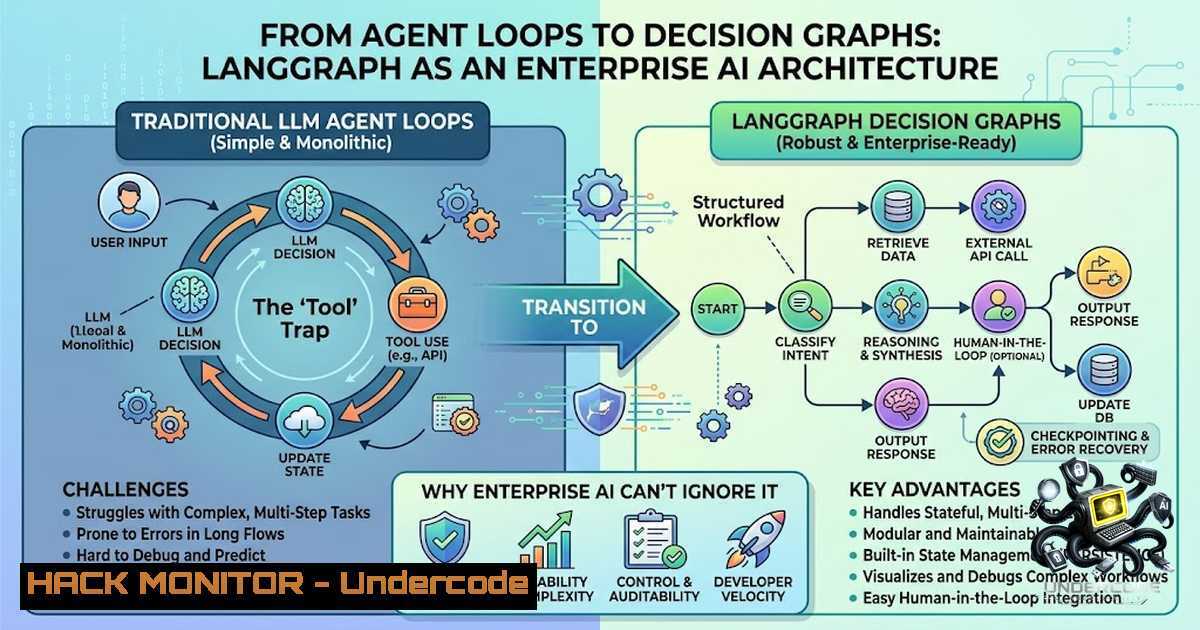
For months, the AI community has been buzzing about “agents” — autonomous systems that can reason, use tools, and execute tasks. But a fundamental misconception persists: that agents are simply a loop of think → act → observe. The reality, as illuminated by LangGraph, is far more sophisticated. Enterprise-grade AI isn’t a single reasoning loop; it’s a graph of decisions and actions — a stateful, interruptible, and human-in-the-loop workflow that brings structure to chaos. This article unpacks the paradigm shift from treating AI agents as magic to engineering them as orchestrated systems, providing a technical deep-dive into LangGraph’s architecture, practical implementation steps, and the security implications of this new paradigm.
Learning Objectives:
- Understand the architectural distinction between LangChain (building blocks) and LangGraph (orchestration).
- Learn how to design, implement, and deploy a stateful AI agent using LangGraph’s Graph API.
- Master advanced patterns including conditional routing, human-in-the-loop interrupts, and persistent memory.
- Apply security and operational best practices for production-grade agentic systems.
1. LangChain vs. LangGraph: Building Blocks vs. Orchestration
The most common pitfall for AI engineers is conflating LangChain with LangGraph. As one developer eloquently put it: “LangChain provides the building blocks. LangGraph orchestrates them into intelligent workflows.”
LangChain offers the components: LLMs, tools, prompts, memory abstractions, and basic agents. It’s the high-level API that lets you quickly compose an LLM-powered application. However, as of v1.0, LangChain agents are themselves built on top of LangGraph. LangGraph is the lower-level runtime — a state machine that gives you granular control over flow, persistence, and error handling.
Why this matters for enterprises: LangGraph carries more conceptual overhead (nodes, edges, state, checkpointers), but the payoff is dramatically simpler reasoning about complex, stateful workflows. You’re not just calling a model; you’re engineering a decision-making system.
Technical Insight: In LangGraph, every workflow is a `StateGraph` — essentially a directed graph. Nodes are agents (or functions that process state), edges are transitions between agents, and state is the shared data structure that flows through the entire graph. This graph-based approach makes branches explicit and easy to visualize, which is critical for debugging and compliance.
- Core Concepts: Nodes, Edges, and the State Machine
To build with LangGraph, you must internalize three core primitives:
- State: A shared dictionary (or Pydantic model) that persists across the entire graph execution. All nodes read from and write to this state.
- Nodes: Python functions (or entire sub-agents) that take the current state as input and return updates to it.
- Edges: Define the flow between nodes. Conditional edges are where the magic happens — they route dynamically based on the current state.
Step‑by‑step guide: Building a Simple Research Agent
This tutorial will build a stateful agent that can perform web searches and calculations, mimicking the “Think → Act → Observe → Respond” cycle described in the post.
Prerequisites:
- Python 3.9+
– `pip install langgraph langchain langchain-openai tavily-python`
Step 1: Define the State
from typing import TypedDict, Annotated, List
from langgraph.graph.message import add_messages

class AgentState(TypedDict):
messages: Annotated[List[bash], add_messages]
next_action: str
tool_results: List[bash]
The `add_messages` reducer ensures that new messages are appended rather than overwritten, maintaining conversation history.
Step 2: Define Tools
from langchain_community.tools import TavilySearchResults
from langchain_community.tools import WikipediaQueryRun
from langchain_community.utilities import WikipediaAPIWrapper

search = TavilySearchResults(max_results=2)
wikipedia = WikipediaQueryRun(api_wrapper=WikipediaAPIWrapper())
tools = [search, wikipedia]
Step 3: Define Nodes (Agent and Tool Executor)
from langgraph.prebuilt import ToolExecutor
from langchain_openai import ChatOpenAI
from langgraph.graph import END, StateGraph

model = ChatOpenAI(model="gpt-4", temperature=0)
tool_executor = ToolExecutor(tools)

def agent_node(state: AgentState):
"""The agent decides which tool to call or if it should respond."""
from langchain_core.messages import HumanMessage
from langgraph.prebuilt import create_react_agent

Use the prebuilt agent for simplicity
agent = create_react_agent(model, tools)
response = agent.invoke({"messages": state["messages"]})
return {"messages": [response["messages"][-1]]}

def tool_node(state: AgentState):
"""Execute the tool requested by the agent."""
last_message = state["messages"][-1]
tool_calls = last_message.get("tool_calls", [])
results = []
for call in tool_calls:
result = tool_executor.invoke(call)
results.append(result)
return {"tool_results": results, "messages": [{"role": "tool", "content": str(results)}]}
Step 4: Build the Graph with Conditional Routing
from langgraph.graph import StateGraph, END

workflow = StateGraph(AgentState)

Add nodes
workflow.add_node("agent", agent_node)
workflow.add_node("tool", tool_node)

Add edges
workflow.set_entry_point("agent")

def should_continue(state: AgentState):
"""Conditional edge: route to tool or end."""
last_message = state["messages"][-1]
if "tool_calls" in last_message:
return "tool"
return END

workflow.add_conditional_edges(
"agent",
should_continue,
{
"tool": "tool",
END: END
}
)
workflow.add_edge("tool", "agent")
Step 5: Add Persistence (Memory)
from langgraph.checkpoint.memory import MemorySaver

memory = MemorySaver()  In-memory checkpointer
graph = workflow.compile(checkpointer=memory)
Step 6: Invoke the Agent
config = {"configurable": {"thread_id": "user-123"}}
inputs = {"messages": [{"role": "user", "content": "What is the capital of France? Then calculate 254."}]}
for event in graph.stream(inputs, config):
print(event)
What this does: The agent first decides it needs to search for “capital of France”. The conditional edge routes to the tool node, which executes the search. The result is fed back to the agent, which then decides if it needs another tool (the calculator) or if it can respond. The `thread_id` ensures that the agent remembers the conversation context across invocations.
- The “Think → Act → Observe → Respond” Cycle Deconstructed
The post beautifully visualizes what happens behind the scenes:
– Think: Can I answer this?
– Act: Choose the right tool.
– Observe: Read the tool’s output.
– Think Again: Do I need another tool?
– Respond: Generate the final answer.
This is not a simple loop; it’s a decision graph. Each tool call is a branch, not a step. This is what makes multi-step reasoning scale. In LangGraph, this is implemented via the `create_react_agent` (now simply create_agent) which combines a model, tools, memory, and system prompt into a single reasoning workflow.
System Prompt Defines Behavior: The system prompt defines the agent’s personality and constraints, while tools define its capabilities. For example:
agent = create_agent(
model="gpt-4",
tools=[search, calculator],
system_prompt="You are a meticulous research assistant. Always verify facts from at least two sources before responding."
)
This separation of concerns is critical for enterprise AI — you can swap models or tools without rewriting the orchestration logic.
4. Human-in-the-Loop: Pause, Approve, Resume
One of LangGraph’s killer features is durable execution with human-in-the-loop (HITL) capabilities. In production, you rarely want an agent to execute destructive actions (e.g., deleting a database, sending an email) without human approval.
Step‑by‑step guide: Implementing an Approval Gate
Step 1: Define an Interrupt
from langgraph.checkpoint import interrupt

def sensitive_action_node(state: AgentState):
 Pause execution and ask for human approval
approved = interrupt("Approve sending email to all users?")
if approved:
 Execute the action
return {"status": "email_sent"}
else:
return {"status": "cancelled"}
Step 2: Compile with a Checkpointer
from langgraph.checkpoint.sqlite import SqliteSaver

with SqliteSaver.from_conn_string("checkpoints.db") as memory:
graph = workflow.compile(checkpointer=memory)
Step 3: Resume After Human Input
 After the interrupt, the graph state is saved
config = {"configurable": {"thread_id": "email-job-456"}}
 Resume with approval
from langgraph.types import Command
result = graph.invoke(Command(resume=True), config)
When `interrupt()` is called, LangGraph saves the current graph state and waits. The client can then resume execution by invoking the graph again with a `Command` containing the resume value. This pattern is invaluable for compliance-heavy industries like finance and healthcare.
- Memory and Persistence: Beyond the LLM’s Context Window
A common misconception is that memory lives inside the LLM. It doesn’t. Memory is managed externally by the framework, which stores conversation state and provides it back to the model when needed. LangGraph provides two complementary persistence systems:
- Checkpointers: Persist a thread’s graph state as checkpoints. Used for short-term, thread-scoped memory (conversation continuity, HITL, fault tolerance).
- Stores: For long-term, cross-thread memory (user profiles, preferences).
Example: Using a MongoDB Checkpointer
from langgraph.checkpoint.mongodb import MongoDBSaver

checkpointer = MongoDBSaver.from_conn_string(
"mongodb://localhost:27017/",
db_name="langgraph_db",
collection_name="checkpoints"
)
graph = workflow.compile(checkpointer=checkpointer)
LangGraph automatically propagates the checkpointer to child subgraphs, making it easy to build complex, stateful multi-agent systems.
Security Implication: Checkpoint data often contains sensitive user information. Ensure that your checkpointer (whether MongoDB, Redis, or SQLite) is encrypted at rest and in transit. Implement proper access controls to prevent unauthorized state tampering.
6. Multi-Agent Workflows and Handoffs
For complex enterprise tasks, a single agent is rarely sufficient. LangGraph excels at orchestrating multi-agent systems where agents hand off tasks to each other. There are two primary routing patterns:
- Conditional Edge Routing: A router function examines the state and decides which agent to call next.
- Command-based Routing: An agent explicitly issues a `Command` to hand off to another agent.
Example: Customer Support Triaging
def router(state):
if "billing" in state["messages"][-1]["content"].lower():
return "billing_agent"
elif "technical" in state["messages"][-1]["content"].lower():
return "tech_agent"
else:
return "general_agent"

workflow.add_conditional_edges("agent", router, {
"billing_agent": "billing_node",
"tech_agent": "tech_node",
"general_agent": "general_node"
})
This graph-based approach makes the system’s decision-making transparent and auditable — a critical requirement for regulated industries.
7. Production Deployment: Security, Observability, and Scaling
Deploying LangGraph agents to production requires more than just graph.invoke().
Security Best Practices:
- Tool Sandboxing: Agents don’t execute Python code directly; they request tools, and the framework executes them. Ensure that tools run in a sandboxed environment (e.g., Docker containers) to prevent arbitrary code execution.
- Input Validation: Sanitize all inputs to tools to prevent prompt injection and command injection.
- Authentication: Implement token-based authentication for your LangGraph server.
Observability:
LangGraph integrates seamlessly with LangSmith for tracing, debugging, and monitoring. Every step of the graph (node execution, tool calls, conditional routing) can be logged and visualized.
Scaling:
- Use async execution (
graph.ainvoke()) for concurrent requests. - Leverage checkpointers backed by distributed databases (MongoDB, PostgreSQL) for state persistence across multiple instances.
- Consider subgraph persistence to isolate state per sub-agent.
Linux/Windows Commands for Deployment:
 Linux: Run LangGraph server with gunicorn
gunicorn -w 4 -k uvicorn.workers.UvicornWorker my_app:app

Windows: Using waitress
waitress-serve --port=8000 my_app:app
What Undercode Say:
- “Tools aren’t just capabilities, they’re decision points.” This reframing is crucial. Each tool call is a branch in the decision graph, not a linear step. This enables complex, multi-step reasoning that scales.
- “The shift from ‘agent loop’ to ‘graph of decisions’ is the architecture change enterprises needed.” Enterprises require auditability, statefulness, and human oversight — all of which are native to LangGraph’s graph-based approach.
Analysis: The post’s author, Faisal Imam, correctly identifies that the naive “loop” model is insufficient for production. By visualizing the agent’s internal reasoning as a graph, engineers can design systems that are not only more capable but also more predictable and debuggable. The integration of HITL, persistence, and conditional routing transforms AI from a black box into an engineered system. This paradigm shift is what will enable enterprises to deploy AI agents with confidence, knowing that they can pause, review, and redirect the agent’s actions at any point.
Prediction:
- +1 LangGraph will become the de facto standard for enterprise AI agents within the next 18 months, displacing simpler frameworks as organizations realize the need for stateful, interruptible workflows.
- +1 The demand for AI engineers who understand graph-based orchestration (rather than just prompt engineering) will surge, creating a new specialization in “AI Systems Engineering.”
- -1 Without proper security hardening (tool sandboxing, input validation, checkpoint encryption), organizations will face data breaches and compliance violations as agents gain access to sensitive systems.
- +1 The human-in-the-loop pattern will become a regulatory requirement for AI systems in finance, healthcare, and legal sectors, making LangGraph’s interrupt capabilities a competitive advantage.
- +1 We will see a rise in “agent handoff” patterns, where specialized agents (e.g., billing, tech support, sales) collaborate via LangGraph, mirroring human organizational structures.
- -1 The complexity of graph-based systems will lead to a new class of debugging challenges, requiring advanced observability tools (like LangSmith) to become table stakes.
- +1 Open-source checkpointer implementations (MongoDB, Redis, PostgreSQL) will mature, enabling seamless state persistence across distributed deployments.
- -1 Teams that fail to adopt graph-based thinking will struggle with agent reliability, as their linear loops break under real-world complexity.
- +1 The integration of LangGraph with cloud hardening tools (e.g., AWS IAM, Azure Managed Identities) will enable secure, scalable agent deployments in regulated environments.
- +1 By 2027, “agent orchestration” will be a core competency in DevOps and MLOps roles, merging AI engineering with traditional infrastructure management.
▶️ Related Video (76% Match):
🎯Let’s Practice For Free:
🎓 Live Courses & Certifications:
Join Undercode Academy for Verified Certifications
🚀 Request a Custom Project:
Secure, high-velocity infrastructure and disruptive technological engineering. Contact our engineering team for high-tier development and proprietary systems:
[email protected]
💎 Smart Architecture | 🛡️ Secure by Design | ⭐ Trusted by Thousands
IT/Security Reporter URL:
Reported By: Faisalimam19 Ai – Hackers Feeds
Extra Hub: Undercode MoN
Basic Verification: Pass ✅


