Listen to this Post
Introduction
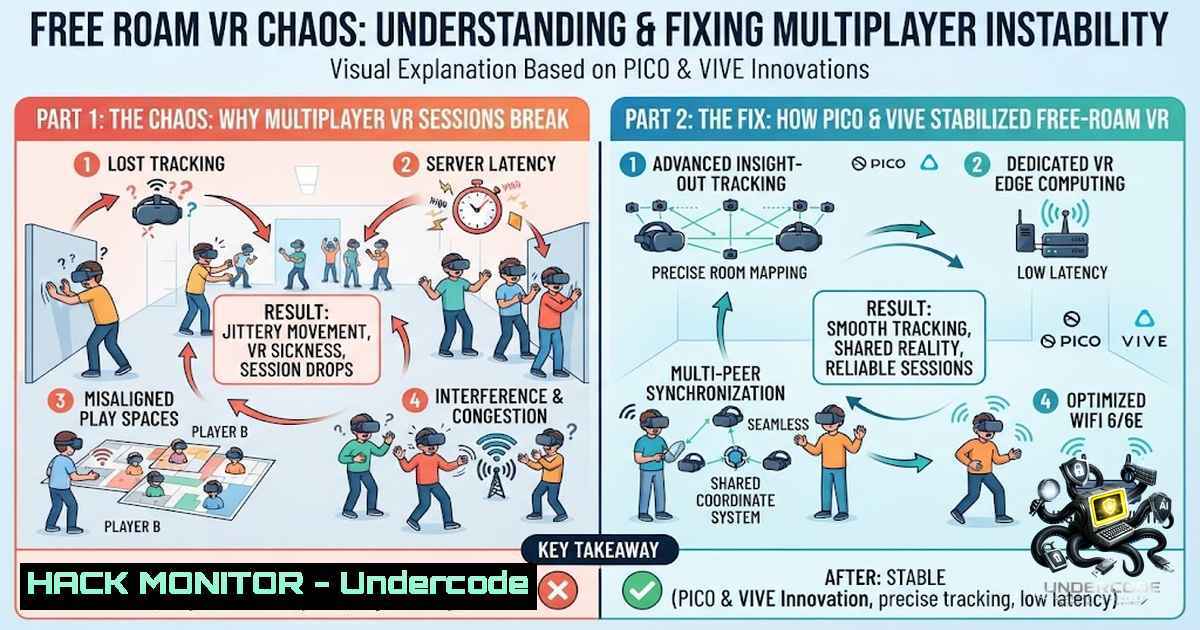
In location‑based entertainment (LBE), free‑roam virtual reality promises groups of players the thrill of moving together through a shared digital world. But that promise shatters the moment each headset builds its own independent spatial map. Standalone VR headsets rely on onboard cameras to construct individual maps of the physical room; even minor environmental changes—a shift in lighting, a smudged lens, or furniture moved near the boundary—can throw a map off by centimetres or more. In a multiplayer arena, this drift manifests as players colliding with obstacles they cannot see, breaking immersion and creating safety hazards. The operational cost of daily recalibration for a typical 10‑headset venue can consume an hour of staff time that could be spent on customer experience. This article dissects why consumer headsets cannot share a boundary map across a fleet, quantifies the true cost of manual calibration, and explains how the PICO 4 Ultra Enterprise and VIVE Focus 3—integrated with SynthesisVR—solve the problem at the operating‑system level.
Learning Objectives
- Understand why inside‑out tracking on consumer VR headsets causes spatial drift and alignment failures in multiplayer free‑roam environments.
- Quantify the operational and financial impact of manual recalibration on a 10‑headset VR arcade.
- Learn how enterprise‑grade headsets (PICO 4 Ultra Enterprise and VIVE Focus 3) and SynthesisVR’s map‑sharing capabilities eliminate drift and streamline venue operations.
- Gain hands‑on knowledge of configuring environment profiles, deploying shared boundaries, and troubleshooting alignment issues using both headset‑native tools and centralised management software.
- Explore practical Linux/Windows commands and scripts for monitoring VR networks, automating calibration logs, and validating tracking performance.
- The Anatomy of Drift: Why Consumer Headsets Fail in Multiplayer
Every standalone VR headset uses inside‑out tracking: cameras on the device capture the surrounding environment and build a spatial map based on visual features. The headset estimates its position by comparing what its cameras see against that stored map. When the map is clear and stable, tracking is reliable. But in a dynamic LBE venue, the environment is never static. Featureless surfaces—plain painted walls, for example—consistently cause large positional drift. Lighting changes between morning and afternoon sessions, reflective floors confuse depth perception, and even the slight movement of a chair can alter the map’s reference points.
In a multiplayer free‑roam scenario, each headset builds its own map independently. There is no native mechanism for one headset to share its boundary data with another. The result is that Player A’s virtual wall might be 30 cm to the left of Player B’s perceived wall, leading to collisions with invisible obstacles. Operators typically respond by recalibrating each headset manually—a process that, for a 10‑headset fleet, can take over an hour per day. This is not merely an inconvenience; it directly eats into revenue‑generating session time.
Step‑by‑step: Diagnosing Drift on a Consumer Headset
- Place the headset in the play area and power it on. Allow it to initialise its inside‑out tracking.
- Observe the guardian boundary displayed in the headset’s view. Note any misalignment with physical markers on the floor.
- Walk the perimeter of the play space while watching the virtual boundary. If the boundary shifts or jumps, the map is unstable.
- Check for environmental changes: has lighting been altered? Are there reflective surfaces (mirrors, glossy floors) within camera view?
- Reboot the headset and repeat the mapping process. If drift persists, the headset’s map database may need to be cleared.
Linux Command: Monitor Network Latency Between Headsets and Host PC
In a PCVR‑streaming setup, network latency can exacerbate perceived drift. Use this command to continuously log ping times:
ping -i 1 -c 3600 192.168.1.100 | ts '[%Y-%m-%d %H:%M:%S]' >> /var/log/vr_latency.log
Replace `192.168.1.100` with the headset’s IP address. The `ts` utility (from moreutils) adds timestamps; install it with `sudo apt install moreutils` on Debian‑based systems.
Windows Command: Check Wi‑Fi Signal Strength
Open PowerShell as Administrator and run:
netsh wlan show interfaces | findstr /i "signal"
Consistent signal below 70% indicates potential connectivity issues that can contribute to tracking lag.
- Enterprise‑Grade Hardware: PICO 4 Ultra Enterprise and VIVE Focus 3
The fundamental limitation of consumer headsets is that their spatial mapping is designed for single‑user, home environments. Enterprise models, by contrast, are built for multi‑user, commercial deployments. The PICO 4 Ultra Enterprise combines advanced inside‑out tracking with enterprise‑grade device management capabilities designed specifically for multi‑headset venues. It features a Snapdragon XR2 Gen 2 processor, 12 GB LPDDR5 RAM, 256 GB UFS 3.1 storage, and Wi‑Fi 7 support. The dual 2.56‑inch screens deliver 2160×2160 resolution per eye at 1200 PPI, with a 90 Hz refresh rate.
The VIVE Focus 3 offers 5K resolution (up to 120° field of view) and a 90 Hz refresh rate, with six degrees of freedom (6DoF) support and up to 15 hours of battery life. Both headsets are designed for all‑day commercial use, with ergonomic balancing and rapid charging.
The critical differentiator, however, is not hardware specs—it is the LBE (Location‑Based Entertainment) mode that these enterprise headsets support. LBE mode enables a headset to store and share its spatial map with a central management system, allowing a single mapped boundary to be deployed across an entire fleet.
Step‑by‑step: Enabling LBE Mode on PICO 4 Ultra Enterprise
- Power on the headset and connect it to the venue’s Wi‑Fi network.
- Navigate to Settings → System → Enterprise and enable LBE Mode.
- Register the headset with your SynthesisVR account. The system will automatically detect the headset and display the LBE tab under its settings.
- Map the physical space using the master headset. Follow the in‑headset instructions to trace the arena boundaries.
- Export the map to SynthesisVR. The map is now stored centrally and can be pushed to all other headsets in the fleet.
-
SynthesisVR: The Central Nervous System of Free‑Roam VR
SynthesisVR is a complete VR location management platform that handles session scheduling, headset management, payment processing, and content licensing for both PCVR and standalone headsets. It powers the world’s largest location‑based VR content and management ecosystem. For free‑roam operations, its most valuable feature is centralised map sharing.
When a master headset maps the physical arena, that map—including boundary coordinates and spatial anchors—is uploaded to SynthesisVR’s cloud or local server. The system then pushes the same map to every other headset in the fleet. Because all headsets share identical spatial data, drift is eliminated. This approach reduces the daily calibration time for a 10‑headset venue from over an hour to just a few minutes.
Step‑by‑step: Configuring Free‑Roam Map Sharing in SynthesisVR
- Install SynthesisVR Local Manager on the venue’s management PC (Windows 10/11 recommended).
2. Log in with your SynthesisVR admin credentials.
- Add each headset to the system via the Devices tab. For PICO headsets with LBE mode enabled, the system will auto‑detect them.
- Create an Environment Profile for free‑roam games. Under Boundary & Headset Management, enable Global Syncing—this ensures the same boundary is shared across all stations.
- Map the arena using one headset as the master. The map is automatically uploaded to SynthesisVR.
- Apply the Environment Profile to all headsets in the free‑roam group. Each headset will download the shared map on its next session start.
Windows Command: Verify SynthesisVR Service Status
Open Command Prompt as Administrator:
sc query SynthesisVRService
If the service is not running, start it with:
net start SynthesisVRService
Linux Command: Backup SynthesisVR Configuration Files
For venues running the SynthesisVR server on Linux:
tar -czvf synthesisvr_backup_$(date +%Y%m%d).tar.gz /opt/synthesisvr/config/
- Shared Spatial Anchors vs. QR Calibration: Which Method Wins?
For headsets that do not natively support LBE mode (e.g., consumer Quest units), operators sometimes resort to alternative alignment methods. Shared Spatial Anchors allow multiple headsets to reference the same physical point in space. However, at arena scale (7–10 metres), anchors alone are not reliable—they drift over time and produce per‑device map differences. Most LBE teams implement custom re‑centering and correction systems on top of anchors, as purely relying on anchors will drift.
QR calibration offers another approach: a printed QR code or target is placed in the arena, and each headset scans it to synchronise its coordinate space. This method is effective for initial alignment but does not persist across sessions; every new session requires re‑scanning.
The enterprise solution—LBE mode with centralised map sharing—is superior because the alignment persists. Once the master map is stored in SynthesisVR, it can be reused indefinitely, regardless of environmental changes. The system compensates for minor lighting or furniture shifts by relying on the stored map’s feature points, rather than building a new map from scratch each time.
Step‑by‑step: Implementing QR Calibration as a Fallback
- Print a high‑contrast QR code and place it in a fixed, visible location within the arena.
- On each headset, open the calibration tool and scan the QR code.
- Verify alignment by having players stand at known reference points (e.g., marked floor tiles) and check that virtual objects align correctly.
- Repeat at the start of each session—this adds approximately 2–3 minutes per headset.
5. Operational Cost Analysis: Manual vs. Automated Calibration
The financial impact of manual recalibration is often underestimated. For a 10‑headset venue operating 12 hours a day, seven days a week, the numbers are stark:
- Manual calibration: 10 headsets × 6 minutes per headset = 60 minutes per day.
- Annual staff time: 60 minutes/day × 365 days = 365 hours.
- Cost at $20/hour: 365 × $20 = $7,300 per year in labour alone.
- Lost session revenue: If each hour of calibration displaces one paid session (at $30 per player × 8 players = $240), the opportunity cost exceeds $87,000 annually.
With SynthesisVR and LBE‑enabled headsets, calibration is reduced to a single master map creation (10 minutes) followed by automated sync (negligible). The annual saving in labour and lost revenue can exceed $90,000 for a busy venue.
Linux Command: Automate Calibration Logging
Create a script to log each calibration event, helping you track time spent:
!/bin/bash
echo "$(date) - Calibration performed on headset $1" >> /var/log/vr_calibration.log
Make it executable: chmod +x log_calibration.sh. Run it after each calibration: ./log_calibration.sh HMD-01.
Windows PowerShell: Generate a Calibration Report
Get-EventLog -LogName Application -Source "SynthesisVR" | Where-Object {$_.Message -like "calibration"} | Export-Csv -Path "C:\Reports\calibration_log.csv"
- Security and Hardening Considerations for VR Venue Networks
A free‑roam VR venue is essentially a distributed computing environment: multiple headsets, gaming PCs, a management server, and payment terminals all share the same network. This creates attack surfaces that malicious actors could exploit.
API Security: SynthesisVR exposes REST APIs for session management and headset control. Ensure these APIs are accessible only over HTTPS and require API keys with least‑privilege permissions. Rotate keys quarterly.
Cloud Hardening: If using SynthesisVR’s cloud tier, enable multi‑factor authentication (MFA) for all admin accounts. Restrict administrative IP ranges to the venue’s static public IP.
Network Segmentation: Isolate the VR network from the guest Wi‑Fi. Use VLANs to separate:
– Management VLAN (SynthesisVR server, admin PCs)
– Headset VLAN (PICO/VIVE devices)
– Guest VLAN (customer devices)
– Payment VLAN (POS terminals)
Firewall Rules: On the venue’s edge firewall, block all inbound traffic except necessary VPN or remote‑support ports. Outbound traffic should be restricted to SynthesisVR’s cloud endpoints and game content delivery networks.
Step‑by‑step: Implementing Network Segmentation
- Access the venue’s managed switch or router configuration interface.
- Create VLANs with IDs 10 (Management), 20 (Headsets), 30 (Guest), and 40 (Payment).
- Assign ports to each VLAN based on device type.
- Configure inter‑VLAN routing to allow only necessary communication (e.g., headset VLAN to Management VLAN for map sync, but not to Guest VLAN).
- Test connectivity from each segment before going live.
Linux Command: Scan for Unauthorised Devices on the Network
sudo nmap -sn 192.168.1.0/24
This performs a ping sweep to identify all active IPs. Compare the list against authorised MAC addresses.
7. Troubleshooting Common Free‑Roam Issues
Even with enterprise hardware, issues can arise. Here is a quick reference guide:
| Symptom | Likely Cause | Resolution |
||–||
| One headset drifts while others are stable | Headset’s local map is corrupted | Clear the headset’s map cache and re‑sync from SynthesisVR |
| All headsets drift simultaneously | Environmental change (lighting, furniture) | Remap the arena with the master headset and push the updated map |
| Headsets fail to sync map | Network connectivity issue | Check Wi‑Fi signal strength; verify that the SynthesisVR service is running |
| Intermittent tracking loss | Reflective surfaces or featureless walls | Add visual markers (tape, posters) to improve camera feature detection |
Windows Command: Check SynthesisVR Logs for Errors
findstr /i "error" C:\ProgramData\SynthesisVR\logs.log
Linux Command: Tail SynthesisVR Logs in Real Time
tail -f /var/log/synthesisvr/synthesisvr.log | grep -i "drift|error|sync"
What Undercode Say
- Drift is not a hardware defect—it is a design limitation of consumer‑grade inside‑out tracking in dynamic environments. Enterprise headsets with LBE mode and centralised map sharing are not merely “better” versions; they are architecturally different solutions to a multi‑user problem.
- Manual recalibration is a silent revenue killer. For a 10‑headset venue, the annual cost in labour and lost sessions can exceed $90,000. Automating calibration with SynthesisVR is not a luxury—it is a financial necessity.
- The PICO 4 Ultra Enterprise and VIVE Focus 3 represent a maturity phase in VR hardware. They combine advanced tracking, ergonomic design, and OS‑level enterprise features that consumer devices simply do not possess. Venues that invest in these platforms gain a competitive advantage through reliability and operational efficiency.
- Network security in VR venues is often overlooked. As free‑roam setups become more distributed and cloud‑connected, they become attractive targets. Segmenting networks, enforcing MFA, and monitoring for unauthorised devices are essential best practices.
- The future of LBE is hybrid. Venues will increasingly mix PCVR streaming with standalone enterprise headsets, all managed through a single platform like SynthesisVR. The ability to seamlessly switch between room‑scale and free‑roam modes on the same hardware will define the next generation of VR arcades.
Prediction
- +1 The adoption of enterprise‑grade headsets with LBE mode will accelerate, with PICO and HTC capturing a combined 70% of the commercial VR headset market by 2028. Consumer brands like Meta will respond by introducing their own enterprise tiers, but they will lag behind in OS‑level map‑sharing capabilities.
- +1 SynthesisVR and similar platforms will evolve into full‑stack venue operating systems, integrating not only headset management but also dynamic pricing, customer analytics, and predictive maintenance—reducing operator overhead by an estimated 40%.
- -1 Smaller VR arcades that continue to rely on consumer headsets and manual calibration will face margin compression as larger competitors offer smoother, more reliable experiences. Consolidation in the LBE sector is inevitable, with 30–40% of independent venues closing or being acquired within the next three years.
- +1 The underlying technology—shared spatial mapping—will find applications beyond entertainment. Corporate training, military simulation, and collaborative design will adopt similar architectures, creating a $2 billion enterprise VR market by 2027.
- -1 Security threats will intensify as VR venues become more connected. Ransomware targeting management servers and session‑disruption attacks could become common, forcing the industry to adopt cybersecurity frameworks akin to those in healthcare and finance. Venues that neglect network hardening will be the first to fall.
▶️ Related Video (74% Match):
🎯Let’s Practice For Free:
🎓 Live Courses & Certifications:
Join Undercode Academy for Verified Certifications
🚀 Request a Custom Project:
Secure, high-velocity infrastructure and disruptive technological engineering. Contact our engineering team for high-tier development and proprietary systems:
[email protected]
💎 Smart Architecture | 🛡️ Secure by Design | ⭐ Trusted by Thousands
IT/Security Reporter URL:
Reported By: Freeroamvr Vrarcade – Hackers Feeds
Extra Hub: Undercode MoN
Basic Verification: Pass ✅


