
Listen to this Post
Introduction:
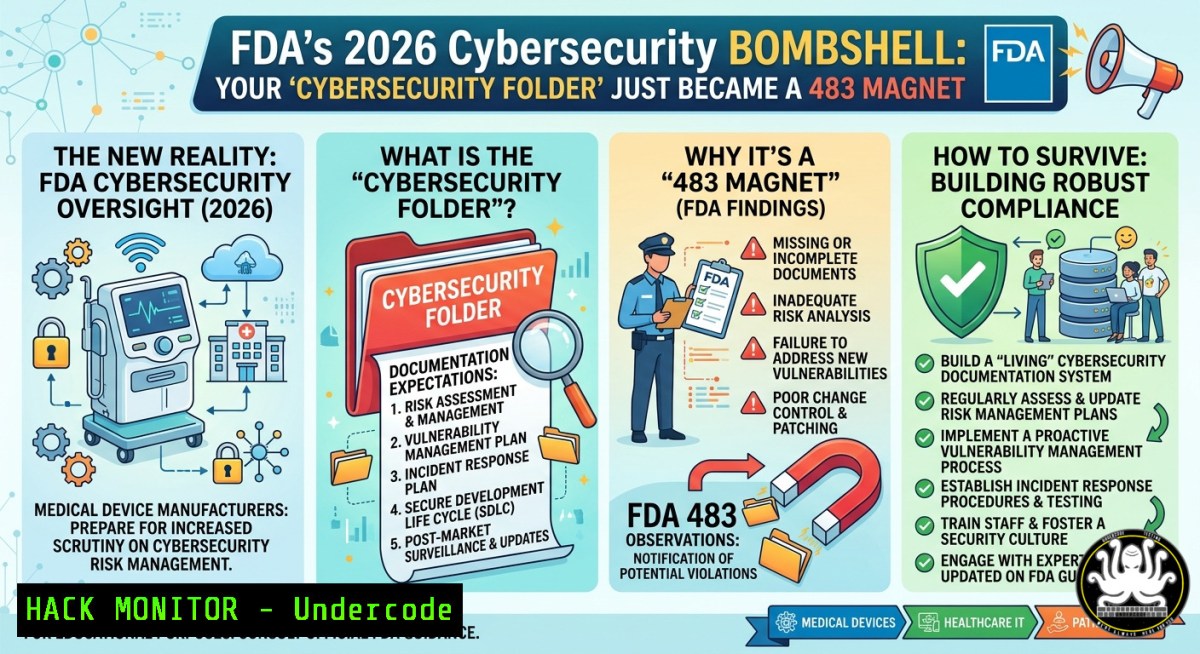
The FDA finalized its updated cybersecurity premarket guidance on February 4, 2026, mandating that cybersecurity become a native component of your Quality Management System (QMS) under ISO 13485 design controls. This means every threat model, Software Bill of Materials (SBOM), and penetration test result must now map directly to specific QMS clauses (7.1, 7.3, 7.5, 8.4, 8.5). If your cybersecurity documentation still lives in a separate folder labeled “Cybersecurity Documents,” you are at high risk of receiving an FDA Form 483—and the retroactive tracing nightmare that follows can derail your 510(k) submission.
Learning Objectives:
- Understand how to integrate threat models, SBOMs, and pen test results into ISO 13485 clause 7.3 (design and development) for traceability.
- Learn to use automated SBOM generation and change control to avoid retroactive rework.
- Master commands and procedures to map cybersecurity artifacts to QMS records using Git, Syft, and OWASP Threat Dragon.
You Should Know
- The Retroactive Tracing Trap – and How to Escape It
The post highlights a real-world scenario: a client with a Class IIb 510(k) for a connected glucose monitor had stored their cybersecurity package (SPDF, SBOM, threat models) separately from design controls. When the FDA requested design verification records for the authentication module, the team had to retroactively trace every threat model entry into clause 7.3 records—a costly and painful process.
Step‑by‑step guide to avoid retroactive tracing:
- Embed references from day one: Every threat model entry must include a `DesignInput_ID` field that links directly to a requirement in your design inputs (clause 7.3).
- Use Git for traceability: Store all cybersecurity documents in the same repository as your design controls. Tag each commit with the QMS clause it addresses.
 Linux command to create a Git tag linking a threat model to clause 7.3
git add threat_models/auth_module_v2.tm
git commit -m "Threat model for authentication module – maps to clause 7.3.2 (design inputs)"
git tag -a "clause-7.3" -m "Linked to FDA design control records"
- Automate SBOM versioning with change control: Every SBOM update must trigger a change request in your QMS. Use `syft` to generate SPDX-compliant SBOMs and store them alongside design verification records.
 Generate SBOM for a Docker container and output as SPDX JSON
syft alpine:latest -o spdx-json > sbom_alpine_latest.spdx.json

Enforce change control – create a hash and log in your QMS
sha256sum sbom_alpine_latest.spdx.json >> change_control_log.txt
For Windows (PowerShell equivalent):
 Generate file hash for change control
Get-FileHash -Algorithm SHA256 .\sbom_alpine_latest.spdx.json | Out-File -Append .\change_control_log.txt
2. Mapping Penetration Test Results to QMS Clauses
Penetration test findings are no longer just technical reports; they must be traced to specific design outputs and risk management entries (clause 8.4 – analysis of data). The FDA will ask: “Which design control record addresses this vulnerability?”
Step‑by‑step guide to map pen test results:
- Standardize your pen test report: Include a column titled `QMS_Clause` with values like `7.3.4` (design verification) or `8.5` (corrective action).
- Automated mapping using a CSV parser: Use this Python script to inject clause references into your report.
import csv
 clause_mapping.csv has columns: finding, clause
with open('pen_test_findings.csv', 'r') as infile, open('mapped_findings.csv', 'w') as outfile:
reader = csv.DictReader(infile)
writer = csv.DictWriter(outfile, fieldnames=reader.fieldnames + ['QMS_Clause'])
writer.writeheader()
for row in reader:
if 'authentication' in row['finding'].lower():
row['QMS_Clause'] = '7.3.3 (design outputs)'
elif 'data integrity' in row['finding'].lower():
row['QMS_Clause'] = '8.4 (analysis of data)'
else:
row['QMS_Clause'] = '7.5 (production controls)'
writer.writerow(row)
- Create a traceability matrix in Markdown (store it in your QMS-controlled repo):
| Finding ID | Vulnerability | Design Input Reference | QMS Clause |
||||-|
| PEN-01 | Weak session tokens | DI-423 (authentication) | 7.3.3 |
| PEN-02 | Missing SBOM validation | DI-089 (supply chain) | 7.5.1 |
- SBOM as a Quality Artifact – Change Control Automation
The post emphasizes: “Every SBOM update is in change control.” This means your SBOM cannot be a static file; it must live under the same revision control as your production and service records (clause 7.5).
Step‑by‑step guide for SBOM change control:
- Automate SBOM generation on every build using CI/CD pipelines (GitHub Actions example below).
- Require a pull request approval before merging any SBOM change.
- Store historical SBOMs with signatures to prove tamper-proof evidence (as Richard Brooks noted).
GitHub Actions workflow (`.github/workflows/sbom.yml`):
name: Generate SBOM on push
on: [bash]
jobs:
sbom:
runs-on: ubuntu-latest
steps:
- uses: actions/checkout@v4
- name: Generate SBOM with Syft
run: syft dir:. -o spdx-json > sbom/spdx_latest.json
- name: Create SHA256 checksum
run: sha256sum sbom/spdx_latest.json > sbom/checksum.txt
- name: Upload SBOM as artifact
uses: actions/upload-artifact@v4
with:
name: sbom-artifact
path: sbom/
On Windows (using PowerShell for the same):
 Run after build
syft dir:. -o spdx-json | Out-File -FilePath .\sbom\spdx_latest.json
(Get-FileHash .\sbom\spdx_latest.json -Algorithm SHA256).Hash | Out-File .\sbom\checksum.txt
- Threat Modeling Directly Inside Design Controls (Clause 7.3)
The post’s key insight: “Every threat model entry references the design input it mitigates.” This transforms threat modeling from a standalone security exercise into a core design activity.
Step‑by‑step guide using OWASP Threat Dragon (open source):
1. Install Threat Dragon (Node.js required):
 Linux / macOS / WSL
npm install -g threat-dragon
threat-dragon
For Windows, download the desktop installer from the official GitHub releases.
- Create a new threat model for each design input (e.g., “Authentication Module v2”). In the “Threats” tab, add a custom property:
DesignInputID = DI-423. -
Export the threat model as JSON or Markdown and commit to your Git repo alongside your design control documents.
4. Automatically validate traceability using a bash script:
!/bin/bash
 check_traceability.sh – ensures every threat has a DesignInputID
for tm in threat_models/.json; do
if ! grep -q "DesignInputID" "$tm"; then
echo "FAIL: $tm missing DesignInputID – violates clause 7.3"
exit 1
fi
done
echo "All threat models traceable to design inputs."
- Cloud Hardening for Connected Medical Devices (Glucose Monitor Example)
The post’s example involves a connected glucose monitor. Such devices often use cloud APIs for data sync. The FDA guidance requires that cloud authentication modules be included in your design verification records.
Step‑by‑step guide to harden and document cloud API security:
- Implement OAuth 2.0 with short-lived tokens (e.g., 15-minute expiry).
- Generate an SBOM for your cloud dependencies (e.g., using `pip freeze` for Python or `npm list` for Node.js).
- Map each dependency to a QMS clause – for example, `requests` library version 2.31.0 maps to clause 7.3.5 (design verification of third-party components).
Linux commands to generate dependency SBOM and hash:
 Python dependencies
pip freeze > requirements.txt
syft dir:. -o spdx-json > sbom_cloud_deps.spdx.json

Verify integrity
sha256sum sbom_cloud_deps.spdx.json >> change_control_log.txt
Windows (PowerShell):
pip freeze | Out-File -FilePath requirements.txt
.\syft.exe dir:. -o spdx-json | Out-File -FilePath sbom_cloud_deps.spdx.json
- API security test using `curl` to validate authentication modules (store output as design verification evidence):
Attempt to access protected endpoint with expired token – expected 401
curl -X GET "https://api.glucosemonitor.com/v1/readings" \
-H "Authorization: Bearer INVALID_TOKEN" \
-w "%{http_code}" -o /dev/null -s
Output should be 401 – save this in your design verification records
What Undercode Say
- Key Takeaway 1: Treating cybersecurity as a separate “folder” outside your QMS is a direct path to an FDA 483. The new guidance demands that every threat model, SBOM, and pen test result be a first-class artifact within ISO 13485 design controls—traceable from design input to verification.
-
Key Takeaway 2: Retroactive tracing (as seen with the glucose monitor client) is expensive and avoidable. By embedding design input references into threat models and automating SBOM change control with Git and CI/CD, you can turn a painful submission into a “straight through” success.
Analysis (10 lines):
The post reveals a seismic shift in medical device cybersecurity: compliance is no longer about producing security documents, but about proving their lineage within your Quality Management System. Eric Gudmundson’s comment on Dexcom G7 underscores that treating security as a quality artifact from the start eliminates the “brutal” retroactive asks. The mention of AI-assisted traceability tools (e.g., gccybersecurity.ai) hints at an emerging market for automated mapping between threat models and QMS clauses. For teams still storing SBOMs in a “Cybersecurity Documents” folder, the 483 risk is real—and the cost of rework can exceed the entire development budget of a Class IIb device. The practical commands provided above (Syft for SBOM, Threat Dragon for modeling, Git tagging for traceability) give immediate, low-cost ways to align with the FDA’s February 2026 guidance. Failure to act will not only delay submissions but also invite regulatory scrutiny that can freeze product launches. Conversely, early adopters who integrate cybersecurity into design controls will treat the new guidance as a competitive moat.
Prediction
By Q4 2026, the FDA will begin issuing Warning Letters citing “lack of traceability between threat models and design controls” as a standalone violation, not just a 483 observation. This will force the medical device industry to adopt automated GRC (Governance, Risk, Compliance) pipelines where every commit to a threat model triggers an update in the QMS. AI-driven tools (like the mentioned gccybersecurity.ai) will become mandatory for Class III devices to perform real-time mapping of SBOM vulnerabilities to clause 8.5 improvement records. Companies that still rely on manual folder structures will face 12–18 month submission delays, while those embedding cybersecurity into ISO 13485 from day one will see accelerated clearances and lower post-market remediation costs. The “separate folder” era of medical device cybersecurity is officially over.
▶️ Related Video (74% Match):
🎯Let’s Practice For Free:
IT/Security Reporter URL:
Reported By: Lisa Voronkova – Hackers Feeds
Extra Hub: Undercode MoN
Basic Verification: Pass ✅


