Listen to this Post
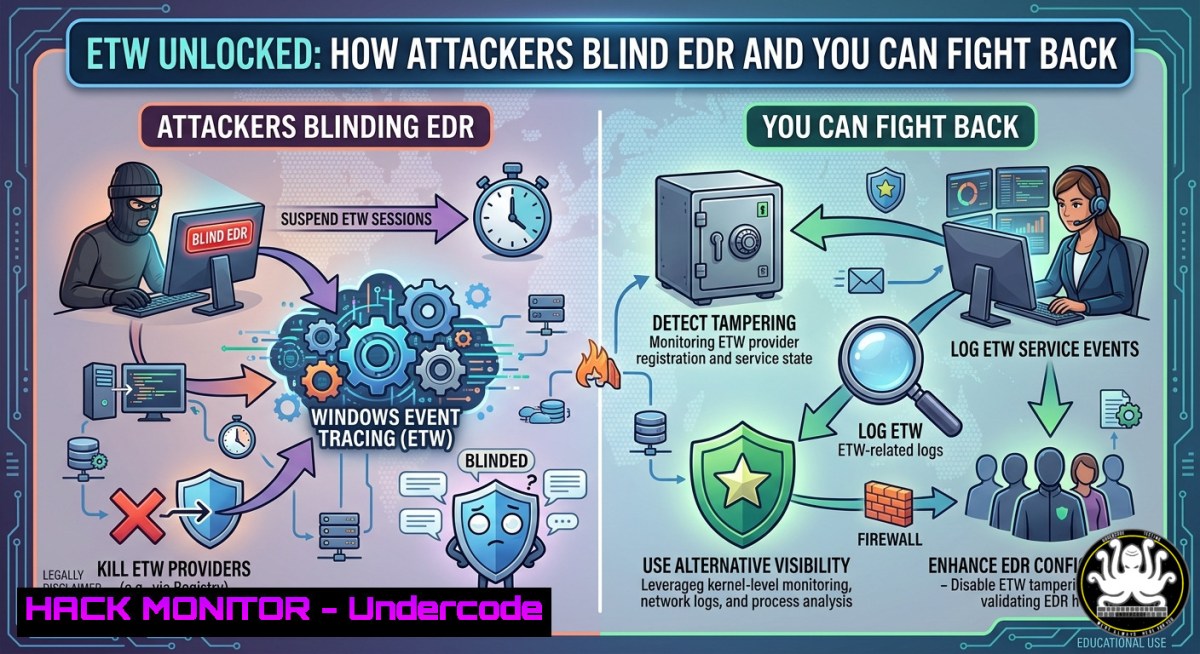
Introduction:
Event Tracing for Windows (ETW) is the invisible telemetry backbone that powers every modern Windows security solution—from EDRs to threat hunters. But when adversaries learn to suppress or bypass ETW, your security stack goes blind. This article extracts real-world ETW internals, provider types, offensive bypass techniques observed in the wild, and a step‑by‑step lab to detect and mitigate ETW tampering.
Learning Objectives:
- Understand ETW architecture, provider categories, and the data it delivers to security tools.
- Learn common ETW bypass methods (e.g., patching, filtering, disabling) used by malware.
- Build a hands‑on ETW detection lab and apply Windows commands to monitor ETW health.
You Should Know:
- ETW Internals & Provider Types – What Telemetry Your EDR Actually Sees
ETW is a high‑speed, kernel‑level tracing system. Providers (applications, drivers, the kernel) generate events, consumers (loggers, EDR agents) subscribe. Key provider types:
– Windows Kernel Provider – Process/thread creation, registry, file I/O.
– Syscall Provider – System call tracing (e.g., Microsoft‑Windows‑Kernel‑System).
– Security Auditing Provider – Logon, privilege use, policy changes.
– Third‑party & User‑mode Providers – .NET, PowerShell (Microsoft‑Windows‑PowerShell), even custom app events.
When an EDR “listens,” it activates a real‑time ETW session. If ETW is broken, the EDR hears nothing.
Step‑by‑step: Verify ETW is running on your Windows machine
1. Open PowerShell as Administrator.
2. List active ETW sessions:
logman query -ets
3. Check a specific provider (e.g., PowerShell):
logman query providers "Microsoft-Windows-PowerShell"
4. Monitor live ETW events (Sysinternals logman or tracerpt):
logman start "ETWMonitor" -p "{Microsoft-Windows-Kernel-Process}" 0x10 -o C:\ETW\proc.etl -ets
logman stop "ETWMonitor" -ets
5. Convert the ETL file to readable XML:
tracerpt C:\ETW\proc.etl -o C:\ETW\output.xml -y
- Offensive ETW Bypass Techniques – How Attackers Go Silent
Real‑world malware uses several methods to blind ETW:
- ETW Patch/Inline Hook – Overwrite `EtwEventWrite` in `ntdll.dll` with a `ret` instruction.
- ETW Filtering – Use `EtwSetInformation` with `EventProviderSetTraits` to block specific events.
- Disable via Registry – Set
Start=4 for the `EventLog` service. - Tampering with Logman – Kill security ETW sessions using
logman stop.
Step‑by‑step: Simulate and detect a basic ETW patch (educational lab only)
- Run a benign PowerShell command that normally generates an event:
Get-WinEvent -LogName "Windows PowerShell" | Select-Object -First 1
- Inject a simulated ETW patch (via minimal C++ or use EtwExplorer from GitHub to test). Attackers would modify
ntdll!EtwEventWrite:// Pseudo: patch with 0xC3 (RET) BYTE patch[] = { 0xC3 }; WriteProcessMemory(GetCurrentProcess(), etwEventWriteAddr, patch, 1, NULL); - After patch, re‑run a PowerShell command. It will execute but no events will be logged.
- Detection: Monitor `ntdll` integrity using Windows Defender Attack Surface Reduction rule `9e6c4e1f-7d60-472f-ba1a-a39ef669e4b2` (Block process creations originating from PSExec and WMI) and custom Sysmon config to alert on `EtwEventWrite` modifications.
-
Building Your Own ETW Detection Lab – Defender‑Grade Telemetry
Use a Windows 10/11 VM + Sysmon + an EDR of choice (or open‑source like Elastic Agent). Goal: detect ETW tampering in real time.
Step‑by‑step lab setup
1. Install Sysmon (download from Microsoft Sysinternals):
.\Sysmon64.exe -accepteula -i sysmon-config.xml
Use a config that logs `ProcessAccess` (event ID 10) and `ProcessTampering` (event ID 25).
2. Enable PowerShell logging (Group Policy or registry):
Set-ItemProperty -Path "HKLM:\SOFTWARE\Policies\Microsoft\Windows\PowerShell\ScriptBlockLogging" -Name "EnableScriptBlockLogging" -Value 1
- Deploy a lightweight ETW health monitor – script that checks if critical security providers are still emitting:
Check if Windows Security Auditing provider is alive $session = "Security" $query = "[System[Provider[@Name='Microsoft-Windows-Security-Auditing']]]" try { Get-WinEvent -LogName $session -MaxEvents 1 -ErrorAction Stop Write-Host "ETW Security provider OK" } catch { Write-Host "ETW Security provider FAILED or tampered" -ForegroundColor Red } -
Alert on missing ETW events using Windows Event ID 1102 (audit log cleared) or 104 (logman session stopped).
-
Hardening ETW Against Bypass – What Blue Teams Must Do
- Enable Protected Process Light (PPL) for your EDR – prevents user‑mode tampering.
- Block unsigned drivers that could patch kernel ETW (Enable HVCI).
- Deploy Microsoft’s `EtwEnable` Group Policy to enforce ETW for all providers.
- Monitor for `EtwEventWrite` patch attempts via Windows Defender for Endpoint or custom kernel callback.
Windows commands to harden ETW:
 Ensure EventLog service starts automatically and cannot be stopped
sc config EventLog start= auto
sc sdset EventLog D:(A;;CCLCSWRPLORC;;;AU)(A;;CCLCSWRPLORC;;;SY)

Enable Hypervisor-protected Code Integrity (HVCI)
bcdedit /set hypervisorlaunchtype auto
bcdedit /set vsmlaunchtype auto
- Using ETW for Threat Hunting – Query Examples
Even without an EDR, you can hunt using built‑in ETW logs:
 Find suspicious process creation (via Kernel Provider)
Get-WinEvent -FilterHashtable @{LogName="Microsoft-Windows-Sysmon/Operational"; ID=1} | Where-Object {$_.Message -match "powershell.-enc"}

Detect LSASS access (potential credential dumping)
Get-WinEvent -FilterHashtable @{LogName="Microsoft-Windows-Sysmon/Operational"; ID=10} | Where-Object {$_.Message -match "lsass.exe"}
What Undercode Say:
- ETW is the silent foundation of Windows security – breaking it breaks every tool above it. Defenders cannot ignore ETW health monitoring.
- Offensive ETW bypass is not theoretical; public tools like `EtwPatch` and `GhostSchtask` are used in ransomware campaigns. Hardening must start with PPL and kernel integrity.
Prediction:
As EDRs move to kernel‑level ETW consumers and Microsoft integrates ETW-based detection as a service, attackers will shift toward abusing legitimate ETW consumers (e.g., disabling via BYOVD – bring your own vulnerable driver) and memory‑only patching that bypasses current integrity checks. The next wave of Windows security will rely on hardware‑backed ETW (Intel PT + VBS) to render user‑mode patches irrelevant. Blue teams must adopt proactive ETW validation within their detection pipelines within the next 12–18 months.
▶️ Related Video (84% Match):
🎯Let’s Practice For Free:
IT/Security Reporter URL:
Reported By: Debox64 Event – Hackers Feeds
Extra Hub: Undercode MoN
Basic Verification: Pass ✅
🎓 Live Courses & Certifications:
Join Undercode Academy for Verified Certifications
🚀 Request a Custom Project:
Secure, high-velocity infrastructure and disruptive technological engineering. Contact our engineering team for high-tier development and proprietary systems:
[email protected]


