Listen to this Post
Introduction
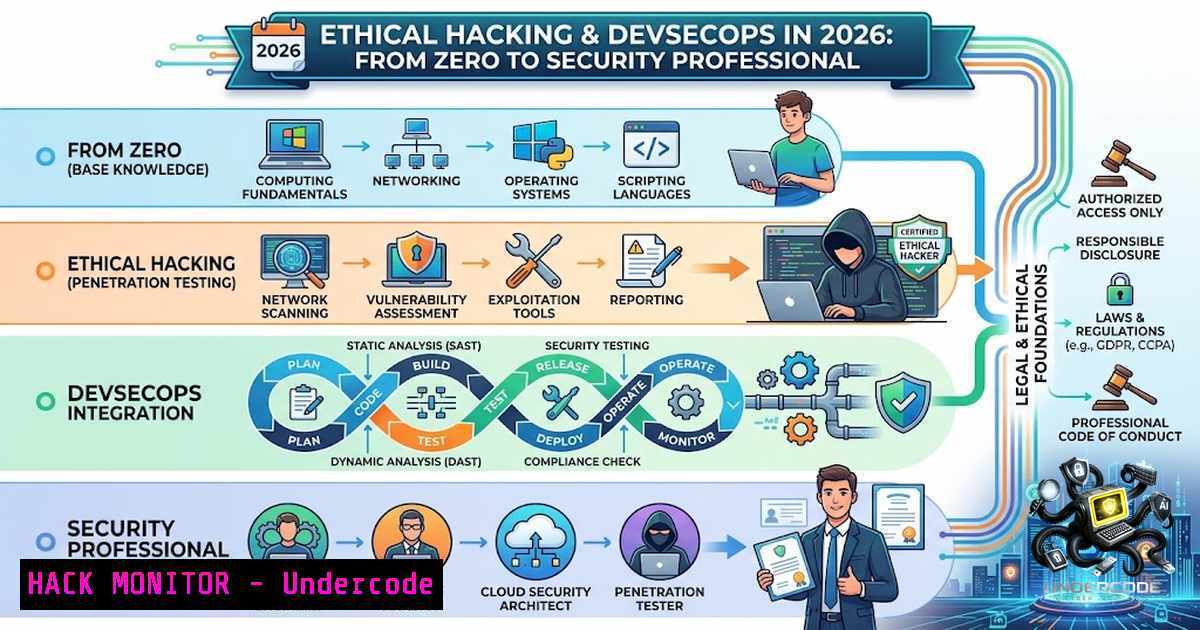
The cybersecurity landscape is evolving at an unprecedented pace, with attack surfaces expanding faster than organizations can defend them. As highlighted in a recent masterclass led by Cisco-Certified Ethical Hacker Yuvraj Gupta and The Learn Skill co-founder Shahbaz, the industry is experiencing a paradigm shift where AI-generated code introduces new vulnerabilities even as automation accelerates development. Ethical hacking is no longer a niche specialisation—it is a critical competency for every developer and IT professional seeking to build resilient systems in an era where unencrypted HTTP traffic can expose credentials in plaintext and malicious actors leverage AI to scale their attacks.
Learning Objectives & Secrets
- Objective 1: Master the Ethical Hacking Mindset — Understand that ethical hacking is strictly authorized security work requiring written permission; legality is not optional but absolute. Build foundational knowledge in networking, Linux, and reconnaissance before touching code.
-
Objective 2: Weaponise Open-Source Security Tools — Learn to deploy Kali Linux 2026.2 with its nine new tools including arsenal-1g (200+ cybersecurity cheat-sheets) and AI-assisted shell-gpt for command generation. Master Wireshark for traffic analysis, John the Ripper for password auditing, and Burp Suite for web application testing.
-
Objective 3: Bridge the AI-Security Gap — AI-generated code is flooding production environments with vulnerabilities—35 CVEs were directly attributable to AI coding tools in March 2026 alone, up from just six in January. Learn to identify and patch command injection, authentication bypass, and SSRF vulnerabilities that AI misses.
You Should Know
- Building Your Ethical Hacking Lab: Kali Linux 2026.2 Setup
The foundation of any ethical hacking journey is a properly configured penetration testing environment. Kali Linux 2026.2, released in June 2026, represents the state of the art in security auditing tools. It runs on Linux kernel 6.18 and introduces nine new tools spanning credential auditing, OSINT, phishing analysis, AI-assisted workflows, and shell management.
Step-by-step guide:
On Linux (Debian/Ubuntu):
 Download and verify Kali 2026.2
wget https://cdimage.kali.org/kali-2026.2/kali-linux-2026.2-installer-amd64.iso
sha256sum kali-linux-2026.2-installer-amd64.iso

Or install Kali tools on existing Debian
sudo apt update
sudo apt install kali-linux-headless  CLI tools only
sudo apt install kali-linux-large  Full toolset
On Windows (WSL2):
 Enable WSL2 and install Kali from Microsoft Store
wsl --install -d kali-linux
 After installation, update and install tools
sudo apt update && sudo apt full-upgrade -y
sudo apt install kali-linux-headless
On macOS (VM):
 Install VirtualBox
brew install --cask virtualbox
 Download Kali ISO and create VM with 4GB RAM, 2 CPU cores
 Enable nested virtualization for better performance
Post-installation hardening:
 Set up a non-root user for daily use
sudo useradd -m -s /bin/bash ethical
sudo passwd ethical
sudo usermod -aG sudo ethical

Update tool repositories
sudo apt update && sudo apt dist-upgrade -y

Install the new arsenal-1g for cheat-sheets
sudo apt install arsenal-1g
 Launch arsenal-1g to browse 200+ command references
arsenal-1g
What this does: This creates a dedicated, isolated environment for legal security testing. The arsenal-1g tool provides instant access to over 200 cybersecurity command references, dramatically accelerating the learning curve for beginners.
2. Capturing Plaintext Credentials with Wireshark
One of the most eye-opening demonstrations in any ethical hacking course is watching unencrypted HTTP traffic expose login credentials in real-time. Wireshark, the world’s most popular network protocol analyzer, makes this visible. Understanding this vulnerability is essential for appreciating why HTTPS and proper encryption are non-1egotiable.
Step-by-step guide:
Installation:
- Linux: `sudo apt install wireshark -y`
– Windows: Download from wireshark.org, install with Npcap driver - macOS: `brew install –cask wireshark`
Capturing HTTP credentials (educational lab only):
 On Linux, ensure you have capture permissions
sudo usermod -aG wireshark $USER
 Re-login for changes to take effect

Start Wireshark from terminal
sudo wireshark
In Wireshark GUI:
- Select your active network interface (Wi-Fi or Ethernet)
2. Start capture
3. Apply display filter: `http`
- Navigate to a test HTTP login page (never use real credentials)
- Right-click a `POST /login` packet and select Follow → TCP Stream
- Observe the credentials in plaintext within the packet payload
Alternative command-line capture:
 Capture HTTP traffic to a file
sudo tshark -i eth0 -f "port 80" -w http_capture.pcap

Filter and display HTTP requests
tshark -r http_capture.pcap -Y "http.request.method == POST" -T fields -e http.request.uri -e http.file_data
What this does: This demonstrates why all web applications must enforce HTTPS/TLS encryption. The lab reveals how easily attackers on the same network can intercept sensitive data, reinforcing the importance of tools like Burp Suite for testing encryption implementations.
3. Password Auditing with John the Ripper
John the Ripper (JtR) is the industry-standard password cracking tool used by penetration testers to audit password strength. The jumbo version, included in Kali Linux, supports over 400 hash formats including MD5, SHA1, NTLM, and even BitLocker volumes.
Step-by-step guide:
Basic usage with wordlist attack:
 Extract password hashes from /etc/shadow (requires root)
sudo unshadow /etc/passwd /etc/shadow > hashes.txt

Run John with rockyou.txt wordlist
john --wordlist=/usr/share/wordlists/rockyou.txt hashes.txt

Show cracked passwords
john --show hashes.txt
Advanced modes:
 Single crack mode (uses account information)
john --single hashes.txt

Incremental/brute-force mode (all possible combinations)
john --incremental hashes.txt

Rules-based attack (mutations of dictionary words)
john --wordlist=rockyou.txt --rules hashes.txt

Crack specific hash types
john --format=nt hashes.txt  NTLM hashes
john --format=raw-md5 hashes.txt  MD5 hashes
Optimisation tips:
 Use all CPU cores
john --wordlist=rockyou.txt --fork=4 hashes.txt

Session management (save and resume)
john --wordlist=rockyou.txt --session=crack1 hashes.txt
john --restore=crack1

Generate a custom wordlist from a website
cewl https://target.com -w custom_wordlist.txt
john --wordlist=custom_wordlist.txt hashes.txt
What this does: John the Ripper demonstrates why password policies must enforce complexity—weak passwords are cracked in seconds. The tool is essential for organisations conducting internal security audits to identify compromised credentials before attackers do.
4. Web Application Security Testing with Burp Suite
Burp Suite Professional 2026.4, released in April 2026, is the premier tool for web application penetration testing. The latest version introduces smarter SQL injection detection that filters out WAF false positives, significantly improving accuracy in identifying genuine time-based SQL injection vulnerabilities.
Step-by-step guide:
Setup and proxy configuration:
- Download Burp Suite from PortSwigger (Community Edition is free)
- Launch Burp and go to Proxy → Options
3. Set proxy listener to `127.0.0.1:8080`
- Configure your browser to use this proxy (FoxyProxy extension recommended)
5. Install Burp’s CA certificate for HTTPS interception
Basic workflow:
 Launch Burp Suite from terminal (Linux)
/usr/bin/burpsuite

Or run the community version
java -jar burpsuite_community_v2026.4.jar
Intercepting and modifying requests:
1. Enable Intercept in the Proxy tab
2. Navigate to your target web application
- Inspect the intercepted request in the Proxy → Intercept panel
- Modify parameters (e.g., change `id=1` to
id=1 OR 1=1)
5. Click Forward to send the modified request
Automated scanning:
- Right-click any request and select Do an active scan
- Burp will automatically crawl and test for SQL injection, XSS, and other vulnerabilities
- Review findings in the Target → Site map and Scanner → Results tabs
Using the new 2026.4 features:
- The unified installer now supports macOS, Linux, and Windows from a single package
- Notes now support Markdown for better documentation
- Organiser includes collection-level annotations for team collaboration
What this does: Burp Suite enables security professionals to identify and remediate web application vulnerabilities before they can be exploited. The 2026.4 release’s improved SQL injection detection reduces false positives, saving hours of manual verification.
5. Securing CI/CD Pipelines: DevSecOps in Practice
The DevSecOps movement integrates security directly into the development pipeline, shifting left to catch vulnerabilities at the commit stage rather than in production. The 2026 State of DevSecOps study emphasises pinning GitHub Actions to immutable commit SHAs rather than tags like `@v1` to prevent supply chain attacks.
Step-by-step guide:
Implementing pre-commit security hooks:
 Install pre-commit framework
pip install pre-commit

Create .pre-commit-config.yaml
cat > .pre-commit-config.yaml << EOF
repos:
- repo: https://github.com/Yelp/detect-secrets
rev: v1.4.0
hooks:
- id: detect-secrets
args: ['--baseline', '.secrets.baseline']
- repo: https://github.com/rhysd/actionlint
rev: v1.6.26
hooks:
- id: actionlint
EOF

Install the git hook scripts
pre-commit install
Secret scanning with TruffleHog:
 Scan a repository for secrets
trufflehog filesystem . --json

Scan a GitHub repository
trufflehog github --repo=https://github.com/your-org/your-repo

Block commits containing secrets (CI integration)
trufflehog git file://. --since-commit HEAD~1 --fail
Container image scanning with Trivy:
 Scan a Docker image for CVEs
trivy image your-image:latest

Scan with severity filtering
trivy image --severity CRITICAL,HIGH your-image:latest

Generate an SBOM (Software Bill of Materials)
trivy image --format cyclonedx your-image:latest > sbom.json
CI pipeline security (GitHub Actions):
 .github/workflows/security-scan.yml
name: Security Scan
on: [push, pull_request]

jobs:
security:
runs-on: ubuntu-latest
steps:
- uses: actions/checkout@v4

<ul>
<li>name: Run Trivy vulnerability scanner
uses: aquasecurity/trivy-action@master
with:
scan-type: 'fs'
scan-ref: '.'
format: 'sarif'
output: 'trivy-results.sarif'</p></li>
<li><p>name: Run Gitleaks (secret detection)
uses: gitleaks/gitleaks-action@v2
env:
GITHUB_TOKEN: ${{ secrets.GITHUB_TOKEN }}
What this does: These practices create a security perimeter around the development pipeline, catching hardcoded secrets, vulnerable dependencies, and misconfigurations before they reach production. The shift-left approach reduces the cost of fixing vulnerabilities by orders of magnitude.
6. AI-Generated Code Vulnerabilities: The New Attack Surface
The rise of “vibe coding”—using AI assistants like Claude Code to generate production code—has created a new class of security vulnerabilities. Georgia Tech researchers identified 35 CVEs in March 2026 directly attributable to AI-generated code, up from six in January. Approximately 20% of AI-generated code samples reference packages that do not exist, enabling “slopsquatting” attacks where malicious actors publish typosquatted packages.
Identifying AI-generated vulnerabilities:
Common patterns to audit:
 VULNERABLE: Command injection in AI-generated code
import os
user_input = request.GET.get('filename')
os.system(f'cat {user_input}')  Attacker: ; rm -rf /

SECURE: Use subprocess with argument list
import subprocess
subprocess.run(['cat', user_input], check=True)

VULNERABLE: SQL injection
query = f"SELECT  FROM users WHERE id = {user_id}"  Attacker: 1 OR 1=1

SECURE: Use parameterised queries
cursor.execute("SELECT  FROM users WHERE id = %s", (user_id,))
Automated scanning for AI-generated code:
 Use Semgrep to find common AI-generated vulnerabilities
semgrep --config=p/owasp-top-ten --config=p/security-audit .

Scan for command injection patterns
semgrep --config rules/command-injection.yml .

Check for hardcoded credentials
gitleaks detect --source . --verbose
Mitigation strategy:
- Never deploy AI-generated code without human review—the 74 confirmed cases included 14 critical risks
- Implement SAST in CI/CD to catch injection vulnerabilities automatically
- Use dependency scanning to detect package squatting attempts
4. Train teams to recognise AI-generated vulnerability patterns
What this does: Understanding AI-specific vulnerabilities enables security teams to adapt their testing methodologies. The tools above help identify the command injection, authentication bypass, and SSRF vulnerabilities that AI coding assistants frequently produce.
What Undercode Say
- Key Takeaway 1: Ethical hacking is a practiced craft, not a memorised subject. The 4-month intensive mentorship program from The Learn Skill covers 20+ modules with live labs and bug bounty methodologies—proving that structured, hands-on training accelerates career entry far more effectively than theoretical study alone.
-
Key Takeaway 2: The AI-security paradox demands new skills. While AI accelerates development, it simultaneously introduces vulnerabilities that require human penetration testers to identify and patch. Professionals who master both AI-assisted development and security testing will command premium positions in the evolving job market.
The future of cybersecurity belongs to those who build securely. With platforms like The Learn Skill transitioning from “Learn with UV” to a structured mentorship model, the barrier to entry has never been lower—and the stakes have never been higher. The tools, commands, and methodologies outlined above represent the essential toolkit for anyone serious about protecting the digital world.
Prediction
- +1 The ethical hacking job market will grow 32% by 2028 as AI-generated code proliferates, creating unprecedented demand for human security testers who can identify AI-blind vulnerabilities.
-
+1 Platforms like The Learn Skill will lead the democratisation of cybersecurity education, with 25,000+ learners already secured—expect this number to triple as organisations prioritise security training.
-
-1 Organisations that fail to implement shift-left security practices will experience a 47% increase in successful supply chain attacks by 2027, as AI-assisted coding accelerates the introduction of vulnerable dependencies.
-
-1 The rise of “vibe coding” without security oversight will generate over 200 AI-attributable CVEs annually by 2027, creating a security debt crisis that will take years to remediate.
-
+1 Bug bounty programs will expand 40% as organisations recognise that ethical hackers provide the most cost-effective vulnerability discovery—validating the hands-on, lab-based approach championed by The Learn Skill.
▶️ Related Video (86% Match):
https://www.youtube.com/watch?v=2KMWJKQZ8yE
🎯Let’s Practice For Free:
🎓 Live Courses & Certifications:
Join Undercode Academy for Verified Certifications
🚀 Request a Custom Project:
Secure, high-velocity infrastructure and disruptive technological engineering. Contact our engineering team for high-tier development and proprietary systems:
[email protected]
💎 Smart Architecture | 🛡️ Secure by Design | ⭐ Trusted by Thousands
IT/Security Reporter URL:
Reported By: https://lnkd.in/p/eDx6JCsM – Hackers Feeds
Extra Hub: Undercode MoN
Basic Verification: Pass ✅


