Listen to this Post
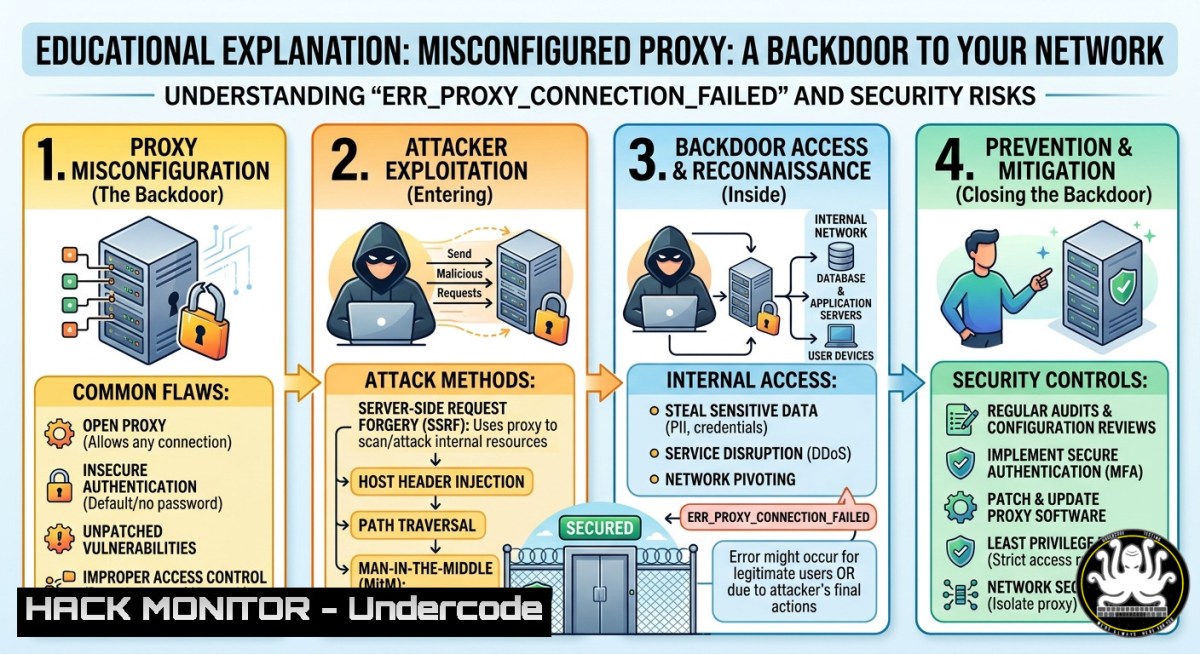
Introduction:
Proxy servers act as gateways between internal users and the internet, filtering traffic, caching content, and enforcing security policies. However, when a proxy misconfiguration or failure occurs—as indicated by the `ERR_PROXY_CONNECTION_FAILED` error—it doesn’t just disrupt connectivity; it can expose an organization to man-in-the-middle attacks, credential harvesting, and unauthorized network access. Understanding how to diagnose, secure, and harden proxy infrastructure is critical for IT and security professionals.
Learning Objectives:
- Diagnose and resolve proxy connection failures using command-line tools on Linux and Windows.
- Identify security risks associated with misconfigured proxies, including proxy auto-config (PAC) file injection and SSL stripping.
- Implement hardening measures such as authenticated proxies, encrypted tunnels, and traffic monitoring to prevent exploitation.
You Should Know:
1. Diagnosing Proxy Connection Failures: Commands and Techniques
The `ERR_PROXY_CONNECTION_FAILED` error typically appears in Chromium-based browsers when the client cannot establish a TCP handshake with the proxy server or when the proxy responds with invalid data. Below are verified commands to diagnose and temporarily bypass or fix the issue.
Step‑by‑step guide:
1. Verify proxy settings on Windows (CMD/PowerShell):
 View current system proxy settings
netsh winhttp show proxy

Reset proxy to direct connection (no proxy)
netsh winhttp reset proxy

Check if proxy is set via environment variables
reg query "HKCU\Software\Microsoft\Windows\CurrentVersion\Internet Settings" | findstr Proxy
2. On Linux (bash):
 Check environment proxy variables
echo $http_proxy $https_proxy $no_proxy

Test proxy connectivity using curl (replace proxy_ip:port)
curl -v -x http://proxy_ip:port https://google.com

If proxy requires authentication
curl -v -x http://user:pass@proxy_ip:port https://google.com

Temporarily unset proxy for a session
unset http_proxy https_proxy
3. Browser‑level check (Chrome/Edge):
- Navigate to `chrome://net-internals/proxy` to view effective proxy settings and any PAC scripts.
- Use `chrome://net-export/` to log network events for deeper analysis.
4. Test proxy server reachability (ICMP and TCP):
 Ping proxy server (if ICMP allowed)
ping proxy_ip

Test TCP connectivity to proxy port (e.g., 8080, 3128)
nc -zv proxy_ip 8080
 Windows equivalent
Test-NetConnection proxy_ip -Port 8080
Security note: Attackers often exploit misconfigured proxies by setting up rogue proxy servers on compromised hosts. Regularly audit proxy settings via Group Policy (Windows) or resolv.conf/NetworkManager (Linux) to prevent redirection to malicious proxies.
2. Hardening Proxy Configurations Against Common Attacks
Misconfigured proxies are a goldmine for attackers. Common attack vectors include:
– PAC file injection (MITM via malicious JavaScript)
– SSL interception without proper certificate validation
– Unauthenticated open proxies used for anonymized attacks
– Proxy chaining to bypass egress filtering
Step‑by‑step hardening guide:
1. Enforce authenticated proxies (Squid example on Linux):
 Install Squid
sudo apt install squid -y  Debian/Ubuntu
sudo yum install squid -y  RHEL/CentOS

Edit /etc/squid/squid.conf
 Require basic authentication
auth_param basic program /usr/lib/squid/basic_ncsa_auth /etc/squid/passwords
auth_param basic realm proxy
acl authenticated proxy_auth REQUIRED
http_access allow authenticated
http_access deny all

Create password file
sudo htpasswd -c /etc/squid/passwords username
sudo systemctl restart squid
- Prevent proxy bypass via DNS or direct IP (Windows Defender Firewall):
Block outbound traffic on common proxy ports except the approved proxy server IP
New-NetFirewallRule -DisplayName "Block Direct HTTP" -Direction Outbound -Protocol TCP -LocalPort 80,443 -Action Block -RemoteAddress "0.0.0.0/0" -RemoteAddress "YourProxyIP" -Action Allow
Note: RemoteAddress exclusion is tricky; better to use route-based enforcement
3. Detect rogue proxy settings using Sysmon (Windows):
- Install Sysmon with configuration to log registry changes to Internet Settings.
- Monitor Event ID 13 (RegistryEvent) for modifications to
ProxyEnable,ProxyServer,ProxyOverride. - Use PowerShell to periodically alert:
$proxy = Get-ItemProperty -Path "HKCU:\Software\Microsoft\Windows\CurrentVersion\Internet Settings"
if ($proxy.ProxyEnable -eq 1) { Write-Warning "Proxy enabled: $($proxy.ProxyServer)" }
4. Mitigate SSL stripping on intercepting proxies:
- Ensure proxy uses TLS for client‑proxy communication (e.g., Squid with
https_port). - Enforce HSTS preload on all internal domains to prevent downgrade attacks.
- Regularly validate proxy certificates against a pinned CA store.
- Linux iptables rule to force traffic through a corporate proxy (transparent proxy):
Redirect all outbound HTTP/HTTPS traffic to local proxy port 8080 (requires proxy listening on that port)
sudo iptables -t nat -A PREROUTING -i eth0 -p tcp --dport 80 -j REDIRECT --to-port 8080
sudo iptables -t nat -A PREROUTING -i eth0 -p tcp --dport 443 -j REDIRECT --to-port 8080
-
Troubleshooting Proxy Errors in Enterprise Environments (Beyond the Browser)
When users see ERR_PROXY_CONNECTION_FAILED, the root cause may be network‑level, not client‑side. Use these steps:
Step‑by‑step guide using Windows Server and Linux tools:
- Check proxy service status on the proxy server itself (Linux):
sudo systemctl status squid  or nginx, tinyproxy
sudo journalctl -u squid -f --since "10 minutes ago"
2. Analyze proxy logs for connection refusals:
- Squid logs to
/var/log/squid/access.log. Look for `TCP_DENIED` orERR_CONNECT_FAIL. - For Nginx as a reverse proxy, check
/var/log/nginx/error.log.
- Test from a client using PowerShell (bypassing WinHTTP):
Use .NET WebRequest with explicit proxy
$proxy = [System.Net.WebRequest]::GetSystemWebProxy()
$request = [System.Net.WebRequest]::Create("http://example.com")
$request.Proxy = $proxy
try { $response = $request.GetResponse() } catch { $_.Exception.Message }
4. Network capture to confirm TCP handshake failure:
 On Linux client
sudo tcpdump -i eth0 host proxy_ip and port 8080 -w proxy_debug.pcap
 Then analyze with Wireshark for RST packets or no SYN-ACK
- For PAC file issues: test PAC script validity
// Save as test_pac.html and open in browser console
var pacUrl = "http://internal/pac/proxy.pac";
fetch(pacUrl).then(r => r.text()).then(script => {
var FindProxyForURL = eval(script + "; FindProxyForURL");
console.log(FindProxyForURL("https://google.com", "google.com"));
});
What Undercode Say:
- Key Takeaway 1: The `ERR_PROXY_CONNECTION_FAILED` error is not merely a connectivity nuisance—it is a symptom of potential security gaps. Attackers routinely scan for open or misconfigured proxies to launch anonymized attacks, pivot into internal networks, or intercept traffic via rogue PAC files. Immediate investigation should include checking whether the proxy was tampered with via malware or malicious Group Policy Objects (GPOs).
-
Key Takeaway 2: Hardening proxy infrastructure requires both preventive controls (authenticated proxies, firewall rules, HSTS) and detective measures (continuous monitoring of proxy settings, Sysmon logging, and periodic PAC file integrity checks). Commands like `netsh winhttp show proxy` on Windows and `env | grep -i proxy` on Linux should be part of every incident response playbook for unexplained internet disconnection complaints.
Analysis: The increasing adoption of always-on VPNs and Secure Web Gateways (SWGs) has blurred the line between proxy and firewall. However, many organizations still rely on legacy proxy configurations that lack TLS inspection or mutual authentication. The error message in the prompt—”No internet. There is something wrong with the proxy server”—is frequently overlooked by help desks as a simple misconfiguration, but it can also indicate a successful adversary-in-the-middle attack where the attacker’s proxy fails to forward traffic correctly. Security teams must train users to report this error immediately, then cross‑reference proxy logs and network flows. Furthermore, red teams can exploit these errors to simulate phishing emails that instruct users to disable proxy settings or install malicious certificates, leading to full compromise. Therefore, automated remediation scripts (e.g., Group Policy resetting proxy settings every hour) and user awareness are essential countermeasures.
Prediction:
-
- By 2026, AI‑driven network detection and response (NDR) systems will automatically correlate proxy error logs with threat intelligence feeds, predicting whether a `ERR_PROXY_CONNECTION_FAILED` is benign or the precursor to a data exfiltration attempt.
-
- Adoption of encrypted client‑proxy protocols (like HTTPS‑based CONNECT and DOH over proxy) will reduce the attack surface for SSL stripping, making proxy error codes more reliable indicators of genuine outages rather than tampering.
-
- As more organizations migrate to cloud‑native proxies (e.g., Zscaler, Netskope), misconfigured API keys and cloud IAM roles will become a new source of proxy‑style errors, potentially exposing internal network topologies via verbose error messages in JSON responses.
-
- Attackers will develop AI tools that automatically generate plausible PAC files and proxy auto‑detection scripts, then deliver them via malicious browser extensions. This will cause an increase in `ERR_PROXY_CONNECTION_FAILED` errors across entire fleets, overwhelming SOC teams with false positives while the real intrusion occurs elsewhere.
▶️ Related Video (88% Match):
🎯Let’s Practice For Free:
IT/Security Reporter URL:
Reported By: Dominiqueforand %F0%9D%97%A0%F0%9D%97%BC%F0%9D%97%BB – Hackers Feeds
Extra Hub: Undercode MoN
Basic Verification: Pass ✅
🎓 Live Courses & Certifications:
Join Undercode Academy for Verified Certifications
🚀 Request a Custom Project:
Secure, high-velocity infrastructure and disruptive technological engineering. Contact our engineering team for high-tier development and proprietary systems:
[email protected]


