Listen to this Post
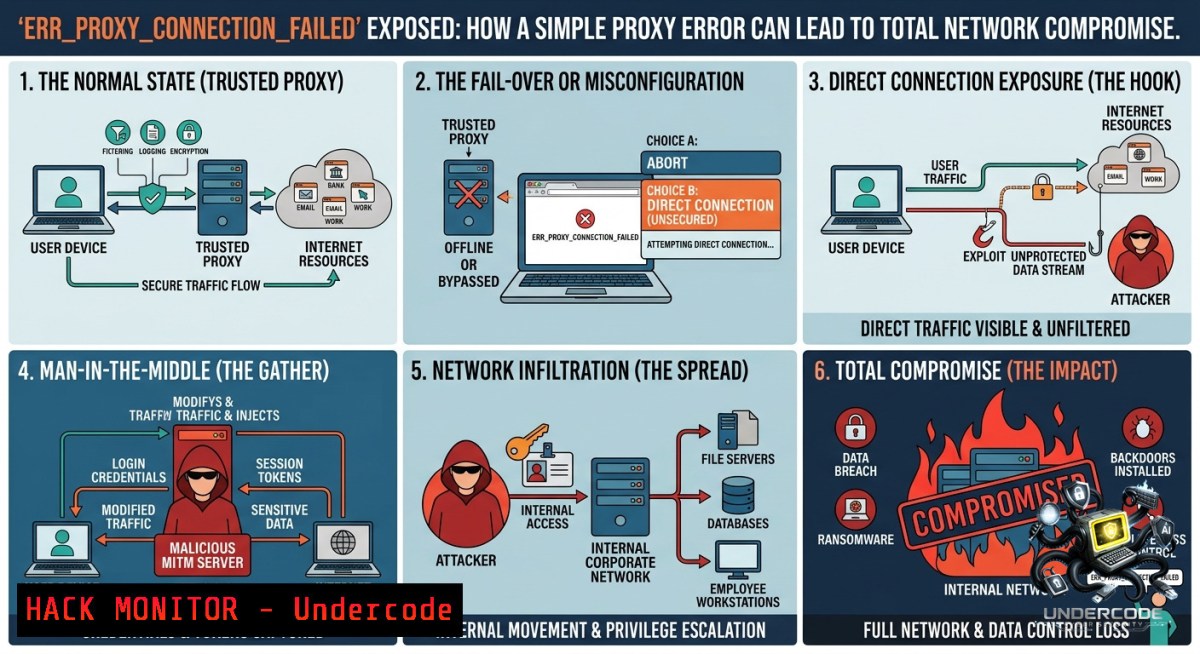
Introduction:
The ERR_PROXY_CONNECTION_FAILED error in Chrome (or similar proxy failure messages in other browsers) occurs when your system is configured to use a proxy server but cannot establish a connection to it. While often dismissed as a routine connectivity glitch, this error can signal deeper issues: misconfigured proxy settings, malicious proxy redirection (Man‑in‑the‑Middle attacks), or even an attempted security bypass by malware. Understanding how to diagnose and fix this error from a cybersecurity perspective—rather than just clicking “OK”—is essential for protecting sensitive data and maintaining secure network perimeters.
Learning Objectives:
– Diagnose proxy connection failures using command‑line tools on Windows and Linux.
– Identify security risks associated with improper proxy configurations (e.g., rogue proxies, SSL stripping).
– Implement hardened proxy settings and mitigation techniques to prevent exploitation.
You Should Know:
1. Diagnosing the ERR_PROXY_CONNECTION_FAILED Error – Step‑by‑Step
This error means your browser (or system) is told to send traffic through a proxy server at a specific IP address and port, but that proxy is unreachable. The root cause can be: an incorrect proxy address/port, the proxy server is down, network firewalls are blocking the proxy port, or the proxy configuration has been tampered with (e.g., by malware). Below are verified commands for both Windows and Linux to investigate the issue.
Step‑by‑Step Guide:
Step 1: Identify current proxy settings
– Windows (Command Prompt as Administrator):
reg query "HKCU\Software\Microsoft\Windows\CurrentVersion\Internet Settings" | findstr /i "proxy"
Look for `ProxyEnable` (1 = enabled) and `ProxyServer` (e.g., `192.168.1.100:8080`).
– Linux (terminal):
echo $http_proxy
echo $https_proxy
env | grep -i proxy
Also check GNOME settings: `gsettings get org.gnome.system.proxy mode`
Step 2: Test connectivity to the proxy server
– Windows (PowerShell):
Test-1etConnection -ComputerName <proxy_IP> -Port <proxy_port>
Example: `Test-1etConnection 192.168.1.100 -Port 8080`
– Linux:
nc -zv <proxy_IP> <proxy_port>
Or using `telnet`: `telnet 192.168.1.100 8080`
If the connection succeeds, the proxy service may be misconfigured; if it fails, the proxy is unreachable (network issue, firewall, or server down).
Step 3: Bypass the proxy temporarily to confirm the error
– Disable proxy via Windows Settings (Settings → Network & Internet → Proxy → turn off “Use a proxy server”) OR via command line:
reg add "HKCU\Software\Microsoft\Windows\CurrentVersion\Internet Settings" /v ProxyEnable /t REG_DWORD /d 0 /f
– Linux – unset proxy variables:
unset http_proxy https_proxy HTTP_PROXY HTTPS_PROXY
Then try to browse. If the error disappears, the proxy server itself is the problem.
Step 4: Check for malicious proxy injection
Malware often sets a rogue proxy to intercept traffic. Run a full system scan. On Linux, inspect systemd or .bashrc for persistent proxy settings:
grep -r "proxy" ~/.bashrc ~/.profile /etc/environment 2>/dev/null
2. Hardening Proxy Configurations to Prevent Exploitation
Rogue proxies can perform SSL/TLS interception, steal credentials, and inject malicious code. Even a “legitimate” but misconfigured proxy can leak internal network topology. Follow these steps to securely configure and validate your proxy.
Step‑by‑Step Hardening Guide:
Step 1: Use authenticated and encrypted proxy protocols
Avoid plaintext HTTP proxies (especially on port 8080). Where possible, use SOCKS5 with username/password or TLS‑encrypted HTTP proxies (HTTPS proxy). Example for Linux using `proxychains` with a SOCKS5 proxy:
 /etc/proxychains.conf
[bash]
socks5 127.0.0.1 9050 user pass
Step 2: Enforce proxy settings via Group Policy (Windows) or PAC files
– Windows (Domain environment): Use Group Policy “Make proxy settings per‑machine” under `Administrative Templates → Windows Components → Internet Explorer`. This prevents users from disabling or changing the proxy.
– PAC (Proxy Auto‑Config) file: Host a PAC file on an internal HTTPS server. Example PAC snippet to block direct connections:
function FindProxyForURL(url, host) {
return "PROXY proxy.company.com:8080; DIRECT";
}
Then configure browsers to use the PAC URL: `https://internal-pac.company.com/proxy.pac`
Step 3: Monitor and alert on proxy connection failures
Integrate proxy failure logs into a SIEM. On Windows, enable “Microsoft‑Windows‑WinHTTP/Operational” log. On Linux, configure `squid` proxy logging and forward to syslog. A spike in `ERR_PROXY_CONNECTION_FAILED` from multiple endpoints suggests either a proxy outage or an active block.
Step 4: Test for proxy bypass vulnerabilities
Use `curl` to try bypassing the proxy by forcing a direct connection to an external site:
curl --1oproxy "" https://ifconfig.me
If this succeeds when the proxy is supposed to be mandatory, your network has a split‑tunnel vulnerability. Remediate by blocking direct outbound traffic at the firewall (allow only traffic from the proxy server’s IP).
3. Using Command‑Line Tools to Simulate and Exploit Proxy Misconfigurations (for Red Teaming)
Ethical hackers can use proxy errors to find misconfigured environments. The `ERR_PROXY_CONNECTION_FAILED` message reveals that the client is expecting a proxy. By manipulating proxy settings, an attacker can redirect traffic to a rogue server.
Step‑by‑Step Attack Simulation (for authorized testing only):
Step 1: Set a rogue proxy on a victim machine (Windows)
reg add "HKCU\Software\Microsoft\Windows\CurrentVersion\Internet Settings" /v ProxyEnable /t REG_DWORD /d 1 /f
reg add "HKCU\Software\Microsoft\Windows\CurrentVersion\Internet Settings" /v ProxyServer /t REG_SZ /d "attacker.com:8080" /f
Then use a tool like `mitmproxy` on the attacker server to intercept traffic.
Step 2: Leverage WPAD (Web Proxy Auto‑Discovery) poisoning
If the network uses WPAD without authentication, an attacker can respond to WPAD requests with a rogue PAC file, forcing all clients to use the attacker’s proxy. Mitigation: disable WPAD via Group Policy or set `HKLM\SOFTWARE\Policies\Microsoft\Windows\WebDiscovery\EnableWebProxyDiscovery` to `0`.
Step 3: Bypass proxy restrictions by abusing `NO_PROXY` (Linux)
Many Linux applications honor the `NO_PROXY` environment variable. An attacker who can write to `/etc/environment` can add `NO_PROXY=””` to effectively disable mandatory proxying. Check for this misconfiguration:
cat /etc/environment | grep -i no_proxy
4. Cloud and API Security Implications of Proxy Failures
In cloud environments (AWS, Azure, GCP), instances and containerized workloads often rely on HTTP proxies to reach external APIs. A proxy misconfiguration can lead to downtime or, worse, data exfiltration if the proxy is set to an untrusted endpoint.
Step‑by‑Step Secure Proxy Configuration for Cloud VMs:
– AWS EC2 (Linux): Set proxy in `/etc/environment` and restrict permissions:
echo "http_proxy=http://internal-proxy.aws:3128" | sudo tee -a /etc/environment
sudo chmod 644 /etc/environment
Use IAM roles for EC2 to authenticate to the proxy (e.g., with AWS Verified Access).
– Docker containers should never use insecure proxy environment variables. Instead, use Docker’s built‑in proxy configuration:
mkdir -p ~/.docker
cat > ~/.docker/config.json <<EOF
{
"proxies": {
"default": {
"httpProxy": "https://proxy.corp:3128",
"httpsProxy": "https://proxy.corp:3128",
"noProxy": "localhost,127.0.0.1,.local"
}
}
}
EOF
– API security: When a proxy fails, some applications fall back to direct internet access, bypassing security controls like Data Loss Prevention (DLP) or SSL inspection. Use `iptables` (Linux) or Windows Firewall to enforce that only the proxy IP can initiate outbound connections on ports 80/443:
sudo iptables -A OUTPUT -p tcp --dport 80 -d ! <proxy_IP> -j DROP
sudo iptables -A OUTPUT -p tcp --dport 443 -d ! <proxy_IP> -j DROP
5. Recovering from a Persistent Proxy Connection Failure – Recovery Playbook
When a proxy server is down or incorrectly addressed, use this incident response playbook to restore secure connectivity without leaving systems exposed.
Step 1: Fallback to direct connection only after verifying no malicious proxy is set.
Run the diagnostic commands from Section 1. If the proxy setting is legitimate but the server is down, temporarily disable the proxy (see Step 3 in Section 1) but immediately enable a host‑based firewall to block unintended egress.
Step 2: Verify proxy server health
SSH into the proxy server (if accessible) and check its service:
systemctl status squid  for Squid proxy
journalctl -u squid -1 50
On Windows Server with Forefront TMG or similar, use `Get-Service | Where-Object {$_.Name -like “proxy”}`.
Step 3: Restore proxy service
Restart proxy service and ensure it listens on the correct interface:
sudo systemctl restart squid
sudo netstat -tulpn | grep :3128
If the server is unreachable, deploy a hot‑standby proxy and update DHCP/PAC file with the new IP.
Step 4: Post‑recovery audit
Check all endpoints for lingering proxy misconfigurations using a PowerShell script:
Get-ItemProperty -Path "HKCU:\Software\Microsoft\Windows\CurrentVersion\Internet Settings" | Select-Object ProxyEnable, ProxyServer
On Linux, deploy an audit script via Ansible:
- name: Check proxy settings
shell: "grep -r 'http_proxy' /etc/environment ~/.bashrc 2>/dev/null"
register: proxy_check
What Undercode Say:
– Key Takeaway 1: ERR_PROXY_CONNECTION_FAILED is not just a nuisance; it’s a diagnostic goldmine. It reveals that your system is relying on a proxy—whether legitimately or by force—and troubleshooting it uncovers potential security gaps (rogue proxies, split‑tunnel bypass, WPAD poisoning).
– Key Takeaway 2: Hardening proxy configurations requires a layered approach: authenticated encrypted proxies, enforced settings via Group Policy/PAC, and egress firewall rules that lock outbound traffic to the proxy alone. Without these, attackers can easily redirect traffic or bypass controls altogether.
Analysis (10 lines):
The ERR_PROXY_CONNECTION_FAILED error sits at the intersection of network reliability and cybersecurity. Most users simply click “OK” and move on, but security professionals see an opportunity. First, it indicates whether proxy settings are centrally managed or user‑alterable—a direct measure of configuration hygiene. Second, it exposes how easily an attacker can manipulate registry keys or environment variables to insert a malicious proxy, enabling SSL decryption and credential theft. Third, cloud and container environments frequently misconfigure proxy fallbacks, leading to data leaks. The step‑by‑step commands provided above empower administrators to move beyond GUI clicking and implement real verification. Moreover, the error’s appearance across an enterprise can signal a proxy outage, which itself is a denial‑of‑service risk. By treating proxy failures as security events—logging, alerting, and investigating them—teams can detect lateral movement and exfiltration attempts. Finally, the shift to zero‑trust architectures demands that proxies be treated not as optional accelerators but as enforced inspection points; failures must trigger automatic fallback to a no‑outbound policy, not direct internet access.
Prediction:
– -1: As more enterprises adopt mandatory TLS inspection proxies, the ERR_PROXY_CONNECTION_FAILED error will become more frequent, especially with misconfigured certificate validation. Attackers will exploit this fatigue by deploying “proxy helper” trojans that “fix” the error while actually rerouting traffic to C2 servers.
– +1: Conversely, the error will drive adoption of transparent proxies (e.g., using policy‑based routing) that eliminate client‑side configuration entirely, closing a major attack vector. Combined with mTLS and SPIFFE identities, future networks will make proxy failures invisible to end users and automatically heal or alert SOC teams without manual intervention.
▶️ Related Video (82% Match):
🎯Let’s Practice For Free:
🎓 Live Courses & Certifications:
[Join Undercode Academy for Verified Certifications](https://undercode.co.uk/certifications/)
🚀 Request a Custom Project:
Secure, high-velocity infrastructure and disruptive technological engineering. Contact our engineering team for high-tier development and proprietary systems:
[[email protected]](mailto:[email protected])
💎 Smart Architecture | 🛡️ Secure by Design | ⭐ Trusted by Thousands
IT/Security Reporter URL:
Reported By: [Baderalhabashi %D9%86%D8%B8%D8%A7%D9%85](https://www.linkedin.com/posts/baderalhabashi_%D9%86%D8%B8%D8%A7%D9%85-%D8%AD%D9%85%D8%A7%D9%8A%D8%A9-%D8%A7%D9%84%D8%A8%D9%8A%D8%A7%D9%86%D8%A7%D8%AA-%D8%A7%D9%84%D8%B4%D8%AE%D8%B5%D9%8A%D8%A9-%D9%88%D9%84%D9%88%D8%A7%D8%A6%D8%AD%D9%87-%D8%A7%D9%84%D8%AA%D9%86%D9%81%D9%8A%D8%B0%D9%8A%D8%A9-share-7467525371291377664-Rys8/) – Hackers Feeds
Extra Hub: Undercode MoN
Basic Verification: Pass ✅
🔐JOIN OUR CYBER WORLD [ CVE News • HackMonitor • UndercodeNews ]
[💬 Whatsapp](https://undercode.help/whatsapp) | [💬 Telegram](https://t.me/UndercodeCommunity)
📢 Follow UndercodeTesting & Stay Tuned:
[𝕏 formerly Twitter 🐦](https://x.com/undercodeupdate) | [@ Threads](https://www.threads.net/@undercodetesting) | [🔗 Linkedin](https://www.linkedin.com/company/undercodetesting/) | [🦋BlueSky](https://bsky.app/profile/undercode.bsky.social)


