Listen to this Post
Introduction:
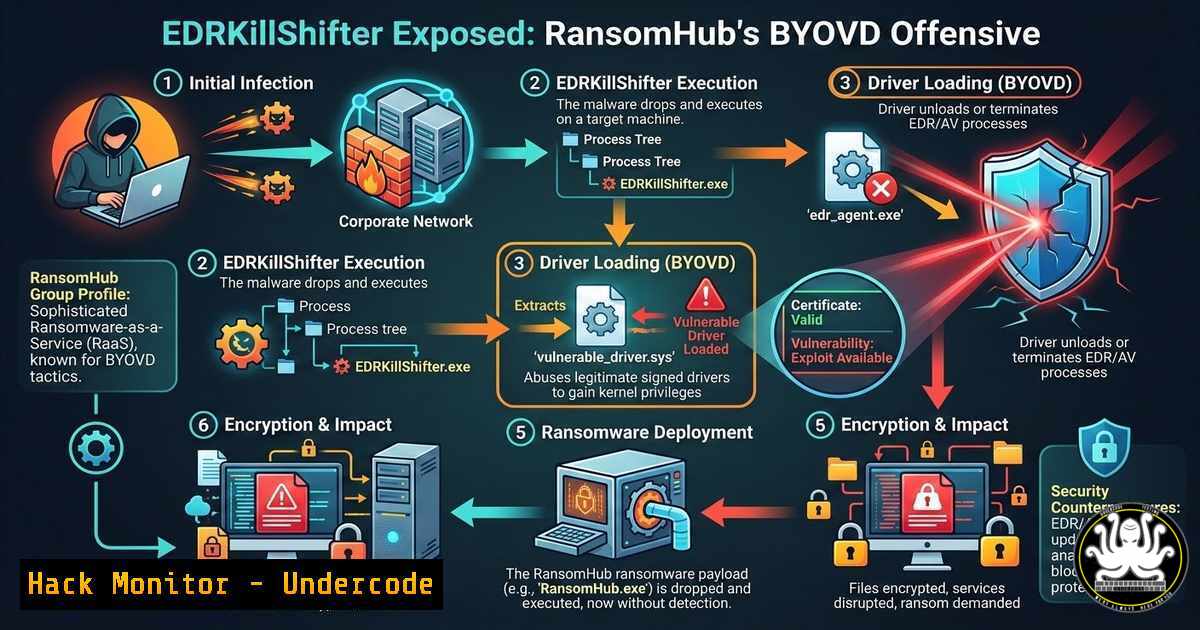
Ransomware operators are no longer just encrypting files—they are systematically dismantling endpoint defenses before deployment. The RansomHub group has recently weaponized a new iteration of EDRKillShifter, a sophisticated Bring Your Own Vulnerable Driver (BYOVD) tool, to forcibly terminate endpoint detection and response (EDR) agents on targeted Windows systems. This article dissects the technical mechanics of the attack, provides the exact commands and methodologies used, and outlines how defenders can hunt for these TTPs.
Learning Objectives:
- Understand the BYOVD technique and how EDRKillShifter leverages kernel‑mode access to terminate protected processes.
- Identify the vulnerable driver (CVE‑2024‑21338) and the specific API calls used for process termination.
- Learn step‑by‑step procedures to simulate and detect this attack using native Windows tools and Sysinternals.
You Should Know:
- The Anatomy of EDRKillShifter – Process Termination via Kernel Privilege
EDRKillShifter is not a driver itself; it is a loader that drops a legitimate but vulnerable driver (often a signed anti‑virus or hardware utility driver) onto the victim system. It then exploits a known vulnerability in that driver—in this campaign, CVE‑2024‑21338—to gain arbitrary kernel memory read/write. From kernel mode, the tool directly accesses the EPROCESS structure of EDR processes and sets the `PsProcessType` flags to allow termination, bypassing user‑mode protections like ObRegisterCallbacks.
Step‑by‑step guide – Simulating the termination mechanism (for educational purposes):
1. Identify the target EDR process name (e.g., CylanceSvc.exe).
2. The tool obtains a handle to the vulnerable driver (e.g., \\.\ZemanaAntiMalware).
3. It sends an IOCTL (I/O Control Code) specific to the vulnerability, passing the PID of the target.
4. The vulnerable driver, running with kernel privileges, executes the supplied code—terminating the process by manipulating its object manager.
Detection: Monitor for the loading of known vulnerable drivers. On Windows, use PowerShell to list loaded drivers and check against a blacklist:
Get-WindowsDriver -Online | Where-Object { $<em>.Driver -like "Zemana" -or $</em>.Driver -like "RtCore" }
Monitor Event ID 7030 (Service installation errors) and 7045 (New service creation) for suspicious driver services.
- Hands‑On BYOVD – Exploiting CVE‑2024‑21338 with Proof‑of‑Concept Code
The vulnerability lies in the Zemana AntiMalware driver (zam64.sys), which allows any user‑mode process to call `DeviceIoControl` with a crafted input buffer that leads to a null pointer dereference and eventually arbitrary code execution in kernel context. Attackers use this to callZwTerminateProcess.
Step‑by‑step guide – Using a public PoC to understand the flow:
1. Download a proof‑of‑concept (e.g., from GitHub repositories tagged with CVE‑2024‑21338).
2. Compile the PoC (requires Visual Studio with Windows SDK):
cl.exe /EHsc EDRKiller_PoC.cpp /link /out:edrkiller.exe
3. Execute the PoC (on an isolated lab VM) with administrator privileges:
edrkiller.exe --pid 1234 --driver \.\ZemanaAntiMalware
4. Observe the target process termination via Task Manager or tasklist.
Mitigation: Block the loading of known vulnerable drivers via Windows Defender Application Control (WDAC) or by using Microsoft’s recommended driver block rules. Apply the following PowerShell to add a deny rule:
Add-WdacDenyRule -DriverFilePath "C:\Windows\System32\drivers\zam64.sys"
- Hunting for BYOVD Activity with Sysmon and Event Logs
Defenders must look for anomalies in driver loading and process termination. Sysmon, configured with a proper configuration file, can log driver loads (Event ID 6) and process termination (Event ID 5).
Step‑by‑step guide – Setting up Sysmon for BYOVD detection:
1. Install Sysmon with a detailed config (e.g., SwiftOnSecurity’s config):
sysmon64 -accepteula -i sysmonconfig.xml
2. Query for suspicious driver loads (Event ID 6) in Windows Event Viewer:
– Filter by ImageLoaded paths that are temporary, user‑writeable, or known vulnerable.
3. Correlate with Event ID 4688 (Process Creation) and 4689 (Process Termination) to spot mass EDR terminations.
4. Use KQL in Microsoft Sentinel to hunt:
Event
| where EventID == 6
| where ImageLoaded contains "temp" or ImageLoaded in ("zam64.sys", "rtcore64.sys")
| project TimeGenerated, Computer, ImageLoaded, Hashes
- Linux Equivalent – Killing EDR Agents via eBPF (Conceptual)
While BYOVD is Windows‑specific, Linux adversaries use eBPF to hook kernel functions and hide processes. A malicious eBPF program can unlink a process from the task list, making it invisible to user‑space EDR.
Step‑by‑step guide – Simulating eBPF rootkit behavior (on a test VM):
1. Install bcc tools:
sudo apt install bpfcc-tools linux-headers-$(uname -r)
2. Write a simple eBPF program that hooks `getdents64` to hide a directory or process (educational snippet available in bcc examples).
3. Load the program:
sudo python3 /usr/share/bcc/examples/hiding/hide_process.py
4. Detect by checking for unexpected eBPF programs:
sudo bpftool prog list
- API Security – Abusing Windows APIs for Defense Evasion
EDRKillShifter relies heavily on Windows API calls that are often monitored. It callsOpenProcess,DuplicateHandle, andZwTerminateProcess. Attackers may unhook ntdll.dll to evade user‑mode hooks.
Step‑by‑step guide – Detecting API unhooking with a simple PowerShell script:
1. Compare in‑memory ntdll.dll with a clean copy from disk:
$process = Get-Process -Name "edrkiller"
$base = (Get-ProcessModule -Process $process -ModuleName "ntdll.dll").BaseAddress
 Use a memory dumping tool or script to compare bytes
2. Look for modified bytes that indicate syscall stubs replaced with direct syscalls.
3. Implement ETW (Event Tracing for Windows) logging for kernel‑mode API calls.
- Cloud Hardening – Protecting Workloads from BYOVD in IaaS
If an attacker compromises a cloud VM (AWS EC2, Azure VM), they can still perform BYOVD attacks. Hardening the OS image is crucial.
Step‑by‑step guide – Creating a hardened Windows AMI with driver blocklisting:
1. Use AWS Systems Manager to run a script on all instances:
 Add registry keys to block unsigned drivers
reg add "HKLM\SOFTWARE\Microsoft\Windows\CurrentVersion\Setup" /v "BlockedDriverList" /t REG_MULTI_SZ /d "zam64.sys\null.sys" /f
2. Enable Hypervisor‑protected Code Integrity (HVCI) via Group Policy.
3. Use AWS Inspector to scan for instances running vulnerable drivers.
- Vulnerability Exploitation – From EDR Kill to Ransomware Deployment
After successfully killing the EDR, RansomHub deploys the ransomware payload. This step often involves scheduled tasks or WMI for persistence.
Step‑by‑step guide – Simulating the attack chain (for blue teams):
1. Execute EDRKillShifter to terminate the EDR process.
- Deploy a benign payload (e.g., a script that creates a file) using:
schtasks /create /tn "Updater" /tr "C:\temp\payload.exe" /sc once /st 00:00
- Verify that no alerts were generated due to the disabled EDR.
What Undercode Say:
- Key Takeaway 1: BYOVD attacks are effective because they abuse trusted, signed drivers. Prevention requires strict application control and driver blocklisting, not just signature‑based detection.
- Key Takeaway 2: Monitoring for the behavior of process termination en masse (e.g., multiple EDR processes ending within seconds) is more reliable than hunting for specific driver names, which change frequently.
The sophistication of tools like EDRKillShifter underscores a fundamental shift in ransomware operations: they now start with a targeted strike against the defender’s eyes and ears. Blue teams must move beyond simple EDR deployment and actively monitor for kernel‑level anomalies, API call patterns, and the sudden silence of their sensors.
Prediction:
As Microsoft and other vendors harden drivers and enforce stricter signing policies, attackers will pivot to exploiting zero‑day driver vulnerabilities or abuse legitimate administrative tools (like Process Explorer’s driver) to achieve the same kernel‑level termination. The next evolution will likely involve fileless BYOVD techniques, where the vulnerable driver is never written to disk, making traditional file‑based blocklisting obsolete.
🎯Let’s Practice For Free:
IT/Security Reporter URL:
Reported By: %E2%9C%94danielle H – Hackers Feeds
Extra Hub: Undercode MoN
Basic Verification: Pass ✅


