Listen to this Post
Introduction:
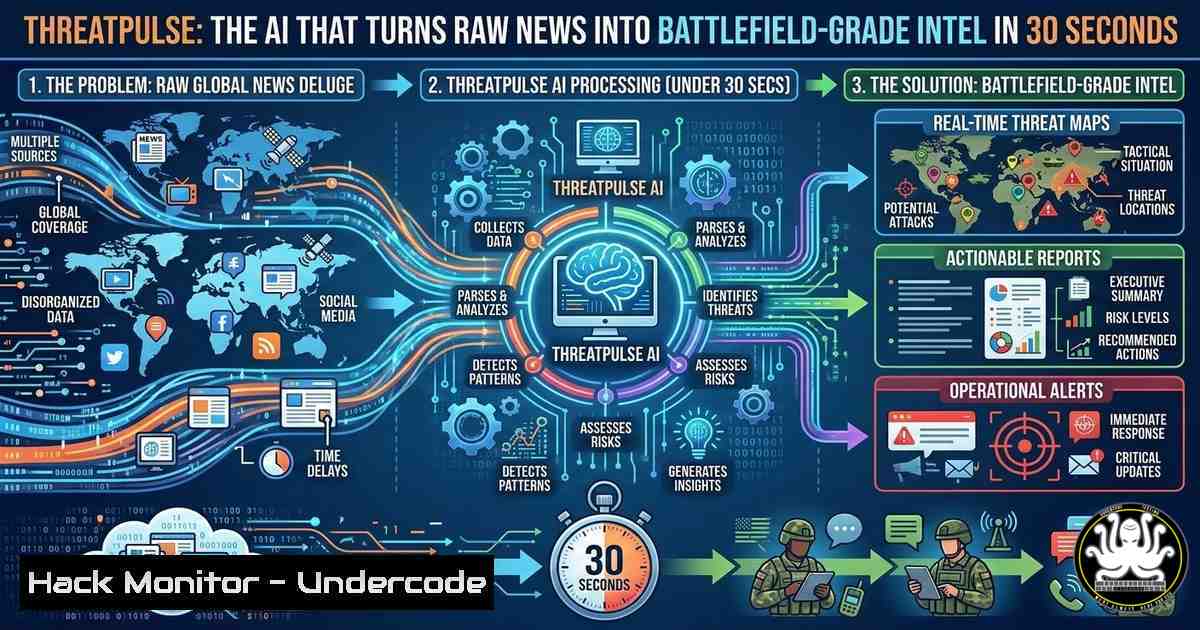
In the high‑stakes world of cyber threat intelligence, the volume of open‑source data far exceeds any team’s capacity to process. Analysts often drown in browser tabs, copy‑pasting fragments from news reports, blogs, and security feeds, struggling to piece together who is attacking whom and why. ThreatPulse, a newly unveiled platform by Randy B. at NEAT Labs, demonstrates how modern AI APIs can collapse this workflow from hours to under 30 seconds—automating the extraction of geospatial attack vectors, actor profiles, and adversarial relationships directly from a URL or raw report.
Learning Objectives:
- Understand how AI‑driven threat intelligence platforms automate the synthesis of open‑source data.
- Learn to extract and map geolocation data from unstructured text for attack visualisation.
- Explore command‑line techniques to interact with threat intelligence feeds and APIs.
- Identify the components of an entity relationship network in cyber conflict scenarios.
- Apply practical steps to verify and enrich threat intelligence using open‑source tools.
You Should Know:
- Deconstructing the ThreatPulse Workflow: From URL to Intelligence Report
The core innovation of ThreatPulse is its ability to ingest a news article or URL and output structured, battlefield‑grade analysis. The backend combines natural language processing (NLP) with a custom geospatial pipeline. Let’s break down what happens under the hood and how you can simulate parts of this process using open‑source command‑line tools.
First, the platform scrapes the target URL, extracts the main text, and feeds it to an AI model (likely GPT‑based) to identify entities: threat actor names, locations, malware variants, and targeted industries. The most complex part, as the creator noted, is the geospatial pipeline—extracting precise latitude and longitude for every event and plotting attack trajectories as curved arcs.
To emulate the data‑gathering phase on Linux, you might use `curl` to fetch a webpage and `html2text` to clean it:
curl -s "https://example-cyber-news.com/article" | html2text > raw_article.txt
For Windows PowerShell users, a similar approach:
(Invoke-WebRequest -Uri "https://example-cyber-news.com/article").Content | Out-File raw_article.txt
Once you have the raw text, you could use a lightweight NLP tool like `spacy` (Python) to perform initial entity recognition. This mirrors the first step of ThreatPulse’s analysis, though without the custom geospatial engine.
- Building a Geospatial Pipeline: Extracting Lat/Lon from Text
ThreatPulse’s standout feature is its ability to map attack vectors. To replicate this minimally, you need a method to extract place names and convert them to coordinates. This is typically done with a gazetteer or a geocoding API.
After extracting a location name (e.g., “Kyiv” or “Moscow”) from the article, you can use a free geocoding service like Nominatim (OpenStreetMap) from the command line. Here’s a Linux example using `curl` and `jq` to parse the JSON response:
 Extract location from text (simulated)
LOCATION="Kyiv"
curl -s "https://nominatim.openstreetmap.org/search?q=$LOCATION&format=json&limit=1" | jq '.[bash] | {lat: .lat, lon: .lon}'
Output:
{
"lat": "50.4501",
"lon": "30.5234"
}
In Windows PowerShell, you might use:
$location = "Kyiv"
$response = Invoke-RestMethod -Uri "https://nominatim.openstreetmap.org/search?q=$location&format=json&limit=1"
$response[bash] | Select-Object lat, lon
This gives you the raw coordinates. ThreatPulse then likely uses a mapping library (like Leaflet or D3.js) to draw curved arcs between these points, representing the origin and target of an attack.
- Entity Relationship Networks: Mapping Who Is Targeting Who
Beyond geography, ThreatPulse generates entity networks—showing connections between threat actors, their affiliates, funding sources, and targets. This is essentially graph analysis.
You can model this using a tool like `Maltego` for visual link analysis, but for a command‑line approach, consider using `jq` to transform JSON threat feeds into a graph format (e.g., CSV edges). Many open‑source threat feeds (like AlienVault OTX or MISP) provide JSON outputs. After downloading a feed, you can extract relationships:
 Example: Extract actor-to-sector relationships from a mock feed
cat threat_feed.json | jq -r '.events[] | select(.actor != null) | [.actor, .target_sector] | @csv' > relationships.csv
This creates a CSV that can be imported into any graph analysis tool. It demonstrates the principle of programmatically identifying connections—the same logic ThreatPulse uses at scale.
4. Intelligence Quality Score: Automated Trust Assessment
One of ThreatPulse’s outputs is an “intelligence quality score.” This is a critical feature because not all open‑source information is equally reliable. Automating this involves checking the source’s historical credibility, cross‑referencing with known‑true data, and looking for corroboration.
To build a simple version, you could maintain a list of trusted sources (e.g., `.txt` file) and use `grep` to see if the article’s domain matches. In Linux:
SOURCE="https://example-cyber-news.com"
if grep -q $SOURCE trusted_sources.txt; then
echo "Quality Score: High"
else
echo "Quality Score: Medium - Verify with secondary sources"
fi
A more advanced method might involve checking the article’s claims against a known vulnerability database (CVE) using `curl` and jq:
 Extract CVE IDs from article text (simulated)
CVE="CVE-2024-1234"
curl -s "https://services.nvd.nist.gov/rest/json/cves/2.0?cveId=$CVE" | jq '.vulnerabilities[bash].cve.metrics'
If the CVE exists and has a high CVSS score, it may corroborate the article’s severity claims.
5. Historical and Geopolitical Context: Augmenting AI Analysis
ThreatPulse adds context “written at the level of a seasoned analyst.” This means the AI is not just summarising but linking current events to past campaigns. For a security professional, achieving this manually means maintaining a well‑curated knowledge base.
Using command‑line tools, you could build a simple timeline. For instance, if you have a directory of past incident reports (as text files), you can use `grep` to find related historical events based on keywords extracted from the current article.
 Search past reports for a threat actor name
ACTOR="APT29"
grep -l $actor ./historical_reports/.txt | xargs -I {} basename {}
This returns a list of previous incidents involving the same actor, providing instant historical context.
6. Automating the Pipeline: A Simple Bash Script
To bring it all together, here’s a conceptual bash script that mimics the ThreatPulse workflow on a small scale. It takes a URL, downloads the content, extracts potential locations, and geocodes them.
!/bin/bash
URL=$1
echo "Fetching article from $URL..."
curl -s $URL | html2text > /tmp/article.txt

echo "Extracting potential locations (simulated)..."
grep -o -E '\b(Ukraine|Russia|Kyiv|Moscow|Washington|London)\b' /tmp/article.txt | sort -u > /tmp/locations.txt

echo "Geocoding locations..."
while read loc; do
echo -n "$loc: "
curl -s "https://nominatim.openstreetmap.org/search?q=$loc&format=json&limit=1" | jq -r '.[bash] | if . then "(.lat), (.lon)" else "Not found" end'
done < /tmp/locations.txt
This is a crude approximation, but it illustrates the core concept: automating the extraction and enrichment of data from a raw text source.
What Undercode Say:
Key Takeaway 1: The bottleneck in threat intelligence is no longer data collection but data synthesis. Platforms like ThreatPulse prove that AI can automate the grunt work of correlation, allowing human analysts to focus on strategic judgment and decision‑making.
Key Takeaway 2: Geospatial mapping of cyber attacks is a complex but critical capability. The challenge lies not just in plotting points, but in accurately inferring attack trajectories from often ambiguous textual descriptions—a problem that requires both robust NLP and precise geocoding pipelines.
The demonstration by Randy B. highlights a paradigm shift: the intelligence community’s formerly proprietary tools are now replicable by a single developer in a weekend using modern AI APIs. This democratisation means that even small security teams or independent researchers can access capabilities once reserved for nation‑states. However, it also raises the bar for what constitutes “analysis.” As machines handle the assembly, the human’s role pivots entirely to interpretation, context, and the ethical application of that intelligence. The fusion of AI with open‑source data is not just an efficiency gain; it is a fundamental change in the craft of cyber defence.
Prediction:
In the next 12 to 24 months, we will see an explosion of AI‑driven threat intelligence platforms, each specialising in different data sources—from dark web forums to corporate leak sites. The real differentiator will be the quality of the underlying geospatial and relational databases. As these tools proliferate, we may also witness a new arms race: threat actors will begin to inject false or misleading data into open sources specifically to poison these automated pipelines, forcing analysts to develop new layers of verification and counter‑deception techniques.
▶️ Related Video (82% Match):
🎯Let’s Practice For Free:
IT/Security Reporter URL:
Reported By: Randy B – Hackers Feeds
Extra Hub: Undercode MoN
Basic Verification: Pass ✅


