Listen to this Post
Introduction:
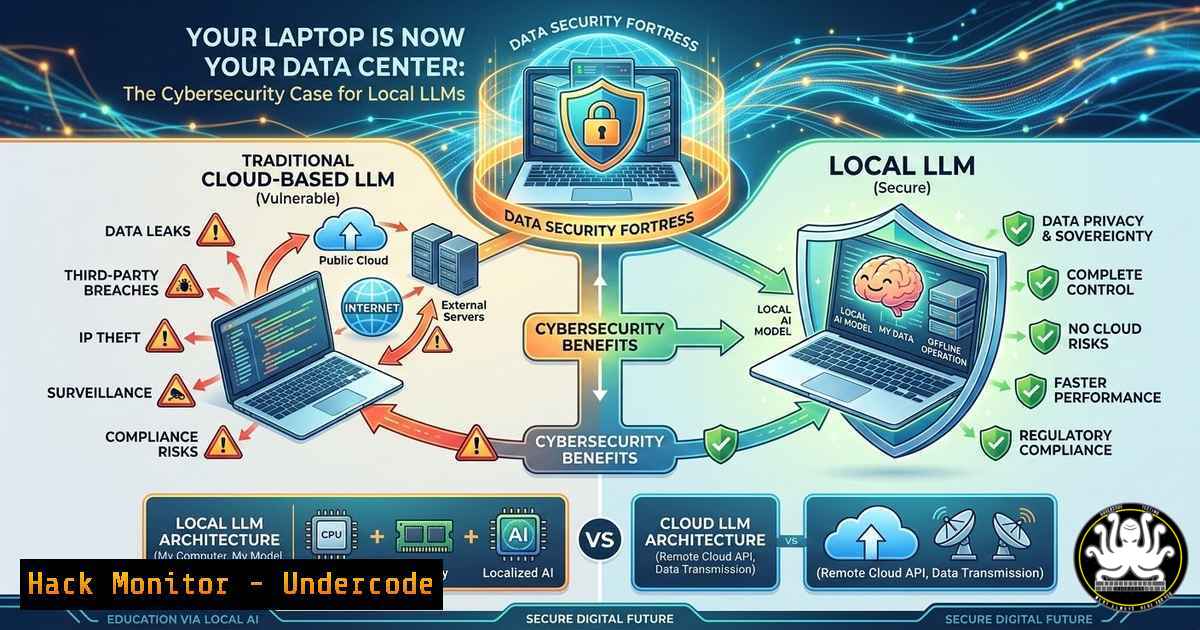
The debate between cloud-based private Large Language Models (LLMs) and locally run open-source models has shifted from a question of convenience to a matter of infrastructure security. While private LLMs offer a walled garden, they fundamentally operate on third-party servers, exposing organizations to vendor lock-in, potential data leaks, and dependence on external uptime. Running LLMs locally in 2026 is no longer a hobbyist experiment but a viable strategy for achieving true data sovereignty, minimizing attack surfaces, and building proprietary intellectual property that never touches a public cloud.
Learning Objectives:
- Understand the cybersecurity advantages of local LLMs over private, cloud-hosted models.
- Learn to deploy, run, and secure open-source LLMs using tools like Ollama.
- Acquire the skills to fine-tune models with domain-specific data using LoRA/QLoRA without compromising data privacy.
You Should Know:
1. The Security Flaw in “Private” Cloud LLMs
Many enterprises believe that using a Virtual Private Cloud (VPC) or a “private LLM” offering guarantees security. However, the data still resides on infrastructure you do not physically control. This introduces risks: the vendor’s internal security vulnerabilities, compliance violations (GDPR/HIPAA) if sensitive data is processed externally, and the threat of API key compromise. Local LLMs flip this model entirely. By running inference on a device you own—from a laptop to an on-premise server—the data never traverses a network or rests on a third-party disk. This “air-gapped” approach to AI is the only way to guarantee that proprietary source code, medical records, or legal documents are not used to train public models or intercepted in transit.
Step‑by‑step guide: Transitioning from Cloud to Local Inference
To immediately secure your AI pipeline, swap out your cloud API calls for a local endpoint.
– Install Ollama: This tool acts as a secure container for your models.
– Linux/macOS: `curl -fsSL https://ollama.com/install.sh | sh`
– Windows: Download the installer from ollama.com.
– Verify Service Security: Ensure the service is bound only to localhost to prevent external access.
– Linux/macOS: `sudo netstat -tulpn | grep 11434` (Ensure it shows 127.0.0.1:11434).
– Modify Application Code: Change your application’s base URL from https://api.openai.com/v1` to `http://localhost:11434/v1`. Your API key can be any dummy value (e.g., "ollama"). This immediately cuts the data pipeline to the cloud.
2. Deploying State-of-the-Art Models on Commodity Hardware
Contrary to popular belief, you do not need a $10,000 server to run useful models. Quantization techniques (like GGUF) reduce the precision of the model weights, drastically shrinking the memory footprint while retaining most of the intelligence. For security professionals, running a smaller, faster model locally is often preferable to sending data to a massive, slow cloud model. Models like Gemma3:1b can run on a Raspberry Pi, while Qwen3:32b (quantized) requires a consumer-grade GPU with 16-24GB VRAM.
Step‑by‑step guide: Running Your First Secure Model
- Pull a Model: Open your terminal (or command prompt) and execute:
- `ollama pull gemma3:1b (For low-resource environments, ideal for testing).
– `ollama pull deepseek-coder-v2` (For local code analysis without leaking IP).
– Run the Model: Start an interactive session.
– `ollama run gemma3:1b`
– Network Hardening Check: By default, Ollama’s API is open. To secure it in a multi-user environment, you must enforce authentication or network policies.
– Linux (UFW): `sudo ufw allow from 192.168.1.0/24 to any port 11434` (Restrict to LAN).
– Windows Firewall: Create a new inbound rule to limit access to specific IPs.
3. Fine-Tuning: Building a Proprietary “Air-Gapped” Brain
The real power of local AI lies in fine-tuning. Using Parameter-Efficient Fine-Tuning (PEFT) techniques like LoRA (Low-Rank Adaptation) and QLoRA (Quantized LoRA), you can train a base model on your specific data without the cost of full retraining. For cybersecurity, this means you can create a model that understands your internal network architecture, your specific SIEM query language, or your proprietary codebase. Crucially, because you run the training locally or on rented GPU instances that you wipe clean, your training data remains confidential.
Step‑by‑step guide: Fine-tuning with QLoRA on a Linux Instance
This assumes you have a dataset (train.jsonl) of your internal support tickets or code.
1. Setup Environment:
pip install transformers datasets peft accelerate bitsandbytes torch
2. Load a Quantized Model (4-bit): This allows a 13B model to fit on a single 24GB GPU.
from transformers import AutoModelForCausalLM, BitsAndBytesConfig
import torch

quantization_config = BitsAndBytesConfig(
load_in_4bit=True,
bnb_4bit_compute_dtype=torch.bfloat16
)
model = AutoModelForCausalLM.from_pretrained(
"mistralai/Mistral-7B-v0.1",
quantization_config=quantization_config,
device_map="auto"
)
3. Apply LoRA Adapters: Freeze the base model and attach trainable adapters.
from peft import LoraConfig, get_peft_model
lora_config = LoraConfig(
r=16,  rank
lora_alpha=32,
target_modules=["q_proj", "v_proj"],
lora_dropout=0.05,
bias="none",
task_type="CAUSAL_LM"
)
model = get_peft_model(model, lora_config)
4. Train and Save: After training, you save only the tiny adapter file (adapter_model.bin), not the whole 7GB model. This file contains your organization’s “intelligence” and can be loaded on top of the base model later.
- Addressing the Hardware Reality: Constraints as a Security Feature
The comment by Igor Lobanov highlights a crucial point: running Qwen3:32b requires significant VRAM. While this is a financial constraint, it is also a security control. It forces organizations to be intentional about their model usage. You cannot spin up a massive instance to scrape and process data indiscriminately. This resource limitation encourages the use of smaller, distilled models that are faster and less vulnerable to prompt injection attacks due to their narrower focus. For instance, a fine-tuned 7B model for log analysis is easier to secure and audit than a massive 70B general model.
What Undercode Say:
- Data Sovereignty is the New Perimeter: Local LLMs shift the boundary of trust back to the hardware you own, eliminating reliance on cloud vendors’ security postures. This is critical for zero-trust architectures.
- The “Fine-Tuned Moat” is a Security Advantage: By fine-tuning models internally, you create proprietary weights that are useless if stolen without the base model and context, adding a layer of obfuscation to your defensive tools.
- Open Source doesn’t mean Insecure: Running models like Llama or Qwen locally allows for direct auditing of the model weights and the inference code, something impossible with closed-source, cloud-based APIs.
While the hardware barrier to running massive models is real, the trajectory is clear. The barrier to entry is low, the security benefits are high, and the models are only getting more efficient. Teams that master local AI infrastructure today are building defensible, proprietary systems that cannot be switched off or compromised by a third-party breach tomorrow.
Prediction:
Within 24 months, “Local AI Orchestration” will become a standard domain in enterprise security architecture, similar to how endpoint detection and response (EDR) is today. We will see the rise of “AI Firewalls” designed to monitor and control the inputs and outputs of on-device models, preventing data exfiltration through prompt engineering, while cloud-based models will be relegated to non-sensitive, public-facing tasks.
▶️ Related Video (82% Match):
🎯Let’s Practice For Free:
IT/Security Reporter URL:
Reported By: Pranabpathakai Localai – Hackers Feeds
Extra Hub: Undercode MoN
Basic Verification: Pass ✅


