Listen to this Post
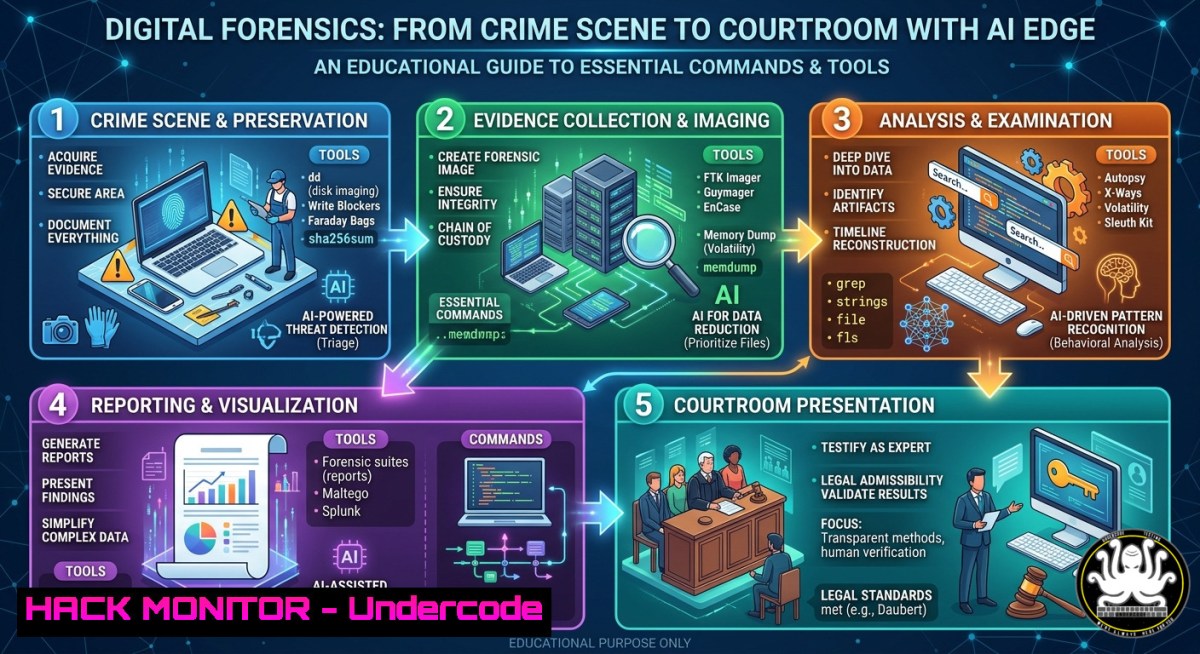
Introduction:
Digital forensics is no longer just about imaging hard drives; it is a rigorous end-to-end process that spans evidence identification, preservation, analysis, and legally sound presentation in court. As artificial intelligence begins to augment investigations – from triaging massive datasets to identifying patterns – professionals must master both traditional command-line techniques and the ethical limitations of AI. This article distills the core technical competencies from an expert-led session on the complete digital forensic lifecycle, providing actionable commands and step-by-step guides for Linux, Windows, and emerging AI‑assisted workflows.
Learning Objectives:
- Understand the complete digital forensics lifecycle (identification, preservation, analysis, reporting, and courtroom presentation).
- Apply Linux and Windows command‑line tools for forensic imaging, memory capture, and log analysis.
- Evaluate the capabilities, limitations, and ethical risks of AI in digital investigations.
You Should Know:
- Preserving Digital Evidence: Forensic Imaging with Linux `dd` and Windows FTK Imager
Proper evidence preservation requires a bit‑for‑bit copy (forensic image) using a write‑blocker to prevent alteration. This step creates a verifiable, court‑admissible replica.
Step‑by‑step guide (Linux):
- Identify the target disk: `sudo fdisk -l` (e.g.,
/dev/sda). - Connect a hardware write‑blocker between the source disk and your analysis machine.
- Create a raw image with
dd:sudo dd if=/dev/sda of=/mnt/evidence/image.dd bs=4096 conv=noerror,sync status=progress
- Generate a SHA‑256 hash for integrity:
sha256sum /mnt/evidence/image.dd > image.dd.sha256
- Verify the hash later using
sha256sum -c image.dd.sha256.
Step‑by‑step guide (Windows):
- Download FTK Imager (free) from AccessData (no URL needed – search “FTK Imager”).
- Run as Administrator, click File → Create Disk Image.
- Select source type (Physical Drive), choose the evidence drive, add a write‑blocker filter.
- Select image destination (E01 or raw), enter case details, and start acquisition.
- The tool automatically computes MD5/SHA1 hashes and logs the process.
- Memory Forensics with Volatility 3: Capturing RAM Artifacts
Live memory contains running processes, network connections, and encryption keys – invaluable for incident response. Volatility 3 is the leading open‑source framework for RAM analysis.
Step‑by‑step guide (capturing memory):
- Linux (LiME):
sudo insmod lime.ko "path=/mnt/evidence/mem.lime format=lime"
- Windows (WinPMEM): Run `winpmem.exe -o memdump.raw` from an admin command prompt.
- Verify the dump size matches installed RAM.
Step‑by‑step guide (analysis with Volatility 3):
- Install Volatility 3: `pip install volatility3` (Python 3.8+).
- Identify OS profile automatically:
vol -f memdump.raw windows.info
- List running processes:
vol -f memdump.raw windows.pslist
- Dump malicious process executable:
vol -f memdump.raw windows.dumpfiles --pid 1234 --dump
- Extract network connections / sockets:
vol -f memdump.raw windows.netscan
- Scan for injected code (hollowing) using
windows.malfind.
- Log Analysis on Windows and Linux: Building a Forensic Timeline
System logs are the investigator’s timeline. On Windows, Event Logs record user activity, service failures, and authentication attempts. On Linux, syslog and auth.log serve similar purposes.
Windows (wevtutil and PowerShell):
- Export the Security log:
wevtutil epl Security C:\forensics\Security.evtx
- Query failed logon events (Event ID 4625) with PowerShell:
Get-WinEvent -Path C:\forensics\Security.evtx -FilterXPath "[System[EventID=4625]]" | Select-Object TimeCreated, Message
- Convert `.evtx` to CSV for timeline tools:
wevtutil qe /f:text C:\forensics\System.evtx > System.txt
Linux (journalctl and grep):
- Export entire journal:
journalctl --output=export --file /var/log/journal//system.journal > system.journal.export
- Filter for SSH brute‑force attempts:
grep "Failed password" /var/log/auth.log | awk '{print $1, $2, $3, $9, $11}' > ssh_failures.txt - Create a combined timeline using `tsort` or
sleuthkit’smactime.
- AI-Assisted Forensic Analysis: Tools, Limits, and Ethical Guards
AI can accelerate image classification, anomaly detection, and spam/email analysis, but it introduces risks: false positives, algorithmic bias, and lack of explainability in court.
Step‑by‑step (using AI for image classification with Autopsy & ML):
– Install Autopsy (digital forensics GUI) and enable the Machine Learning module (if available).
– Ingest a disk image; the module will tag images containing faces, weapons, or nudity.
– For custom models, use YARA rules first (deterministic) before employing neural networks:
rule Suspicious_PDF {
strings:
$js = /.js/ nocase
$eval = /eval(/
condition:
$js and $eval
}
– Limitations to document in your report:
– Model training bias (e.g., skin‑tone misclassification).
– Lack of explainability – cannot testify as a witness.
– Need for human verification of every AI flag.
– Ethical check: Never rely solely on AI for probable cause; always re‑examine raw evidence.
- Chain of Custody and Reporting: Generating Verifiable Forensic Reports
Every piece of evidence must have an unbroken chain of custody. Use hashing, digital signatures, and timestamping to prove integrity.
Step‑by‑step:
- Compute multiple hashes for every file:
sha256sum evidence.dd && md5sum evidence.dd
- Create a timestamped log:
echo "$(date -Iseconds) - Acquired image of /dev/sda, hash=$(sha256sum evidence.dd)" >> custody.log
- For legal tamper‑proofing, use OpenSSL timestamping:
openssl ts -query -data evidence.dd -sha256 -out query.tsq
(Submit query.tsq to a Trusted Timestamp Authority)
- Generate an Autopsy report: In Autopsy, go to Reports → Generate Report → HTML/PDF.
- Attach the custody log, hashes, and timeline to the final expert report.
- Anti-Forensics Detection: Timestomping and Alternate Data Streams (Linux/Windows)
Attackers manipulate file timestamps (timestomping) or hide data in alternative streams to evade detection.
Windows (detect alternate data streams):
- List ADS with
dir /R:dir /R C:\suspicious\file.txt
- Use LADS (free tool) recursively:
lads.exe C:\evidence /s
- Extract an ADS:
more < C:\suspicious\file.txt:hidden.txt
Linux (detect timestomping via $MFT analysis):
- Use `mft2csv` from MFTECmd (Windows tool) to parse
$MFT:MFTECmd.exe -f "\.\C:" --csv C:\forensics
- Compare `SI` (standard info) and `FN` (filename) timestamps – discrepancies indicate tampering.
- On Linux, use `find` to search for files with modified time older than creation (ext4
crtime):debugfs -R 'stat <inode>' /dev/sda1 | grep crtime
- Cloud and API Forensics: Extracting Logs from AWS and Azure
With workloads moving to the cloud, investigators must collect API logs, object storage metadata, and identity access records.
AWS (CloudTrail and CLI):
- Install AWS CLI and configure credentials.
- Look up recent CloudTrail events (last 90 days, free tier):
aws cloudtrail lookup-events --lookup-attributes AttributeKey=EventName,AttributeValue=DeleteBucket
- Export all events to JSON for analysis:
aws cloudtrail lookup-events --max-items 10000 --output json > cloudtrail.json
- Use `jq` to filter for suspicious IPs:
cat cloudtrail.json | jq '.Events[].CloudTrailEvent | fromjson | .sourceIPAddress' | sort -u
Azure (Activity Log and CLI):
- Login: `az login`
– Query activity logs for security events:az monitor activity-log list --max-events 100 --query "[?contains(operationName,'delete')]" --output table
- For storage forensic, generate SAS URL and download blob metadata:
az storage blob list --account-name myaccount --container-name evidence --output json > blobs.json
What Undercode Say:
- Key Takeaway 1: A defensible forensic process depends on write‑blockers, cryptographic hashes, and a documented chain of custody – tools are only as good as their procedural rigor.
- Key Takeaway 2: AI can triage and flag anomalies at scale, but investigators must never outsource legal judgment; explainability, bias testing, and human verification remain non‑negotiable.
Analysis (≈10 lines):
The session delivered by Husam Shbib highlights a critical shift: digital forensics is becoming a hybrid discipline that blends traditional low‑level artifact recovery with AI‑assisted pattern recognition. While AI reduces time‑to‑insight – for example, classifying thousands of images in minutes – its black‑box nature clashes with evidentiary rules requiring reproducible, transparent methods. Practitioners must therefore maintain proficiency in command‑line tools (dd, volatility, wevtutil) while learning to validate AI outputs with deterministic YARA rules or hash‑based integrity checks. The growing adoption of cloud forensics (AWS/Azure logs) and anti‑forensic techniques (timestomping, ADS) further demands that investigators continuously update their toolkit. Ultimately, the most successful forensic analysts will be those who combine automation with rigorous manual validation – a lesson reinforced by the enthusiastic Q&A from NEIU students and global professionals.
Prediction:
Within three years, AI‑powered forensic platforms will handle 80% of initial data triage, from log correlation to malware family detection. However, courts will push back, demanding “human‑in‑the‑loop” attestation for every AI‑generated finding. This will create a new certification category – Certified AI Forensic Examiner – blending forensic best practices with ML model auditing. Additionally, as anti‑forensics increasingly targets cloud APIs (e.g., tampering with CloudTrail logs), real‑time integrity monitoring on control planes will become mandatory. Professionals who invest today in mastering both command‑line forensics and responsible AI integration will lead the next generation of digital investigations.
▶️ Related Video (76% Match):
🎯Let’s Practice For Free:
IT/Security Reporter URL:
Reported By: Https: – Hackers Feeds
Extra Hub: Undercode MoN
Basic Verification: Pass ✅


