Listen to this Post
Introduction
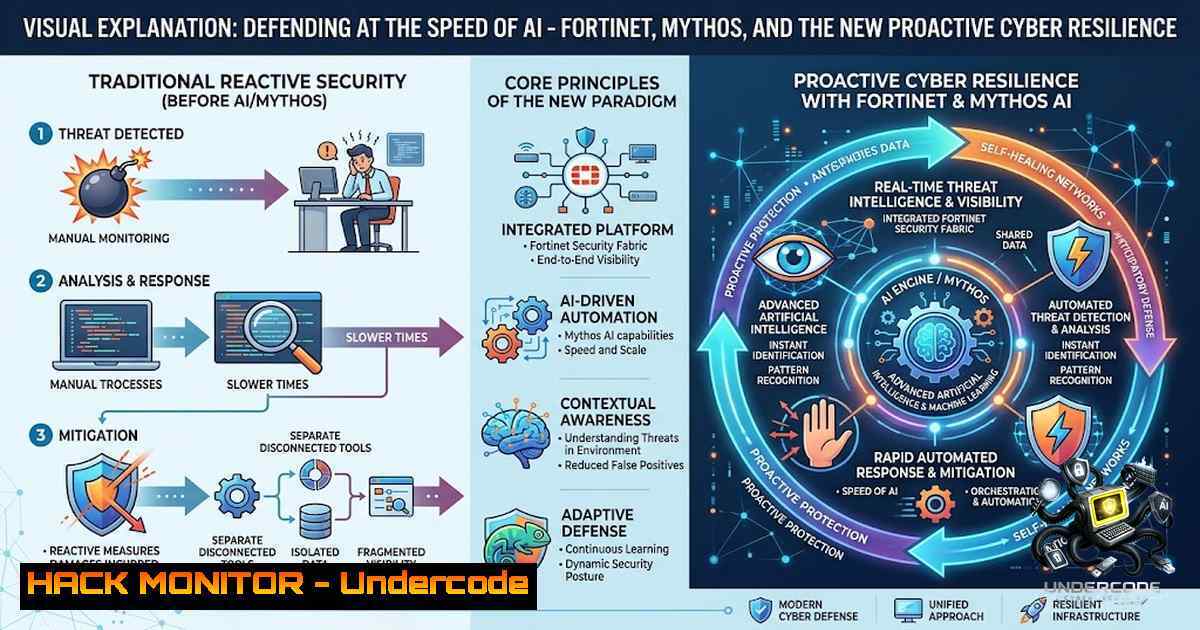
The cybersecurity landscape has undergone a paradigm shift with the emergence of frontier AI models capable of autonomously discovering and weaponizing vulnerabilities in hours rather than weeks or months. Anthropic’s Mythos model demonstrated that AI can take a CVE identifier and a git commit hash and autonomously produce a privilege escalation exploit, collapsing the defensive response window that security teams once relied upon to near-zero. World Wide Technology’s (WWT) ARMOR framework, combined with Fortinet’s AI-powered security fabric, provides organizations with a structured, vendor-agnostic approach to defending against AI-driven threats at machine speed.
Learning Objectives
- Understand the threat landscape introduced by frontier AI models like Mythos and the compression of the vulnerability-to-exploit timeline
- Master the implementation of Fortinet’s AI-powered security solutions, including FortiAI, FortiSandbox, and FortiNDR, within a proactive defense architecture
- Apply WWT’s ARMOR framework principles to build resilient, continuously hardened security postures that operate at AI speed
You Should Know
- Understanding the Mythos Threat Vector: AI-Driven Exploit Generation
Mythos did not create AI-assisted vulnerability discovery, but it made the transition from vulnerability to working exploit publicly visible. The model demonstrated that frontier-model offensive workflows had crossed a threshold where patch-diff analysis, exploit adaptation, variant discovery, and proof-of-concept generation could occur at a tempo fundamentally misaligned with human-centered defensive processes.
What makes Mythos particularly dangerous is the diffusion curve that follows frontier capability. Techniques move from gated environments into research communities, open-weight experimentation, commercial tooling, and eventually criminal ecosystems. The strategic concern is not Mythos itself, but how quickly existing governance and response models become insufficient when that diffusion occurs.
The Technical Reality: In testing, Mythos produced thousands of working exploits for approximately $2,000 each. It created the first exploit for x86_64 architecture for CVE-2024-7965—a feat that eluded the original vulnerability reporters. The model can now move from CVE identifier to working exploit faster than most organizations can triage the disclosure.
Step-by-Step: Assessing Your Organization’s Mythos Exposure
- Inventory Your External Attack Surface: Use FortiRecon (Fortinet’s external attack surface monitoring platform) to identify all publicly exposed assets, including subdomains, open ports, and cloud services.
-
Prioritize CVEs with AI-Augmented Triage: Traditional CVSS-based prioritization is insufficient when AI can generate exploits within hours. Implement evidence-backed exploitability validation to determine which CVEs demand immediate action.
-
Deploy AI-Powered Detection: Configure FortiNDR to identify suspicious network activity patterns that may indicate AI-generated exploit attempts.
FortiGate CLI Command for Enabling AI-Based Detection:
config system settings
set ai-mode enable
end
This enables AI logic for behavioral analysis across the FortiGate deployment.
- Continuous Hardening: Adopt a philosophy of continuous, automated hardening rather than periodic patching. Mythos emphasizes why continuous hardening is critical—the same vulnerability research can now happen faster, across more targets, and with far less dependence on human effort.
-
Fortinet’s AI Security Fabric: Operationalizing AI for Defense
Fortinet has been utilizing AI techniques in FortiGuard Labs since 2015, long before the Mythos era. The organization receives trillions of security signals per day, which are automatically classified using machine learning and artificial neural networks, freeing human researchers to focus on the most elusive threats.
Fortinet’s AI capabilities span multiple product lines:
- FortiSandbox: AI-powered sandboxing that identifies high-risk files in email and network traffic
- FortiEDR: Endpoint detection and response that identifies malicious files and traffic behavior
- FortiNDR: Network detection and response that identifies suspicious network activity
- FortiAI: A context-aware GenAI security assistant that allows interaction with FortiSOAR through natural language commands for data analysis, threat identification, and resolution
Step-by-Step: Deploying FortiAI for Automated Security Operations
1. Verify License Status:
diagnose sys license list | grep -i ai
Confirm that AI features are licensed and enabled on your FortiGate deployment.
2. Access FortiAI CLI:
Connect via SSH or telnet to the FortiGate device:
ssh admin@<fortigate-ip>
The FortiAI CLI can be accessed through the console or using an SSH/TELNET client.
3. Enable AI-Assisted Configuration:
FortiOS 8.0 integrates FortiAI as a RAG (Retrieval-Augmented Generation) system that supports document Q&A, troubleshooting, and CLI command generation through natural language.
Example Natural Language to CLI:
“Create a firewall policy that blocks all traffic from the IP range 192.168.1.0/24 except for HTTPS”
Generated CLI:
config firewall policy
edit 0
set srcintf "internal"
set dstintf "wan1"
set srcaddr "192.168.1.0/24"
set dstaddr "all"
set action deny
set schedule "always"
set service "HTTPS"
set logtraffic all
next
end
4. Integrate FortiAI with FortiSOAR:
Configure the FortiAI solution pack to enable natural language commands for data analysis, threat identification, and resolution across your security operations workflow.
- WWT’s ARMOR Framework: A Structured Approach to AI Security
WWT’s ARMOR (AI Readiness Model for Operational Resilience) framework is among the first vendor-agnostic, end-to-end AI security frameworks designed to empower organizations to accelerate AI adoption confidently while ensuring robust security, compliance, and operational resilience.
ARMOR provides a structured blueprint across six critical domains:
1. Governance, Risk, and Compliance (GRC): Establishing policies and controls for AI security
2. Model Security: Protecting AI models from poisoning, inversion threats, and theft
3. Secure AI Operations: Ensuring secure deployment and operation of AI systems
4. Infrastructure Security: Hardening the underlying infrastructure supporting AI workloads
5. Data Protection: Securing data throughout the AI lifecycle
6. Secure Development Lifecycle (SDLC): Integrating security into AI development processes
Step-by-Step: Implementing ARMOR Principles with Fortinet Solutions
1. Conduct an AI Security Assessment:
Map your current AI deployments against the ARMOR framework’s six domains. Identify gaps in governance, model security, and infrastructure hardening.
2. Deploy Fortinet’s Security Fabric for Infrastructure Security:
Fortinet’s AI-powered Next-Generation Firewalls (NGFWs) offer unified security solutions integrating advanced threat detection and seamless scalability.
Linux Command for Auditing Firewall Rules:
 Audit existing iptables rules
sudo iptables -L -1 -v --line-1umbers

Log all dropped packets for analysis
sudo iptables -A INPUT -j LOG --log-prefix "IPTables-Dropped: "

Block suspicious IP ranges (example)
sudo iptables -A INPUT -s 192.168.1.0/24 -j DROP
Windows Command for Firewall Auditing:
 List all firewall rules
netsh advfirewall firewall show rule name=all

Enable logging for dropped packets
netsh advfirewall set allprofiles logging filename %SystemRoot%\System32\LogFiles\Firewall\pfirewall.log
netsh advfirewall set allprofiles logging droppedconnections enable

Block an IP address
netsh advfirewall firewall add rule name="Block IP" dir=in action=block remoteip=192.168.1.100
- Implement Zero Trust Access with Fortinet Universal ZTNA:
Deploy continuous, context-aware access control with endpoint verification and centralized analytics.
4. Establish Continuous Monitoring with FortiNDR:
Configure network detection and response to detect, prioritize, investigate, hunt, and respond to attacks across your network.
4. Cyber Threat Intelligence as a Defensive Shield
In a post-Mythos world, attacker weaponization velocity is increasingly measured in hours rather than days. Cyber threat intelligence (CTI) that functions only as reporting will fall behind; CTI must evolve into a defensive shield that translates intelligence into governed enforcement quickly, predictably, and with bounded scope.
Three Critical Shifts for CTI:
- Fused Protection Signal: Weight exposure using live exploitation indicators and trust-path sensitivity
- Curated TTP–Exploit Pairing: Make compensating controls and detection more deterministic
- Regulated Autonomy: Enable surgical, time-bound, reversible defensive action
Step-by-Step: Building a Post-Mythos CTI Program
1. Implement Automated Threat Intelligence Feeds:
Configure FortiGuard Labs’ threat intelligence integration to receive real-time updates on emerging threats.
2. Deploy AI-Powered Sandboxing:
FortiGuard Sandbox provides AI-based detection on zero-day malware using its Tracer engine to collect behavioral data.
FortiSandbox CLI Configuration:
config system sandbox
set ai-mode enable
set behavior-analysis enable
set submit-suspicious enable
end
3. Establish a Feedback Loop:
Ensure threat intelligence feeds back into your security controls to enable automated, bounded enforcement actions.
5. Continuous Hardening and Automated Response
The fundamentals of offensive security haven’t changed, but the speed has. Organizations that rely on slower, fragmented approaches will not be able to keep pace. Security today needs to operate as a continuous, integrated process spanning development, detection, and response.
Step-by-Step: Implementing Continuous Hardening
1. Automate Vulnerability Scanning:
Integrate SAST and SCA into your DevOps pipeline to identify vulnerabilities before deployment.
2. Implement AI-Guided Fuzzing:
Fortinet has been using AI-guided fuzzing as part of its security testing process, leveraging frontier models to analyze and test software at scale.
3. Deploy Automated Response Playbooks:
Configure FortiSOAR to execute automated response actions when specific threat indicators are detected.
Example FortiSOAR Playbook Snippet (Python):
 Automated IP blocking playbook
def block_malicious_ip(ip_address, duration=3600):
 Block IP on FortiGate
fortigate_api = FortiGateAPI()
fortigate_api.block_ip(ip_address, duration)

Log the action
log_security_event("IP_BLOCKED", ip_address, duration)

Alert SOC team
send_alert(f"Blocked malicious IP: {ip_address}")
4. Regular Security Posture Assessments:
Use WWT’s ATC (Advanced Technology Center) validation capabilities to test your defenses against AI-generated attack scenarios.
6. Securing the AI Supply Chain
As organizations adopt AI, they must secure not only their own models but also the entire AI supply chain. This includes protecting against model poisoning, inversion threats, and theft.
Step-by-Step: AI Supply Chain Security
1. Implement Model Validation:
Verify the integrity of AI models before deployment using cryptographic attestation.
2. Deploy Data Protection for AI Training:
Use FortiDLP to reduce the exposure of sensitive data across GenAI tools.
3. Monitor for Shadow AI:
Use FortiGuard Labs’ AI-Protect Security Services to provide full visibility and risk assessment for unauthorized AI tools.
4. Establish AI Incident Response:
Develop specific playbooks for AI-specific incidents, including model compromise and data poisoning.
7. Practical Commands for Post-Mythos Security Operations
Linux Commands for Security Hardening:
 Check for open ports and listening services
sudo netstat -tulpn | grep LISTEN

Audit system for known vulnerabilities
sudo apt-get update && sudo apt-get upgrade -y  Debian/Ubuntu
sudo yum update -y  RHEL/CentOS

Enable auditd for system call monitoring
sudo auditctl -e 1
sudo auditctl -w /etc/passwd -p wa -k identity
sudo auditctl -w /etc/shadow -p wa -k identity

Monitor for suspicious processes
ps aux | grep -E "(nc|netcat|nmap|hydra|john|sqlmap)"

Check for unauthorized SUID binaries
find / -perm -4000 -type f 2>/dev/null

Configure iptables for zero-trust approach
sudo iptables -P INPUT DROP
sudo iptables -P FORWARD DROP
sudo iptables -P OUTPUT ACCEPT
sudo iptables -A INPUT -m state --state ESTABLISHED,RELATED -j ACCEPT
sudo iptables -A INPUT -p tcp --dport 22 -j ACCEPT  SSH only
Windows PowerShell Commands for Security Hardening:
 Check for open ports
Get-1etTCPConnection | Where-Object {$_.State -eq "Listen"}

Audit installed software for known vulnerabilities
Get-WmiObject -Class Win32_Product | Select-Object Name, Version, Vendor

Enable Windows Defender real-time protection
Set-MpPreference -DisableRealtimeMonitoring $false

Configure Windows Firewall to block all inbound by default
Set-1etFirewallProfile -Profile Domain,Public,Private -DefaultInboundAction Block

Monitor for suspicious processes
Get-Process | Where-Object {$<em>.Path -like "temp" -or $</em>.Path -like "downloads"}

Enable PowerShell logging
Set-ItemProperty -Path "HKLM:\SOFTWARE\Wow6432Node\Policies\Microsoft\Windows\PowerShell\ScriptBlockLogging" -1ame "EnableScriptBlockLogging" -Value 1

Check for suspicious scheduled tasks
Get-ScheduledTask | Where-Object {$_.State -1e "Disabled"}
FortiGate CLI Commands for AI-Enhanced Security:
 Enable AI-based malware detection
config system settings
set ai-mode enable
end

Configure FortiSandbox integration
config system sandbox
set ai-mode enable
set submit-suspicious enable
set behavior-analysis enable
end

Enable FortiNDR for network threat detection
config system ndr
set status enable
set ai-analysis enable
end

Configure FortiAI assistant
config system fortiai
set status enable
set provider fortiai  or openai
end

View AI threat intelligence feeds
diagnose system fortiguard ai-threats show
What Undercode Say
Key Takeaway 1: The Mythos threat is not about AI creating “superhuman hackers”—it’s about the compression of offensive iteration to a pace that defenders have not yet absorbed. Organizations are losing the advantage they relied on most heavily: time. The response is not to abandon AI but to operationalize it defensively, embedding AI into every layer of the security lifecycle from development to detection to response.
Key Takeaway 2: WWT’s ARMOR framework provides a structured, vendor-agnostic approach to AI security that goes beyond traditional compliance. By embedding security from chip to cloud, ARMOR ensures resilience across governance, model security, secure operations, infrastructure, data protection, and the secure development lifecycle. Combined with Fortinet’s mature AI capabilities—which have been in development since 2015—organizations can build defenses that operate at the same speed as the threats they face.
Analysis: The cybersecurity industry is at an inflection point. The traditional model of reactive patching and human-centered incident response is no longer viable when AI can generate working exploits from a CVE identifier in hours. The organizations that will survive and thrive in the post-Mythos era are those that embrace continuous, automated, AI-powered defense. This means shifting from a mindset of “if we get breached” to “when we get breached, how quickly can we detect and respond?” The defensive playbook must now include AI-powered threat intelligence, automated response orchestration, and continuous hardening that operates at machine speed. Fortinet’s Security Fabric, combined with WWT’s ARMOR framework, offers a practical path forward—one that acknowledges the new reality of AI-driven threats while providing the tools and structure needed to defend against them.
Prediction
-1 The Mythos diffusion curve will accelerate offensive capabilities faster than most organizations can adapt, leading to a widening protection gap over the next 12–24 months as AI-generated exploits become commoditized and accessible to criminal ecosystems.
-1 Traditional vulnerability management programs built around weekly or monthly patching cycles will become obsolete, forcing organizations to completely restructure their security operations around continuous, AI-driven hardening.
+1 The integration of AI into defensive operations—particularly through Fortinet’s Security Fabric and WWT’s ARMOR framework—will enable early adopters to achieve a new level of cyber resilience, shifting from reactive to preemptive security postures.
+1 The demand for AI security expertise will create new career opportunities in AI security architecture, adversarial machine learning, and AI incident response, with organizations investing heavily in upskilling their security teams.
-1 Organizations that fail to adopt AI-powered defense will face increasing breach risks, with AI-generated exploits targeting the gaps in traditional security controls. The cost of recovery from AI-driven breaches will be significantly higher than traditional incidents due to the speed and scale of automated attacks.
+1 The collaboration between WWT, Fortinet, and other security vendors will drive innovation in AI security, leading to more sophisticated, interoperable defense solutions that can counter AI-generated threats at machine speed.
▶️ Related Video (80% Match):
🎯Let’s Practice For Free:
🎓 Live Courses & Certifications:
Join Undercode Academy for Verified Certifications
🚀 Request a Custom Project:
Secure, high-velocity infrastructure and disruptive technological engineering. Contact our engineering team for high-tier development and proprietary systems:
[email protected]
💎 Smart Architecture | 🛡️ Secure by Design | ⭐ Trusted by Thousands
IT/Security Reporter URL:
Reported By: Matt Murawskistl – Hackers Feeds
Extra Hub: Undercode MoN
Basic Verification: Pass ✅


