Listen to this Post
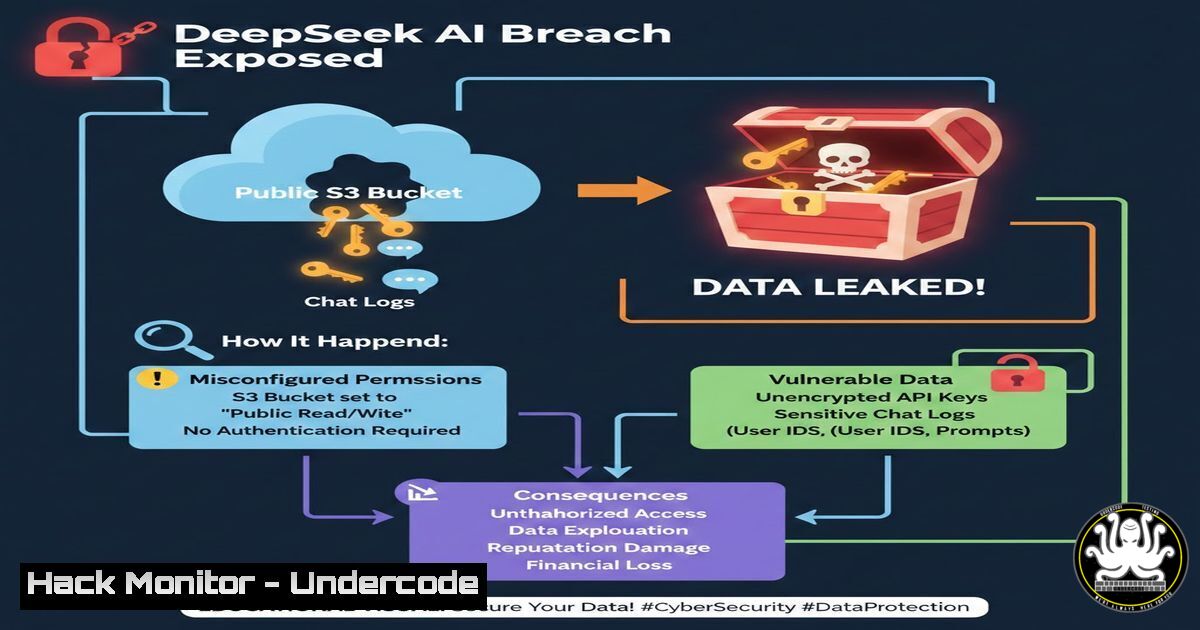
Introduction:
In a stark reminder of the fragility of cloud security, a recent exposure involving DeepSeek AI’s infrastructure has sent shockwaves through the tech community. Security researchers discovered a publicly accessible cloud storage bucket containing sensitive data, including明文 API keys, internal chat logs, and operational metadata. This incident underscores the critical importance of Identity and Access Management (IAM) misconfigurations, which remain one of the leading causes of data breaches in cloud-native environments. By examining this exposure, we can extract vital lessons on securing AI pipelines and protecting against similar leaks.
Learning Objectives:
- Understand the mechanics of cloud storage misconfigurations and their impact on AI/ML pipelines.
- Learn to audit cloud environments for exposed data using open-source tools and manual techniques.
- Implement hardening measures for API security and cloud infrastructure across AWS, Azure, and GCP.
You Should Know:
1. Anatomy of the DeepSeek AI Leak
The breach reportedly stemmed from a misconfigured Amazon S3 bucket. Unlike sophisticated cyberattacks, this exposure was the digital equivalent of leaving a vault door wide open. The bucket, intended for internal use only, had its Block Public Access settings disabled and a bucket policy allowing public read access ("Effect": "Allow", "Principal": ""). This allowed anyone with a direct URL or a tool like `awscli` to list and download the contents without authentication.
Step‑by‑step guide: Auditing for Public S3 Buckets using AWS CLI
To check your own or a client’s environment for this exact vulnerability, use the AWS Command Line Interface.
 1. Configure AWS CLI (if not already done)
aws configure
 Enter your Access Key ID, Secret Access Key, and default region.

<ol>
<li>List all S3 buckets in the account
aws s3api list-buckets --query "Buckets[].Name"</p></li>
<li><p>For each bucket, check the public access block settings
aws s3api get-public-access-block --bucket YOUR_BUCKET_NAME</p></li>
<li><p>Check the bucket policy for any "Principal": "" statements
aws s3api get-bucket-policy --bucket YOUR_BUCKET_NAME --query Policy --output text | jq .</p></li>
<li><p>List the contents of a bucket (will fail if permissions are correct, succeed if misconfigured)
aws s3 ls s3://YOUR_BUCKET_NAME --no-sign-request
The --no-sign-request flag attempts to access the bucket anonymously.
What this does: This sequence audits your S3 configuration. Steps 3 and 4 identify if public access is blocked or if a permissive policy exists. Step 5 is the litmus test, attempting anonymous access exactly as an attacker would.
2. Lateral Movement from Exposed Credentials
The DeepSeek leak was particularly dangerous because the exposed data included valid API keys and internal chat logs. An attacker possessing a valid API key can bypass perimeter defenses entirely, masquerading as a legitimate user or service. From chat logs, they could extract database connection strings, internal IP addresses, or even more credentials.
Step‑by‑step guide: Simulating an Attacker with an Exposed API Key (Linux)
Once a key is found, the first step is to identify what services it unlocks.
 Assuming you've found an exposed AWS Access Key ID and Secret Key.
 1. Configure a new profile with the stolen keys
aws configure --profile attacker
 AWS Access Key ID [bash]: AKIA...EXPOSED...
 AWS Secret Access Key [bash]: wJalrXUtnFEMI/K7MDENG...EXPOSED...

<ol>
<li>Enumerate the attacker's identity and permissions
aws sts get-caller-identity --profile attacker
This returns the Account ID and User ARN.</p></li>
<li><p>Attempt to list all available S3 buckets in the account
aws s3api list-buckets --profile attacker</p></li>
<li><p>If successful, download all contents from a target bucket
aws s3 sync s3://target-bucket-name ./downloaded_data --profile attacker</p></li>
<li><p>Check for EC2 instances to potentially launch more compute for crypto-mining
aws ec2 describe-instances --region us-east-1 --profile attacker
What this does: This simulates post-exploitation. It validates the stolen credentials, enumerates the compromised account’s assets, and exfiltrates data, showing the cascading damage of a single leaked key.
3. Hardening Containerized AI Workloads (Kubernetes)
AI models like DeepSeek are often deployed on Kubernetes. If the leaked API keys allowed access to the cluster’s configuration file (kubeconfig), the attacker could gain control over the entire AI serving infrastructure, potentially poisoning models or stealing training data.
Step‑by‑step guide: Securing kubeconfig and Implementing Pod Security Standards
On your local machine (Linux/Windows WSL), ensure your `kubeconfig` is secure and your cluster is hardened.
 Linux/macOS: Check permissions on your kubeconfig file
ls -la ~/.kube/config
 It should be readable and writable only by you (600). If not, fix it:
chmod 600 ~/.kube/config

Windows (PowerShell as Admin): Check and set permissions
Get-Acl -Path $env:USERPROFILE.kube\config | Format-List
 To restrict, you may need to use icacls:
 icacls $env:USERPROFILE.kube\config /inheritance:r /grant:r "%USERNAME%:F"

In the cluster, apply a Pod Security Standard to prevent privilege escalation.
 Save the following as pss-baseline.yaml
apiVersion: v1
kind: Namespace
metadata:
name: my-ai-namespace
labels:
pod-security.kubernetes.io/enforce: baseline
pod-security.kubernetes.io/enforce-version: latest

Apply it to the namespace
kubectl apply -f pss-baseline.yaml
What this does: The commands secure the local configuration file that holds the keys to the Kubernetes kingdom. The YAML configuration enforces a baseline security standard on the namespace, preventing pods from running as root or accessing the host node’s filesystem.
- API Security: Preventing Key Exposure in Transit and Logs
The exposure of chat logs containing API keys points to a failure in secure logging practices. Keys should never be logged in plain text.
Step‑by‑step guide: Masking Secrets in Application Logs (Python Example)
If your AI application uses Python, you can implement a logging filter to redact sensitive patterns.
import logging
import re

class SensitiveDataFilter(logging.Filter):
 Common patterns for API keys, passwords, etc.
sensitive_patterns = [
(re.compile(r'(api[<em>-]?key["\s]:?\s["\']?)([a-zA-Z0-9_-]{20,})', re.IGNORECASE), r'\1[bash]'),
(re.compile(r'(authorization:\s)(bearer\s+[a-zA-Z0-9-.</em>~+/]+)', re.IGNORECASE), r'\1[bash]'),
]

def filter(self, record):
 Check if the log message is a string
if isinstance(record.msg, str):
for pattern, replacement in self.sensitive_patterns:
record.msg = pattern.sub(replacement, record.msg)
return True

Configure the root logger
logging.basicConfig(level=logging.INFO)
logging.getLogger().addFilter(SensitiveDataFilter())

Example usage
api_key = "sk-1234567890abcdefghijklmnopqrstuvwxyz"
logging.info(f"Calling external AI service with API Key: {api_key}")
 Output: "Calling external AI service with API Key: [bash]"
What this does: This code creates a custom logging filter. Before a log message is written, it scans for patterns resembling API keys or authorization headers and replaces them with
</code>, ensuring secrets never hit the log files.

<h2 style="color: yellow;">5. Cloud Hardening: IAM Roles over Long-Lived Keys</h2>

A fundamental flaw in many breaches is the use of long-lived access keys. DeepSeek could have mitigated this by using IAM Roles for service-to-service communication, which provide temporary, automatically rotating credentials.

Step‑by‑step guide: Implementing IAM Roles for EC2 (AWS Console & CLI)
Instead of storing keys on an EC2 instance, assign it an IAM Role.
[bash]
 1. Create an IAM Role (using AWS CLI)
aws iam create-role --role-name ECS-AI-Task-Role --assume-role-policy-document file://trust-policy.json
 trust-policy.json would contain: {"Version":"2012-10-17","Statement":[{"Effect":"Allow","Principal":{"Service":"ec2.amazonaws.com"},"Action":"sts:AssumeRole"}]}

<ol>
<li>Attach a policy granting necessary permissions (e.g., S3 read access)
aws iam attach-role-policy --role-name ECS-AI-Task-Role --policy-arn arn:aws:iam::aws:policy/AmazonS3ReadOnlyAccess</p></li>
<li><p>When launching an EC2 instance, specify the IAM Role
aws ec2 run-instances --image-id ami-0abcdef1234567890 --instance-type t3.medium --iam-instance-profile Name=ECS-AI-Task-Role ...
What this does: This creates an IAM role and attaches it to an EC2 instance. The instance can now automatically retrieve temporary credentials from the instance metadata service (`http://169.254.169.254/latest/meta-data/iam/security-credentials/`), eliminating the need to store permanent keys on the disk.
6. Network-Level Scanning for Open Buckets (Nmap Scripts)
For a broader assessment, security teams can use network scanning tools to identify exposed storage services across IP ranges, not just in the cloud console.
Step‑by‑step guide: Using Nmap to Detect Open S3 Buckets
This is useful for finding misconfigurations in hybrid or multi-cloud environments.
 Use Nmap's http-enum script with custom S3 paths
nmap -p80,443 --script http-enum --script-args http-enum.fingerprintfile=./s3-paths.txt <target_domain_or_ip>

Create s3-paths.txt with common bucket names and paths
echo "/bucket-name/" >> s3-paths.txt
echo "/my-ai-bucket/" >> s3-paths.txt
echo "/backup/" >> s3-paths.txt
echo "/.env" >> s3-paths.txt  Often contains credentials

For a more targeted approach, use a tool like 's3scanner' from GitHub
 git clone https://github.com/sa7mon/S3Scanner.git
 cd S3Scanner
 pip install -r requirements.txt
 echo "target-company-backup" > buckets.txt
 python3 s3scanner.py --buckets-file buckets.txt --dump
What this does: The Nmap command checks web servers for open directories that might be misconfigured S3 buckets or file stores. The `s3scanner` tool specifically checks for the existence and public accessibility of S3 buckets based on a list of names, and can dump their contents if open.
7. Mitigation: Automated Remediation with AWS Config
To prevent recurrence, organizations must implement automated compliance checks.
Step‑by‑step guide: Setting an AWS Config Rule to Detect Public S3 Buckets
 Enable AWS Config (if not already done)
 In the AWS Console, navigate to AWS Config and set it up.

Use the AWS CLI to add a managed config rule for s3-bucket-public-read-prohibited
aws configservice put-config-rule --config-rule file://s3-public-rule.json

Contents of s3-public-rule.json:
{
"ConfigRuleName": "s3-bucket-public-read-prohibited",
"Description": "Checks that your S3 buckets do not allow public read access.",
"Scope": {
"ComplianceResourceTypes": [
"AWS::S3::Bucket"
]
},
"Source": {
"Owner": "AWS",
"SourceIdentifier": "S3_BUCKET_PUBLIC_READ_PROHIBITED"
},
"MaximumExecutionFrequency": "TwentyFour_Hours"
}
What this does: This creates a rule in AWS Config that continuously evaluates all S3 buckets. If a bucket becomes public, the rule flags it as NON_COMPLIANT, triggering alerts and potentially automated remediation via AWS Lambda.
What Undercode Say:
- Misconfiguration, Not Hacking, is the Primary Threat: The DeepSeek incident is a textbook example of how non-malicious errors—an unchecked box, a permissive policy—can have the same impact as a state-sponsored hack. The attack vector was not a zero-day exploit, but the human element of cloud management.
- Secrets Management is an Architectural Requirement: API keys, tokens, and passwords must be treated as toxic assets. They should be ephemeral, never hard-coded, and never, ever logged. The integration of secrets like database passwords into chat logs represents a catastrophic failure of application design and logging hygiene.
The exposure serves as a critical warning for the AI industry. As companies race to deploy large language models and AI services, security fundamentals are being left behind. The leak wasn't just about data; it was about trust. It demonstrates that without a "security-first" mindset in cloud architecture and CI/CD pipelines, the very models designed to be intelligent become vectors for corporate suicide.
Prediction:
In the next 12–18 months, we will see the rise of "AI Security Posture Management" (AI-SPM) as a distinct market category. Just as Cloud Security Posture Management (CSPM) emerged to handle cloud misconfigurations, AI-SPM tools will specifically audit AI pipelines for data leaks, model theft, and prompt injection vulnerabilities. Furthermore, regulatory bodies will begin mandating strict auditing and redaction policies for any logs generated by AI training and inference workloads, making incidents like the DeepSeek leak not just a business risk, but a compliance violation.
▶️ Related Video (78% Match):
🎯Let’s Practice For Free:
IT/Security Reporter URL:
Reported By: Captshawnsequeira Everyone - Hackers Feeds
Extra Hub: Undercode MoN
Basic Verification: Pass ✅


