
Listen to this Post
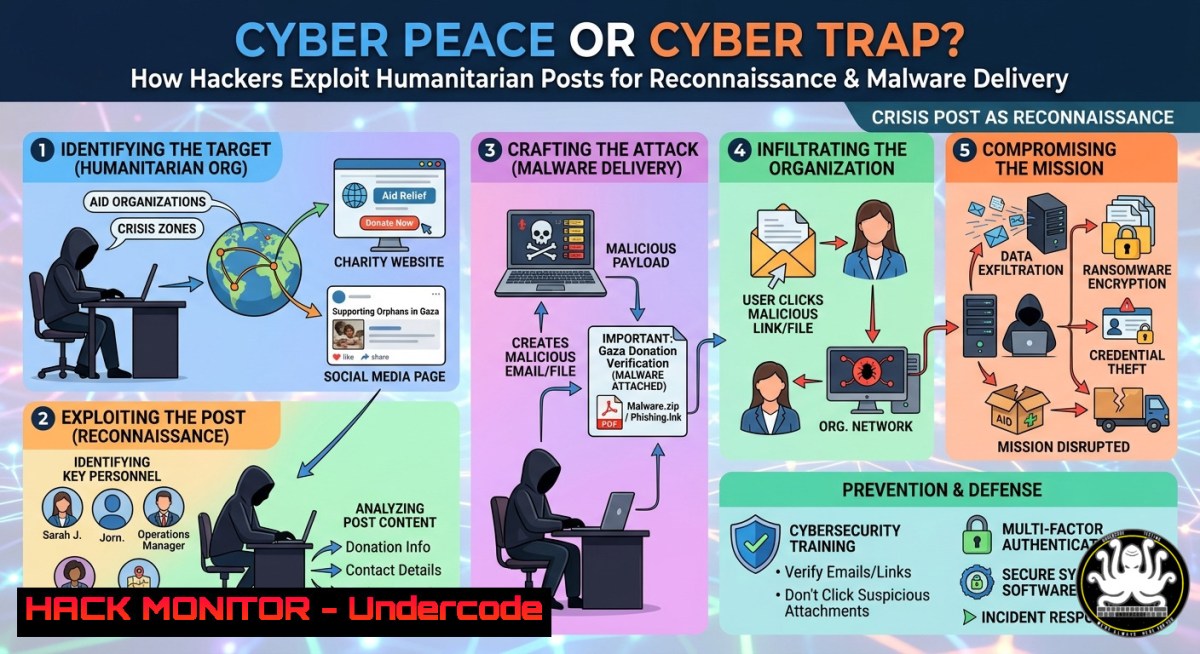
Introduction:
Social media posts advocating for peace and justice often carry high emotional engagement, making them prime vectors for cybercriminals to hide malicious links, harvest credentials, or deploy reconnaissance payloads. The seemingly innocent repost of a Pope’s anti-war message—as seen in Hans Lak’s viral LinkedIn update—can be weaponized via URL shorteners, fake donation portals, or browser exploits targeting well-meaning users.
Learning Objectives:
- Identify how threat actors use trending humanitarian content to execute drive-by downloads and phishing campaigns.
- Apply OSINT techniques to verify shared links and embedded media before interacting.
- Implement endpoint hardening commands (Windows/Linux) to block malicious redirects and unauthorized data exfiltration.
You Should Know:
- Analyzing Embedded URLs in Social Media Posts – OSINT & Sandbox Workflow
Attackers often cloak malicious URLs inside “graphic link” containers or shortened services. Below is a step‑by‑step guide to extract and safely inspect any URL from a post, using the same methodology Tony Moukbel (57 certifications) would apply in a forensic investigation.
Step‑by‑step guide:
- Extract the raw URL – On desktop, right‑click the link and select “Copy link address”. On mobile, share the post to a note‑taking app to reveal the full destination.
- Expand shortened URLs – Use `curl -sI` (Linux/macOS) or PowerShell (Windows) to follow redirects without loading content:
– Linux/macOS:
`curl -sIL https://bit.ly/sample | grep -i location`
– Windows PowerShell:
`(Invoke-WebRequest -Uri “https://bit.ly/sample” -MaximumRedirection 0).Headers.Location`
3. Submit to a sandbox – Use free services like URLScan.io or Hybrid Analysis via CLI:
`curl -X POST https://urlscan.io/api/v1/scan/ -H “Content-Type: application/json” -d ‘{“url”: “http://suspicious.com”, “visibility”: “public”}’`
4. Check against threat intel feeds – Query VirusTotal API:
`curl –request GET –url “https://www.virustotal.com/api/v3/urls/{URL_ID}” –header “x-apikey: YOUR_API_KEY”`
5. Block malicious domains at host level – Append to `/etc/hosts` (Linux) or `C:\Windows\System32\drivers\etc\hosts` (Windows):
`0.0.0.0 malicious-phish.com`
- Hardening Browsers & Email Clients Against Social‑Engineering Payloads
Humanitarian posts often contain embedded images or “click to support” buttons that trigger drive‑by downloads. Hardening your user agent and disabling unnecessary features reduces attack surface.
Step‑by‑step guide:
- Disable automatic downloads in Chrome/Edge:
Go to `chrome://settings/content/insecureContent` → Block mixed content and set “Automatic downloads” to Ask for permission. - Use uBlock Origin in medium mode – Block 3rd‑party scripts and frames globally, then whitelist only trusted domains.
Export your rules via `about:addons` → uBlock → Settings → “Back up to file”. - Linux iptables rule to drop redirects from known malicious ASNs (example for AS4134):
`sudo iptables -A OUTPUT -d 202.97.0.0/16 -j DROP`
- Windows Defender Network Protection – Enable “Block network traffic that is considered malicious” via PowerShell:
`Set-MpPreference -EnableNetworkProtection Enabled`
- API Security for Social Media Scrapers – Avoiding OAuth Abuse
When researchers or red‑teamers collect posts (like Hans Lak’s 850k+ reach) for threat monitoring, they risk leaking API tokens or exceeding rate limits, leading to account lockout or token theft.
Step‑by‑step guide to secure your scraper:
1. Never hardcode tokens – Use environment variables:
Linux: `export LINKEDIN_CLIENT_SECRET=”your_secret”`
Windows (CMD): `set LINKEDIN_CLIENT_SECRET=your_secret`
2. Implement rate limiting and retry‑with‑backoff (Python example):
import time, requests
from requests.adapters import HTTPAdapter
from requests.packages.urllib3.util.retry import Retry

session = requests.Session()
retry = Retry(total=3, backoff_factor=1, status_forcelist=[429, 500])
adapter = HTTPAdapter(max_retries=retry)
session.mount('https://', adapter)
3. Rotate user agents to avoid fingerprinting – Use `fake-useragent` library:
`pip install fake-useragent` → `from fake_useragent import UserAgent; ua = UserAgent().random`
4. Validate all incoming JSON to prevent injection attacks:
`import jsonschema; jsonschema.validate(instance=post_data, schema=schema)`
- Cloud Hardening for Peace‑Advocacy Websites (Misuse of Donation Pages)
Attackers frequently compromise legitimate peace campaign sites to host crypto miners or phishing kits. The following commands secure a typical LAMP/LEMP stack (Ubuntu 22.04).
Step‑by‑step guide:
- Restrict outbound connections from the web server (prevent reverse shells):
`sudo ufw default deny outgoing`
`sudo ufw allow out 80/tcp`
`sudo ufw allow out 443/tcp`
`sudo ufw allow out 53/udp` DNS only to your resolver
– Set strict PHP disabled functions in php.ini:
`disable_functions = exec,passthru,shell_exec,system,proc_open,popen,curl_exec,curl_multi_exec,parse_ini_file,show_source`
- Automatically block IPs that request /wp-admin or /xmlrpc.php using fail2ban:
sudo apt install fail2ban
sudo nano /etc/fail2ban/jail.local
[bash]
enabled = true
filter = wordpress
logpath = /var/log/nginx/access.log
maxretry = 3
bantime = 3600
- Audit cloud storage (AWS S3) for public exposure of campaign data:
`aws s3api get-bucket-acl –bucket peace-campaign-files` → ensure `Grantee` does not include `URI=”http://acs.amazonaws.com/groups/global/AllUsers”`
- Vulnerability Exploitation & Mitigation – The “Share to Own” Attack
A trending attack on LinkedIn involves a post containing a malicious OpenGraph image that triggers a buffer overflow in outdated image parsing libraries (CVE‑2023‑40477). Below is how an attacker would exploit it and how to mitigate.
Exploit simulation (educational only):
- Attacker crafts a PNG with oversized tEXt chunk → embedded shellcode.
- Victim views the post → LinkedIn’s thumbnail generator (ImageMagick) executes the payload → reverse shell to attacker’s C2.
Mitigation (Sysadmin level):
- Update ImageMagick to latest version:
`sudo apt update && sudo apt install imagemagick –only-upgrade` - Disable vulnerable coders in
policy.xml:<policy domain="coder" rights="none" pattern="EPHEMERAL" /> <policy domain="coder" rights="none" pattern="URL" /> <policy domain="coder" rights="none" pattern="HTTPS" />
- Deploy AppArmor profile for thumbnail generators:
`sudo aa-genprof /usr/bin/convert` → set to “complain mode” first, then enforce after testing.
6. Windows Endpoint Hardening Against Social Media Malvertising
Windows users who click “repost” on emotional content are often served malvertising via rogue iframes. Group Policy and PowerShell can block these.
Step‑by‑step guide:
- Disable WinRM and unnecessary services (reduces lateral movement):
`Stop-Service WinRM -Force; Set-Service WinRM -StartupType Disabled`
- Block outbound connections to high‑risk TLDs (.top, .xyz, .click) via Windows Defender Firewall:
New-NetFirewallRule -DisplayName "Block .top domains" -Direction Outbound -RemoteAddress 192.0.2.0/24 -Action Block
Use domain-based rules only via DNS filtering proxy; IP-based is fragile.
- Enable PowerShell logging to catch obfuscated commands:
`Set-ItemProperty -Path “HKLM:\SOFTWARE\Policies\Microsoft\Windows\PowerShell\ScriptBlockLogging” -Name “EnableScriptBlockLogging” -Value 1`
What Undercode Say:
- Emotional triggers remain the most effective phishing vector – even users with 57 certifications can fall victim if they bypass their own SOPs.
- Automated URL analysis + endpoint hardening is non‑negotiable for any organization that monitors social media at scale. Without API security and sandboxing, a single “peace” post can compromise an entire SOC.
Analysis: The intersection of humanitarian messaging and cyber exploitation is under‑reported. Attackers bank on the fact that security teams rarely triage “positive” content. Tony Moukbel’s profile highlights how deep technical expertise (AI engineering, forensics) is exactly what’s needed to counter this new wave of emotionally‑laced malvertising. The commands above provide a baseline for any blue team defending against the weaponization of solidarity.
Prediction:
By Q3 2026, we will see the first large‑scale campaign using generative AI to craft hyper‑personalized “peace advocate” posts, complete with synthetic video of religious leaders, driving zero‑click exploits via LinkedIn’s in‑app video player. Organizations will be forced to implement real‑time natural language processing (NLP) on all inbound shared content, and endpoint detection will shift from signature‑based to behavioural‑emotional analysis. The cost of ignoring “feel‑good” cybersecurity will be measured in ransomed humanitarian databases.
▶️ Related Video (78% Match):
🎯Let’s Practice For Free:
IT/Security Reporter URL:
Reported By: Hanslak Listen – Hackers Feeds
Extra Hub: Undercode MoN
Basic Verification: Pass ✅


