
Listen to this Post
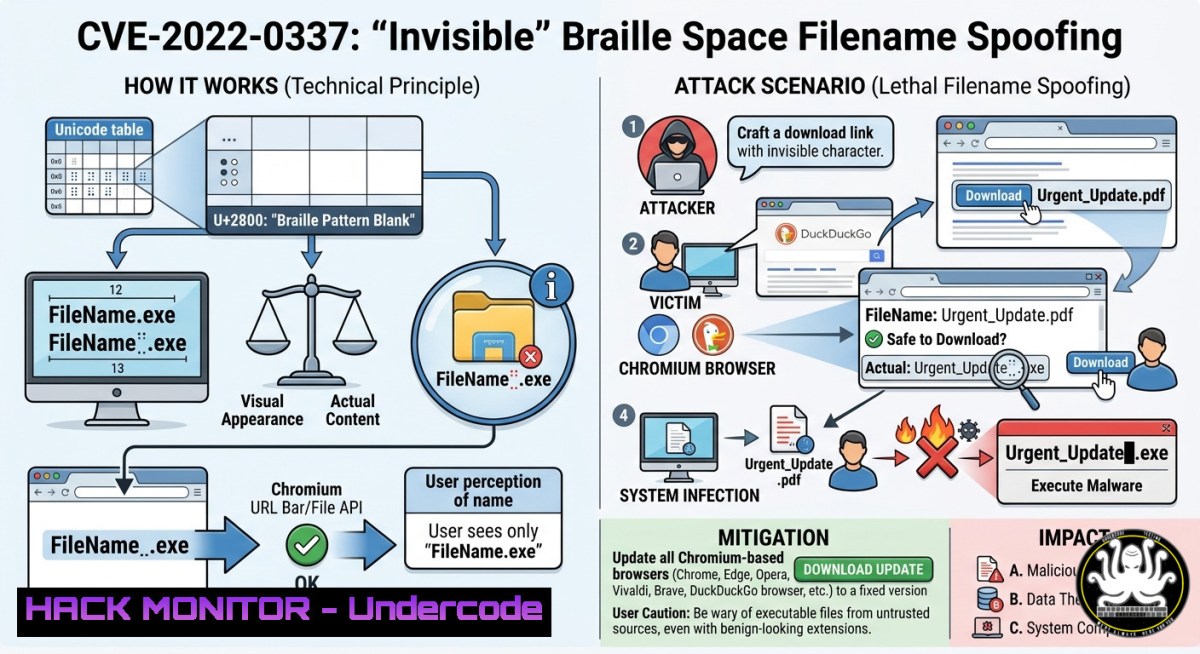
A deceptively simple Unicode character, the Braille Pattern Blank (U+2800), is at the heart of a new wave of “Improper Input Validation” attacks. This character appears entirely invisible to the human eye, allowing attackers to spoof filenames in critical browser components like the `showSaveFilePicker()` API and download managers. The issue is widespread, with security researchers filing dozens of duplicate reports across Chromium, Firefox, and privacy-focused browsers like DuckDuckGo and Brave over the past month.
Learning Objectives:
- Understand how the Braille Pattern Blank (U+2800) character can be weaponized to bypass filename validation logic in modern browsers.
- Learn to identify and detect this specific Unicode-based spoofing technique using command-line tools and security rules.
- Master client-side and server-side mitigation strategies, including input sanitization and browser security policy configuration.
- You Should Know: The Anatomy of the Braille Blank Attack
The attack exploits fundamental gaps in how browsers handle Unicode input before rendering filenames. The attacker injects the U+2800 character into a filename string. Since this character is treated as valid text but rendered as a blank space, it can push the true file extension out of the viewable area in a download dialog or file picker. For example, a file named `malware⠀.pdf` would visually appear to the user as malware .pdf, hiding the executable `.exe` payload that follows the blank sequence. The core issue is improper validation; the browser’s input parser accepts the character, but the text rendering engine fails to display it, creating a disconnect between the actual file identity and the user’s perception. This flaw is deeply rooted in how applications handle text that is both human-readable and machine-readable.
2. You Should Know: Exploiting showSaveFilePicker() on Windows
The `window.showSaveFilePicker()` API is a prime vector for this attack, especially on Windows. By injecting the U+2800 character into the `suggestedName` parameter, an attacker can control the default filename presented to the user. When combined with environment variable leakage (CVE-2022-0337), this can become a high-impact data exfiltration tool. A malicious website can prompt a user to save a file. The suggested name appears harmless, but the invisible Braille characters conceal a request that, once saved, leaks system information like `%USERNAME%` or even cloud API keys.
Step‑by‑step guide: Replicating the Vulnerability
This demonstration is for educational purposes in a controlled, isolated lab environment.
- Set up a local test environment. On Windows, create an HTML file named `braille_poc.html` with the following content. This code requests the victim to press “Enter” to “continue,” which also saves a file with a maliciously crafted name:
<html>
<body>

<h1>Press ENTER to continue...</h1>

<script>
document.body.onkeydown = (e) => {
if(e.key == "Enter") {
// Injecting Braille Blank (U+2800) to hide a .exe extension
let maliciousName = "invoice_2025" + "\u2800" + ".pdf\u2800.exe";
window.showSaveFilePicker({ suggestedName: maliciousName });
}
};
</script>

</body>
</html>
- Open the file in a vulnerable browser (e.g., an unpatched Chromium version from the 92-96 range).
- Press “Enter” when prompted. Observe the default filename in the save dialog. The `.exe` portion will be invisible, and the file will appear to be a
.pdf. -
You Should Know: Detecting Braille Blanks and Unicode Spoofing
Detecting this attack requires moving beyond human visual inspection. System administrators and security analysts must use tools to scan for the presence of the U+2800 character and other Unicode homoglyphs in file systems, logs, and email attachments.
Step‑by‑step guide: Command-Line Detection (Linux & Windows)
- Linux/macOS Detection with grep: To recursively find any file containing the Braille Pattern Blank in its name, use `grep` with Perl-compatible regex (PCRE):
 Find files with U+2800 in the current directory
ls -R | grep -P '\x{2800}'

Search inside all text files in /var/log for the character
grep -r -P '\x{2800}' /var/log/
- Windows Detection with PowerShell: For Windows systems, PowerShell can be used to search for the Unicode character in filenames and file content.
 Search for U+2800 in all filenames under the current directory
Get-ChildItem -Recurse | Where-Object { $_.Name -match "\x{2800}" }

Search within the contents of .txt files
Get-ChildItem -Recurse -Filter .txt | Select-String -Pattern "\x{2800}"
- Implement Automated Detection Rules: For enterprise security, deploy YARA or SIEM rules. A detection rule for email gateways should scan for `\x{2800}` in attachment filenames and recursively inside archive files, as attackers often nest these spoofed names within ZIP or RAR archives to bypass initial checks.
-
You Should Know: Mitigation at the Browser and Code Level
While users await vendor patches, several proactive measures can be implemented. For end-users, consider using browsers like Brave or Firefox if they have patched related issues, or ensure your Chromium-based browser is updated to version 97 or later for CVE-2022-0337 mitigations. For web application developers and system administrators, controls must be applied to input validation.
Step‑by‑step guide: Input Sanitization & Enterprise Policy Configuration
- Sanitize on the Server-Side: In any application that processes user-supplied filenames (e.g., a file upload portal), implement a sanitization function to remove or reject the Braille Patterns block. The Unicode range for these characters is `U+2800` to
U+28FF.
// PHP example to strip Braille Pattern characters
function sanitizeUnicode($input) {
// Remove all characters in the Braille Patterns block
return preg_replace('/[\x{2800}-\x{28FF}]/u', '', $input);
}
A similar approach can be taken in other languages like Python or JavaScript, using regex with the `\u2800` notation.
- Enforce Strict Enterprise Download Policies: System administrators can block the `showSaveFilePicker()` API’s ability to bypass security controls. On Linux systems, configure Chromium policies to block all downloads. Create a JSON policy file:
sudo mkdir -p /etc/chromium/policies/managed
echo '{ "DownloadRestrictions": 3 }' | sudo tee /etc/chromium/policies/managed/policy.json
However, note that in some Chromium versions, this policy could be bypassed by the `showSaveFilePicker()` API. Administrators should combine it with strict execution policies and application allowlisting.
What Undercode Say:
- Key Takeaway 1: Invisible ≠ Inert. The Braille Pattern Blank is a powerful technique for bypassing human-centered security controls like download dialogs. It proves that input validation must occur at the machine level, not the visual UI level.
- Key Takeaway 2: The Browser is the Perimeter. This vulnerability chain shows how a modern browser API can be the initial entry point for a system compromise, leaking sensitive environment variables and confusing users into executing malicious files.
Analysis: The analysis of this vulnerability timeline across browsers reveals a fragmented security landscape. Chromium-based browsers (Chrome, Edge, Opera) are struggling with duplicate reports and triage delays, indicating a potential bottleneck in their vulnerability management process. The privacy-centric DuckDuckGo browser, despite its focus on security, is not immune to these classes of flaws, with duplicate statuses suggesting that security research into its specific fork is still nascent. The “beginner” status of the original researcher highlights a growing trend where novel attack surfaces are being discovered by a diverse, global community, not just elite professionals.
Prediction:
Expect a surge in “Unicode Smuggling” attacks over the next 12-18 months. As AI-assisted code generation becomes more prevalent, developers may inadvertently introduce input validation flaws that miss complex Unicode homoglyphs. Future browsers will likely adopt “Safe Rendering” modes for download dialogs, where any non-standard Unicode character is displayed as a raw hex block to the user, prioritizing security over internationalization in high-risk contexts. The era of trusting the file extension a user sees is definitively over.
🎯Let’s Practice For Free:
IT/Security Reporter URL:
Reported By: Sans1986 Improper – Hackers Feeds
Extra Hub: Undercode MoN
Basic Verification: Pass ✅


