Listen to this Post
Introduction:
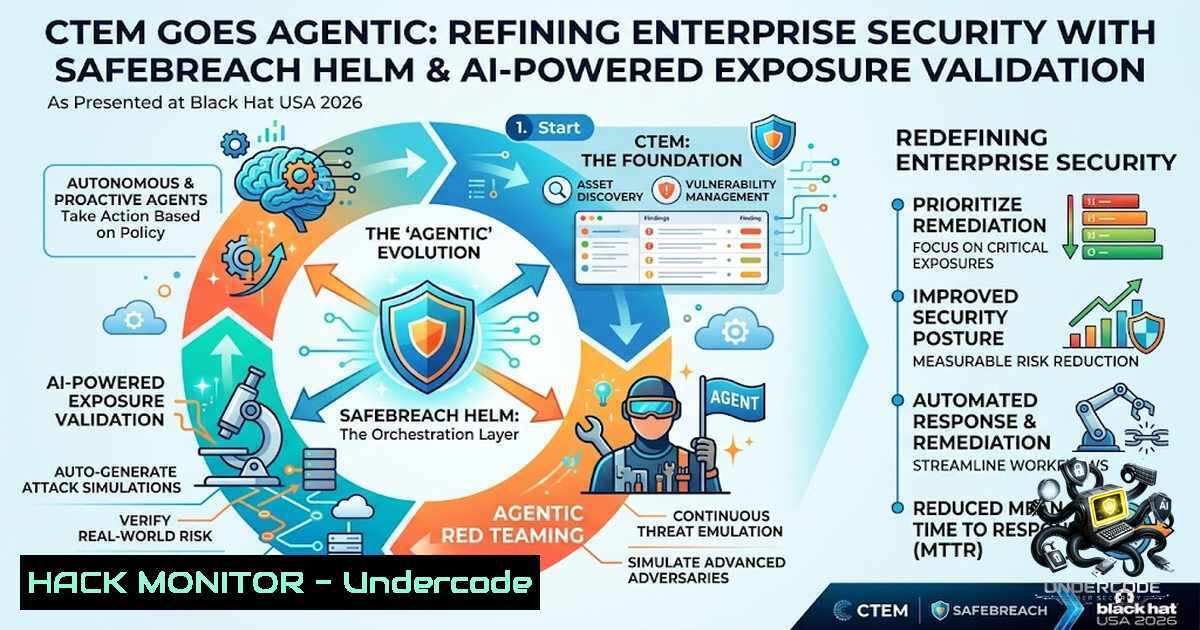
The cybersecurity industry has long struggled with a fundamental paradox: organizations possess more security tools than ever before, yet breach after breach demonstrates that visibility does not equal protection. Continuous Threat Exposure Management (CTEM)—a framework pioneered by Gartner—emerged to bridge this gap by shifting from periodic vulnerability scanning to a continuous, cyclical approach that identifies, validates, prioritizes, and remediates exposures. At Black Hat USA 2026, SafeBreach unveiled the next evolutionary leap: AI agent orchestration through SafeBreach Helm, operationalizing the full CTEM lifecycle and democratizing Fortune-100-grade exposure management for security teams of every size.
Learning Objectives:
- Understand the five phases of the CTEM framework and how AI agents automate each stage from scoping to mobilization
- Learn to implement breach and attack simulation (BAS) and attack path validation using SafeBreach Validate and Propagate
- Master the deployment and configuration of AI-powered exposure validation across hybrid enterprise and AI attack surfaces
- Acquire practical Linux and Windows commands for validating security controls and remediating identified exposures
- Explore the Anvilogic integration for closing the loop between validated findings and deployed detections
You Should Know:
- The CTEM Framework: From Theory to Automated Execution
Continuous Threat Exposure Management is not a product—it is a strategic operating model that turns exposure reduction into a routine that leadership can fund and teams can run. The framework comprises five continuous motions: Scoping, Discovery, Prioritization, Validation, and Mobilization. Historically, executing CTEM required manual integration of disparate tools—Vulnerability Management (VM), External Attack Surface Management (EASM), Threat Intelligence (TI), and Security Orchestration, Automation, and Response (SOAR)—a process so complex that most organizations abandoned it before achieving闭环.
SafeBreach Helm changes this equation entirely. As the AI infrastructure layer of the SafeBreach CTEM Platform, Helm unifies adversarial exposure validation (AEV) data with insights from an organization’s existing security ecosystem through a single natural-language interface. Users query Helm with conversational prompts to initiate each CTEM phase: scoping critical assets using TI context, discovering exposures via VM and EASM correlation, prioritizing based on asset criticality, validating exploitability through breach and attack simulation, and mobilizing remediation through SIEM, SOAR, and ticketing integrations.
Step-by-Step Guide: Implementing CTEM with AI Orchestration
Step 1: Scope Your Attack Surface
Define your organization’s critical assets and business priorities. Use SafeBreach Helm’s natural-language interface to query: “Identify crown jewel assets and map their dependencies across my hybrid cloud environment.” The Analyst Agent correlates data from TI feeds, CMDB, and cloud asset inventories to establish scope.
Step 2: Discover Exposures Continuously
Configure Helm to aggregate exposure data from your VM tools (e.g., Tenable, Qualys) and EASM platforms. The Discovery phase runs continuously, not as a quarterly fire drill. For Linux environments, validate exposure discovery with:
 Nmap scan to discover open ports and services
nmap -sV -sC -O -A -T4 192.168.1.0/24

Use Masscan for high-speed internet-scale discovery
masscan -p1-65535 --rate=10000 192.168.1.0/24

Enumerate SMB shares for lateral movement paths
enum4linux -a 192.168.1.10
For Windows environments, leverage built-in tools:
 Discover active network resources
Get-1etTCPConnection | Where-Object {$_.State -eq "Listen"}

Enumerate Active Directory attack paths
Get-ADUser -Filter  -Properties MemberOf,LastLogon

Check for unquoted service paths (privilege escalation vector)
wmic service get name,displayname,pathname,startmode | findstr /i "auto" | findstr /i /v "C:\Windows\"
Step 3: Prioritize Based on Exploitability
Helm uses asset context to highlight exposures that present the greatest risk, cutting through the noise of traditional CVSS scores. The prioritization engine considers threat intelligence, attacker behavior, and business impact.
Step 4: Validate with Breach and Attack Simulation
This is where SafeBreach differentiates. The Validation Agent utilizes SafeBreach Validate (BAS) and SafeBreach Propagate (attack path validation) to confirm exploitability. The platform executes more than 33,000 real attack simulations from the Hacker’s Playbook™, including CISA alerts, nation-state tradecraft, and emerging ransomware techniques.
To manually validate a critical exposure—for example, a misconfigured SMB service—use:
 Test SMB signing vulnerability
nmap --script smb-security-mode -p445 192.168.1.10

Exploit EternalBlue (MS17-010) in a controlled test environment
 WARNING: Production use only with explicit authorization
msfconsole -q -x "use exploit/windows/smb/ms17_010_eternalblue; set RHOST 192.168.1.10; run"
For Windows-based validation of Active Directory misconfigurations:
 Test for Kerberoasting vulnerability
Add-Type -AssemblyName System.IdentityModel
 (Use Rubeus or PowerView in authorized testing)
 Invoke-Kerberoast -OutputFormat HashCat
Step 5: Mobilize Remediation
SafeBreach Helm translates validated findings into actionable guidance, pushing remediation tickets to ServiceNow, Jira, SIEM, and SOAR platforms. The SecOps Agent ensures that proven findings become deployed defenses.
2. Three Purpose-Built AI Agents: Democratizing Exposure Management
SafeBreach’s architecture centers on three specialized AI agents orchestrated by Helm, each addressing a distinct gap in exposure management.
Analyst Agent: Exposure Management Expertise for All
Responsible for continuously correlating exposure data across internal and external attack surfaces, the Analyst Agent integrates directly with VM and EASM tools. It applies de-identified best practices from the world’s most mature security organizations, effectively democratizing expertise that was previously available only to Fortune 100 enterprises. The agent covers the Scope, Discover, and Prioritize phases of CTEM.
Validation Agent: Confirming What’s Real
This agent operationalizes the validation phase by executing breach and attack simulations and attack path validation. It answers the critical question: “Is this exposure actually exploitable by a real adversary?” The Validation Agent leverages SafeBreach’s 12+ years of adversarial exposure validation and the continuously updated Hacker’s Playbook™.
SecOps Agent: Closing the Loop
The SecOps Agent turns validated findings into deployed defenses, integrating with SIEM, SOAR, and ticketing systems. With the new Anvilogic integration, the SecOps Agent closes the loop between validated findings and deployed detections—enabling security teams to automatically generate and deploy detection rules based on validated attack patterns.
Step-by-Step Guide: Configuring and Using the AI Agents
Step 1: Deploy SafeBreach Helm
Helm is deployed as a cloud-1ative or on-premises infrastructure layer. Initial setup involves connecting Helm to your existing security ecosystem:
 Example: Deploy SafeBreach Helm using Docker (conceptual)
docker run -d \
--1ame safebreach-helm \
-p 8443:8443 \
-e API_KEY="your-api-key" \
-e TI_PROVIDER="recordedfuture" \
-e VM_PROVIDER="tenable" \
safebreach/helm:latest
Step 2: Configure Agent Policies
Define policies for each agent. For the Analyst Agent, specify data sources:
 analyst_agent_config.yaml
analyst_agent:
data_sources:
- vulnerability_management: tenable
- easm: riskiq
- threat_intel: recordedfuture
correlation_rules:
- prioritize_by_asset_criticality: true
- apply_mitre_attck_mapping: true
update_interval: 3600  seconds
Step 3: Query Helm via Natural Language
Use conversational prompts to initiate CTEM workflows:
"Show me all critical vulnerabilities in our production environment that are
exploitable by ransomware groups and have a validated attack path to domain
controllers."
Helm responds with a prioritized list, validated findings, and remediation guidance.
Step 4: Automate Detection Deployment (Anvilogic Integration)
With the two-way Anvilogic integration, validated findings automatically generate Sigma or Splunk detection rules:
 Conceptual API call to Anvilogic
curl -X POST https://api.anvilogic.com/v1/detections \
-H "Authorization: Bearer ${ANVILOGIC_API_KEY}" \
-H "Content-Type: application/json" \
-d '{
"rule_name": "Volt_Typhoon_SMB_Exploit_Detection",
"rule_type": "sigma",
"logic": "SELECT  FROM events WHERE event_id=4624 AND logon_type=3 AND source_ip IN (SELECT malicious_ips FROM threat_intel)",
"severity": "critical"
}'
- SafeBreach Labs Research: Exposing Critical Flaws at Black Hat
SafeBreach Labs researchers presented original research across three sessions at Black Hat USA 2026 and DEF CON 34, marking the team’s eighth consecutive year of earning speaking slots at both conferences simultaneously. The research exposed critical flaws in legacy Linux services and Microsoft’s Python in Excel feature.
Vulnerability Deep-Dive: Legacy Linux Services
Many organizations continue running legacy Linux services (e.g., RPC, NFS, SMB over Linux) that harbor unpatched vulnerabilities. SafeBreach Labs demonstrated how attackers chain these flaws to achieve privilege escalation and lateral movement.
Mitigation Commands for Linux Legacy Services:
 Identify running legacy services
systemctl list-units --type=service --state=running | grep -E "rpc|nfs|smb|telnet|ftp"

Disable and mask insecure services (e.g., telnet)
sudo systemctl stop telnet.socket
sudo systemctl disable telnet.socket
sudo systemctl mask telnet.socket

Restrict RPC services to specific interfaces
echo "RPC: 127.0.0.1" >> /etc/hosts.allow
echo "RPC: ALL" >> /etc/hosts.deny

Update NFS configuration to use secure versions
echo "NFS: 10.0.0.0/8" >> /etc/exports
exportfs -ra

Audit for vulnerable SMB versions (SMBv1)
sudo grep -r "client min protocol" /etc/samba/
 Set to SMB2 or higher in /etc/samba/smb.conf:
 client min protocol = SMB2
 server min protocol = SMB2
Vulnerability Deep-Dive: Microsoft’s Python in Excel
SafeBreach Labs identified that Python in Excel—a feature enabling Python code execution within Excel spreadsheets—could be abused for code execution and data exfiltration when malicious spreadsheets are opened. This highlights the expanding attack surface introduced by AI and automation features in productivity tools.
Mitigation for Windows Environments:
 Disable Python in Excel via Group Policy
Set-GPRegistryValue -1ame "PythonExcelPolicy" -Key "HKLM\SOFTWARE\Policies\Microsoft\Office\16.0\Excel\Security" -ValueName "DisablePythonInExcel" -Type DWord -Value 1

Alternative: Use PowerShell to set registry key directly
New-Item -Path "HKLM:\SOFTWARE\Policies\Microsoft\Office\16.0\Excel\Security" -Force
Set-ItemProperty -Path "HKLM:\SOFTWARE\Policies\Microsoft\Office\16.0\Excel\Security" -1ame "DisablePythonInExcel" -Value 1

Enable Windows Defender Attack Surface Reduction rules
Set-MpPreference -AttackSurfaceReductionRules_Ids 75668C1F-73B5-4CF0-BB93-3ECF5CB7CC84 -AttackSurfaceReductionRules_Actions Enabled
4. Cloud Hardening and API Security for CTEM
As enterprises adopt CTEM, cloud and API security become paramount. The SafeBreach platform validates both enterprise and AI attack surfaces. Below are practical hardening commands for cloud environments.
AWS Cloud Hardening Commands:
 Audit S3 bucket permissions for public exposure
aws s3api list-buckets --query 'Buckets[].Name' --output text | xargs -I {} aws s3api get-bucket-acl --bucket {} --query 'Grants[?Grantee.URI==`http://acs.amazonaws.com/groups/global/AllUsers`]' --output table

Enable AWS Config for continuous compliance monitoring
aws configservice put-configuration-recorder --configuration-recorder name=default,roleARN=arn:aws:iam::account-id:role/config-role
aws configservice start-configuration-recorder --configuration-recorder-1ame=default

Harden IAM policies using Access Analyzer
aws accessanalyzer create-analyzer --analyzer-1ame "CTEM-Analyzer" --type ACCOUNT
Azure Security Hardening:
 Audit Azure Key Vault access policies
Get-AzKeyVault | ForEach-Object { Get-AzKeyVaultAccessPolicy -VaultName $_.VaultName }

Enable Azure Defender for all subscriptions
Set-AzSecurityPricing -1ame "default" -PricingTier "Standard"

Harden Azure AD conditional access policies
Get-AzureADMSConditionalAccessPolicy | Where-Object {$_.State -eq "Enabled"} | Format-Table DisplayName,State
API Security Validation:
 Test for OWASP API Top 10 vulnerabilities using OWASP ZAP
zap-cli quick-scan --self-contained --start-options '-config api.disablekey=true' https://api.yourdomain.com

Use Burp Suite for API fuzzing (headless)
 Example: Fuzz parameters for injection vulnerabilities
ffuf -u "https://api.yourdomain.com/v1/users?id=FUZZ" -w /usr/share/wordlists/fuzzing/SQL.txt -fc 404

Validate API authentication and authorization
curl -X GET "https://api.yourdomain.com/admin/users" -H "Authorization: Bearer invalid_token" -v
5. Incident Response Validation Using BAS
SafeBreach’s BAS platform is not a set-and-forget tool—it is designed to continuously test incident response plans, validate custom detections, and identify weaknesses.
Step-by-Step Guide: Using BAS for IR Validation
Step 1: Simulate a Real-World Attack Scenario
Configure SafeBreach Validate to execute a simulation based on the MITRE ATT&CK framework. Example: Simulate a ransomware deployment using techniques T1486 (Data Encrypted for Impact) and T1021 (Remote Services).
Step 2: Monitor Your SIEM/SOAR Response
Observe how your security operations center responds. Does the SIEM generate alerts? Does the SOAR trigger automated playbooks?
Step 3: Validate Custom Detections
Use SafeBreach to test whether your custom detection rules fire correctly:
 Example: Validate a Splunk detection rule
import requests
url = "https://splunk.yourdomain.com/services/search/jobs"
payload = {
"search": "index=main sourcetype=windows EventCode=4624 Logon_Type=3 | stats count by src_ip",
"exec_mode": "blocking"
}
response = requests.post(url, data=payload, auth=("admin", "password"))
Step 4: Refine and Retest
Based on simulation results, refine your detection rules and incident response playbooks, then retest.
What Undercode Say:
- CTEM without validation is just another compliance checklist. SafeBreach’s emphasis on adversarial exposure validation (AEV) is the critical differentiator. Organizations must move beyond vulnerability scores to confirm exploitability through continuous simulation.
-
AI agents are not replacing security analysts—they are augmenting them. The three-agent architecture (Analyst, Validation, SecOps) handles the heavy lifting of data correlation, simulation execution, and remediation orchestration, allowing analysts to focus on strategic decisions.
The Black Hat USA 2026 announcements from SafeBreach signal a maturation of the CTEM market. The integration with Anvilogic is particularly significant—it closes the loop between validation and detection deployment, addressing a long-standing gap in security operations. For security teams of every size, the democratization of exposure management expertise through AI agents represents a paradigm shift. No longer is Fortune-100-grade security reserved for organizations with unlimited budgets; SafeBreach Helm makes it accessible through natural-language interfaces and automated workflows.
However, organizations must approach AI-powered security with caution. The same AI agents that defend can become attack vectors if not properly secured. The research presented by SafeBreach Labs on Python in Excel vulnerabilities underscores that AI and automation features introduce new attack surfaces that must be included in CTEM scoping.
Prediction:
- +1 The convergence of AI agents and CTEM will accelerate adoption of exposure validation, reducing mean time to remediation (MTTR) by 40-60% within 18 months as organizations operationalize closed-loop remediation workflows.
-
+1 SafeBreach’s Anvilogic integration will catalyze a broader trend of detection-as-code, where validated attack patterns automatically generate deployable detection rules, eliminating the manual translation gap between red team findings and blue team defenses.
-
-1 The democratization of exposure management through AI interfaces introduces new risks: prompt injection, agent manipulation, and adversarial AI attacks will become critical threat vectors requiring dedicated validation within CTEM frameworks.
-
-1 Organizations that treat CTEM as a “set and forget” AI implementation—rather than a continuous, human-supervised program—will experience automation blind spots, where AI agents validate only what they are configured to see, missing emergent attack patterns.
-
+1 The SafeBreach Labs research on legacy Linux services will drive a wave of modernization, as enterprises accelerate decommissioning of outdated services in favor of secure, containerized alternatives.
-
+1 By 2028, AI-powered CTEM platforms will become the default security operating model for enterprises, with Gartner predicting that 70% of organizations will adopt CTEM programs, up from less than 20% today, driven by the operationalization that AI agents provide.
▶️ Related Video (70% Match):
https://www.youtube.com/watch?v=2jU-mLMV8Vw
🎯Let’s Practice For Free:
🎓 Live Courses & Certifications:
Join Undercode Academy for Verified Certifications
🚀 Request a Custom Project:
Secure, high-velocity infrastructure and disruptive technological engineering. Contact our engineering team for high-tier development and proprietary systems:
[email protected]
💎 Smart Architecture | 🛡️ Secure by Design | ⭐ Trusted by Thousands
IT/Security Reporter URL:
Reported By: Tovadvorin Live – Hackers Feeds
Extra Hub: Undercode MoN
Basic Verification: Pass ✅


