Listen to this Post
Introduction:
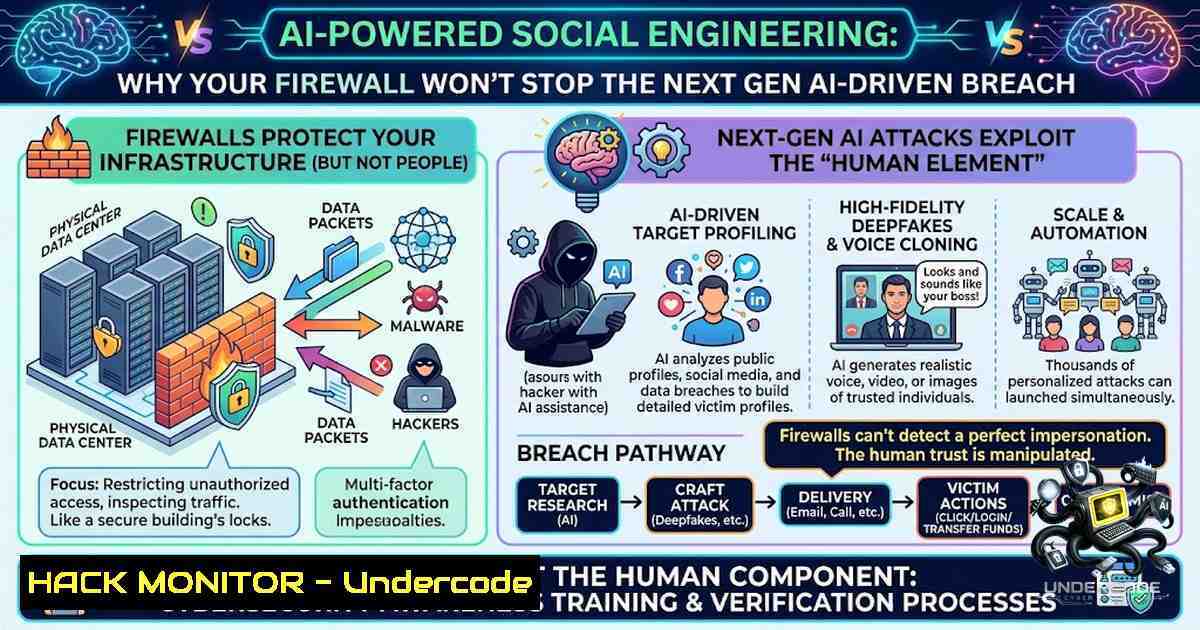
The cybersecurity battlefield has shifted. Verizon’s 2026 Data Breach Investigations Report confirms that the human element remains the weakest link, involved in 62 percent of all data breaches analyzed. While organizations have stacked firewalls and endpoint protection, attackers are now leveraging Artificial Intelligence to automate and personalize social engineering at an unprecedented scale, erasing the grammatical errors and red flags that once gave phishing attempts away. As AI lowers the barrier for attackers and simultaneously creates new blind spots in security stacks, the question is no longer if your business will be targeted, but when—and whether your defenses can detect an adversary that already thinks like a machine.
Learning Objectives:
- Understand how attackers use generative AI to automate reconnaissance, craft hyper-personalized phishing lures, and exploit zero-day vulnerabilities.
- Identify critical security layers (identity, cloud, email, and network monitoring) that are often misconfigured or missing in small to medium-sized businesses.
- Acquire actionable commands and configuration steps to harden Windows and Linux environments against AI-driven social engineering and post-exploitation tactics.
You Should Know:
- The New Attack Surface: AI-Generated Phishing and Deepfake Impersonation
Attackers are no longer limited by language barriers or poor grammar. Using Large Language Models (LLMs), they can scrape an executive’s public social media activity, analyze their writing style, and generate a perfectly crafted email that mimics their tone and vocabulary. This eliminates the traditional “spelling mistake” giveaway. Furthermore, voice cloning and deepfake video are being used in business email compromise (BEC) attacks to impersonate CEOs during conference calls.
Step‑by‑step guide: Detecting AI‑Generated Lures
- Inspect Metadata: Use `exiftool` on Linux to examine email headers and embedded image metadata for signs of AI generation tools.
- Analyze Linguistic Patterns: Employ tools like `Hemingway Editor` or Python’s `textstat` library to score readability; AI-generated text often has unnaturally consistent sentence structures.
- Verify Out-of-Band: Always verify financial or sensitive requests through a secondary channel (e.g., a phone call to a known number) rather than replying to the email.
- Implement DMARC/DKIM/SPF: On your mail server, enforce strict email authentication to reduce spoofing. For Postfix on Linux, add:
sudo postconf -e 'smtpd_recipient_restrictions = permit_mynetworks, permit_sasl_authenticated, reject_unauth_destination, check_policy_service unix:private/policy'
sudo systemctl restart postfix
2. The Blind Spot: Identity and Cloud Misconfigurations
According to Caleb Kwong, CEO of Savant Solutions, while larger companies may have identity and cloud security layers, they are often “set them up wrong”. Attackers exploit these misconfigurations to move laterally and remain undetected for weeks. Common oversights include overprivileged service accounts, lack of Multi-Factor Authentication (MFA) on all admin portals, and improper cloud storage permissions.
Step‑by‑step guide: Hardening Identity and Cloud Access
- Audit Privileged Accounts (Windows): Use the following PowerShell command to list all local admin accounts:
Get-LocalGroupMember -Group "Administrators" | Format-Table Name, ObjectClass
- Enforce MFA for All Cloud Users (Azure AD/Entra ID): Run this PowerShell cmdlet to require MFA for all users:
$users = Get-MgUser -All foreach ($user in $users) { Update-MgUser -UserId $user.Id -StrongAuthenticationRequirements @(@{RelyingParty = ""; State = "Enabled"}) } - Review Cloud Storage Permissions (AWS CLI): Identify publicly accessible S3 buckets:
aws s3api list-buckets --query "Buckets[].Name" --output text | xargs -I {} aws s3api get-bucket-acl --bucket {} --query "Grants[?Grantee.URI=='http://acs.amazonaws.com/groups/global/AllUsers']" --output table - Implement Just-In-Time (JIT) Access: Use Azure PIM or AWS IAM Identity Center to grant admin rights only for a limited time, reducing the attack surface.
-
The AI Arms Race: Offensive vs. Defensive AI
Yvonne Pire, CEO of Trofholz Technologies, highlights the ethical divide: “There are ethical uses and unethical uses” of AI. While security teams use AI to filter noise and investigate threats, attackers use it to pivot faster. AI-powered penetration testing tools can now autonomously map networks and exploit vulnerabilities, while defensive AI struggles to keep up with the speed of generation.
Step‑by‑step guide: Deploying Defensive AI Tools
- Set Up Suricata with AI Threat Intelligence: On Linux, install Suricata and configure it to pull emerging threat feeds:
sudo apt-get install suricata
sudo suricata-update
sudo systemctl start suricata
- Implement User and Entity Behavior Analytics (UEBA): Use open-source tools like `Apache Spot` or commercial SIEMs to establish baselines. Configure alerts for deviations (e.g., a user logging in from a new country at 3 AM).
- Deploy AI-Powered Email Filtering: Utilize tools like `Proofpoint` or `Abnormal Security` that use machine learning to analyze communication patterns and detect anomalies.
- Conduct Regular Red Team Exercises: Simulate AI-generated attacks using frameworks like `Caldera` or `Atomic Red Team` to test your defenses.
-
Linux and Windows Forensic Commands for Incident Response
When an AI-driven attack bypasses your perimeter, rapid detection is critical. Attackers often use living-off-the-land binaries (LOLBins) to avoid detection.
Step‑by‑step guide: Detecting Lateral Movement and Persistence
1. Linux – Check for Unusual Processes:
ps aux --sort=-%mem | head -10
netstat -tulpn | grep LISTEN
2. Linux – Review Cron Jobs and Systemd Timers:
crontab -l
systemctl list-timers --all
3. Windows – Check for Scheduled Tasks and Services:
Get-ScheduledTask | Where-Object {$<em>.State -1e "Disabled"}
Get-Service | Where-Object {$</em>.StartType -eq "Automatic" -and $_.Status -1e "Running"}
4. Windows – Analyze PowerShell Logs:
Get-WinEvent -LogName "Microsoft-Windows-PowerShell/Operational" | Where-Object {$_.Id -eq 4104} | Select-Object TimeCreated, Message
- Securing the Supply Chain: AI-Generated Code and Zero-Days
Attackers are using AI to find hidden flaws in software and hardware—zero-day vulnerabilities—that developers lack time to patch. Furthermore, AI can generate malicious code snippets that are injected into legitimate open-source repositories.
Step‑by‑step guide: Mitigating AI-Generated Supply Chain Risks
- Implement Software Composition Analysis (SCA): Use tools like `OWASP Dependency-Check` to scan for known vulnerabilities:
dependency-check --scan /path/to/your/code --format HTML
- Enforce Code Signing: On Windows, use `SignTool` to verify digital signatures:
signtool verify /pa /v C:\path\to\file.exe
- Enable Windows Defender Application Control (WDAC): Create a base policy to only allow approved binaries to run:
New-CIPolicy -FilePath C:\WDAC\BasePolicy.xml -Level Publisher -UserPEs
What Undercode Say:
- AI is a double-edged sword that automates both attack and defense, but the attackers currently have the speed advantage because they don’t have to worry about false positives.
- The fundamentals still matter: identity management, email authentication, and continuous monitoring are non-1egotiable, regardless of AI’s involvement.
Analysis: The core issue isn’t the technology itself but the organizational readiness. Most companies treat security as a checkbox exercise—firewall installed, antivirus running—without validating configurations or training employees to spot sophisticated lures. The 62% human element statistic isn’t a failure of technology; it’s a failure of process and awareness. As AI-generated content becomes indistinguishable from human-created content, the traditional “trust but verify” model must shift to “never trust, always verify.” Organizations that invest in continuous security awareness training, coupled with AI-driven detection tools, will be the ones that survive the next wave of cyberattacks.
Prediction:
- -1: The gap between AI-driven attack capabilities and defensive AI adoption will widen over the next 18 months, leading to a spike in successful BEC and ransomware incidents, particularly in mid-market companies with limited security budgets.
- +1: Regulatory bodies will introduce mandatory AI security frameworks by 2027, compelling organizations to adopt ethical AI standards and regular third-party audits, which will ultimately raise the baseline security posture across industries.
- -1: As AI-generated deepfakes become more convincing, traditional biometric authentication (voice, facial recognition) will become unreliable, forcing a shift toward behavioral and contextual authentication methods.
- +1: The cybersecurity job market will see a surge in demand for AI security specialists, creating new career pathways and pushing universities to integrate offensive and defensive AI into their curricula.
▶️ Related Video (82% Match):
🎯Let’s Practice For Free:
🎓 Live Courses & Certifications:
Join Undercode Academy for Verified Certifications
🚀 Request a Custom Project:
Secure, high-velocity infrastructure and disruptive technological engineering. Contact our engineering team for high-tier development and proprietary systems:
[email protected]
💎 Smart Architecture | 🛡️ Secure by Design | ⭐ Trusted by Thousands
IT/Security Reporter URL:
Reported By: Ai Is – Hackers Feeds
Extra Hub: Undercode MoN
Basic Verification: Pass ✅


