Listen to this Post
Introduction:
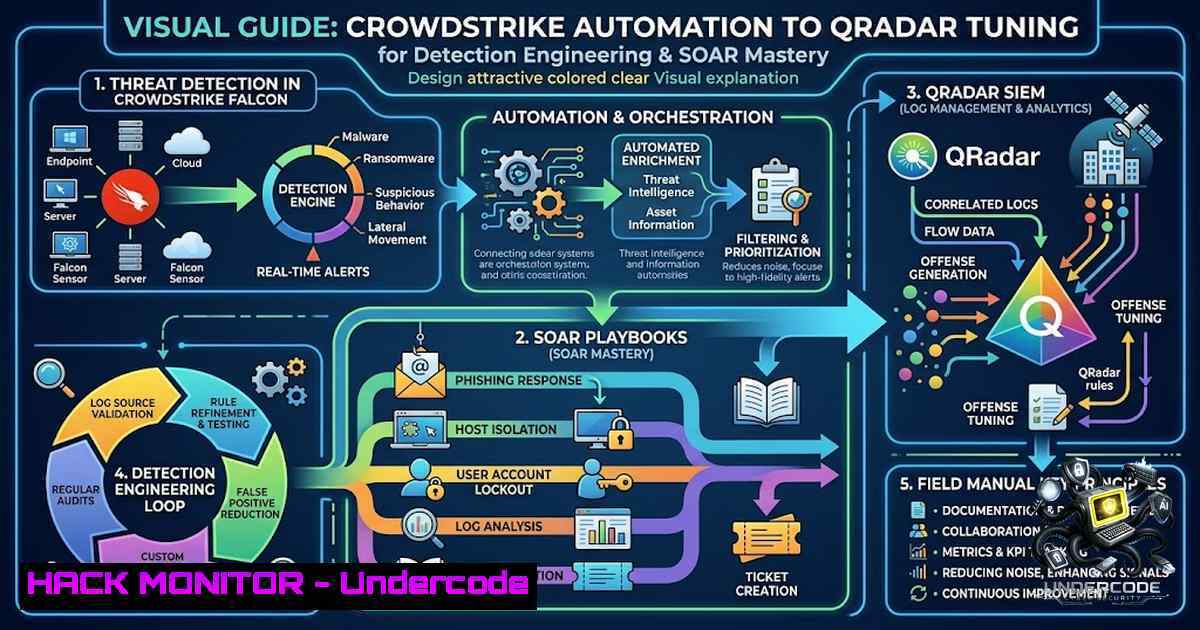
The modern Security Operations Center (SOC) is no longer a passive log-collection facility; it is an active, API-driven combat information center. As evidenced by the practical experience of SecOps engineers working with platforms like CrowdStrike Falcon and IBM QRadar, the true differentiator between a reactive security team and a resilient one lies in mastering automation, precise tuning, and cross-platform orchestration. This article provides a technical deep-dive into the core competencies required to build, automate, and optimize an enterprise-grade detection and response infrastructure.
Learning Objectives:
- Objective 1: Master API-driven automation for policy and host management within CrowdStrike Falcon.
- Objective 2: Implement systematic tuning methodologies for IBM QRadar to reduce false positives and enhance detection fidelity.
- Objective 3: Develop and deploy custom SOAR workflows using Falcon Fusion and Cortex XSOAR for accelerated incident response.
- Automating Policy & Host Management with the CrowdStrike Falcon API
The CrowdStrike Falcon platform offers a comprehensive set of APIs that allow engineers to move beyond the console and implement Infrastructure-as-Code (IaC) principles for security controls. Building a custom automation tool for policy and host management typically involves interacting with the Policies and Host Groups API modules.
Step-by-Step Guide:
- Authentication: Your first API request must retrieve an OAuth2 token using the `oauth2/token` endpoint. This token is required for all subsequent API calls.
- Host Group Management: Use the `host_groups` API to create dynamic or static groups. A dynamic group uses a rule (e.g., “OS: Windows” and “Tag: Production”) to automatically assign hosts, while a static group uses a predefined list of Agent IDs (AIDs).
- Policy Application: Utilize the unified policies API to apply prevention or sensor update policies to these host groups. The API supports all six policy types, enabling full lifecycle management.
4. Automation Script (Python Example):
import requests

Obtain OAuth2 token
def get_token(client_id, client_secret):
url = "https://api.crowdstrike.com/oauth2/token"
payload = f"client_id={client_id}&client_secret={client_secret}"
headers = {"Content-Type": "application/x-www-form-urlencoded"}
response = requests.post(url, data=payload, headers=headers)
return response.json()["access_token"]

List all host groups
def list_host_groups(token):
url = "https://api.crowdstrike.com/host-groups/entities/host-groups/v1"
headers = {"Authorization": f"Bearer {token}"}
response = requests.get(url, headers=headers)
return response.json()

Usage
token = get_token("YOUR_CLIENT_ID", "YOUR_CLIENT_SECRET")
groups = list_host_groups(token)
print(groups)
Pro Tip: Always implement pagination handling in your scripts. The API response includes a `pagination.total` field which is useful for determining “how many” records match your filter.
2. Systematic Tuning of IBM QRadar SIEM
A poorly tuned SIEM is worse than no SIEM at all. IBM QRadar tuning is a two-phase process: the initial configuration phase (network hierarchy, log sources) and the ongoing tuning phase (offense investigation, rule editing, and false positive reduction).
Step-by-Step Guide:
- Network Hierarchy Review: Navigate to the QRadar console and review the network hierarchy. Ensure that all internal subnets are correctly defined. Incorrect definitions lead to mis-categorized offenses (e.g., internal scans flagged as external threats).
- Identify Noisy Rules: Use the Use Case Manager (formerly the Tuning app) to identify the top offense-generating or Custom Rule Engine (CRE)-generating rules.
- Implement Building Blocks: Instead of editing rules directly, create Building Blocks. These are reusable components that can be added to multiple rules. For example, create a building block that excludes known maintenance IPs from all brute-force detection rules.
- False Positive Suppression: Add high-frequency false positive sources to reference set exclusions. For noisy rules (e.g., failed logins), increase the event threshold. If the rule triggers on 5 failed logins, consider raising it to 25 for service accounts to avoid alert fatigue.
- Validate DSM Parsing: Ensure your Log Source Extensions (DSMs) are correctly parsing fields. Undefined or mis-mapped fields render your correlation rules ineffective.
3. Orchestrating Response with Falcon Fusion SOAR
CrowdStrike Falcon Fusion SOAR provides a no-code orchestration engine that automates processes based on Falcon platform alerts and data. It allows you to create workflows using drag-and-drop actions, conditions, and loops directly in the Falcon console.
Step-by-Step Guide:
- Navigate to Workflows: In the Falcon console, go to Workflows to access the Fusion SOAR builder.
- Define the Trigger: Select a trigger for your workflow. This could be a new detection, a scheduled time, or an API call.
- Add Actions: Use first-party actions provided by CrowdStrike, which include device queries, sending email, creating Jira tickets, and writing to logs.
- Custom HTTP Actions: For actions not natively supported, use the HTTP Request action. This allows you to call any REST API (including third-party tools) directly from the workflow. Authentication can be handled via tenant context or API keys.
- Deploy: Save and activate the workflow. The workflow will now run automatically based on the defined trigger.
4. Enriching Investigations with Cortex XSOAR
While Falcon Fusion handles native automation, Cortex XSOAR excels as a central orchestration hub for multi-vendor environments. It allows you to integrate existing security tools to streamline security processes.
Step-by-Step Guide:
- Integration Configuration: Navigate to Settings > Integrations in Cortex XSOAR.
- Add a New Instance: Search for the desired integration (e.g., CrowdStrike Falcon, IBM QRadar, VirusTotal) and add a new instance.
- Provide Credentials: Enter the required API keys, URLs, and authentication parameters.
- Test Connectivity: Use the “Test” button to validate that XSOAR can communicate with the third-party tool.
- Build a Playbook: Create a new playbook that uses these integrations. For example, a playbook that receives a CrowdStrike alert, queries QRadar for related logs, and enriches the results with threat intelligence before creating a ticket in your ITSM platform.
-
Deploying a Custom Web App on AWS EC2
A practical example of an engineer’s versatility is deploying a custom web application. The process of building a Python (Flask) app with Playwright for web scraping and deploying it on AWS EC2 involves several key steps.
Step-by-Step Guide:
- Launch an EC2 Instance: In the AWS EC2 Dashboard, click “Launch Instance.” Choose an Amazon Machine Image (AMI), such as Amazon Linux 2.
- Configure Security Groups: Ensure the security group allows inbound traffic on port 22 (SSH) and port 80/443 (HTTP/HTTPS) from your IP range.
- Connect via SSH: Connect to your instance using SSH.
- Install Dependencies: Update the package manager and install Python, pip, and Nginx.
5. Deploy the Application:
- Transfer your Flask application code to the server.
- Install Python dependencies using
pip install -r requirements.txt. - Install Playwright browsers:
playwright install.
- Configure Web Server: Configure Nginx as a reverse proxy to forward requests to your Flask application (usually running on port 5000). Use Gunicorn or uWSGI as the WSGI server to run the Flask app in production.
What Undercode Say:
- Key Takeaway 1: The modern SecOps Engineer must be a hybrid professional—equally comfortable writing Python scripts against REST APIs as they are tuning SIEM correlation rules. The lines between developer and operator are permanently blurred in security.
- Key Takeaway 2: Automation is not just about speed; it is about consistency. By using APIs and Infrastructure-as-Code for policy deployment, organizations eliminate the configuration drift that often leads to security gaps. Coupled with systematic tuning, this creates a self-healing, highly resilient security posture.
Analysis: The skills highlighted in the source post represent the current gold standard for mid-level security engineering. The ability to navigate the CrowdStrike API for automation, utilize AI tools like Claude for coding acceleration, and conduct platform audits against industry standards demonstrates a maturity beyond “two years of experience.” The inclusion of a personal project (the 3D file search web app) is particularly valuable as it showcases practical DevOps skills (Python, Playwright, AWS EC2) that are highly sought after for roles requiring cloud-1ative security deployments. As environments become more complex, the ability to automate and orchestrate across these distinct domains is what separates a Security Engineer from a SecOps Engineer.
Prediction:
- +1 We will see a significant rise in AI-assisted coding within SecOps, where tools like Claude (mentioned in the source) are used to generate boilerplate API integration code, accelerating automation development cycles.
- +1 The demand for engineers who can bridge the gap between traditional SIEM tuning and modern XDR/EDR API management will skyrocket, making hybrid roles the new norm.
- -1 Organizations that fail to invest in training their SOC teams on API automation and SOAR development will find themselves increasingly outpaced by adversaries who are already automating their attack infrastructure.
▶️ Related Video (76% Match):
🎯Let’s Practice For Free:
🎓 Live Courses & Certifications:
Join Undercode Academy for Verified Certifications
🚀 Request a Custom Project:
Secure, high-velocity infrastructure and disruptive technological engineering. Contact our engineering team for high-tier development and proprietary systems:
[email protected]
💎 Smart Architecture | 🛡️ Secure by Design | ⭐ Trusted by Thousands
IT/Security Reporter URL:
Reported By: Ofek Shoval – Hackers Feeds
Extra Hub: Undercode MoN
Basic Verification: Pass ✅


