Listen to this Post
Introduction:
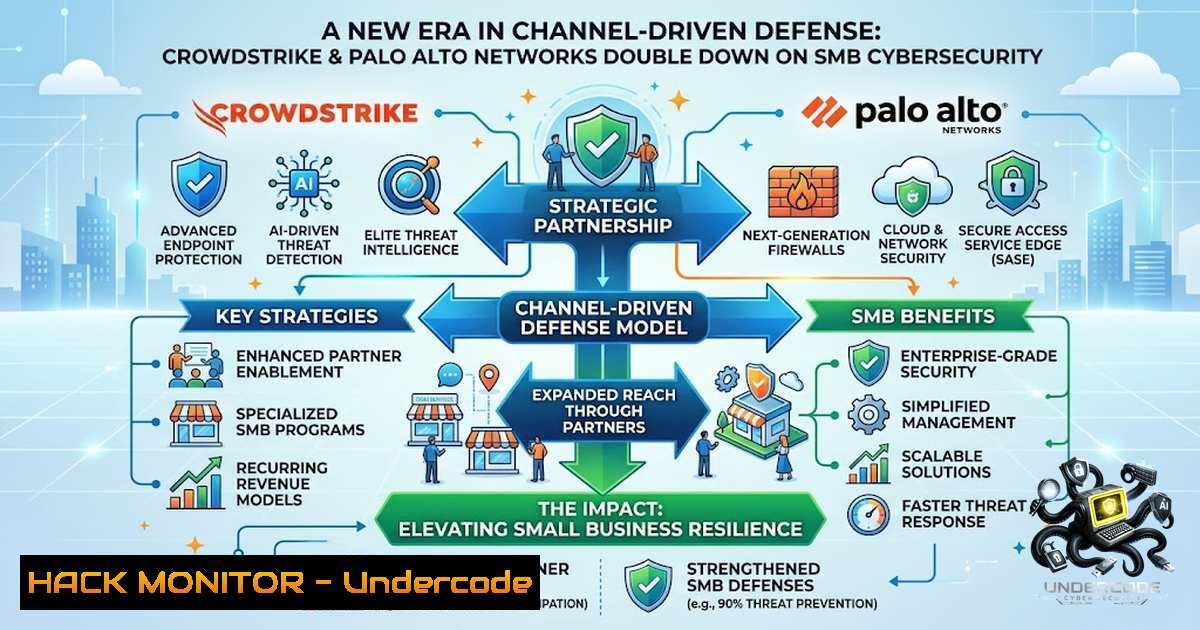
The cybersecurity landscape is undergoing a seismic shift as industry titans CrowdStrike and Palo Alto Networks pivot aggressively toward the small and midsize business (SMB) market. In an era of AI‑amplified attacks and widespread ransomware campaigns, both vendors announced on the same day their commitment to expanding beyond the enterprise—placing channel partners at the forefront of this democratization of enterprise‑grade security. This strategic realignment signals that SMBs, long considered too small to be viable targets, are now recognized as both prime attack vectors and critical growth opportunities for the cybersecurity industry.
Learning Objectives:
- Understand the strategic drivers behind CrowdStrike and Palo Alto Networks’ expansion into the SMB cybersecurity market.
- Identify key channel programs, product launches, and partnership models designed to deliver AI‑native protection to smaller organizations.
- Acquire practical commands and configurations for securing SMB environments across Linux, Windows, and cloud infrastructures.
You Should Know:
1. AI‑Native Threat Detection and Response at Scale
CrowdStrike’s expansion of Project QuiltWorks to SMBs represents a landmark move: extending frontier AI risk protection to organizations of every size. Through partnerships with global distributors like Westcon‑Comstor and Zip Security, the Falcon platform’s AI‑driven threat detection is now accessible to MSPs serving the SMB segment. Simultaneously, Palo Alto Networks introduced the SMB‑focused Prisma Secure Browser, offering built‑in protection against phishing, ransomware, and fraud. These twin announcements underscore a shared thesis: AI is the great equalizer, enabling SMBs to defend against sophisticated attacks that once required dedicated security operations centers.
Step‑by‑Step Guide: Deploying AI‑Powered Endpoint Protection on Linux and Windows
For Linux (using CrowdStrike Falcon sensor):
 Download the Falcon sensor for Linux (replace with your unique download URL)
wget https://download.crowdstrike.com/sensor/linux/falcon-sensor-<version>.rpm

Install the sensor (RHEL/CentOS)
sudo rpm -ivh falcon-sensor-<version>.rpm

Register the sensor with your Falcon instance
sudo /opt/CrowdStrike/falconctl -s --cid=<your_customer_id>

Start the Falcon service
sudo systemctl start falcon-sensor
sudo systemctl enable falcon-sensor

Verify sensor status
sudo /opt/CrowdStrike/falconctl -g --aid
For Windows (PowerShell as Administrator):
 Download the Falcon sensor installer
Invoke-WebRequest -Uri "https://download.crowdstrike.com/sensor/windows/FalconSensor_<version>.msi" -OutFile "$env:TEMP\FalconSensor.msi"

Install silently with Customer ID
msiexec /i "$env:TEMP\FalconSensor.msi" /quiet CID=<your_customer_id>

Verify installation
Get-Service -1ame "CSFalconService"

Check sensor status via API (requires FalconPy Python module)
pip install falconpy
python -c "from falconpy import Hosts; hosts = Hosts(api_key='<key>'); print(hosts.query_devices_by_filter())"
2. Channel‑First Strategies: MSPs as the New Frontline
Both vendors are doubling down on partner ecosystems. CrowdStrike has empowered distributors to recruit and onboard MSSPs, increasing SMB access to the Falcon platform. Palo Alto Networks launched the NextWave partner program, reshaping partner profitability models in the AI era. Meanwhile, Exclusive Networks introduced the SASE Supercharge program, enabling channel partners to deliver managed, AI‑powered SASE services to mid‑market clients. This channel‑centric approach acknowledges that SMBs lack in‑house security expertise—they rely on trusted partners to translate complex security offerings into manageable solutions.
Step‑by‑Step Guide: Configuring SASE for SMB Environments
Basic SASE policy configuration via Palo Alto Networks Prisma Access (API‑driven):
 Authenticate to Prisma Access API
curl -X POST "https://api.prismaaccess.com/v1/auth" \
-H "Content-Type: application/json" \
-d '{"username":"<user>","password":"<pass>"}' \
-o auth_token.json

Extract token
export TOKEN=$(jq -r '.token' auth_token.json)

Create a new security policy for an SMB tenant
curl -X POST "https://api.prismaaccess.com/v1/policies" \
-H "Authorization: Bearer $TOKEN" \
-H "Content-Type: application/json" \
-d '{
"name": "SMB_Default_Policy",
"description": "Baseline security for SMB clients",
"rules": [
{"action": "allow", "applications": ["ssl","web-browsing"], "profiles": ["anti-virus","anti-spyware"]},
{"action": "deny", "applications": ["peer-to-peer"], "profiles": ["url-filtering"]}
]
}'
For Windows administrators managing SASE via PowerShell:
 Use Invoke-RestMethod to interact with Prisma Access API
$headers = @{
"Authorization" = "Bearer $env:PRISMA_TOKEN"
"Content-Type" = "application/json"
}
$body = @{
name = "SMB_Default_Policy"
rules = @(
@{ action = "allow"; applications = @("ssl","web-browsing") },
@{ action = "deny"; applications = @("peer-to-peer") }
)
} | ConvertTo-Json

Invoke-RestMethod -Uri "https://api.prismaaccess.com/v1/policies" -Method Post -Headers $headers -Body $body
- Strategic Partnerships: CrowdStrike and Nord Security Redefine SMB Protection
In January 2026, CrowdStrike and Nord Security announced a strategic partnership to redefine SMB cybersecurity. The collaboration integrates CrowdStrike’s AI‑native Falcon platform—specifically Falcon Go, purpose‑built for SMBs—with NordLayer, Nord Security’s business network security platform. This toggle‑ready integration delivers enterprise‑grade protection with VPN and Zero Trust Network Access (ZTNA) capabilities, all on an SMB‑friendly budget. The move addresses a critical gap: SMBs face constraints in cybersecurity expertise and spending, yet threat actors increasingly target them with enterprise‑level attacks.
Step‑by‑Step Guide: Implementing ZTNA for SMB Environments
Linux (using NordLayer CLI and CrowdStrike Falcon integration):
 Install NordLayer CLI
curl -s https://nordlayer.com/install.sh | sudo bash

Authenticate and connect to NordLayer
nordlayer login --token <your_api_token>
nordlayer connect --gateway <gateway_id>

Verify ZTNA tunnel status
nordlayer status

Integrate with CrowdStrike Falcon (query sensor health)
falconctl -g --aid && echo "Falcon sensor active"
Windows (PowerShell with NordLayer and Falcon integration):
 Download NordLayer Windows client
Invoke-WebRequest -Uri "https://downloads.nordlayer.com/windows/NordLayerSetup.exe" -OutFile "$env:TEMP\NordLayerSetup.exe"

Install silently
Start-Process -FilePath "$env:TEMP\NordLayerSetup.exe" -ArgumentList "/quiet" -Wait

Connect via CLI (after installation)
& "C:\Program Files\NordLayer\NordLayer.exe" --connect --gateway <gateway_id>

Verify Falcon sensor alongside NordLayer
Get-Service -1ame "CSFalconService" | Format-Table -AutoSize
Get-1etIPConfiguration | Where-Object {$_.InterfaceAlias -like "NordLayer"}
4. API Security and Cloud Hardening for SMBs
As SMBs adopt cloud‑first strategies, API security becomes paramount. Both CrowdStrike and Palo Alto Networks emphasize API‑driven security automation. CrowdStrike’s Falcon platform exposes extensive REST APIs for threat hunting and response, while Palo Alto Networks’ Prisma Cloud offers API security posture management. SMBs must harden their cloud environments—whether AWS, Azure, or GCP—against misconfigurations that lead to data breaches.
Step‑by‑Step Guide: Cloud Hardening Commands
AWS CLI – Enforce S3 bucket encryption and block public access:
 Set default encryption on an S3 bucket
aws s3api put-bucket-encryption \
--bucket <bucket_name> \
--server-side-encryption-configuration '{
"Rules": [
{"ApplyServerSideEncryptionByDefault": {"SSEAlgorithm": "AES256"}}
]
}'

Block all public access
aws s3api put-public-access-block \
--bucket <bucket_name> \
--public-access-block-configuration '{
"BlockPublicAcls": true,
"IgnorePublicAcls": true,
"BlockPublicPolicy": true,
"RestrictPublicBuckets": true
}'
Azure CLI – Enforce just‑in‑time VM access:
 Enable JIT on a virtual machine
az vm update --resource-group <rg> --1ame <vm_name> --set \
securityProfile.jitPolicy.enabled=true

Request JIT access
az vm jit-policy create --resource-group <rg> --vm-1ame <vm_name> \
--duration 8 --port 22 --protocol TCP
GCP CLI – Restrict service account permissions:
 List all service accounts and their roles
gcloud projects get-iam-policy <project_id> \
--flatten="bindings[].members" \
--format="table(bindings.role, bindings.members)"

Remove overly permissive roles (e.g., Editor)
gcloud projects remove-iam-policy-binding <project_id> \
--member="serviceAccount:<sa_email>" \
--role="roles/editor"
- Vulnerability Exploitation and Mitigation: The SMB Threat Landscape
SMBs are increasingly targeted by ransomware and credential‑based attacks. Palo Alto Networks recently disclosed CVE‑2026‑0257, a high‑severity authentication bypass affecting PAN‑OS GlobalProtect and Prisma Access. Threat actors have been observed establishing IPSec tunnels and generating internal SMB and NTLM activity consistent with Impacket‑based reconnaissance. This underscores the need for continuous vulnerability management and rapid patch deployment—capabilities that channel partners can now deliver at scale.
Step‑by‑Step Guide: Vulnerability Scanning and Mitigation
Linux – Using OpenVAS for internal vulnerability scanning:
 Install OpenVAS (Greenbone)
sudo apt-get update && sudo apt-get install -y openvas
sudo gvm-setup

Start the Greenbone service
sudo gvm-start

Scan an internal subnet (replace with your SMB network range)
gvm-cli socket --gmp-username admin --gmp-password <pass> \
--socket-path /var/run/gvm/gvmd.sock \
--xml "<create_task>
<name>SMB_Network_Scan</name>
<target id='<target_id>'/>
<config id='daba56c8-73ec-11df-a475-002264764cea'/>
</create_task>"
Windows – Using PowerShell for SMB share enumeration and hardening:
 Enumerate all SMB shares on the network
Get-SmbShare | ForEach-Object {
$share = $<em>.Name
Get-SmbShareAccess -1ame $share | Where-Object {$</em>.AccountName -1e "BUILTIN\Administrators"}
}

Disable SMBv1 (insecure protocol)
Set-SmbServerConfiguration -EnableSMB1Protocol $false -Force

Enable SMB signing to prevent man‑in‑the‑middle attacks
Set-SmbServerConfiguration -RequireSecuritySignature $true -Force
Set-SmbClientConfiguration -RequireSecuritySignature $true -Force

Audit SMB share permissions
Get-SmbShare | Get-SmbShareAccess | Format-Table -AutoSize
Remediation for CVE‑2026‑0257 (Palo Alto Networks GlobalProtect):
 Check PAN-OS version
curl -k https://<firewall_ip>/api/?type=op&cmd=<show><system><info>

Apply the hotfix (via CLI)
configure
set deviceconfig system version <patched_version>
commit
6. Ransomware Defense: Proactive and Reactive Measures
Ransomware remains the top threat for SMBs. CrowdStrike’s Falcon platform offers behavioral‑based ransomware detection, while Palo Alto Networks’ Unit 42 provides threat intelligence tailored to mid‑market organizations. Channel partners are now equipped to deliver managed detection and response (MDR) services that combine AI‑driven analytics with human expertise—a crucial capability for SMBs that cannot staff 24/7 security operations centers.
Step‑by‑Step Guide: Ransomware Prevention and Response
Linux – Implement immutable backups using `restic`:
 Install restic
sudo apt-get install -y restic

Initialize a backup repository (e.g., on AWS S3 with immutability)
restic init --repo s3:https://s3.amazonaws.com/<bucket> \
--access-key <key> --secret-key <secret>

Perform an immutable backup
restic backup /important_data --repo s3:https://s3.amazonaws.com/<bucket> \
--access-key <key> --secret-key <secret> \
--tag ransomware_protection

Verify backup integrity
restic check --repo s3:https://s3.amazonaws.com/<bucket> \
--access-key <key> --secret-key <secret>
Windows – Enable Windows Defender and configure ransomware protection:
 Enable Controlled Folder Access
Set-MpPreference -EnableControlledFolderAccess Enabled

Add protected folders
Add-MpPreference -ControlledFolderAccessProtectedFolders "C:\Users\$env:USERNAME\Documents"
Add-MpPreference -ControlledFolderAccessProtectedFolders "C:\Users\$env:USERNAME\Desktop"

Configure real‑time protection
Set-MpPreference -DisableRealtimeMonitoring $false
Set-MpPreference -SubmitSamplesConsent 2

Enable cloud‑delivered protection
Set-MpPreference -CloudBlockLevel High
Set-MpPreference -CloudTimeout 50
Incident response – Isolate compromised endpoints via CrowdStrike Falcon API:
 Using FalconPy to isolate a host
python -c "
from falconpy import Hosts
hosts = Hosts(api_key='<key>')
response = hosts.perform_action(
action_name='contain',
ids=['<host_id>']
)
print(response)
"
What Undercode Say:
- Key Takeaway 1: The simultaneous SMB pivot by CrowdStrike and Palo Alto Networks marks a fundamental industry inflection—cybersecurity is no longer the exclusive domain of enterprise budgets; AI‑native platforms are democratizing protection for smaller organizations.
- Key Takeaway 2: Channel partners and MSPs are the critical bridge. The success of this strategy hinges on partners’ ability to translate complex, AI‑driven security stacks into simplified, managed services that SMBs can actually deploy and maintain.
Analysis: The convergence of AI capabilities with channel‑first distribution models creates a powerful flywheel: as more SMBs adopt these platforms, telemetry data improves, AI models become more accurate, and the entire ecosystem becomes more resilient. However, this also introduces new risks—SMBs may become over‑reliant on automated defenses without maintaining basic security hygiene, and the proliferation of managed services could create single‑points‑of‑failure if MSPs themselves are compromised. The partnerships with Nord Security and Exclusive Networks suggest that vendors are thinking holistically, combining endpoint protection with network security and managed services. The real test will be whether SMBs, traditionally underinvested in security, will allocate the necessary budget and operational attention to fully leverage these new capabilities. The rapid exploitation of vulnerabilities like CVE‑2026‑0257 serves as a stark reminder that technology alone is insufficient—continuous education, patch management, and incident response planning remain foundational.
Prediction:
- +1 CrowdStrike and Palo Alto Networks will accelerate M&A activity targeting SMB‑focused MSSPs, consolidating the channel ecosystem and driving further standardization of AI‑native security stacks.
- +1 The integration of ZTNA and SASE into SMB offerings will reduce the attack surface for remote workforces, potentially lowering ransomware success rates by 30‑40% over the next 18 months.
- ‑N The complexity of managing multiple integrated platforms (Falcon + NordLayer + Prisma) may overwhelm understaffed SMB IT teams, leading to misconfigurations and new exposure vectors.
- ‑N Adversaries will increasingly target the channel partners themselves—MSPs and distributors—as high‑value pivot points to compromise hundreds of SMB clients in a single attack.
- +1 The democratization of AI‑driven threat intelligence will enable SMBs to respond to zero‑day vulnerabilities at speeds previously reserved for Fortune 500 enterprises, narrowing the security gap between large and small organizations.
▶️ Related Video (76% Match):
🎯Let’s Practice For Free:
🎓 Live Courses & Certifications:
Join Undercode Academy for Verified Certifications
🚀 Request a Custom Project:
Secure, high-velocity infrastructure and disruptive technological engineering. Contact our engineering team for high-tier development and proprietary systems:
[email protected]
💎 Smart Architecture | 🛡️ Secure by Design | ⭐ Trusted by Thousands
IT/Security Reporter URL:
Reported By: https://lnkd.in/p/eeHjyqru – Hackers Feeds
Extra Hub: Undercode MoN
Basic Verification: Pass ✅


