
Listen to this Post
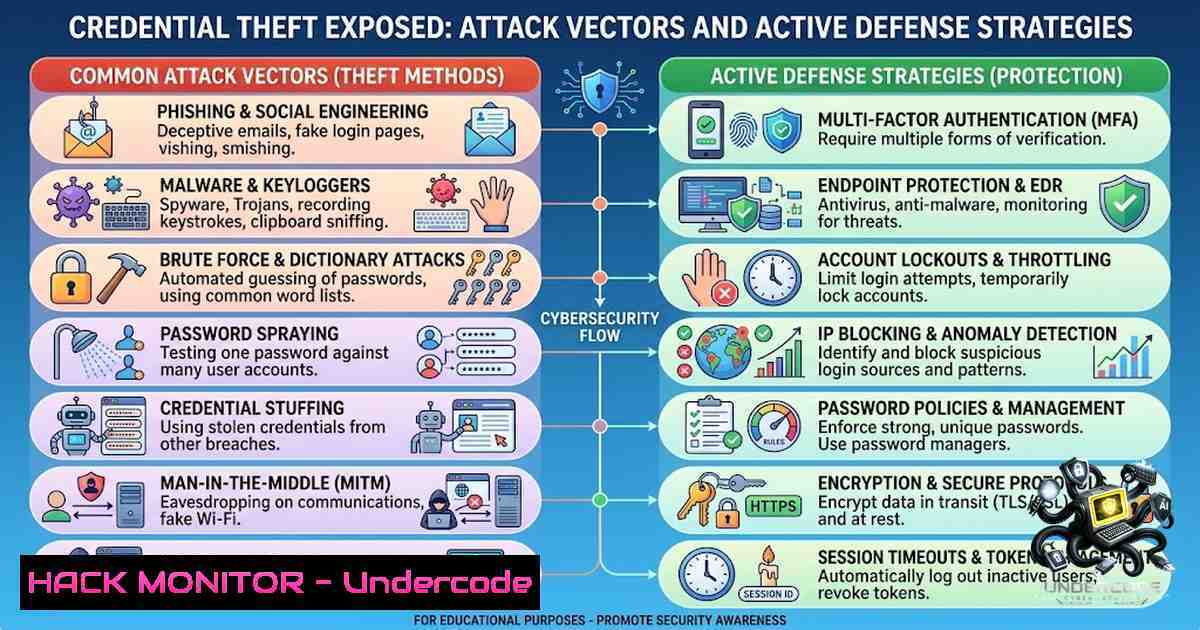
Introduction:
Credential theft has evolved from a simple phishing nuisance into the primary vector for modern data breaches, with over 80% of hacking-related breaches now involving compromised passwords. The fundamental truth is that attackers no longer need to exploit complex software vulnerabilities when they can simply trick a user into revealing their keys to the kingdom. This article dissects the common methods used to steal credentials, as outlined by industry expert Shabbir Shaikh, and provides a comprehensive, technical playbook for implementing defensive controls, from configuration hardening to active threat hunting.
Learning Objectives & Secrets:
- Objective 1: Master the technical detection of credential harvesting techniques, including phishing domains and session cookie exfiltration.
- Objective 1 Secret Tip: To detect credential harvesting infrastructure, utilize OSINT tools like `urlscan.io` and `VirusTotal` to identify newly registered domains that mimic legitimate corporate login portals, focusing on typosquatting and homoglyph attacks.
- Objective 2: Implement robust, phishing-resistant Multi-Factor Authentication (MFA) and conditional access policies.
- Objective 2 Secret Tip: Configure “Impossible Travel” alerts via Microsoft Entra ID or Okta to detect simultaneous logins from geographically distant locations, and pair this with risk-based step-up authentication requiring FIDO2 keys for high-risk sessions.
- Objective 3: Deploy endpoint and network-level controls to mitigate credential harvesting via malware and social engineering.
- Objective 3 Secret Tip: Use Windows Event Viewer or Sysmon to monitor for `event ID 4624` (successful logins) and cross-reference them with the creation of scheduled tasks (
event ID 4698) to identify persistence mechanisms often used post-credential compromise.
You Should Know:
1. Deploying Phishing-Resistant MFA (FIDO2/Passkeys)
The post highlights the necessity of phishing-resistant MFA. The common pitfalls of SMS and OTP-based MFA are that they are susceptible to man-in-the-middle (MITM) proxy attacks. Implementing FIDO2 (WebAuthn) uses public-key cryptography, binding the authentication to a specific website’s domain. Even if a user is on a fake portal, the key exchange fails.
Step‑by‑step guide:
- Step 1: For Microsoft environments, navigate to the Azure Active Directory (Microsoft Entra) portal > Security > Authentication Methods.
- Step 2: Enable “Security Key (FIDO2)” and set the target policy to specific user groups.
- Step 3: Configure Conditional Access policies to require FIDO2 for specific high-risk applications (e.g., VPN, Financial Data).
- Step 4: On a Windows 10/11 machine, users can set up the key via Settings > Accounts > Sign-in options > Security Key.
- Step 5: Audit success and failure logs using the Microsoft Graph API: `Get-AzureADAuditSignInLogs -Filter “status/errorCode eq 50057″` (50057 indicates user not enrolled in required MFA).
2. Creating a Password Manager Implementation Policy
Given that password reuse is a massive vulnerability, security teams must enforce the use of enterprise-grade password managers (e.g., 1Password Business, Bitwarden, Keeper). This prevents credential stuffing attacks following third-party data breaches.
Step‑by‑step guide:
- Step 1: Procure and deploy a password manager with SSO integration.
- Step 2: Enforce a master password complexity policy—minimum 16 characters.
- Step 3: Configure the manager to automatically rotate passwords for critical Active Directory service accounts.
- Step 4: Utilize the manager’s “Breach Report” feature to alert users if a stored password is found in known breach databases (e.g., HaveIBeenPwned).
- Step 5: Monitor privileged account access within the vault using SIEM integration (e.g., splunk to ingest vault audit logs).
3. Hardening Windows Endpoints Against Keyloggers
The post mentions malware/keyloggers as a core threat vector. To mitigate, one must restrict the execution of unauthorized software and enable Credential Guard.
Step‑by‑step guide (Linux/Windows):
- Windows: Enable Windows Defender Credential Guard to use virtualization-based security to isolate secrets (Kerberos tickets, NTLM hashes).
- Command: `bcdedit /set {0cb3b571-2f2e-434b-a01d-cc4b5cd9bf52} vm` and enable the Group Policy setting: Computer Configuration > Administrative Templates > System > Device Guard > Turn On Virtualization Based Security.
- Windows: Enable “Attack Surface Reduction” (ASR) rules via PowerShell to block credential stealing from the Windows local security authority subsystem (LSASS).
- Command: `Set-MpPreference -AttackSurfaceReductionRules_Ids D1E49AAC-8F56-4280-B9BA-993A6D77406C -AttackSurfaceReductionRules_Actions Enabled`
– Linux: For Linux systems, use `auditd` to monitor for unusual read/write access to `/etc/passwd` or/etc/shadow. - Command: `sudo auditctl -w /etc/shadow -p wa -k shadow_changes`
– Monitor logs withsudo ausearch -k shadow_changes.
4. Session Cookie Hijacking Prevention (Token Theft)
Stealing session cookies allows attackers to bypass MFA entirely. This is typically achieved via man-in-the-browser (MITB) malware. To combat this, “Token Binding” and conditional access policies are crucial.
Step‑by‑step guide:
- Step 1: In Microsoft Entra ID, enforce the “Sign-in Frequency” control. Force re-authentication every 1-2 hours for sensitive apps, limiting the validity of the token.
- Step 2: Implement “Continuous Access Evaluation” (CAE) to immediately revoke tokens when a user’s risk profile changes (e.g., password reset, location change).
- Step 3: For web applications, ensure the `HttpOnly` and `Secure` flags are set on session cookies to prevent JavaScript access and force HTTPS transmission.
- Step 4: Deploy proxy solutions (e.g., Zscaler, Netskope) that inspect encrypted SSL traffic (SSL inspection) to identify rogue cookies being exfiltrated to unknown command-and-control (C2) servers.
5. Active Directory (AD) Protection and Monitoring
The post details the attack chain ending in “Company Network Access.” To reach the “Data Theft” stage, attackers often use stolen AD credentials to move laterally. Defenders must focus on “Tiered Access” and honeytoken accounts.
Step‑by‑step guide:
- Step 1: Implement “Group Managed Service Accounts” (gMSA) for service accounts to automatically rotate complex passwords.
- Step 2: Use “Microsoft Defender for Identity” to monitor for “Kerberoasting” attacks (an attack where attackers request Kerberos service tickets to crack passwords).
- Step 3: Create decoy (honeytoken) AD accounts. If these accounts are accessed, trigger a high-severity incident response.
- Step 4: Use PowerShell to identify stale user accounts and inactive sessions.
- Command: `Search-ADAccount -AccountInactive -TimeSpan 30.00:00:00 | Disable-ADAccount -Confirm:$false`
– Step 5: Enforce “Windows Firewall” rules via GPO to limit lateral movement (restrict RDP to specific jump servers).
6. Employee Training and Simulation (The Human Firewall)
Since social engineering and phishing are primary vectors, technical controls must be paired with “Phishing Simulation” campaigns (e.g., KnowBe4, Proofpoint). The goal is to train users to report, not click.
Step‑by‑step guide:
- Step 1: Run a “Red Team” simulation using open-source frameworks like `Gophish` to craft a fake Microsoft 365 password reset campaign.
- Step 2: Track “Failure Rates” and “Report Rates.” A healthy benchmark is a 5% click rate or less on the first simulation, dropping to 1% or less over 6 months.
- Step 3: Integrate the reporting button into Outlook or Gmail so employees can instantly report the email to the SOC.
- Step 4: Analyze the email headers of reported phishing emails to create custom block rules in Exchange Online (Transport Rules) targeting specific domains or attachment types.
What Undercode Say:
- Key Takeaway 1: The attack chain is predominantly social (phishing), technical (malware), or operational (reuse). Defenses must be layered, treating identity as the new perimeter rather than just relying on network firewalls.
- Key Takeaway 2: Proactive monitoring is non-1egotiable. It is not enough to simply set up MFA; organizations must actively monitor “Impossible Travel,” “MFA Fatigue” attacks, and the use of stolen session tokens to be effective.
Analysis:
The core of cybersecurity today rests upon Identity and Access Management (IAM). The post correctly identifies that attackers are simply adapting to the defenders’ adoption of MFA—moving from stealing the password to stealing the session cookie or harassing the user with multiple MFA prompts until they accept one (MFA Fatigue). From a technical perspective, the shift to passwordless authentication (FIDO2/Passkeys) is the only way to completely negate the phishing vector. Furthermore, the emphasis on “Unique Passwords” highlights a lack of technological enforcement; passwords should be generated and stored by the manager, never typed by a user. The security architecture must prioritize “Zero Trust”—verifying every access request as if it originates from an open network, using device health (Endpoint Detection and Response (EDR) posture) and user behavior analytics to grant or deny access dynamically.
Prediction:
- -1: The reliance on MFA fatigue attacks will surge in 2026, forcing organizations to deploy risk-based authentication that automatically blocks repeated failed/denied authentication attempts.
- +1: The adoption of “Passkeys” will significantly reduce credential theft, as the biometric or PIN-based key is cryptographically bound to the device, making it impossible to phish.
- -1: AI-driven deepfake voice attacks will infiltrate the social engineering landscape, rendering traditional “IT Support” impersonation attacks significantly more dangerous.
- +1: The integration of EDR and Identity Threat Detection and Response (ITDR) will close the loop, automatically resetting a user’s password or revoking sessions immediately upon detection of endpoint malware or anomalous login patterns.
▶️ Related Video (90% Match):
🎯Let’s Practice For Free:
🎓 Live Courses & Certifications:
Join Undercode Academy for Verified Certifications
🚀 Request a Custom Project:
Secure, high-velocity infrastructure and disruptive technological engineering. Contact our engineering team for high-tier development and proprietary systems:
[email protected]
💎 Smart Architecture | 🛡️ Secure by Design | ⭐ Trusted by Thousands
IT/Security Reporter URL:
Reported By: https://lnkd.in/p/e8BQtt7h – Hackers Feeds
Extra Hub: Undercode MoN
Basic Verification: Pass ✅


