Listen to this Post
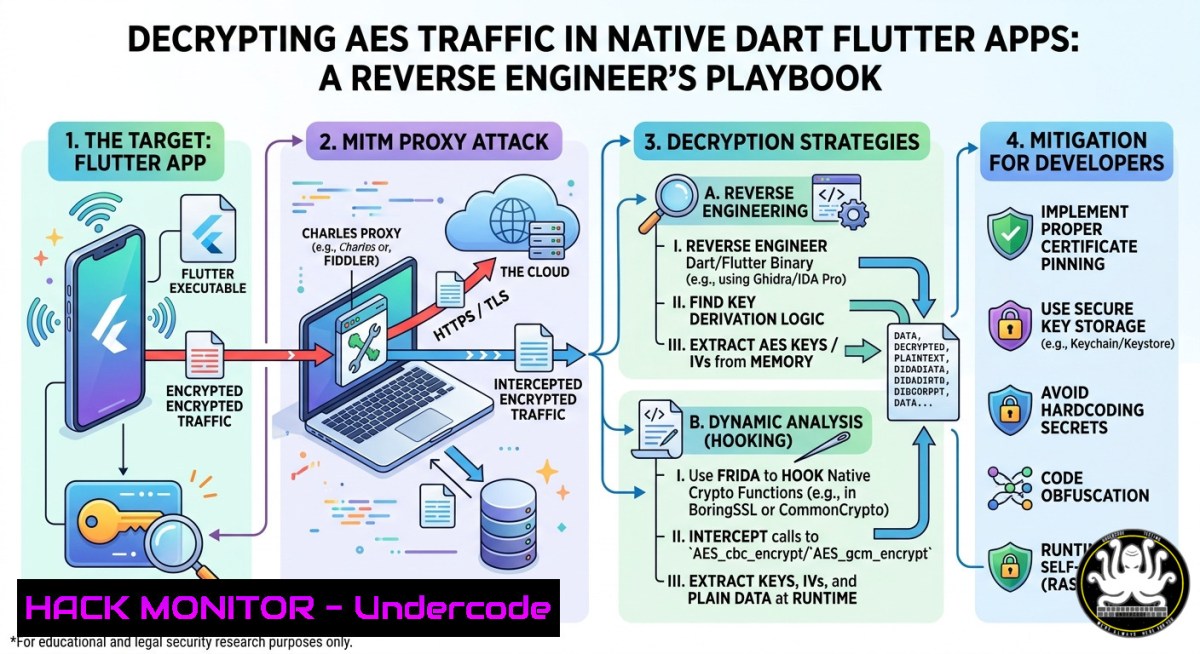
Introduction:
Flutter apps compile Dart directly to native ARM64 code, hiding strings in an object pool and breaking traditional reverse engineering tools like `apktool` or jd-gui. However, standard cryptographic libraries still leave forensic footprints — and with the right workflow, you can intercept and decrypt AES-encrypted traffic from live Flutter applications using Blutter and Frida.
Learning Objectives:
- Understand Flutter’s compilation model and why conventional reverse engineering fails.
- Use Blutter to extract Dart assembly, IDA scripts, and a ready‑to‑use Frida hooking script.
- Intercept AES keys and IVs from native ARM64 registers and decrypt live traffic with CyberChef or Burp Suite.
You Should Know
1. Extracting the Flutter Engine with Blutter
Blutter automates parsing of Flutter’s bundled snapshot – a task impossible with standard decompilers. Start by obtaining the target app’s `.apk` or .ipa, then extract its native library folder.
Step‑by‑step guide:
1. Install prerequisites (Linux/macOS/WSL):
sudo apt install python3 python3-pip git
git clone https://github.com/worawit/blutter
cd blutter
pip3 install -r requirements.txt
2. Extract the APK and locate `libapp.so`:
unzip target_app.apk -d app_unpacked
ls app_unpacked/lib/arm64-v8a/
 You should see libapp.so and possibly libflutter.so
3. Run Blutter against the ARM64 library:
python3 blutter.py app_unpacked/lib/arm64-v8a/ ./blutter_out
– This automatically detects the Dart version, extracts assembly snippets, generates IDA Python scripts, and creates blutter_frida.js.
- Verify output – the `blutter_out` folder now contains:
– `pp.txt` – object pool dump (strings, offsets)
– `asm/` – ARM64 assembly per function
– `blutter_frida.js` – skeleton Frida script for hooking
Windows alternative: Use WSL2 with Ubuntu – Blutter is not natively Windows‑friendly.
2. Reconnaissance in the Object Pool
Open blutter_out/pp.txt. This file lists every string and data object the Flutter app uses – including API endpoints, encryption parameters, and even hardcoded secrets.
Step‑by‑step search strategy:
grep -i "api|aes|cbc|pkcs|key|iv" blutter_out/pp.txt
Look for:
- API hostnames (e.g., `https://api.target.com/v1/login`)
- AES mode indicators (
cbc,gcm,pkcs7) - Suspicious base64 strings that might be keys
Note the memory offset next to each match – e.g., [+0x12a3b4]. These offsets directly map to positions inside the extracted assembly.
Pro tip: If the app uses Flutter’s `dart:convert` or `pointycastle` package, you’ll often find recognizable constants like `AES/CBC/PKCS5Padding` in pp.txt.
3. Hunting Target Functions in ARM64 Assembly
Map the offsets from `pp.txt` to actual functions inside the `asm/` folder. Since Dart ≥3.4.0 follows standard ARM64 calling conventions, arguments are passed in registers `x0` through x7.
Step‑by‑step tracing:
- Locate the function that references your target offset. Use `grep` recursively:
grep -r "0x12a3b4" blutter_out/asm/
This returns a file like `some_function.s` with the surrounding assembly.
-
Identify encryption calls – look for `bl` (branch with link) to known crypto functions such as
AES_encrypt,EVP_EncryptInit_ex, orCC_crypt. -
Note parameter registers – just before the branch, you’ll see
mov x0, ...,mov x1, ..., etc. These hold:
– `x0` → often the key pointer
– `x1` → IV/nonce pointer
– `x2` → plaintext/ciphertext length -
Record absolute addresses (e.g.,
0x7a4b2c) for the Frida hook.
Example assembly snippet:
ldr x0, [x8, 0x30] ; load key pointer
ldr x1, [x8, 0x38] ; load IV pointer
mov x2, 0x200 ; length 512 bytes
bl 0x5c8e0 ; call AES_CBC_encrypt
4. Hooking & Dumping AES Keys with Frida
Blutter already generated `blutter_frida.js` with placeholders. Modify it to hook the addresses you discovered.
Step‑by‑step Frida setup:
- Edit `blutter_frida.js` – find the `onLibappLoaded` function and add:
Interceptor.attach(ptr(0x7a4b2c), { // address of the encryption call onEnter: function(args) { console.log("[] AES encryption entered"); var keyPtr = args[bash]; var ivPtr = args[bash]; var len = args[bash].toInt32();</li> </ol> console.log("Key (32 bytes): " + hexdump(keyPtr, {length: 32})); console.log("IV (16 bytes): " + hexdump(ivPtr, {length: 16})); console.log("Plaintext length: " + len); } });- Push the script to the device (Android example):
adb push blutter_frida.js /data/local/tmp/
-
Run Frida against the target app (package name
com.target.app):frida -U -f com.target.app -l blutter_frida.js --no-pause
-
Trigger network traffic – perform login or any encrypted action. The console will dump the AES key and IV in hex.
Troubleshooting: If the app crashes, the offset may be inside a function that’s called multiple times. Use `onLeave` instead or add conditional logging.
- Decrypting Traffic with CyberChef & Automating with Burp
Now you have the AES key and IV. Use them to decrypt the app’s API requests/responses.
Step‑by‑step decryption:
- Capture traffic with Burp Suite or
tcpdump. Export a request body (e.g., a base64‑encoded ciphertext). -
Open CyberChef and build the recipe:
– From Base64
– AES Decrypt (choose mode: CBC, key: your hex key, IV: your hex IV, input: raw)
– Optionally “To UTF‑8”- Automate in Burp – write a Python extension using `jython` or the Burp API:
from burp import IBurpExtender, IHttpListener
from Crypto.Cipher import AES
import base64</li>
</ol>

class BurpExtender(IBurpExtender, IHttpListener):
def registerExtenderCallbacks(self, callbacks):
self._callbacks = callbacks
callbacks.setExtensionName("Flutter AES Decryptor")
callbacks.registerHttpListener(self)

def processHttpMessage(self, toolFlag, messageIsRequest, messageInfo):
if messageIsRequest:
body = messageInfo.getRequest()[messageInfo.getBodyOffset():]
decrypted = self.aes_decrypt(body)
 Replace or log decrypted body
print("[] Decrypted: " + decrypted)

def aes_decrypt(self, data):
key = bytes.fromhex("YOUR_KEY_HEX")
iv = bytes.fromhex("YOUR_IV_HEX")
cipher = AES.new(key, AES.MODE_CBC, iv)
return cipher.decrypt(base64.b64decode(data)).rstrip(b'\x00')
Load it into Burp’s Extender tab and watch live decryption.
6. Linux/Windows Commands for Environment Setup
Linux (Debian/Ubuntu):
sudo apt install adb frida-tools python3-pip
pip3 install frida-tools pycryptodome
Windows (with WSL2):
wsl --install -d Ubuntu
 Inside WSL: follow Linux commands
 Use Windows adb from platform-tools if needed
Verify installation:
frida --version
adb devices
python3 -c "from Crypto.Cipher import AES; print('OK')"
7. Mitigation Strategies for Developers
Understanding this attack is the first step to defending against it.
- White‑box cryptography – obfuscate keys within custom lookup tables instead of passing them in plain registers.
- Certificate pinning + mutual TLS – prevents MitM interception even if keys are dumped.
- Runtime integrity checks – detect Frida and other hooking frameworks (though advanced bypasses exist).
- Use platform keystores (Android Keystore, iOS Keychain) for key storage, never in memory during encryption of user data.
- Obfuscate control flow with Dart’s `–obfuscate` flag – makes assembly harder to read.
Remember: No client‑side protection is unbreakable. The goal is to raise the cost of reverse engineering.
What Undercode Say:
- Key Takeaway 1: Flutter’s native compilation does not equal security – standard crypto libraries leave register‑based artifacts that are fully recoverable with Blutter + Frida.
- Key Takeaway 2: Automating AES key extraction from ARM64 registers is straightforward once you map Dart’s object pool offsets to assembly functions.
The post by Zlatan H. highlights a critical blind spot in mobile app security: developers assume that compiling to native code obscures their crypto logic, but dynamic instrumentation (Frida) combined with static analysis (Blutter) defeats that assumption. For penetration testers, this workflow is a must‑have – it turns a “black box” Flutter app into a transparent data source. The same techniques apply to iOS Flutter apps after extracting the
.ipa. On the defensive side, teams should implement white‑box crypto and runtime anti‑tampering, though these only delay determined adversaries. As Flutter adoption grows, expect more automated tools to emerge that integrate Blutter output directly into Burp or mitmproxy.Prediction:
Within 12–18 months, we will see commercial and open‑source Burp extensions that fully automate Flutter traffic decryption – feeding Blutter’s output into a live proxy without manual hook editing. This will force financial and healthcare apps to abandon client‑side AES for sensitive data and migrate to server‑driven encryption or certificate‑based session keys. Meanwhile, reverse engineering marketplaces will offer “Flutter unpacker” services as a commodity, lowering the barrier for script kiddies. The cat‑and‑mouse game will shift toward runtime polymorphism and hardware‑backed keystores, but the core lesson remains: never trust the client.
▶️ Related Video (74% Match):
🎯Let’s Practice For Free:
IT/Security Reporter URL:
Reported By: Zlatanh Cybersecurity – Hackers Feeds
Extra Hub: Undercode MoN
Basic Verification: Pass ✅🔐JOIN OUR CYBER WORLD [ CVE News • HackMonitor • UndercodeNews ]
📢 Follow UndercodeTesting & Stay Tuned:
- Push the script to the device (Android example):


