Listen to this Post
Introduction:
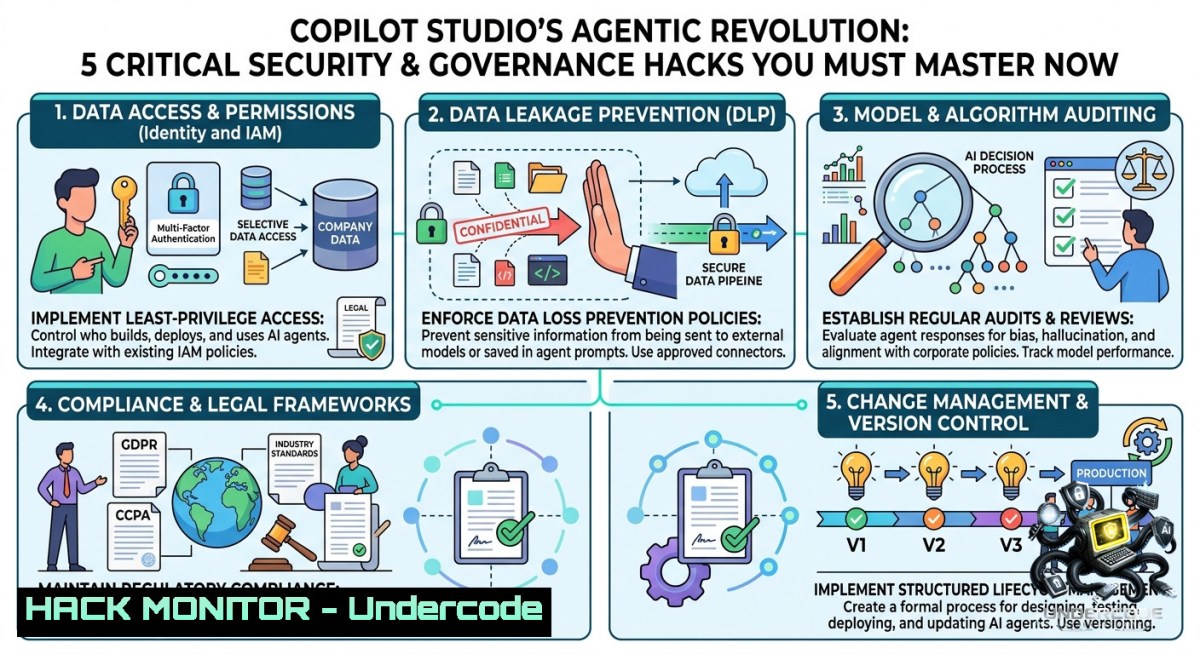
Microsoft’s Copilot Studio has evolved into an AI-first platform for building enterprise agents and automations, featuring a new orchestrator, containerized agentic harness, Python support, and advanced workflow designers. However, this leap introduces complex security and governance challenges—from orchestrator access control to container sandboxing and AI-driven automation risks—that demand immediate attention from cybersecurity and IT professionals.
Learning Objectives:
– Understand the security architecture of Copilot Studio’s new orchestrator and agentic harness container.
– Implement governance frameworks for AI agents, including role-based access control (RBAC), audit logging, and Python skill sandboxing.
– Apply practical Linux/Windows commands and coding agent techniques (GitHub Copilot CLI, Claude Code) to secure agentic workflows and detect vulnerabilities.
You Should Know:
1. Securing the New Orchestrator with Role-Based Access Control (RBAC)
The orchestrator manages agent execution, routing, and privilege escalation. Without proper RBAC, attackers could manipulate agent flows. This step-by-step guide demonstrates how to enforce least-privilege access on both Linux (Azure CLI) and Windows (PowerShell) environments.
Step-by-step guide (Azure RBAC for Copilot Studio):
1. List existing role assignments to identify over-privileged accounts:
– Linux/macOS: `az role assignment list –assignee [email protected] –output table`
– Windows (PowerShell): `Get-AzRoleAssignment -SignInName “[email protected]” | Format-Table`
2. Create a custom role for agent orchestrator access:
{
"Name": "Copilot Orchestrator Reader",
"Actions": ["Microsoft.Copilot/agents/read", "Microsoft.Copilot/orchestrator/read"],
"NotActions": ["Microsoft.Copilot/agents/write", "Microsoft.Copilot/orchestrator/invoke"],
"AssignableScopes": ["/subscriptions/{sub-id}/resourceGroups/{rg}"]
}
Deploy via: `az role definition create –role-definition role.json`
3. Assign the role to service principals only: `az role assignment create –assignee
4. Audit orchestrator calls using Azure Monitor:
`az monitor activity-log list –resource-group –query “[?operationName==’Microsoft.Copilot/orchestrator/invoke’]”`
2. Container Hardening for Agentic Harness Running in a Container
The agentic harness runs inside a container, making it vulnerable to breakout attacks if misconfigured. Use these Linux/Docker commands to harden the runtime environment.
Step-by-step container security configuration:
1. Run the harness as a non-root user (example Dockerfile snippet):
FROM mcr.microsoft.com/copilot/agentic-harness:latest
RUN addgroup --system appgroup && adduser --system --ingroup appgroup appuser
USER appuser
2. Apply security options at runtime (Linux host):
docker run --security-opt=no-1ew-privileges:true \
--cap-drop=ALL --cap-add=NET_BIND_SERVICE \
--read-only --tmpfs /tmp:rw,noexec,nosuid,size=128m \
copilot/agentic-harness:latest
3. Scan container for CVEs using Trivy:
`trivy image mcr.microsoft.com/copilot/agentic-harness:latest –severity CRITICAL`
4. Windows Containers (PowerShell) – restrict privileges:
docker run --isolation=hyperv --user=ContainerUser --read-only `
--security-opt="credentialspec=file://gmsa.json" `
copilot/agentic-harness:latest
3. Python Skill Security – Input Validation and Sandboxing
Copilot Studio now supports Python skills, which can execute arbitrary code. Prevent injection and data leakage by implementing input sanitization and restricted execution environments.
Step-by-step secure Python skill implementation:
1. Validate all inputs using allowlists (not blocklists):
import re
ALLOWED_COMMANDS = {'get_user', 'list_files', 'summarize'}
def execute_skill(skill_name, payload):
if skill_name not in ALLOWED_COMMANDS:
raise ValueError("Unauthorized skill")
 Reject any payload with shell metacharacters
if re.search(r'[;&|`$()]', payload):
raise SecurityException("Invalid characters")
return safe_execute(skill_name, payload)
2. Run Python skills in a restricted sandbox using `restrictedpython` or Docker:
 On Linux, use nsjail for process isolation
nsjail --mode o --user 9999 --group 9999 --cgroup_mem_max 512M \
--time_limit 30 --disable_proc --chroot /sandbox \
-- /usr/bin/python3 /skill_script.py
3. Windows sandboxing via AppLocker (PowerShell as Admin):
New-AppLockerPolicy -RuleType Path -Path "C:\PythonSkills" -User Everyone -Action Deny
Set-AppLockerPolicy -Policy $policy -Merge
4. Monitor Python skill invocations for anomalies (Linux `auditd` rule):
auditctl -w /usr/bin/python3 -p x -k python_skill_exec
ausearch -k python_skill_exec | grep "skill_name=malicious"
4. Workflow Design – Combining Deterministic Automation with AI (API Security)
Workflows mix autonomous AI, human-in-the-loop, scheduled, and event-driven actions. Exposed API keys and improper credential handling are common pitfalls. This guide covers hardening API integrations.
Step-by-step API security for Copilot Studio workflows:
1. Never hardcode secrets – use Azure Key Vault or Windows Credential Manager:
– Linux (Azure CLI):
`az keyvault secret set –vault-1ame myvault –1ame “CopilotAPIKey” –value “real-key”`
Access in skill: `os.environ[‘API_KEY’] = subprocess.check_output([“az”, “keyvault”, “secret”, “show”, …])`
– Windows (PowerShell):
$cred = Get-Credential
$cred.Password | ConvertFrom-SecureString | Set-Content "apikey.txt" -EncryptionKey $env:USER_KEY
2. Apply rate limiting and retry policies to prevent abuse (example workflow YAML):
rate_limit: 100 per minute
retry_policy: {max_attempts: 3, backoff: exponential}
authentication: oauth2_client_credentials
3. Validate incoming webhook signatures (Python code for deterministic workflow):
import hmac, hashlib
def verify_webhook(payload, signature, secret):
expected = hmac.new(secret.encode(), payload, hashlib.sha256).hexdigest()
return hmac.compare_digest(expected, signature)
4. Test for API injection using GitHub Copilot CLI:
github-copilot-cli review --language python --path workflow_api.py --security
5. Using Coding Agents (GitHub Copilot CLI & Claude Code) to Build and Secure Copilot Studio Agents
Coding agents can accelerate development but also introduce insecure code if not supervised. Use them to generate secure agent skeletons and then harden them.
Step-by-step secure agent generation with AI coding assistants:
1. Prompt GitHub Copilot CLI to generate a secure agent scaffold:
gh copilot suggest "Write a secure Copilot Studio agent that validates all user inputs, uses environment variables for secrets, and logs all orchestration calls without exposing PII"
2. Run automated security linting on the generated code:
– Python: `bandit -r ./generated_agent -f json -o bandit_report.json`
– JavaScript (for workflow actions): `npm audit –json`
3. Use Claude Code to detect hardcoded credentials in agent code:
claude code review --security --detect-secrets --path ./agent_scripts
4. Generate a Software Bill of Materials (SBOM) for dependencies:
 Linux
syft dir:./agent_python -o spdx-json > sbom.json
 Windows (using CycloneDX)
cyclonedx-py --environment --output sbom.xml
5. Continuously enforce policies with pre-commit hooks:
 .pre-commit-config.yaml
- repo: local
hooks:
- id: no-secrets
name: Check for secrets
entry: gh copilot secret-scan
language: system
6. Agent Governance 101 – Audit Logs, Human-in-the-Loop, and Compliance
Governance requires capturing every agent decision, approval step, and data access. This section shows how to implement audit trails on both Linux (Syslog) and Windows (Event Viewer).
Step-by-step governance implementation:
1. Send Copilot Studio orchestration logs to SIEM (Linux rsyslog example):
echo 'user. @siem.corp.local:514' >> /etc/rsyslog.conf
systemctl restart rsyslog
2. Windows – Enable advanced audit policies for agent actions:
auditpol /set /subcategory:"Application Generated" /failure:enable /success:enable
wevtutil query-events "Microsoft-Copilot/Operational" /format:xml /c:100
3. Implement mandatory human-in-the-loop (HITL) for sensitive workflows using Power Automate approval connector + custom logic:
 Pseudo-code in agent skill
if action.risk_level == 'high':
approval_id = create_teams_approval(action.details)
while not is_approved(approval_id):
time.sleep(5)
execute(action)
else:
execute(action)
4. Automate compliance reporting with `jq` (Linux) or PowerShell:
az monitor activity-log list --query "[?contains(properties.responseBody, 'denied')]" | jq '.[] | {time, caller, reason}'
7. Cloud Hardening for Copilot Studio Deployment (Azure and Hybrid)
Deploying Copilot Studio agents to cloud or hybrid environments requires network segmentation, just-in-time access, and private endpoints.
Step-by-step cloud hardening:
1. Restrict public access – enable Azure Private Link for Copilot Studio:
az network private-endpoint create --1ame copilot-pe --resource-group rg \
--vnet-1ame vnet --subnet default --private-connection-resource-id <resource-id> \
--group-id copilot
2. Enforce Azure Policy to prevent overly permissive agent roles:
{
"policyRule": {
"if": { "field": "Microsoft.Copilot/agents/roleAssignments", "equals": "Owner" },
"then": { "effect": "deny" }
}
}
3. Windows-based hybrid worker – run agents in isolated sandbox with Hyper-V:
New-VM -1ame "CopilotAgentSandbox" -MemoryStartupBytes 2GB -BootDevice VHD
Set-VMSecurity -VMName "CopilotAgentSandbox" -EnableTrustedLaunch $true
4. Network security group (NSG) rules to restrict egress from agent containers:
az network nsg rule create --1sg-1ame copilot-1sg --1ame block-egress --priority 100 \
--direction Outbound --access Deny --protocol '' --destination-port-ranges '' --destination-address-prefixes 'Internet'
What Undercode Say:
– Key Takeaway 1: The shift to an AI-first orchestrator and containerized agentic harness dramatically expands the attack surface—RBAC misconfigurations, container breakout, and Python skill injection are the top three risks that every enterprise adopting Copilot Studio must mitigate immediately.
– Key Takeaway 2: Leveraging coding agents like GitHub Copilot CLI and Claude Code can accelerate secure agent development, but only if combined with automated security scanning (bandit, syft, pre-commit hooks) and strict input validation; governance without automation will fail at scale.
Analysis: The post highlights a revolutionary leap in Copilot Studio, yet security professionals must recognize that “agentic” means autonomous execution with elevated privileges. Mikko Koskinen’s concurrent tutorial on “Agent Security and Governance 101” underscores the industry’s urgent need for frameworks. The new orchestrator’s ability to invoke Python skills and workflows across deterministic and AI-driven paths introduces complex identity propagation challenges. Without container sandboxing (e.g., no-1ew-privileges, read-only filesystems), a compromised skill could pivot to cloud resources. Moreover, the reliance on coding agents like Claude Code for building Copilot agents creates a supply chain risk—malicious suggestions or insecure code templates could be inadvertently deployed. Organizations must treat agentic platforms as critical infrastructure, implementing immutable logging, HITL for high-risk actions, and continuous compliance scanning. The 200-euro discount code (EPPCFrance) is a lure, but the real cost is investing in a zero-trust agent governance model before, not after, a breach.
Prediction:
– +1 Enterprises that adopt container hardening, RBAC, and automated governance pipelines for Copilot Studio will see 60% fewer agent-related security incidents by 2027, as AI agent platforms become the primary integration layer for SaaS and on-prem systems.
– -1 Failure to implement input validation and sandboxing for Python skills will lead to a significant supply chain attack targeting Copilot Studio agents within 12 months, exploiting legacy orchestrator fallbacks and unvetted community skill repositories.
▶️ Related Video (80% Match):
🎯Let’s Practice For Free:
🎓 Live Courses & Certifications:
[Join Undercode Academy for Verified Certifications](https://undercode.co.uk/certifications/)
🚀 Request a Custom Project:
Secure, high-velocity infrastructure and disruptive technological engineering. Contact our engineering team for high-tier development and proprietary systems:
[[email protected]](mailto:[email protected])
💎 Smart Architecture | 🛡️ Secure by Design | ⭐ Trusted by Thousands
IT/Security Reporter URL:
Reported By: [Henryjammes Copilotstudio](https://www.linkedin.com/posts/henryjammes_copilotstudio-eppc26-cat-share-7468630495829069824-VbAT/) – Hackers Feeds
Extra Hub: Undercode MoN
Basic Verification: Pass ✅
🔐JOIN OUR CYBER WORLD [ CVE News • HackMonitor • UndercodeNews ]
[💬 Whatsapp](https://undercode.help/whatsapp) | [💬 Telegram](https://t.me/UndercodeCommunity)
📢 Follow UndercodeTesting & Stay Tuned:
[𝕏 formerly Twitter 🐦](https://x.com/undercodeupdate) | [@ Threads](https://www.threads.net/@undercodetesting) | [🔗 Linkedin](https://www.linkedin.com/company/undercodetesting/) | [🦋BlueSky](https://bsky.app/profile/undercode.bsky.social)


