Listen to this Post
Introduction
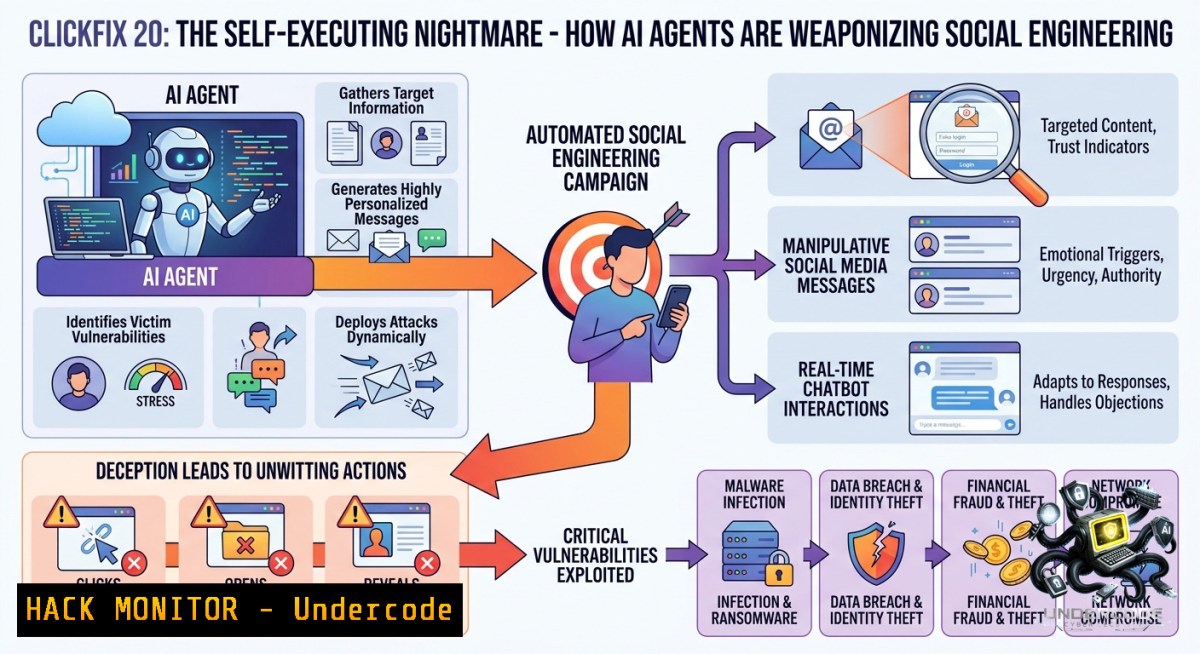
The threat landscape is evolving beyond attacks that rely on human error. A new wave of “ClickFix” campaigns is exploiting advanced techniques like clipboard hijacking and living-off-the-land binaries (LOLBins) to deliver Remote Access Trojans (RATs) without ever raising a traditional alarm. As Red Specter Security Research notes, the most alarming evolution isn’t the technique itself, but its potential for autonomous execution by AI agents, marking a shift from human deception to machine-speed compromise.
Learning Objectives
Understand the mechanics of modern ClickFix attacks, including clipboard replacement and `conhost –headless` execution.
Identify and implement detection and mitigation strategies against RATs delivered via steganography in image files.
Analyze the emerging threat of AI agents autonomously executing social engineering chains.
You Should Know
1. Anatomy of an Evasive ClickFix Attack: From Clipboard to RAT
Attackers have refined ClickFix to operate with impressive stealth. The attack chain no longer relies on a user clicking a malicious link; instead, it uses social engineering to trick the user into becoming an unwitting accomplice. The key innovation is the use of a fake error page, such as an SSL certificate warning impersonating a payment platform like Lirunex, which instructs the user to “fix” the issue. The malicious JavaScript on the page silently replaces the user’s clipboard with a PowerShell command. When the user follows the instructions to paste and run the command, they execute the payload themselves. The command often launches `conhost.exe` with the `–headless` flag, a technique that hides the console window from the user, making the infection silent and invisible. This headless process then fetches a malicious payload, often a RAT concealed within an innocent-looking PNG image file using steganography, bypassing many security solutions.
Step-by-step Guide:
1. A user visits a compromised or malicious website displaying a fake error message.
2. The user is instructed to open the Windows Run dialog (`Win + R`) or PowerShell.
3. The user is told to press `Ctrl + V` to “fix” the issue, unknowingly pasting a malicious command from their hijacked clipboard.
4. The command, often a PowerShell script, executes `conhost.exe –headless` to silently download a RAT (e.g., NetSupport RAT) from a remote server, with the malware hidden inside a retrieved image file.
5. The RAT is executed, giving the attacker remote access to the system.
Linux & Windows Commands for Analysis:
To monitor suspicious `conhost.exe` child processes on Windows (PowerShell as Admin):
Get-WinEvent -FilterHashtable @{LogName='Microsoft-Windows-Sysmon/Operational'; ID=1} | Where-Object { $_.Message -match "conhost.exe" -and $_.Message -match "--headless" } | Format-List
This command queries Sysmon event logs (Event ID 1 for process creation) to find instances where `conhost.exe` is launched with the stealthy `–headless` parameter.
To analyze a suspicious PNG file for steganography on Linux:
 Check for embedded data using binwalk
binwalk -e suspicious_image.png

 Examine the entropy of the image file to find anomalies
ent suspicious_image.png

 Extract potential hidden payloads from the image
steghide extract -sf suspicious_image.png
2. Mitigation & Hardening: Disrupting the Attack Chain
Defending against ClickFix requires a multi-layered approach that disrupts the attack at every stage, from the initial social engineering to the final payload execution. Because the technique tricks the user into initiating the attack, technical controls are essential to limit the damage.
Step-by-step Guide:
1. Implement Application Control: Use Windows Defender Application Control (WDAC) or AppLocker to block the execution of scripts and binaries from untrusted locations, such as the user’s `AppData` or `Temp` folders where RATs often hide.
2. Restrict LOLBin Execution: Configure Windows to restrict or monitor the use of living-off-the-land binaries. For instance, log and alert on any execution of `conhost.exe` with command-line arguments, especially those containing `–headless` or `powershell`.
3. PowerShell Logging: Enable comprehensive PowerShell logging (Module, Script Block, and Transcription logging) to capture the full context of executed commands. This can be done via Group Policy.
4. Network Segmentation: Isolate critical systems from endpoints that are more likely to be compromised by social engineering. This limits the ability of a RAT to move laterally.
Linux & Windows Commands for Hardening:
Enable PowerShell Script Block Logging (Windows Group Policy via PowerShell):
Set-ItemProperty -Path "HKLM:\SOFTWARE\Policies\Microsoft\Windows\PowerShell\ScriptBlockLogging" -1ame "EnableScriptBlockLogging" -Value 1
Monitor for Suspicious Processes with Sysmon (Example Configuration):
<Sysmon>
<EventFiltering>
<ProcessCreate onmatch="include">
<CommandLine condition="contains">conhost.exe --headless</CommandLine>
</ProcessCreate>
</EventFiltering>
</Sysmon>
Use ClamAV to scan images for known malware signatures (Linux):
sudo freshclam  Update virus definitions
clamscan --detect-pua=yes --recursive --bell -i /path/to/user/downloads/
3. The AI Agent Threat: Autonomous Execution of Social Engineering
The most critical warning from the source post is the weaponization of AI agents. As Red Specter Security Research observes, “the victim is no longer the weak link” when an AI agent with clipboard access and browser tool use can autonomously process a ClickFix page and execute the attack chain. The attack moves from deceiving a human to exploiting the excessive privileges and tool-use capabilities granted to an AI agent. This shift is identified as one of 24 new attack layers, significantly expanding the blast radius of social engineering.
Step-by-step Guide:
1. Inventory AI Agents: Begin by auditing all AI agents and copilot tools used within your organization.
2. Review Permissions: Critically examine the permissions granted to these agents. Does an agent with browser access truly need clipboard read/write capabilities or the ability to execute shell commands?
3. Apply the Principle of Least Privilege: Implement strict sandboxing for AI agents. They should operate in isolated environments with minimal access to system resources, tools, and sensitive data.
4. Input Validation and Sanitization: If an AI agent takes actions based on browser content, implement strict sanitization and validation to prevent malicious prompts or commands from being executed.
5. Monitor Agent Behavior: Establish baselines for normal agent activity and set up alerts for anomalous behavior, such as an agent initiating PowerShell or spawning a `conhost.exe` process.
What Undercode Say
Key Takeaway 1: The evolution of ClickFix demonstrates a clear shift from simple phishing to complex, multi-stage infection chains that weaponize native OS features (`conhost.exe`) and benign file formats (image steganography), bypassing traditional signature-based defenses.
Key Takeaway 2: The most significant escalation is the potential for AI agents to autonomously execute these attacks, removing the human error factor. This transforms social engineering from a probabilistic risk to a deterministic exploit. The security community must urgently develop AI-specific detection and governance frameworks to counter this emerging threat.
Prediction
-1: The weaponization of AI agents for social engineering will render conventional security awareness training obsolete. Malicious actors will deploy autonomous agents at scale, leading to a surge in successful, silent system compromises.
+1: This threat will force a paradigm shift in cybersecurity, driving the rapid development of AI-powered defensive agents, zero-trust architectures for AI tools, and new real-time behavioral analysis frameworks, ultimately creating a more resilient and automated security posture.
▶️ Related Video (82% Match):
🎯Let’s Practice For Free:
🎓 Live Courses & Certifications:
[Join Undercode Academy for Verified Certifications](https://undercode.co.uk/certifications/)
🚀 Request a Custom Project:
Secure, high-velocity infrastructure and disruptive technological engineering. Contact our engineering team for high-tier development and proprietary systems:
[[email protected]](mailto:[email protected])
💎 Smart Architecture | 🛡️ Secure by Design | ⭐ Trusted by Thousands
IT/Security Reporter URL:
Reported By: [Clickfix Share](https://www.linkedin.com/posts/clickfix-share-7468710971256274945-R7ch/) – Hackers Feeds
Extra Hub: Undercode MoN
Basic Verification: Pass ✅
🔐JOIN OUR CYBER WORLD [ CVE News • HackMonitor • UndercodeNews ]
[💬 Whatsapp](https://undercode.help/whatsapp) | [💬 Telegram](https://t.me/UndercodeCommunity)
📢 Follow UndercodeTesting & Stay Tuned:
[𝕏 formerly Twitter 🐦](https://x.com/undercodeupdate) | [@ Threads](https://www.threads.net/@undercodetesting) | [🔗 Linkedin](https://www.linkedin.com/company/undercodetesting/) | [🦋BlueSky](https://bsky.app/profile/undercode.bsky.social)


