Listen to this Post
Introduction:
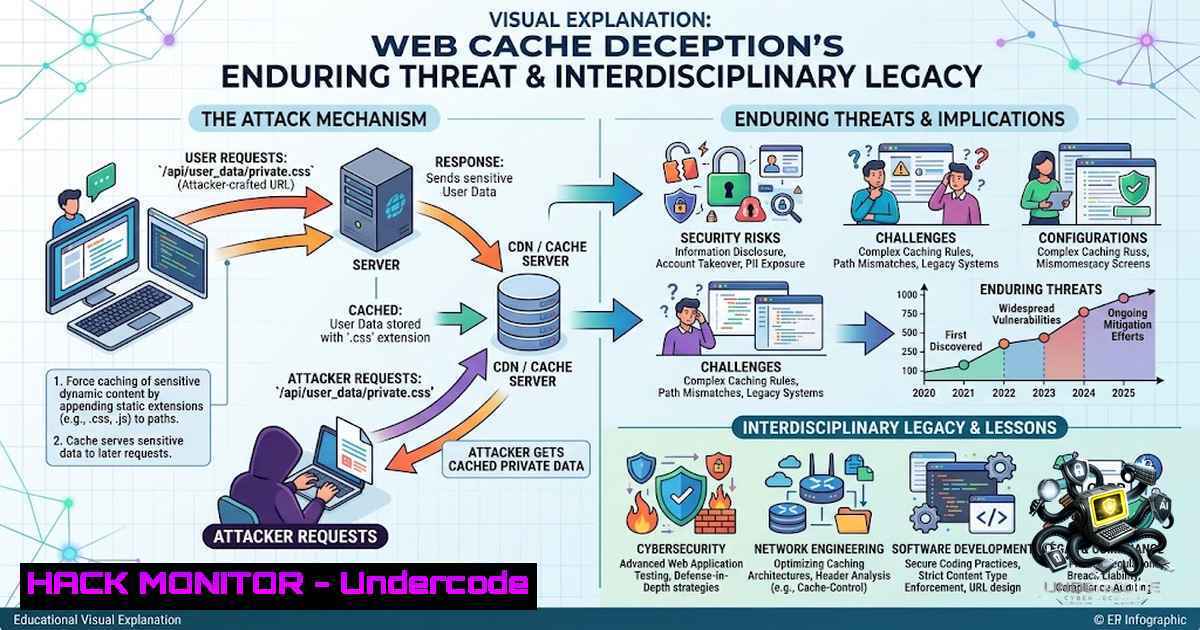
Web Cache Deception (WCD) is an attack that exploits discrepancies between how a caching proxy (like a CDN) and the origin web server interpret a URL, tricking the cache into storing a private, authenticated user response as if it were a public static asset. The seminal 2019 USENIX Security paper “Cached and Confused” by Mirheidari, Onarlioglu, et al. systematically quantified this vulnerability across 340 high-profile sites, revealing widespread leakage of private user data and authentication tokens. The paper’s impact has been profound, not only winning top spot in Portswigger’s “Top 10 Web Hacking Techniques of 2019” but also recently being cited in a Springer Nature paper on growing fig trees—an unexpected interdisciplinary reach that highlights the foundational nature of this research. This article provides a deep technical dive into WCD, offering a step-by-step exploitation guide, practical mitigation strategies, and verified commands for security professionals.
Learning Objectives:
- Understand the root cause of web cache deception and differentiate it from cache poisoning.
- Learn practical exploitation techniques across various discrepancy classes.
- Implement detection and mitigation strategies for both origin servers and CDN configurations.
You Should Know:
- The Root Cause: Caching Rules vs. Routing Rules
At its core, WCD is an instance of the path confusion class of attacks. Caches use fast, syntactic rules to determine cacheability—typically based on static file extensions (.css, .js, .jpg) or path prefixes (/static/). Origin servers and frameworks, however, use their own routing logic, often ignoring trailing segments, collapsing slashes, or stripping suffixes. An attacker crafts a single URL that the cache classifies as a static asset, while the origin resolves it to a dynamic, authenticated handler. The origin returns the victim’s private page; the cache sees the static extension and stores it.
Step‑by‑Step Guide: Path Confusion Exploitation
- Identify a Target Endpoint: Find a sensitive, authenticated endpoint such as `/my-account` or
/api/user/profile. Use Burp Suite to intercept the request and observe the response containing sensitive data like an API key. - Test for Path Mapping Discrepancies: In Burp Repeater, append an arbitrary segment to the path (e.g.,
/my-account/abc). If the response still contains your sensitive data, the origin server is abstracting the path. - Add a Static Extension: Append a static file extension like `.js` or `.css` (e.g.,
/my-account/abc.js). Send the request and check the response headers. - Verify Caching Behavior: Look for `X-Cache: miss` followed by
Cache-Control: max-age=30. Resend the request within 30 seconds. If the `X-Cache` header changes tohit, the response is now cached. - Craft the Exploit: Create an HTML payload that navigates the victim to the malicious URL:
<script>document.location="https://target.com/my-account/wcd.js"</script>. - Retrieve the Cached Data: After the victim visits the URL, access the same URL unauthenticated to retrieve the cached sensitive response.
Linux Command (cURL):
 Test for path confusion - check if origin ignores appended segment
curl -s -I -H "Cookie: session=<victim-session>" https://target.com/my-account/abc.js

Retrieve cached response (attacker, no cookies)
curl -s https://target.com/my-account/abc.js | grep -i "api_key|email|csrf"
2. Delimiter Discrepancies and Advanced Vectors
Beyond simple appended segments, modern WCD exploits rely on delimiter discrepancies—disagreements between cache and origin on which characters separate path segments. Common delimiters include semicolons (;), double slashes (//), and URL-encoded sequences like `%2f` (forward slash). For example, a request to `/my-account;foo.css` might be routed to `/my-account` by the origin but cached as `/my-account;foo.css` by the CDN.
Step‑by‑Step Guide: Delimiter Discrepancy Exploitation
- Enumerate Delimiters: Use Burp Intruder or a custom script to fuzz common delimiters and encodings (
;,%3b,//,%2f%2e%2e%2f, etc.) against a known endpoint. - Analyze Cache Headers: For each variant, examine the `X-Cache` and `Cache-Control` headers to determine if the response is being cached.
- Chain with CSRF: For endpoints like email change forms, craft a CSRF payload that triggers the request and caches the sensitive response.
- Extract Data: Access the cached URL to retrieve the victim’s data, such as an API key or password reset token.
Windows Command (PowerShell):
 Test for delimiter discrepancy
Invoke-WebRequest -Uri "https://target.com/my-account;foo.css" -Headers @{"Cookie"="session=<victim-session>"} -Method GET

Retrieve cached response
Invoke-WebRequest -Uri "https://target.com/my-account;foo.css" -Method GET | Select-Object -ExpandProperty Content
3. Static-Extension Abuse and Cache-Key Manipulation
Many CDNs and web servers use file extensions as a primary cache key component. Attackers can abuse this by forcing a sensitive endpoint to be cached under a static extension. This is particularly effective when the origin server’s routing is suffix-sensitive (e.g., Spring Framework’s older path-matching).
Step‑by‑Step Guide: Static-Extension Abuse
- Identify Cacheable Extensions: Determine which extensions the cache treats as static (
.css,.js,.jpg,.png,.gif). - Craft the Payload: Request the victim’s sensitive page with a fake static extension:
GET /account/settings/nonexistent.css HTTP/1.1. - Test Caching: Verify that the response is cached by checking the `X-Cache` header.
- Exfiltrate: Request the same URL without authentication to access the cached response.
Burp Suite Configuration:
- Use the Web Cache Deception Scanner extension to automate the detection of cache deception vulnerabilities.
- Leverage Param Miner to discover unkeyed cache parameters that can be manipulated.
4. CDN-Specific Quirks and Mitigations
CDN providers like Cloudflare, Akamai, and CloudFront have unique behaviors that can be exploited or misconfigured. For example, Akamai’s `X-Host` header and Cloudflare’s query string keying can introduce discrepancies. The “Cached and Confused” paper emphasizes that web caches are not “plug & play” technologies.
Mitigation Strategies:
- Cache-Control Headers: Set `Cache-Control: no-store` or `private` on all authenticated endpoints.
- Vary Header: Use `Vary: Cookie` to ensure that authenticated responses are not cached and served to other users.
- Path Normalization: Ensure that the origin server and cache use identical path normalization logic.
- Cache Rules: Configure cache rules to only cache explicitly static paths (e.g.,
/static/,/assets/). - Regular Audits: Use tools like Burp Suite and custom scripts to regularly audit for WCD vulnerabilities.
Linux Command (cURL for Header Inspection):
 Inspect cache headers
curl -s -I -H "Cookie: session=<victim-session>" https://target.com/my-account/abc.js | grep -i "cache-control|x-cache"
5. Detection and Exploitation Tools
Several tools and resources are available to help security professionals detect and exploit WCD:
- Portswigger Web Security Academy: Offers interactive labs on path mapping, exact-match cache rules, and cache server normalization.
- PayloadsAllTheThings: A comprehensive repository of WCD payloads and cheat sheets.
- Web Cache Deception Scanner (Burp Extension): Automates the detection of WCD vulnerabilities.
- Custom Scripts: Use Python or Bash scripts to automate the fuzzing of path delimiters and extensions.
What Undercode Say:
- Key Takeaway 1: Web Cache Deception is not a theoretical vulnerability—it has been demonstrated on high-profile sites like PayPal and remains a significant threat years after its public disclosure.
- Key Takeaway 2: The interdisciplinary citation of “Cached and Confused” in a paper on fig trees underscores the foundational nature of this research. It also serves as a reminder of the unintended consequences of AI-driven literature discovery, where papers are cited for their methodological rigor rather than domain relevance.
Analysis: The “Cached and Confused” paper’s impact extends far beyond its original scope. By systematically quantifying WCD and providing a scientific framework for path confusion attacks, it has become a cornerstone reference in web security. The paper’s citation in an unrelated field highlights how AI tools, like those from OpenAI, can surface and connect research across disciplines, sometimes in unexpected ways. For security practitioners, this serves as a powerful reminder that the methodologies we develop can have far-reaching implications. The enduring relevance of WCD—with many sites remaining vulnerable two years after disclosure—demands that organizations adopt a holistic view of their web infrastructure, carefully configuring cache settings and regularly auditing for discrepancies.
Prediction:
- -1 The increasing reliance on CDNs and edge computing will likely expand the attack surface for WCD, as more applications adopt complex caching architectures without fully understanding the security implications.
- +1 The integration of AI in security testing tools will improve the automated detection of path confusion and cache deception vulnerabilities, making it easier for organizations to identify and remediate these issues before they are exploited.
- -1 As WCD becomes more widely understood, attackers will continue to develop novel variations on the path confusion technique, exploiting new delimiters and normalization discrepancies.
- +1 The security community’s focus on cache security, driven by research like “Cached and Confused,” will lead to better default configurations from CDN providers and more robust caching standards.
▶️ Related Video (86% Match):
🎯Let’s Practice For Free:
🎓 Live Courses & Certifications:
Join Undercode Academy for Verified Certifications
🚀 Request a Custom Project:
Secure, high-velocity infrastructure and disruptive technological engineering. Contact our engineering team for high-tier development and proprietary systems:
[email protected]
💎 Smart Architecture | 🛡️ Secure by Design | ⭐ Trusted by Thousands
IT/Security Reporter URL:
Reported By: https://lnkd.in/p/eeKEfXrk – Hackers Feeds
Extra Hub: Undercode MoN
Basic Verification: Pass ✅


