
Listen to this Post
Introduction:
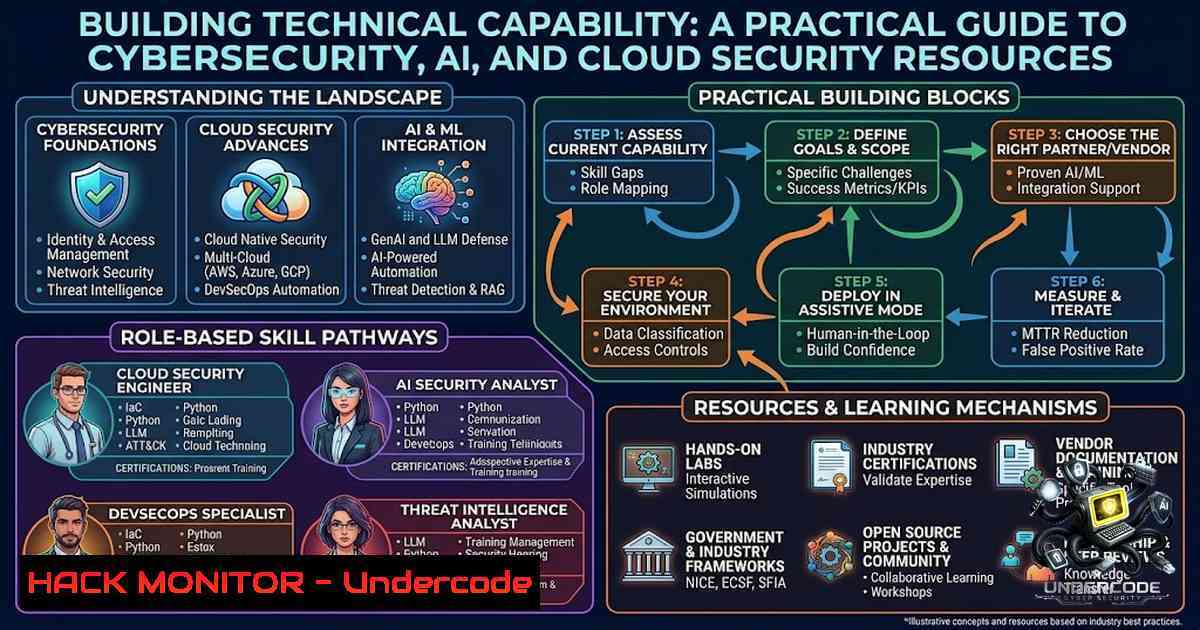
Cybersecurity skills are not built by passively consuming courses, they are forged through continuous learning, hands-on labs, real-world tools, and practical exploration. In an era where cloud misconfigurations account for a staggering percentage of data breaches and AI-driven attacks are emerging as the new frontier, professionals must move beyond theory and develop actionable, technical capability. This article provides a comprehensive technical roadmap for cybersecurity students, SOC analysts, penetration testers, bug bounty hunters, cloud engineers, and DevSecOps practitioners, offering verified commands, tool configurations, and step‑by‑step guides across Linux, Windows, cloud security, API security, and AI security domains.
Learning Objectives & Secrets:
- Objective 1: Master OSINT Reconnaissance Workflows – Build a repeatable intelligence-gathering pipeline using theHarvester, Sublist3r, DNSRecon, Masscan, and Amass to map attack surfaces efficiently.
- Objective 2: Implement Cloud Hardening Across AWS, Azure, and GCP – Apply least‑privilege IAM, enforce encryption at rest and in transit, and continuously monitor configurations to prevent drift.
- Objective 3: Hunt Threats with Linux and Windows Command‑Line Techniques – Detect anomalies, unauthorized processes, and suspicious network connections using
ss,netstat,ps, and PowerShell cmdlets.
You Should Know:
1. OSINT Reconnaissance & Information Gathering
Open Source Intelligence (OSINT) is the foundation of any security assessment. Building a structured reconnaissance pipeline allows you to discover subdomains, enumerate DNS records, scan ports, and map attack surfaces efficiently. Below is a verified OSINT workflow using tools available on Kali Linux and other penetration testing distributions.
Step‑by‑step guide:
 1. Initial reconnaissance with theHarvester (v4.10.1) - gathers emails, subdomains, and hosts from 50+ sources
theharvester -d example.com -b google,bing,linkedin -f output.xml

<ol>
<li>Subdomain enumeration with Sublist3r - combines multiple search engines
sublist3r -d example.com -b -e google,yahoo,bing -p 80,443,8080 -o subdomains.txt</p></li>
<li><p>Deep DNS enumeration with DNSRecon - supports 9 enumeration types including zone transfer tests
dnsrecon -d example.com -t std,axfr,brt -j dns_output.json</p></li>
<li><p>High-speed port scanning with Masscan (up to 10 million packets per second)
sudo masscan 192.168.1.0/24 -p80,443,22,445 --rate=10000 --banners -oJ masscan_output.json</p></li>
<li><p>Attack surface mapping with Amass - enterprise-grade asset discovery
amass enum -d example.com -passive -config config.ini -o amass_output.txt</p></li>
<li><p>SpiderFoot - OSINT automation tool for comprehensive intelligence gathering
sudo apt install spiderfoot
spiderfoot -s example.com -u all -o json
SpiderFoot automates intelligence gathering about IP addresses, domain names, hostnames, network subnets, ASNs, email addresses, or person names. It can be used offensively for penetration testing or defensively to identify what information your organization is exposing.
2. Cloud Security Hardening (AWS, Azure, GCP)
Cloud misconfigurations remain the leading cause of data breaches. The 2026 bar for cloud security is runtime proof: controls must show what is enforced, where it drifted, who owns the affected service, and whether the fix actually landed. Identity and access management (IAM) is the bedrock of cloud security.
Step‑by‑step guide for multi‑cloud hardening:
AWS Hardening Commands:
 List all IAM users and their attached policies
aws iam list-users --query 'Users[].[UserName,Arn]' --output table

Check for publicly accessible S3 buckets
aws s3api list-buckets --query 'Buckets[].Name' | while read bucket; do
aws s3api get-bucket-acl --bucket $bucket --query 'Grants[?Grantee.URI==`http://acs.amazonaws.com/groups/global/AllUsers`]'
done

Enable CloudTrail for all regions
aws cloudtrail create-trail --1ame SecurityTrail --s3-bucket-1ame your-bucket --is-multi-region-trail

Enable VPC Flow Logs for network visibility
aws ec2 create-flow-logs --resource-type VPC --resource-id vpc-xxxxx --traffic-type ALL --log-destination-type cloud-watch-logs --log-group-1ame VPCFlowLogs
Azure Hardening Commands:
 List all Azure role assignments
az role assignment list --all

Enable Azure Defender for Cloud
az security auto-provisioning-setting create --1ame default --auto-provision On

Check NSG flow logs
az network watcher flow-log show --resource-group YourRG --1sg YourNSG

Enforce MFA for all users
az ad user list --query '[].userPrincipalName' | while read user; do
az ad user update --id $user --force-change-password-1ext-login true
done
GCP Hardening Commands:
 List all IAM policies
gcloud projects get-iam-policy your-project-id

Enable Cloud Audit Logs
gcloud logging sinks create audit-sink storage.googleapis.com/your-bucket --log-filter='logName:"cloudaudit"'

Check for public buckets
gsutil ls -p your-project | while read bucket; do
gsutil iam get $bucket | grep allUsers
done
Key Cloud Security Controls:
- IAM: No long-lived access keys in CI/CD or developer machines. Use short-lived federation (OIDC, SSO, IRSA, Workload Identity)
- Encryption: Enforce TLS 1.2+ everywhere. Encrypt data at rest using customer-managed keys (CMKs)
- Monitoring: Centralize logs with CloudTrail + Config + VPC Flow (AWS), Activity Log + Defender for Cloud + NSG Flow (Azure), Cloud Audit Logs + VPC Flow Logs (GCP)
3. Threat Hunting & Anomaly Detection
Proactive threat hunting is no longer optional; it is the bedrock of modern cybersecurity defense. Adversaries often hide in plain sight using masqueraded process names or unexpected outbound connections.
Step‑by‑step guide – Linux:
 List all listening ports and associated processes
sudo ss -tulpn

Monitor new processes every 5 seconds (watch for CPU spikes)
watch -1 5 'ps aux --sort=-%cpu | head -20'

Find processes without a controlling terminal (often daemons or malware)
ps aux | awk '$6 ~ /?/ {print}'

Check for unusual outbound connections
netstat -antp 2>/dev/null | grep ESTABLISHED | awk '{print $5}' | cut -d: -f1 | sort -u

Trace system calls of a suspicious process (PID 1337)
sudo strace -p 1337 -o strace_output.txt
Step‑by‑step guide – Windows (PowerShell as Admin):
 List all TCP connections with process IDs
Get-1etTCPConnection | Select-Object LocalAddress, LocalPort, RemoteAddress, RemotePort, State, OwningProcess

Get process details for suspicious PIDs
Get-Process -Id 1234 | Format-List

Detect unsigned processes running from temp folders
Get-Process | Where-Object {$<em>.Path -like "\Temp\" -or $</em>.Path -like "\Users\Public\"} | Select-Object Name, Path

Check for scheduled tasks that shouldn't be there
Get-ScheduledTask | Where-Object {$_.State -1e "Disabled"} | Select-Object TaskName, State
4. API Security Testing & Vulnerability Scanning
APIs are the backbone of modern applications and a prime attack vector. Tools like APIScan and VulnAPI provide lightweight, non-invasive security assessments.
Step‑by‑step guide:
APIScan Installation & Usage:
 Install from PyPI
pip install apiscan

Basic scan of a public API
apiscan https://api.github.com

Scan specific endpoints
apiscan https://api.example.com --paths / /users /login --report html
APIScan performs TLS/HTTPS enforcement validation, protocol downgrade detection, security headers analysis (HSTS, CSP, X-Frame-Options), CORS misconfiguration detection, rate limiting assessment, and OpenAPI/Swagger discovery.
VulnAPI Installation & Usage:
 Discover API information first
vulnapi discover api https://api.example.com

Scan using curl-like CLI
vulnapi scan curl https://api.example.com -H "Authorization: Bearer token"

Scan using OpenAPI contract
echo "JWT_TOKEN" | vulnapi scan openapi /path/to/openapi.json
VulnAPI detects vulnerabilities including missing security headers, CORS misconfigurations, and operations that accept unauthenticated requests.
5. Kubernetes Security Hardening
Containerized environments introduce unique security challenges. In 2026, Pod Security Admission (PSA) is the standard, and network policies should default to deny.
Step‑by‑step guide:
 Enforce Pod Security Admission with restricted profile
kubectl label namespace production pod-security.kubernetes.io/enforce=restricted --overwrite

Check RBAC permissions for a user
kubectl auth can-i --list --1amespace=production [email protected]

Disable anonymous authentication on API server
 Add to kube-apiserver manifest: --anonymous-auth=false

List all cluster role bindings to audit permissions
kubectl get clusterrolebindings -o json | jq -r '.items[] | select(.subjects != null) | .metadata.name'

Apply deny-by-default network policy
kubectl apply -f - <<EOF
apiVersion: networking.k8s.io/v1
kind: NetworkPolicy
metadata:
name: deny-all
spec:
podSelector: {}
policyTypes:
- Ingress
- Egress
EOF
Key Kubernetes security practices include enforcing RBAC and least-privilege access, using Pod Security Admission with restricted profiles, encrypting secrets at rest, and implementing policy-as-code with Kyverno or OPA Gatekeeper.
6. AI Security & Prompt Engineering
Prompt injection has held the top slot on the OWASP Top 10 for LLM Applications. Attackers are now executing full kill chains—initial access, persistence, lateral movement, and data exfiltration—entirely through crafted text inputs to AI agents.
Step‑by‑step guide for AI security:
- System Prompt Hardening: Implement input validation and sanitization for all prompts. Treat user inputs as untrusted data
- Rate Limiting: Apply strict rate limits on AI API endpoints to prevent abuse
- Output Filtering: Validate and sanitize AI-generated outputs before presentation
- Audit Logging: Log all prompt inputs and outputs for forensic analysis
- Least Privilege: Restrict AI agent permissions to the minimum required for task execution
What Undercode Say:
- Key Takeaway 1: Cybersecurity is a hands-on discipline. The resources listed represent over 29TB of practical learning materials across 207+ Google Drive links, 133+ Mega links, and 57+ TeraBox links, covering 68+ courses and 164+ training resources. This is not about passive consumption but about building technical capability through labs, tools, and real-world exploration.
-
Key Takeaway 2: The convergence of cybersecurity, AI, and cloud security is the defining trend of 2026. Professionals who can navigate OSINT reconnaissance, cloud hardening, threat hunting, API security, and AI prompt security will be the most valuable assets to any organization. The technical commands and workflows provided in this article represent the minimum viable toolkit for modern security practitioners.
Analysis:
The cybersecurity landscape in 2026 demands a multi‑domain skillset. Cloud misconfigurations continue to be exploited at scale, with average remediation times stretching to 35 days, long enough for exposed credentials or open ports to be discovered and exploited. Meanwhile, AI‑powered attacks are emerging as a new threat vector, with prompt injection attacks reported at more than 90 organizations during 2025. The shared responsibility model remains misunderstood, leading to critical security gaps where customers assume the provider handles everything.
The resources advertised represent a comprehensive technical ecosystem that addresses these challenges head‑on. The inclusion of OSINT tools, certification pathways, cloud security resources, AI prompt networks, and DevSecOps materials reflects the interdisciplinary nature of modern cybersecurity. For students, SOC analysts, penetration testers, and cloud engineers, the ability to deploy the commands and configurations outlined in this article will directly translate into enhanced defensive and offensive capabilities.
Prediction:
- +1 The democratization of cybersecurity education through aggregated resource libraries will accelerate the development of skilled professionals, narrowing the global cybersecurity talent gap.
- -1 The increasing sophistication of AI‑driven attacks, including prompt injection and indirect prompt injection, will outpace defensive capabilities unless organizations invest in AI‑specific security controls and training.
- +1 Cloud security posture management (CSPM) tools and infrastructure‑as‑code scanning will become standard practice, reducing misconfiguration‑related breaches significantly.
- -1 The average remediation time of 35 days for cloud misconfigurations remains dangerously long, suggesting that many organizations will continue to suffer breaches from preventable issues.
- +1 The integration of AI agents with OSINT frameworks will enable faster threat intelligence gathering and correlation, improving SOC efficiency.
- -1 As AI agents become more autonomous, the risk of over‑authorization and unintended data exfiltration will grow, requiring new governance frameworks.
▶️ Related Video (82% Match):
🎯Let’s Practice For Free:
🎓 Live Courses & Certifications:
Join Undercode Academy for Verified Certifications
🚀 Request a Custom Project:
Secure, high-velocity infrastructure and disruptive technological engineering. Contact our engineering team for high-tier development and proprietary systems:
[email protected]
💎 Smart Architecture | 🛡️ Secure by Design | ⭐ Trusted by Thousands
IT/Security Reporter URL:
Reported By: https://lnkd.in/p/eQmQf_cy – Hackers Feeds
Extra Hub: Undercode MoN
Basic Verification: Pass ✅


