Listen to this Post
Introduction:
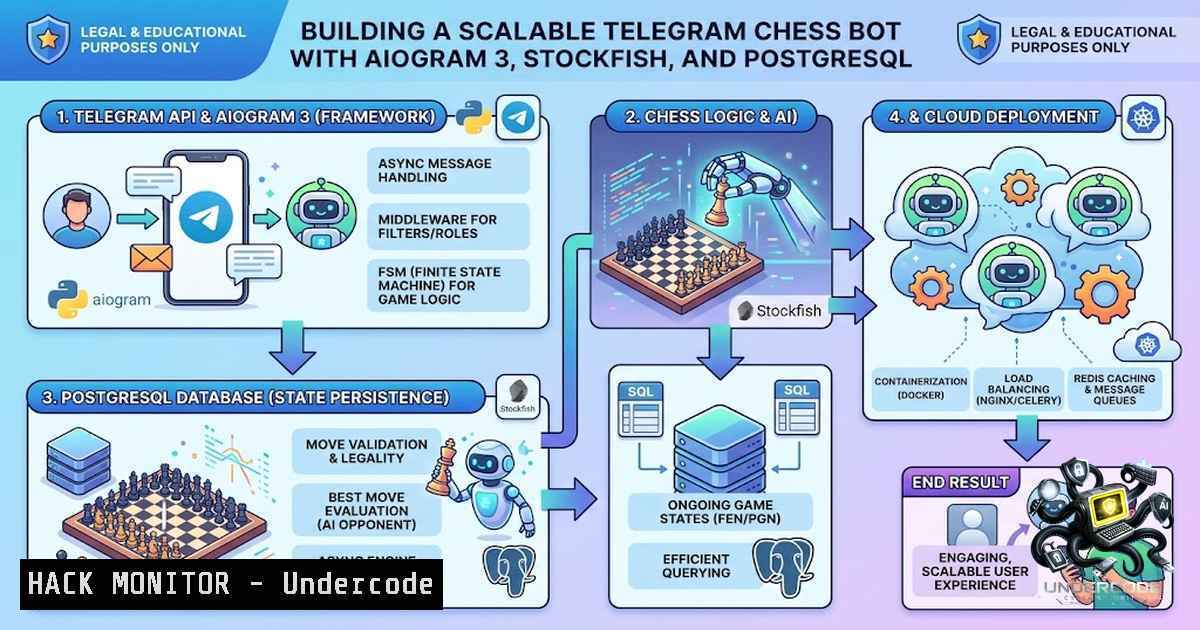
The intersection of real-time game engines and conversational interfaces presents unique technical challenges. Developing a Telegram bot that hosts chess games requires a sophisticated backend architecture to manage low-latency move analysis, persistent player state, and gamification mechanics. This case study examines a production application that successfully scaled to over 100 daily active users by implementing server-side AI processing and a robust data layer without any marketing investment, offering key insights into building resilient and engaging bot applications.
Learning Objectives:
- Understand the architecture and implementation of a high-performance Telegram bot using the aiogram 3 framework.
- Learn how to integrate and optimize a UCI chess engine (Stockfish) for server-side move generation and analysis.
- Explore strategies for implementing user retention mechanics, such as ELO rating systems and group chat support, using PostgreSQL.
You Should Know:
- Optimizing Stockfish for Instantaneous Response in Cloud Environments
The core of the application is the Stockfish chess engine, which runs server-side to analyze positions and suggest moves. A critical factor for user retention is response latency; users expect a move analysis in under three seconds. To achieve this, the developer implemented dynamic search depth tuning based on the selected difficulty level. For novice levels, the search depth is kept shallow (e.g., depth=10), while expert modes use a deeper search (depth=18), balancing computational cost with move quality.
Step-by-Step Guide to Configuring Stockfish for Telegram Bot Deployment:
1. Download Stockfish: Obtain the latest Stockfish binary for your server’s OS (Linux recommended). Use `wget https://stockfishchess.org/files/stockfish-ubuntu-x86-64-avx2.tar.gz` and extract it.
2. Python Integration: Use the `python-chess` library to interface with the engine.
import chess
import chess.engine

engine = chess.engine.SimpleEngine.popen_uci("/path/to/stockfish")
 Set thread count and hash size
engine.configure({"Threads": 4, "Hash": 512})
 Analyze for a specific move
result = engine.play(board, chess.engine.Limit(depth=12))
3. Tuning Depth: The depth parameter is the primary lever for response time. A Python script can adjust this dynamically.
def get_engine_limit(difficulty):
if difficulty == "easy":
return chess.engine.Limit(depth=10)
elif difficulty == "medium":
return chess.engine.Limit(depth=15)
else:
return chess.engine.Limit(depth=20, time=2.0)  Fallback to time limit
4. Linux Process Management: Ensure the Stockfish process is managed efficiently. Use `nice` and `renice` to prioritize the engine process on the server.
 Start the bot with high priority
nice -1 -5 python3 bot.py
5. Resource Monitoring: Implement monitoring to track CPU usage. High latency often indicates resource saturation. Tools like `htop` and `psutil` in Python can be used to throttle requests if CPU usage exceeds a threshold (e.g., 80%).
2. Implementing ELO Ratings for Retention and Gamification
The introduction of an ELO rating system transformed the bot from a simple game into a competitive platform. Users are motivated to return to improve their rating, which provides a tangible metric for skill progression. This system involves storing user stats in a PostgreSQL database and updating them after each completed game.
Step-by-Step Guide to Building an ELO System:
- Database Schema: Create a `users` table to store
user_id,elo_rating,games_played, andwins.CREATE TABLE users ( user_id BIGINT PRIMARY KEY, elo_rating INTEGER DEFAULT 1200, games_played INTEGER DEFAULT 0, wins INTEGER DEFAULT 0 );
- ELO Calculation: Implement the standard ELO formula. The expected score for a player is
1 / (1 + 10^((opponent_rating - player_rating) / 400)). The new rating iscurrent_rating + K (actual_score - expected_score).def calculate_elo(my_rating, opponent_rating, my_score, k_factor=32): expected = 1 / (1 + 10 ((opponent_rating - my_rating) / 400)) new_rating = my_rating + k_factor (my_score - expected) return round(new_rating)
- Transaction Management: Update both players’ ratings within a single transaction to ensure data consistency.
async def update_elo(winner_id, loser_id, db_pool): async with db_pool.acquire() as conn: async with conn.transaction(): winner_elo = await conn.fetchval("SELECT elo_rating FROM users WHERE user_id = $1", winner_id) loser_elo = await conn.fetchval("SELECT elo_rating FROM users WHERE user_id = $1", loser_id) Calculate new ratings new_winner_elo = calculate_elo(winner_elo, loser_elo, 1) new_loser_elo = calculate_elo(loser_elo, winner_elo, 0) Update database await conn.execute("UPDATE users SET elo_rating = $1, wins = wins + 1 WHERE user_id = $2", new_winner_elo, winner_id) await conn.execute("UPDATE users SET elo_rating = $1 WHERE user_id = $2", new_loser_elo, loser_id) - Displaying Progress: Add a command like `/rank` to show the user’s current rating and percentile.
3. Managing Group Chat Architecture and Permissions
Most users discovered the bot through group chats. Implementing group chat support requires handling specific aiogram features, such as managing inline keyboards, handling `chat_member` updates to track who adds the bot, and ensuring the bot doesn’t respond excessively in large groups.
Step-by-Step Guide for Group Integration:
- Aiogram Dispatcher Setup: Use the `ChatTypeFilter` to differentiate between private and group messages.
from aiogram.filters import ChatTypeFilter router = Router() @router.message(ChatTypeFilter(chat_type=["group", "supergroup"])) async def group_handler(message: types.Message): Respond only if mentioned or specific command used if message.mention or message.text.startswith("/play"): Proceed with game initiation pass - Tracking Adds: Use a `chat_member` update listener to log when a user adds the bot to a group. This data can be used to attribute growth to specific users.
@router.chat_member()
async def on_chat_member_update(event: ChatMemberUpdated):
if event.new_chat_member.status == "member":
Award points or track the user who added the bot
await database.record_add(event.from_user.id, event.chat.id)
- Noise Reduction: Implement a cooldown using
aiogram‘s `ThrottlingMiddleware` to prevent spam and ensure a positive user experience in noisy environments.
4. Scaling Backend Infrastructure for Concurrent Games
Handling over 100 daily active users means potentially managing 20-30 concurrent games. The architecture must support high concurrency without blocking the main async loop. This requires efficient use of aiogram’s asynchronous features and careful management of the Stockfish process.
Step-by-Step Guide to Concurrency Tuning:
- Asynchronous Connection Pooling: PostgreSQL connection pools are essential to avoid database bottlenecks. Use `asyncpg` with a pool size of 10-15.
pool = await asyncpg.create_pool(dsn="postgresql://user:pass@localhost/db", min_size=5, max_size=20)
- Limiting Stockfish Instances: Running multiple Stockfish processes per move can crash the server. Use an `asyncio.Queue` or semaphore to limit concurrent engine calls to the number of CPU cores (e.g., 4).
- Linux Kernel Tuning: On high traffic, Linux network stack may require tuning. Increase file descriptor limits:
ulimit -1 65535
5. Security Hardening and API Protection
While the bot is primarily a gaming application, its backend is still a web service. It handles user IDs and potentially interactions with Telegram’s API. Securing the bot token and user data is critical.
Step-by-Step Guide for Security Measures:
- Environmental Variables: Store secrets (
BOT_TOKEN,DATABASE_URL) in `.env` files and parse them usingpython-dotenv. Never hardcode them. - Input Sanitization: While using aiogram’s filters, ensure any user input used in SQL queries is parameterized to prevent SQL injection.
- Webhook Validation: If using webhooks instead of polling, validate that incoming updates come from Telegram. Use `X-Telegram-Bot-Api-Secret-Token` header.
- Windows/Linux Commands for Status: On Linux, ensure the bot runs as a systemd service with restart policies.
sudo systemctl enable my-telegram-bot.service
sudo systemctl start my-telegram-bot.service
What Undercode Say:
- Latency is the Feature: “A bot that takes 8 seconds to reply loses users fast.” This is the fundamental lesson; technical performance directly impacts user retention.
- Gamification Drives Organic Growth: The ELO system turned a utility into a habit. Users return to chase the dopamine hit of increasing numbers.
- Platform Features (Groups) are Fuel: The bot’s growth hinged on a social feature (group adds) rather than paid acquisition, highlighting the importance of peer-to-peer discovery.
- Infrastructure Needs Regular Tuning: The transition from 5 to 100 users requires proactive database and engine scaling; what works at 5 DAU fails at 100 DAU.
Prediction:
- +1 The future of Telegram bots will heavily incorporate AI models (LLMs and game engines) to create “micro-games” that are low-friction yet deeply engaging, leveraging the messenger as a primary distribution channel.
- +1 Gamification mechanics like ELO and leaderboards will become standard in non-gaming bots (e.g., productivity bots, language learning bots) as developers realize the power of data-driven engagement loops.
- -1 As these bots scale, the cost of maintaining dedicated AI engines (like Stockfish) and PostgreSQL databases will require developers to implement stricter rate limiting and monetization strategies, or risk service disruption during peak hours.
▶️ Related Video (84% Match):
🎯Let’s Practice For Free:
🎓 Live Courses & Certifications:
Join Undercode Academy for Verified Certifications
🚀 Request a Custom Project:
Secure, high-velocity infrastructure and disruptive technological engineering. Contact our engineering team for high-tier development and proprietary systems:
[email protected]
💎 Smart Architecture | 🛡️ Secure by Design | ⭐ Trusted by Thousands
IT/Security Reporter URL:
Reported By: https://lnkd.in/p/ehepn2Z2 – Hackers Feeds
Extra Hub: Undercode MoN
Basic Verification: Pass ✅


