Listen to this Post
Introduction
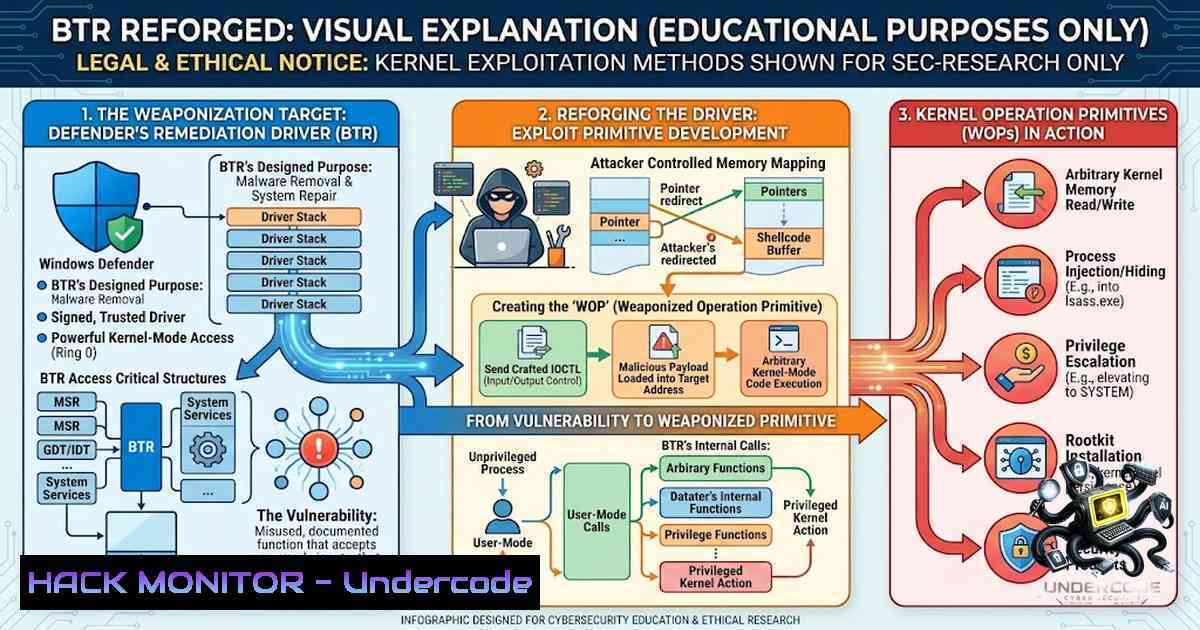
What if a trusted security component could be repurposed into an attacker-controlled kernel primitive? This is precisely the question that Jiří Vinopal from Check Point Research answered at Black Hat USA 2026 and DEF CON 34, unveiling the first public documentation of BTR.sys—a Microsoft-signed kernel driver used by Windows Defender for boot-time malware remediation. The research reveals that this legitimate driver, present on every modern Windows installation, can be weaponized to execute arbitrary Ring-0 file and registry operations without exploits, vulnerabilities, or memory corruption. By crafting valid encrypted transactions and loading the driver via a transient Boot Bus Extender service, an attacker with SeLoadDriverPrivilege can bypass Tamper Protection, delete EDR/AV components before they start, drop malicious drivers, and gain persistence—all using a built-in, Microsoft-signed, WDAC-immune component.
Learning Objectives & Secrets
- Objective 1: Understand the BTR.sys Architecture – Learn how Windows Defender’s Boot-Time Removal driver operates as a one-shot kernel component that reads RC4-encrypted transaction lists from Alternate Data Streams (ADS) and executes Ring-0 operations. Recognize the driver’s legitimate role and the undocumented protocol that makes it exploitable.
-
Objective 2 Secret Tip: Weaponize the Transaction Protocol – Discover how to construct valid encrypted configuration blobs using the hard-coded 256-byte RC4 key embedded in BTR.sys (consistent across 18 builds since Windows 7). Leverage the six kernel primitives—Delete File, Delete Directory, Move/Quarantine File, Delete Registry Key, Delete Registry Value, and Set Registry Value—to perform privileged operations. Chain multiple actions into a single transaction for maximum impact.
-
Objective 3 Secret Tip: Bypass Defenses with Boot-Time Execution – Exploit the “Golden Window”—the interval during system boot where the filesystem is writable but Defender’s user-mode services haven’t started. Schedule transactions for next boot to delete EDR binaries (e.g., WdFilter.sys, MsMpEng.exe) before they can lock themselves, effectively dismantling the security stack.
You Should Know
1. Technical Deep Dive: The BTR.sys Transaction Protocol
BTR.sys is embedded as a PE resource within MpEngine.dll and is dropped to disk with a randomized filename (e.g., mzqnjtaq.sys) only when a remediation action requires a reboot. The driver does not expose a standard IOCTL interface; instead, it reads a configuration blob from an Alternate Data Stream pointed to by the Args value in its Service Registry Key.
The configuration blob is RC4-encrypted and protected by integrity checks using a modified CRC-32 (denoted as ~CRC32) that omits the final bitwise inversion step. The decrypted payload consists of:
- Global Header (24 bytes): Contains Magic (0xFEE1DEAD), Version (2), PayloadOffset (0x10), GlobalCRC, and a TransID composed of ~CRC32(Payload) and Size(Payload).
- Global Payload (variable): A null-terminated Unicode string specifying the Feedback File path where BTR.sys writes execution results.
- Item Headers (16 bytes each): Define DataSize, ActionID, HeaderCRC, and DataCRC for each operation.
- Item Data (variable): Per-action payload with a mandatory 4-byte trailing padding.
The driver supports six Action IDs:
| ID | Primitive | Description |
||||
| 1 | Delete File | Ring-0 deletion bypassing exclusive file locks |
| 2 | Delete Directory | Removes empty directories |
| 3 | Move/Quarantine | Moves files; empty destination = delete |
| 4 | Delete Registry Key | Removes registry keys |
| 5 | Delete Registry Value | Removes registry values |
| 6 | Set Registry Value | Creates parent key path if missing; supports all REG_ types |
Step‑by‑Step Guide: Constructing and Executing a BTR Transaction
- Extract the RC4 Key: Locate MpEngine.dll under Defender’s Definition Updates and extract the 256-byte RC4 key from the .rdata section. Alternatively, use the embedded fallback BTR.sys copy included in BTR_CLI.
2. Build the Transaction Structure:
- Create a Global Header with Magic = 0xFEE1DEAD, Version = 2, and PayloadOffset = 0x10.
- Calculate ~CRC32 for the header (with GlobalCRC zeroed) and the payload.
- Append the Global Payload (Feedback File path as a null-terminated Unicode string).
- For each action, create an Item Header (DataSize, ActionID, HeaderCRC, DataCRC) followed by Item Data (Flags if applicable, strings, 4-byte padding).
- Encrypt the Blob: RC4-encrypt the entire structure using the hard-coded 256-byte key.
-
Write to ADS: Save the encrypted blob to an Alternate Data Stream attached to the driver file (e.g., C:\Windows\system32\drivers\random.sys:changelist).
-
Create the Service: Write registry entries under HKLM\SYSTEM\CurrentControlSet\Services{Random} with Type=1 (Kernel Driver), Start=1 (System Start), ErrorControl=0 (Ignore), Group=”Boot Bus Extender”, and Args pointing to the ADS path.
-
Trigger Execution: Use NtLoadDriver for immediate runtime execution (-trigger now) or schedule for next boot (-trigger boot).
-
Cleanup: Unload the driver, delete the service key, and remove the randomized driver file (which cascades and removes both ADS streams).
Linux/Windows Commands for Detection and Analysis
 Windows: Detect BTR.sys driver load events
Get-WinEvent -FilterHashtable @{LogName='System'; ID=7045} | Where-Object {$_.Message -like "BTR"}

Windows: Find BTR.sys on disk
dir /s C:\Windows\System32\drivers.sys | findstr /i "[a-z]{8}.sys"

Windows: Check for suspicious ADS streams
dir /r C:\Windows\System32\drivers\ | findstr /i ":$"

Windows: Monitor registry for transient Boot Bus Extender services
reg query HKLM\SYSTEM\CurrentControlSet\Services /s | findstr /i "Boot Bus Extender"

Windows: Sysmon rule to detect BTR.sys loads (Event ID 6)
<RuleGroup name="" groupRelation="or">
<DriverLoad onmatch="include">
<Image condition="contains">BTR.sys</Image>
</DriverLoad>
</RuleGroup>

Linux: Analyze Windows event logs remotely (using evtxdump)
evtxdump /mnt/windows/System32/winevt/Logs/System.evtx | grep -i "btr|7045"
- Weaponization: Abusing BTR.sys as a Kernel Operation Primitive
The BTR_CLI tool, released as supporting material for the research, implements the complete staging pipeline. It requires Administrator privileges (SeLoadDriverPrivilege) and works on Windows 7 through Windows 11 25H2 (July 2026).
Runtime Execution – Delete a file immediately:
BTR_CLI.exe -a 1 -s "C:\Windows\Temp\example.txt"
Move a Payload into System32 – Ring-0 write:
BTR_CLI.exe -a 3 -s "C:\payload.sys" -d "C:\Windows\System32\drivers\payload.sys"
Set a Registry Value – Create key path if missing:
BTR_CLI.exe -a 6 -s "HKLM\SOFTWARE\Example" -d "MyVal" -v "0x1" -t 4
Chain Multiple Actions – Delete Defender service keys in one transaction:
BTR_CLI.exe -chain ^ -item "4|HKLM\SYSTEM\CurrentControlSet\Services\WdFilter" ^ -item "4|HKLM\SYSTEM\CurrentControlSet\Services\WinDefend"
Boot-Time Scheduling – Schedule deletion of Defender binaries for next reboot:
BTR_CLI.exe -chain ^ -item "1|C:\Windows\System32\drivers\WdFilter.sys" ^ -item "1|C:\ProgramData\Microsoft\Windows Defender\Platform\MsMpEng.exe" ^ -trigger boot
Cleanup (after boot-time execution):
BTR_CLI.exe -cleanup <randomized_service_name>
The tool implements six stages that mirror Defender’s own process: driver extraction, stealth configuration via ADS, payload construction, action chaining (always prepending an anti-forensics Action 1 that deletes BootClean.log), service creation bypassing the SCM (no Event ID 7045 generated), and cleanup.
Step‑by‑Step Guide: Bypassing EDR with Boot-Time Execution
- Identify Target EDR Components: Determine the driver files and registry keys used by the EDR/AV solution (e.g., WdFilter.sys, MsMpEng.exe, service keys).
-
Chain Actions for Maximum Impact: Create a transaction that deletes the EDR’s kernel driver file, deletes its service registry keys, and optionally drops a replacement driver.
-
Schedule for Boot: Use `-trigger boot` to execute during the Golden Window.
-
Reboot the System: Upon reboot, BTR.sys executes the transaction before Defender’s user-mode services start, deleting locked files and registry keys.
-
Verify Success: After reboot, the EDR stack is structurally gone, with arbitrary write into System32\drivers demonstrated.
-
Clean Up Artifacts: Run `BTR_CLI.exe -cleanup` to remove the transient service and driver files.
3. Detection and Hardening: Defending Against BTR.sys Abuse
Microsoft declined to patch the technique, stating it requires SeLoadDriverPrivilege. WDAC and the Microsoft Vulnerable Driver Blocklist cannot block BTR.sys because it is a required Windows component, not a third-party or vulnerable driver. Detection is currently the only defense.
Detection Signals (Sysmon/EDR) :
- Event ID 6 (DriverLoad): BTR.sys loaded with a randomized filename.
- Event ID 23 (FileDelete): Attributed to ProcessId 4 / Image: System—the kernel-mode execution-lineage fingerprint.
- Registry Changes: Transient service creation under HKLM\SYSTEM\CurrentControlSet\Services with Group=”Boot Bus Extender”.
- ADS Creation: Alternate Data Streams (:$changelist) attached to driver files.
Hardening Controls:
- Restrict SeLoadDriverPrivilege: Limit which accounts can load kernel drivers. Use Group Policy or Windows Defender Application Control to enforce least privilege.
-
Monitor for Randomized Driver Names: BTR.sys is dropped with a random [a-z]{8}.sys filename. Deploy detection rules for new drivers with this pattern.
-
Audit Boot Bus Extender Services: Monitor for services with Group=”Boot Bus Extender” that are not part of the normal boot sequence.
-
Scan for ADS Attachments: Use tools like `dir /r` or Sysinternals Streams to detect Alternate Data Streams attached to driver files in System32\drivers.
Step‑by‑Step Guide: Deploying Detection Rules
- Deploy Sysmon: Install Sysmon with a configuration that captures DriverLoad (Event ID 6) and FileDelete (Event ID 23) events.
2. Create Detection Queries:
// KQL for Microsoft Sentinel
Event
| where EventID == 6
| where Image contains "BTR.sys" or Image matches regex @"[a-z]{8}.sys"
| project TimeGenerated, Computer, Image, Signature
3. Monitor Registry for Boot Bus Extender Services:
 Scheduled task to check for unauthorized Boot Bus Extender services
$services = Get-ChildItem -Path "HKLM:\SYSTEM\CurrentControlSet\Services" |
ForEach-Object { Get-ItemProperty $<em>.PSPath } |
Where-Object { $</em>.Group -eq "Boot Bus Extender" -and $_.Start -eq 1 }
if ($services) { Write-Warning "Suspicious Boot Bus Extender services found" }
- Enable Advanced Audit Policies: Configure `Audit Registry` and `Audit File System` to log changes to System32\drivers and service registry keys.
What Undercode Say
- Key Takeaway 1: Trusted Components Are the New Attack Surface – BTR.sys demonstrates that even Microsoft-signed, WDAC-immune kernel drivers can be repurposed as offensive tools. The driver is already present on every modern Windows install, making this a built-in, non-patchable attack vector. This shifts the paradigm from BYOVD (Bring Your Own Vulnerable Driver) to “use what’s already there”—a far more dangerous proposition because it eliminates the need to introduce new code that could be detected.
-
Key Takeaway 2: Detection Over Patching – With no patch planned from Microsoft, defenders must rely on behavioral detection and privilege restrictions. The research enumerates four Sysmon/EDR signals and one hardening control (restrict SeLoadDriverPrivilege). Organizations should prioritize deploying these detections immediately, as the technique is now publicly documented and tooling (BTR_CLI) is available. The “Golden Window” boot-time execution makes traditional EDR solutions ineffective because they aren’t running when the attack occurs.
Analysis: The BTR.sys vulnerability is a textbook example of how defensive technology can become offensive capability. What began as an incident response false positive—where legitimate Defender remediation activity resembled malicious kernel loader behavior—evolved into a full reverse-engineering effort that uncovered undocumented functionality. The driver’s RC4 encryption, integrity checks, and transaction protocol were all reverse-engineered without a PDB, demonstrating the depth of analysis required. The technique requires SeLoadDriverPrivilege, but many enterprises grant this to trusted administrators or service accounts, creating a privilege escalation path. The fact that Microsoft declined to patch this—citing the privilege requirement—places the burden squarely on defenders to monitor for abuse. This research also raises broader questions: how many other signed Microsoft drivers contain similar undocumented protocols that could be weaponized?
Prediction
- -1 – Increased Targeting of Built-in Windows Components: Threat actors will rapidly adopt BTR.sys abuse in post-exploitation scenarios, particularly in targeted attacks where maintaining stealth is paramount. The technique’s ability to bypass Tamper Protection and delete EDR components before they start makes it invaluable for ransomware groups and APT actors seeking to disable defenses.
-
-1 – Detection Evasion Arms Race: EDR vendors will scramble to deploy signatures for BTR.sys behavior (randomized driver names, Boot Bus Extender services, ADS creation), but the cat-and-mouse game will intensify as attackers find new ways to obfuscate the transaction protocol or modify the RC4 key.
-
+1 – Improved Defensive Visibility: The public disclosure of BTR.sys internals will empower defenders to build more precise detections. Organizations that deploy the recommended Sysmon rules and restrict SeLoadDriverPrivilege will significantly reduce their risk surface.
-
-1 – Persistence Mechanisms Evolve: Attackers will use BTR.sys not just for EDR bypass but also for establishing kernel-level persistence, leveraging the driver’s ability to write arbitrary registry values and drop files into System32. This could lead to a new class of rootkits that are immune to traditional removal techniques.
-
+1 – Community-Driven Detection Engineering: The release of BTR_CLI as research code enables the security community to reproduce, verify, and build detections. This transparency will accelerate defensive countermeasures and improve overall Windows security posture.
-
-1 – No Patch Means Permanent Risk: With Microsoft declining to patch, every Windows system from Windows 7 to Windows 11 25H2 remains vulnerable. This technique will be viable for years, and organizations must treat it as a permanent part of their threat model.
-
+1 – Increased Scrutiny of Signed Drivers: This research will prompt deeper analysis of other Microsoft-signed drivers for similar undocumented protocols. The security community will likely uncover additional “built-in” attack vectors, leading to broader disclosure and ultimately stronger security.
-
-1 – Supply Chain Implications: If attackers can weaponize a component that is part of Windows Defender’s update mechanism, they could potentially persist across definition updates, making detection and removal extraordinarily difficult. The hard-coded RC4 key across 18 builds suggests that rotating this key would be a significant engineering effort, further entrenching the risk.
▶️ Related Video (86% Match):
https://www.youtube.com/watch?v=1UJoH-p3Xik
🎯Let’s Practice For Free:
🎓 Live Courses & Certifications:
Join Undercode Academy for Verified Certifications
🚀 Request a Custom Project:
Secure, high-velocity infrastructure and disruptive technological engineering. Contact our engineering team for high-tier development and proprietary systems:
[email protected]
💎 Smart Architecture | 🛡️ Secure by Design | ⭐ Trusted by Thousands
IT/Security Reporter URL:
Reported By: https://lnkd.in/p/eib6DTw3 – Hackers Feeds
Extra Hub: Undercode MoN
Basic Verification: Pass ✅


