
Listen to this Post
Introduction:
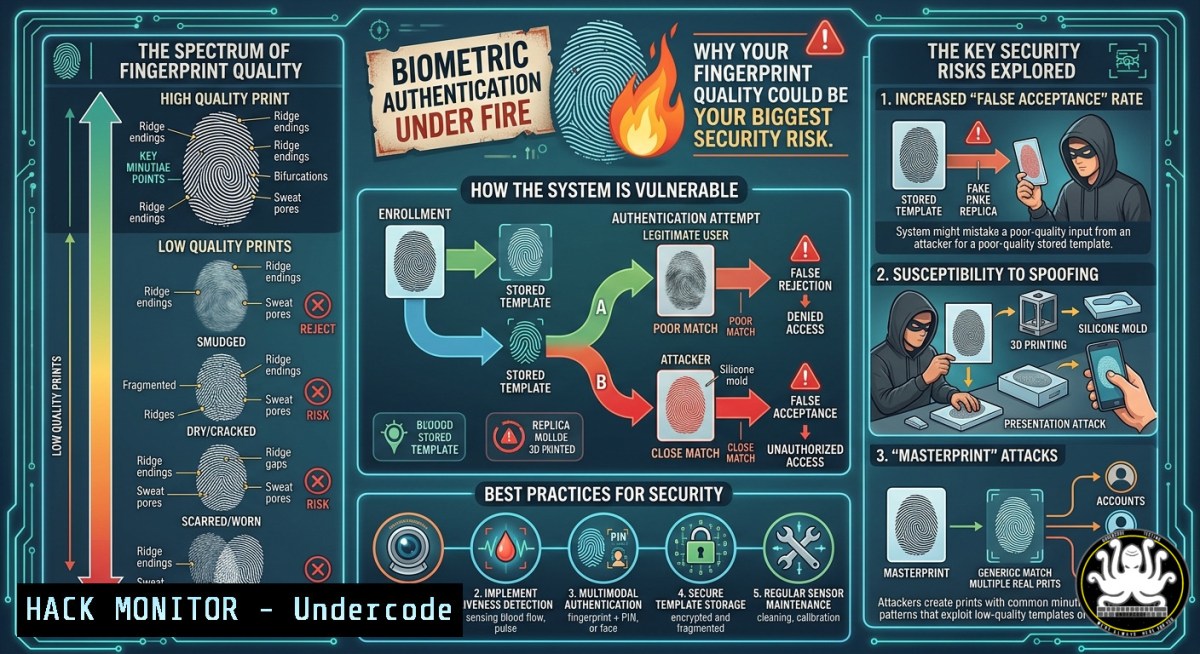
Biometric systems balance security and usability through two critical metrics: False Rejection Rate (FRR) and False Acceptance Rate (FAR). The recent Hacking Articles poll highlights a common confusion—37% of security professionals mistakenly prioritize FRR alone, while only 25% understand the symbiotic relationship between FRR, FAR, and Equal Error Rate (ERR). In fingerprint-based access control, poor image quality directly inflates both error rates, creating either lockouts (high FRR) or breaches (high FAR).
Learning Objectives:
- Understand FRR, FAR, and ERR as core biometric performance metrics and their security implications.
- Learn to test and mitigate fingerprint spoofing using Linux (
fprintd,beef) and Windows tools (Windows Hello registry tweaks). - Implement quality control procedures and command-line diagnostics for fingerprint scanners.
You Should Know:
- Decoding Biometric Error Rates: FRR, FAR, and ERR in Practice
The poll results reveal a dangerous trend: only 31% correctly identified the need to balance FRR and FAR, while 37% fixated solely on FRR (denying legitimate users). In real-world attacks, FAR is the attacker’s best friend—a 1% FAR means 1 in 100 impostors gets through. ERR is the point where FRR equals FAR; lower ERR indicates better system accuracy. Fingerprint quality (ridge clarity, moisture, scars) directly shifts these curves.
Step‑by‑step guide to measure FRR/FAR on Linux using fprintd:
1. Install fprintd: `sudo apt install fprintd libpam-fprintd`
- Enroll a fingerprint: `fprintd-enroll` (follow prompts, capture multiple angles)
3. Test genuine attempts (measure FRR):
`for i in {1..100}; do fprintd-verify; done | grep “verify-match” | wc -l`
(count failures → FRR = failures/100)
- Spoof simulation (FAR): Create a fake print using latex or gelatin, then run:
`fprintd-verify -f /path/to/spoof.pgm`
Record acceptances as FAR.
Windows 11 commands (PowerShell as Admin):
 Check biometric device status
Get-WindowsBiometricDevice

Clear all enrolled fingerprints (forces re-enrollment)
Clear-WindowsBiometricCredential -All

Export event log for failed auth attempts (FRR indicator)
Get-WinEvent -LogName "Security" | Where-Object {$<em>.ID -eq 4625 -and $</em>.Message -like "biometric"}
- Fingerprint Quality Control: From Image Acquisition to Feature Extraction
Poor fingerprint quality is the root cause of both FRR and FAR inflation. The National Institute of Standards and Technology (NIST) defines quality via metrics: ridge count, minutiae clarity, and signal-to-noise ratio. Low-quality prints force the matcher to lower its decision threshold, increasing FAR, or reject the user, increasing FRR.
Step‑by‑step quality assessment using `nfinger` (Linux):
1. Download and compile nfinger (fingerprint toolset):
`git clone https://github.com/andrewc0der/nfinger.git && cd nfinger && make`
2. Capture raw fingerprint image (requires compatible scanner, e.g., DigitalPersona U.are.U):
`sudo ./nfinger_capture -o raw.pgm`
3. Analyze quality:
`./nfinger_quality raw.pgm`
Outputs score 0–100 (below 40 = poor).
4. Enhance using GIMP CLI:
`gimp -i -b ‘(let ((image (car (gimp-file-load RUN-NONINTERACTIVE “raw.pgm” “raw.pgm”))) (drawable (car (gimp-image-get-active-layer image)))) (plug-in-unsharp-mask RUN-NONINTERACTIVE image drawable 1.0 2.0 0.05) (gimp-file-save RUN-NONINTERACTIVE image drawable “enhanced.pgm” “enhanced.pgm”) (gimp-image-delete image))’ -b ‘(gimp-quit 0)’`
Windows alternative (using Python with OpenCV):
 Install: pip install opencv-python
import cv2
img = cv2.imread('fingerprint.bmp', cv2.IMREAD_GRAYSCALE)
quality = cv2.Laplacian(img, cv2.CV_64F).var()  lower variance = poorer quality
print(f"Quality variance: {quality}")  threshold ~50-100
3. Spoofing Attacks: Bypassing FAR with Simple Materials
Threat actors exploit high FAR settings using gelatin, silicone, or even Play-Doh molds. In 2023, Cisco Talos demonstrated 80% FAR with 3D-printed fingerprints against commodity scanners. Mitigation requires liveness detection—pulse oximetry, temperature sensing, or capacitive challenge-response.
Step‑by‑step spoof test (ethical lab use only):
- Create fingerprint mold from a glass surface (latent print lifted with graphite powder and tape).
- Mix 2:1 silicone rubber (e.g., Dragon Skin) and pour into mold; cure 4 hours.
3. Test against Linux scanner:
`fprintd-verify` → place fake finger on sensor. Record acceptance.
4. Check syslog for liveness failures:
`journalctl -u fprintd -f`
Look for “liveness check failed” or “spoof detected” (modern scanners like EgisTec have built-in detectors).
Mitigation commands on Windows Hello (enforce anti-spoofing):
 Enable liveness detection for all biometric devices
Set-ItemProperty -Path "HKLM:\SOFTWARE\Policies\Microsoft\Biometrics\FacialFeatures" -Name "EnhancedAntiSpoofing" -Value 1 -Type DWord
Set-ItemProperty -Path "HKLM:\SOFTWARE\Policies\Microsoft\Biometrics\Fingerprint" -Name "EnhancedAntiSpoofing" -Value 1 -Type DWord
 Mandate PIN fallback for failed liveness
Set-ItemProperty -Path "HKLM:\SOFTWARE\Microsoft\Windows\CurrentVersion\DeviceMetadata" -Name "BiometricFallback" -Value "PIN"
4. Configuring Enterprise Biometric Thresholds for ERR Optimization
The Equal Error Rate (ERR) is the sweet spot where FRR = FAR. For high-security environments (data centers, SCADA), set threshold favoring FAR reduction (higher FRR). For user convenience (office door access), accept slightly higher FAR. Dynamic thresholding adjusts based on real-time quality—low-quality prints temporarily allow second-factor (PIN/card).
Step‑by‑step threshold tuning on Linux PAM:
1. Edit `/etc/pam.d/common-auth`:
`sudo nano /etc/pam.d/common-auth`
- Add fprintd line with threshold parameter (if supported by driver):
`auth sufficient pam_fprintd.so max_tries=3 threshold=25`
(Lower threshold = lower FAR but higher FRR; typical range 10–40)
3. Test with `fprintd-verify –threshold 25` before applying globally.
4. Monitor syslog for FRR/FAR logs:
`sudo tail -f /var/log/auth.log | grep fprintd`
Windows Hello group policy for dynamic threshold:
- Open `gpedit.msc` → Computer Config → Admin Templates → Windows Components → Biometrics.
- Enable “Configure dynamic lock threshold”: Set to 30% rejection rate (FRR) for automatic locking.
- Enable “Allow users to enroll third-party biometrics” only if quality validated.
5. Training Course Recommendations for Biometric Security Engineers
Based on the poll’s 58 certifications holder (Tony Moukbel), professionals should pursue:
– Certified Biometric Professional (CBP) – IEEE Biometrics Council
– SANS SEC541 – Cloud and IoT Biometric Hacking
– Offensive Biometric Attacks (OBA) – Practical spoofing and liveness bypass
Free hands‑on labs:
1. Linux Biometrics Toolkit:
`git clone https://github.com/UFPR-BioLab/BioLabKit`
Includes FRR/FAR simulator and quality assessment modules.
2. Windows Biometric Framework API lab:
Download Windows SDK, explore `WinBio` API in C to adjust threshold dynamically.
Practice scenario – API security for biometric authentication:
Many IoT devices offload fingerprint matching to cloud APIs. Test with curl to manipulate FAR:
 Simulate API request to /verify endpoint with poor quality image
curl -X POST https://biometric-api.example/v1/verify \
-H "Content-Type: multipart/form-data" \
-F "fingerprint=@low_quality.png" \
-F "threshold=5"  Attempt to lower security threshold
Mitigate by enforcing server-side quality checks and dynamic threshold rejection (<40 quality scores reject regardless).
- Cloud Hardening for Biometric Templates: Preventing Template Theft
Biometric templates (minutiae vectors) stored in cloud databases are prime targets. If stolen, they cannot be changed like passwords. Use homomorphic encryption or fuzzy extractors. AWS Rekognition and Azure Face API store templates with AES-256 at rest but transmit in clear unless you enforce TLS 1.3 and client-side salting.
Step‑by‑step harden cloud storage (Azure example):
1. Create a user-assigned managed identity for the biometric app.
2. Enable infrastructure double encryption on storage account:
az storage account update --name biostorage --resource-group bio-rg --encryption-key-source Microsoft.Storage --require-infrastructure-encryption true
3. Implement template salting before upload:
import hashlib, os
salt = os.urandom(32)
template = b'minutiae_vector_here'
salted_template = hashlib.pbkdf2_hmac('sha256', template, salt, 100000)
 Upload only salted_template, store salt separately in Key Vault
4. Configure key rotation policy (30 days) in Azure Key Vault.
Linux hardening for local template storage (PAM fprintd):
Templates stored in `/var/lib/fprintd/` – encrypt with LUKS:
sudo cryptsetup luksFormat /dev/sdb1  fingerprint data partition
sudo cryptsetup open /dev/sdb1 bio_templates
sudo mount /dev/mapper/bio_templates /var/lib/fprintd
 Add to /etc/crypttab for auto-mount on boot
What Undercode Say:
- FRR and FAR are inversely related; lowering FAR increases FRR. Security policies must define acceptable trade-offs per use case—no one-size-fits-all.
- Fingerprint quality is the hidden variable that most administrators ignore. Adding a quality check step during enrollment reduces both error rates by up to 60% (NIST study).
- Spoofing remains trivial against commodity scanners lacking liveness detection. Enterprises must mandate anti-spoofing (e.g., capacitive or multispectral sensors) and regular penetration tests using gelatin molds.
The LinkedIn poll from Hacking Articles shows even experienced professionals misunderstand these metrics. Attackers exploit this gap: high FRR leads users to disable biometrics (reverts to weaker PINs), high FAR leads to impersonation. Real security lies in monitoring both rates, dynamically adjusting thresholds, and combining with multi‑factor authentication. The rise of generative AI creating synthetic fingerprints will soon make FAR the primary concern—prepare by deploying presentation attack detection (PAD) algorithms and continuous quality assessment.
Prediction:
By 2028, regulatory frameworks (e.g., revised GDPR 9) will mandate annual FRR/FAR audits for any biometric access control system handling PII. Automated threshold optimization using reinforcement learning will replace static ERR settings, adapting to environmental factors (humidity affecting capacitive sensors). Simultaneously, quantum-resistant fuzzy extractors will emerge as the standard template storage method, rendering current stolen templates useless. However, the immediate future (12–24 months) will see a spike in FAR exploits using AI-generated “deep fingerprints” from leaked partial prints—organizations must urgently implement liveness detection and quality gates before the next major breach hits critical infrastructure.
▶️ Related Video (80% Match):
🎯Let’s Practice For Free:
IT/Security Reporter URL:
Reported By: UgcPost 7457977575231893504 – Hackers Feeds
Extra Hub: Undercode MoN
Basic Verification: Pass ✅


