Listen to this Post
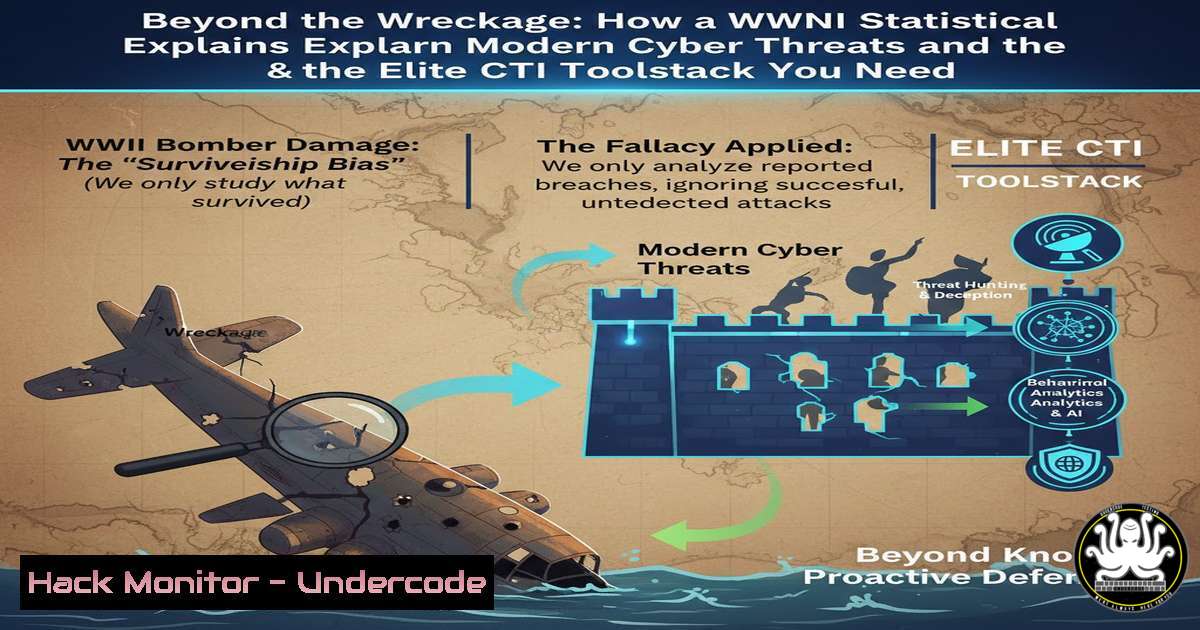
Introduction:
Cyber Threat Intelligence (CTI) is often misconstrued as a simple collection of Indicators of Compromise (IoCs). In reality, true CTI is a strategic discipline focused on understanding the adversary and the attacks you don’t see, a concept perfectly illustrated by the historical “Survivor Bias” from WWII aviation. This article deconstructs this cognitive bias to build a practical framework for proactive threat intelligence, complete with the essential toolstack and methodologies used by professionals.
Learning Objectives:
- Understand the “Survivor Bias” analogy and its critical application to cybersecurity threat analysis.
- Map the core functions of a professional CTI toolstack (Maltego, Shodan, VirusTotal, etc.) to the intelligence lifecycle.
- Apply practical techniques to search for threats beyond known IoCs, focusing on infrastructure, tactics, and procedures (TTPs).
You Should Know:
- The Survivor Bias: Your First Lesson in True Threat Intelligence
The core insight from Bastien C.’s post is the analogy to Abraham Wald’s WWII analysis. Allies examined returning bombers, noting damage on wings and fuselage, and initially sought to reinforce those areas. Wald correctly argued the unharmed areas on returning planes—engines and cockpits—were actually the most critical, as hits there meant the plane did not return. This is Survivor Bias: the logical error of focusing only on data that “survived” a process.
Step‑by‑step guide explaining what this does and how to use it.
In CTI, the “returning planes” are detected attacks, known malware hashes, and blocked IPs. The “planes that didn’t return” are the sophisticated, stealthy campaigns that evade your current defenses. To combat this bias:
Step 1: Audit Your Alerts. Don’t just analyze your SIEM alerts. Ask: “What TTPs would bypass my current detection rules?”
Step 2: Study Adversary Behavior. Use the MITRE ATT&CK framework (the “doctrine & maps” from the post) to understand techniques (like T1059.003 - Windows Command Shell) that might not leave your standard IoCs.
Step 3: Hunt Proactively. Use tools like `Velociraptor` or `Azure Sentinel` Hunting Queries to search for those TTPs in your environment, looking for the “unseen” damage.
2. Assembling Your Fleet: The CTI Toolstack Explained
The post’s “crew” list is a premier CTI toolstack. Each serves a distinct function in the intelligence cycle (Planning, Collection, Processing, Analysis, Dissemination).
Step‑by‑step guide explaining what this does and how to use it.
Amiral: Maltego. This is for link analysis and visualizing relationships. You start with an IoC (an entity) and “transform” it to find related data.
Example Command/Use: Within Maltego, add a `Domain` entity for suspicious[.]com. Run a “To DNS Name” transform. Then run a “To IP Address” transform on the results. Finally, use a “To Threat Intelligence (VirusTotal)” transform on the IP to see if it’s malicious.
Vice-Amiraux: Shodan, Censys, FOFA. These search engines for Internet-connected devices.
Example Command: Using Shodan CLI (pip install shodan), you can search for vulnerable services: shodan search 'http.title:"DVR login" country:FR'. This finds potential exposed DVRs in France.
Chefs d’escadrons: URLScan.io, VirusTotal. For rapid analysis of URLs and files.
Example Command: Use VirusTotal’s API via `curl` to check a hash: curl --request GET --url 'https://www.virustotal.com/api/v3/files/{file_hash}' --header 'x-apikey: YOUR_VT_API_KEY'.
- From IoCs to TTPs: Pivoting on Adversary Infrastructure
The post highlights targeted indicators and C2 infrastructure discovery. Moving from a simple IP address to understanding the adversary’s full campaign is key.
Step‑by‑step guide explaining what this does and how to use it.
1. Start with an IoC: You have a malicious IP: 185.220.101[.]134.
2. Pivot with Passive DNS: Use a tool like `RiskIQ PassiveDNS` or `SecurityTrails` API to find all domains that have resolved to this IP.
3. Analyze Certificates: Use `Censys` to search the IP. Look for SSL certificates. Adversaries often reuse certificates across infrastructure. The certificate’s `Subject` or `Issuer` field can be a pivot point.
4. Map to ATT&CK: The infrastructure may host a phishing site (T1583.001) or a C2 server (TA0011). Document this in your threat intelligence platform.
4. Operationalizing Intelligence: From Jupyter Notebooks to Action
The post mentions `JupyterSecurityBreak` (Jupyter notebooks for security). This highlights the analytical phase—processing and enriching data.
Step‑by‑step guide explaining what this does and how to use it.
1. Set Up a Notebook: Run Jupyter Lab: jupyter lab.
2. Automate Enrichment: Write a Python script in a notebook cell to automate queries.
import vt, requests, json
client = vt.Client("YOUR_API_KEY")
with open("malware_sample.bin", "rb") as f:
analysis = client.scan_file(f)
print(json.dumps(analysis, indent=2))  Enrich file with VT
3. Correlate Data: Merge results from VirusTotal, GreyNoise (which tells you if an IP is scanning the internet), and your internal logs to judge relevance.
- Hardening Your Defenses: Applying the “Unharmed Areas” Lesson
Recall Wald’s conclusion: reinforce the untouched areas. In cybersecurity, this means bolstering defenses against techniques used in successful, undetected attacks.
Step‑by‑step guide explaining what this does and how to use it.
Windows Command Example (Detecting Living-off-the-Land): Sophisticated attacks use legitimate tools (living-off-the-land). Enhance logging to detect `rundll32.exe` being used for network connections.
PowerShell to enable detailed process auditing: `Set-MpPreference -AttackSurfaceReductionRules_Ids D1E49AAC-8F56-4280-B9BA-993A6D -AttackSurfaceReductionRules_Actions Enabled`
Linux Command Example (Persistence): Check for uncommon cron jobs or systemd services, a common “unseen” persistence mechanism.
Command: `systemctl list-unit-files –type=service | grep enabled` and audit each, especially in /etc/systemd/system/.
What Undercode Say:
- True CTI is an Offensive-Defensive Loop: It’s not passive “veille” (monitoring). It requires actively hunting for the gaps in your visibility—the “unharmed areas” on your digital perimeter—and using that knowledge to pressure-test and improve defenses.
- Tools Are Crew, Not Captains: The listed tools (Shodan, Maltego, etc.) are powerful, but their value is multiplied exponentially when used within a structured analytical framework like MITRE ATT&CK and guided by cognitive principles like overcoming Survivor Bias. The analyst’s critical thinking is the true captain.
The post adeptly bridges a profound historical analytical failure with the modern challenge of advanced persistent threats (APTs). The most valuable threat intelligence doesn’t come from cataloging what you blocked, but from hypothesizing what could have slipped through and relentlessly searching for it. The recommended toolstack provides the technical means, but the mindset shift—actively seeking evidence of what you cannot see—is the foundational breakthrough.
Prediction:
The future of CTI will be defined by the integration of AI to simulate adversarial TTPs at scale, automatically identifying an organization’s “unharmed areas.” Predictive analytics, powered by frameworks understanding survivor bias, will move CTI from reactive reporting to proactive security posture modeling. Furthermore, automation will handle the collection and initial correlation of IoCs, freeing analysts to focus on high-level cognitive tasks: interpreting adversary intent, modeling complex campaigns, and conducting the strategic “what if” analyses that prevent the next unseen kill shot. The bootcamps and methodologies highlighted are forging the analysts who will wield these AI-augmented toolsets.
▶️ Related Video (70% Match):
🎯Let’s Practice For Free:
IT/Security Reporter URL:
Reported By: Camacho Bastien – Hackers Feeds
Extra Hub: Undercode MoN
Basic Verification: Pass ✅


