Listen to this Post
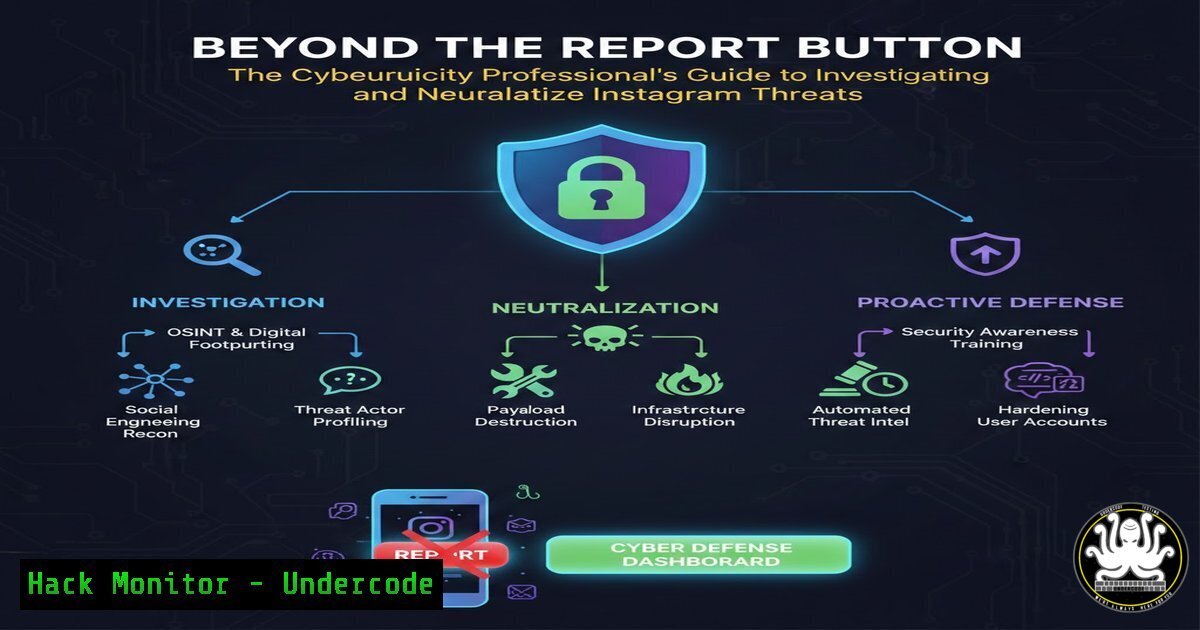
Introduction:
In the modern threat landscape, social media platforms like Instagram are not just channels for personal connection but arenas for cybercrime, including impersonation, harassment, scam operations, and intellectual property theft. For cybersecurity and IT professionals, understanding the legitimate, policy-driven methods to report and dismantle malicious accounts is a critical component of digital defense and online hygiene. This guide moves beyond basic user reporting, framing Instagram’s reporting mechanisms as a formal incident response procedure within the context of open-source intelligence (OSINT) and policy enforcement.
Learning Objectives:
- Understand the legal and policy-based frameworks for reporting major categories of Instagram abuse.
- Learn to gather and document technical evidence (OSINT) to strengthen a report and support potential legal action.
- Identify common reporting failures and how to avoid them to ensure platform action.
You Should Know:
- OSINT Foundations: Profiling a Malicious Account Before You Report
Before clicking “Report,” a professional gathers evidence. This process, akin to the reconnaissance phase of a security assessment, involves collecting publicly available data to build a case.
Step-by-Step Guide:
- Document Everything: Take full-screen screenshots (including URL) of the profile, posts, and direct messages. Use `Alt+Print Screen` on Windows or `Cmd+Shift+4` on macOS. Note timestamps.
- Analyze the Profile Data: Examine the username, bio, and links. Use Linux command-line tools like `whois` on any linked domain to check registration details.
Command Example: `whois examplemaliciousdomain.com`
- Reverse Image Search: Use the profile picture in a reverse image search via Google Images or tools like `Sherlock` (for username searches across platforms) to find connected accounts.
Tool Example: Using Sherlock: `python3 sherlock.py username_here`
- Reporting Impersonation & Fake Accounts: A Technical Workflow
Impersonation is a direct identity attack. The reporting process must clearly articulate the violation.
Step-by-Step Guide:
- Navigate to the impersonating profile, click the three dots (
...), and select Report. - Follow: Report > Report Account > Pretending to be someone else > Me (or someone I know).
- Critical Step: In the additional details box, paste a concise, factual statement. Reference your evidence: “This account, created on [approx. date], is using my copyrighted profile image (attached) and my name to defraud followers. Evidence archive available upon legal request.”
-
Reporting Harassment, Bullying & Hate Content: Logging and Escalation
These reports require demonstrating a pattern of behavior. Systematic logging is key.
Step-by-Step Guide:
- For a specific post: Click the three dots above it > Report.
- Select the appropriate category (e.g., Bullying, Hate speech).
- For direct message harassment: Open the conversation, tap and hold the message, select Report.
- Professional Practice: Maintain an incident log. A simple text log or structured data (e.g., CSV) with columns for
Date_Time,Message/Post_Content, `Report_Reference_ID` (if provided by Instagram), and `Action_Taken` is crucial for potential law enforcement escalation.
4. Reporting Copyright Violations: The DMCA Takedown Process
This is a formal legal procedure, not a simple platform report. You are filing a notice under the Digital Millennium Copyright Act (DMCA).
Step-by-Step Guide:
- Do Not Use the in-app “Report” for best results. Use Instagram’s dedicated DMCA Takedown Web Form.
- Prepare a statement that includes: a) Your contact info, b) Identification of the copyrighted work, c) URL of the infringing material, d) A statement of good faith belief of unauthorized use, e) A statement under penalty of perjury that you are authorized, f) Your electronic signature.
- Send the notice. Platform response is legally mandated and typically faster than standard reporting.
-
Automating Evidence Collection: Basic Scripting for Repetitive Tasks
If monitoring multiple impersonators or scraping a scam network’s public posts for analysis, simple automation is invaluable.Step-by-Step Guide (Educational Purpose – Respect `robots.txt` and ToS):
A Python script using `requests` and `BeautifulSoup` can archive public post text. Warning: Always comply with Instagram’s Terms of Service. This example is for illustrating web scraping concepts.import requests from bs4 import BeautifulSoup import time EXAMPLE CONCEPT - Scraping a public, generic website for text. target_url = "https://example-public-site.com" headers = {'User-Agent': 'Mozilla/5.0'} response = requests.get(target_url, headers=headers) soup = BeautifulSoup(response.text, 'html.parser') Find and print all paragraph text for paragraph in soup.find_all('p'): print(paragraph.get_text()) time.sleep(1) Polite delayFor Instagram-specific automation, you must use their official Graph API with proper authentication, which is designed for developers to access data compliantly.
-
Avoiding Common Reporting Failures: The “Why Wasn’t It Removed?” Checklist
Reports fail due to lack of clarity, insufficient evidence, or misuse of categories.
Step-by-Step Guide:
- Mismatched Category: Reporting a scam as “Spam” instead of “Fraud or Scam” reduces effectiveness. Precisely identify the violation.
- Insufficient Context: A report that says “this is bad” provides no actionable data. Always add a clear, one-sentence explanation in the provided field.
- One-and-Done Mentality: For clear violations, if the first report is rejected, re-report and consider seeking the platform’s official support channel for businesses or creators, which often has a different review pipeline.
7. Post-Report: Monitoring and Legal Preparedness
Reporting is often step one. Prepare for the next phases.
Step-by-Step Guide:
- Monitor for Action: The account may be removed, or specific content may be deleted. Document the outcome.
- Preserve Evidence Chain: Ensure screenshots and logs are stored securely (e.g., encrypted volume). Use tools like `Veracrypt` (Windows/Linux) or `Disk Utility` (macOS) to create an encrypted container for sensitive case files.
- Know When to Escalate: For severe threats (doxxing, violent threats, large-scale fraud), prepare your evidence dossier for law enforcement. This should include a timeline, compiled evidence, and the platform’s response (or lack thereof).
What Undercode Say:
- Key Takeaway 1: Effective abuse reporting is a formal investigative process. Success hinges on the quality of evidence (OSINT) and the precision with which you map that evidence to the platform’s specific policy categories. Treat it with the same rigor as a security incident.
- Key Takeaway 2: The legal and policy-based approach is not a limitation but a framework. Mastering it—from DMCA takedowns to structured harassment logs—provides a more powerful and defensible toolset than any unofficial “hack” and builds essential skills in digital forensics and procedure.
The professionalization of social media defense is inevitable. As platforms grapple with scale, well-documented, policy-aligned reports from knowledgeable users act as a force multiplier for their enforcement teams. The individual equipped with these skills moves from being a passive victim to an active defender within the digital ecosystem.
Prediction:
The future of platform abuse mitigation will see a tighter integration between user reporting and AI-driven threat intelligence. Platforms will likely develop more granular reporting APIs for trusted reporters (e.g., verified security researchers) and implement blockchain-verifiable evidence logging to create immutable audit trails for severe cases. Furthermore, we will see a rise in cross-platform threat-sharing alliances, where a pattern of behavior identified and reported on Instagram could lead to proactive suspension on connected platforms, effectively creating a unified defense grid against sophisticated cross-platform threat actors. The legal reporting methodologies outlined today will become the foundational language for interacting with these advanced, automated defense systems.
▶️ Related Video (80% Match):
🎯Let’s Practice For Free:
IT/Security Reporter URL:
Reported By: Zabitmajeed Learn – Hackers Feeds
Extra Hub: Undercode MoN
Basic Verification: Pass ✅


