
Listen to this Post
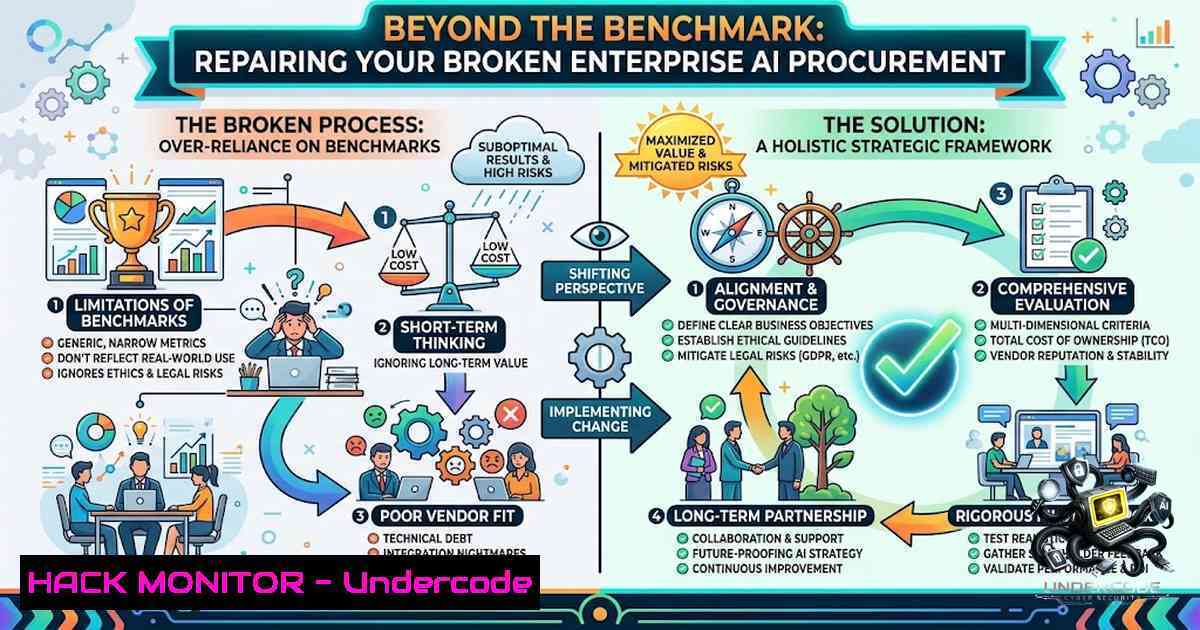
Introduction:
Enterprise AI procurement is fundamentally flawed. Organizations invest months in rigorous model benchmarking, treating leaderboard scores as the primary success metric. However, our engineering team’s analysis reveals that raw model weights account for only 40% of real-world performance; the remaining 60% is the operational harness—the infrastructure, security, and integration layer—that no one prices before signing the contract. This misalignment leads to catastrophic deployment budget overruns and operational failures the moment an AI agent interacts with a live workflow.
Learning Objectives & Secrets:
- Objective 1: Evaluate the “Harness” Before the Model. Teams must shift focus from model accuracy scores to the engineering effort required for integration, logging, monitoring, and security.
- Objective 2 Secret Tip: Audit the Cost of Context Injection. The hidden cost of retrieval-augmented generation (RAG) and vector database querying often dwarfs inference costs. Always benchmark the full pipeline latency and token consumption, not just the base model.
- Objective 3 Secret Tip: Operationalize Adversarial Testing. A model that scores 95% on a public benchmark can fail catastrophically against a simple prompt injection or data exfiltration attempt. Build a red-team harness before you buy.
You Should Know:
- Designing a Resilient AI Monitoring Stack with OpenTelemetry and ELK
To manage the “harness,” you must instrument every layer of the AI pipeline. Standard logging is insufficient; you need distributed tracing to correlate user prompts, model inference, and vector database retrieval.
– What this does: Provides end-to-end visibility into the AI workflow, helping identify bottlenecks and security anomalies in real-time.
– Step-by-step guide:
1. Install OpenTelemetry Collector: Deploy the OpenTelemetry Collector as a sidecar to your AI inference service to capture traces and metrics.
2. Configure Instrumentation: Add the OpenTelemetry SDK to your Python or Java application. For Python: pip install opentelemetry-api opentelemetry-sdk opentelemetry-instrumentation-flask.
3. Set up the ELK Stack: Deploy Elasticsearch, Logstash, and Kibana using Docker: docker run -p 9200:9200 -p 5601:5601 --1ame elk -e discovery.type=single-1ode docker.elastic.co/elasticsearch/elasticsearch:8.6.0.
4. Configure Logstash Pipeline: Create a `logstash.conf` file to ingest JSON logs from your AI gateway and parse them for latency and error rates.
5. Visualize with Kibana: Create dashboards to monitor token usage per user, request latency, and error rates to quickly identify degradation in the production harness.
- Implementing Rate Limiting and Token Bucket Control using Kong Gateway
AI APIs are expensive and vulnerable to Denial-of-Service (DoS) through excessive token consumption. A robust API gateway is critical to control cost and prevent abuse.
– What this does: Throttles incoming API requests based on token or request rate, protecting downstream LLM endpoints from being overwhelmed or drained financially.
– Step-by-step guide:
1. Install Kong: Use Docker to spin up Kong: docker run -d --1ame kong-database -p 5432:5432 -e POSTGRES_USER=kong -e POSTGRES_DB=kong postgres:9.6.
2. Run Migrations: docker run --rm --link kong-database -e KONG_DATABASE=postgres -e KONG_PG_HOST=kong-database kong:latest kong migrations bootstrap.
3. Start Kong Gateway: docker run -d --1ame kong-gateway --link kong-database -e KONG_DATABASE=postgres -e KONG_PG_HOST=kong-database -p 8000:8000 -p 8443:8443 kong:latest.
4. Enable Rate Limiting Plugin: Add a rate-limiting plugin to your AI service via Admin API: curl -i -X POST http://localhost:8001/services/{SERVICE_ID}/plugins --data "name=rate-limiting" --data "config.minute=100" --data "config.limit_by=consumer".
5. Set up Token Quota: Configure a quota plugin to track total tokens used per consumer over a month, enabling automated alerts when budgets are exceeded.
- Securing the RAG Pipeline: Hardening Vector Database Access (Pinecone/Weaviate)
The “harness” includes vector databases that hold sensitive corporate data. Misconfigured access controls here can lead to massive data leaks.
– What this does: Implements strict role-based access control (RBAC) and network policies for your vector database, ensuring only authorized services can query embeddings.
– Step-by-step guide:
1. Enable TLS Encryption: Ensure your vector database endpoint (e.g., Weaviate) is configured with TLS. For Weaviate, use `–tls-certificate` and `–tls-key` flags.
2. Implement API Key Rotation: Store vector DB API keys in a secrets manager (e.g., HashiCorp Vault) and rotate them automatically. Script to rotate Weaviate keys: weaviate-client rotate-keys --old-key $OLD_KEY --1ew-key $NEW_KEY.
3. Network Segmentation: Use firewall rules to restrict access to the vector DB only from the specific IP ranges of your application servers. Linux command: iptables -A INPUT -p tcp --dport 8080 -s 10.0.0.0/24 -j ACCEPT.
4. Audit Logging: Enable audit logging for all read/write operations to track who is querying what data.
5. Data Sanitization: Before embedding data, run a sanitization script to remove PII and sensitive metadata using a regex pipeline: `grep -P ‘\b\d{3}-\d{2}-\d{4}\b’ input.txt` to identify and redact SSNs.
- Cost Observability: Creating a Real-Time Budget Alert System with AWS CloudWatch
Given that operational costs (the 60%) are unpredictable, you need a system that tracks cost against usage in real time.
– What this does: Monitors AWS/Billing data and sends alerts when spend on AI services exceeds a threshold, preventing the “deployment budget collapse” mentioned in the post.
– Step-by-step guide:
1. Enable Cost Explorer: Turn on AWS Cost Explorer to get hourly granularity on service costs.
2. Create a Billing Alarm: In AWS CloudWatch, create a new alarm using the `AWS/Billing` namespace.
3. Metric Configuration: Select `EstimatedCharges` and filter by `ServiceName` (e.g., Amazon Bedrock or SageMaker).
4. Set Threshold: Define an alarm if the cost exceeds 80% of the monthly budget.
5. Configure SNS Topic: Connect the alarm to an SNS topic to send an email or trigger a Lambda function that automatically throttles usage via the Kong Gateway, effectively creating a “kill switch” when budgets are at risk.
- Automating Security Audits for Prompt Injection and Data Leakage
The 60% harness requires continuous security validation. This section outlines a script that audits logs for common attack patterns.
– What this does: Scans inference logs for attempts at prompt injection (e.g., “ignore previous instructions”) or attempts to extract system prompts.
– Step-by-step guide:
1. Collect Logs: Dump recent inference logs from ELK/CloudWatch to a local file: aws s3 cp s3://my-bucket/inference-logs/ ./ --recursive.
2. Run Grep Patterns: Use `grep` to search for jailbreak attempts: grep -i "ignore previous" ./inference-logs/.
3. Search for Data Exfiltration: Look for unauthorized base64 encodings or long URLs: grep -E "[A-Za-z0-9+/]{40,}" ./inference-logs/.
4. Automate with Python: Write a script to parse JSON logs and flag anomalous requests based on length or special character density.
5. Trigger Remediation: Integrate the script with a SIEM (e.g., Splunk) to automatically trigger a webhook that adds the malicious IP to a block list on the edge firewall.
6. Configuring Azure Policy to Enforce “Harness” Compliance
For large enterprises, ensuring the AI environment adheres to security policies is vital.
– What this does: Uses Azure Policy to enforce that AI resources (e.g., Azure OpenAI instances) are deployed only in specific, secure regions and have specific network restrictions.
– Step-by-step guide:
1. Create Custom Policy: Define a policy in Azure Policy that denies the creation of Cognitive Services accounts without a specific tag (e.g., CostCenter).
2. Enforce Network ACLs: Create an initiative that forces the `networkAcls` configuration to be set to `Bypass = AzureServices` only.
3. Assign Initiative: Assign the initiative to the subscription root management group.
4. Remediation Task: Set up a remediation task to correct existing non-compliant resources using a PowerShell script: Update-AzCognitiveServicesAccount -1ame $name -ResourceGroupName $rg -1etworkRuleSet $rule.
5. Monitor Compliance: Watch the compliance dashboard to ensure new deployments automatically align with operational budgets and security rules.
7. Load Testing the AI Agent with Locust
Before deployment, stress-test the agent to ensure the harness can handle peak loads.
– What this does: Simulates thousands of concurrent users querying the AI agent to measure latency and error rates.
– Step-by-step guide:
1. Install Locust: `pip install locust`.
- Write Test Script: Create a `locustfile.py` that defines user behavior, using the `@task` decorator to send requests to the AI endpoint.
- Run Locust: Start the web interface: `locust -f locustfile.py –host https://your-ai-gateway.com`.
- Monitor Metrics: Use the GUI to spawn users and watch the performance metrics; watch for 429 errors indicating the rate limiter is working.
- Analyze Results: Export the CSV results to analyze the 95th percentile of latency, which dictates the actual user experience.
What Undercode Say:
- Key Takeaway 1: The procurement process must pivot from “Which model is smarter?” to “Which system is more robust and cheaper to operate?” The 60% harness is where the real cost and security risk reside, and it is entirely within the enterprise’s control.
- Key Takeaway 2: The future of AI talent lies in operational auditing and security engineering, not model fine-tuning. Professionals who can build the gates, monitors, and alerts around the model will be more valuable than those who simply write prompts.
Analysis: This shift fundamentally changes the economics of AI. It means vendor lock-in is less about the model and more about the tooling ecosystem (e.g., LangChain, vector databases). Enterprises that invest in an open-source, modular harness can easily swap out models, maintaining negotiation leverage. Conversely, organizations that continue to focus solely on model benchmarks will hemorrhage money and fail to operationalize AI safely, leaving them vulnerable to data leaks and budget overruns.
Prediction:
- +1 By 2027, most enterprise AI contracts will include Service Level Agreements (SLAs) based on task completion accuracy rather than token generation, aligning vendor incentives with business value.
- +1 The emergence of specialized “AI Operations” (AIOps) platforms that manage the harness (monitoring, cost, security) will become a multi-billion dollar industry, similar to how Cloud Management Platforms emerged for AWS/Azure.
- -1 Companies that fail to adapt their procurement and security teams to evaluate the harness will suffer a major data breach within two years, as attack vectors move from the model weights to the RAG database and prompt chains.
- -1 The “talent shortage” will shift from AI researchers to AI Security Engineers, leading to a salary premium of 40% for those proficient in guardrails and observability, potentially slowing down innovation for companies unable to hire these specialists.
▶️ Related Video (78% Match):
🎯Let’s Practice For Free:
🎓 Live Courses & Certifications:
Join Undercode Academy for Verified Certifications
🚀 Request a Custom Project:
Secure, high-velocity infrastructure and disruptive technological engineering. Contact our engineering team for high-tier development and proprietary systems:
[email protected]
💎 Smart Architecture | 🛡️ Secure by Design | ⭐ Trusted by Thousands
IT/Security Reporter URL:
Reported By: https://lnkd.in/p/e4b7dNQd – Hackers Feeds
Extra Hub: Undercode MoN
Basic Verification: Pass ✅


