
Listen to this Post
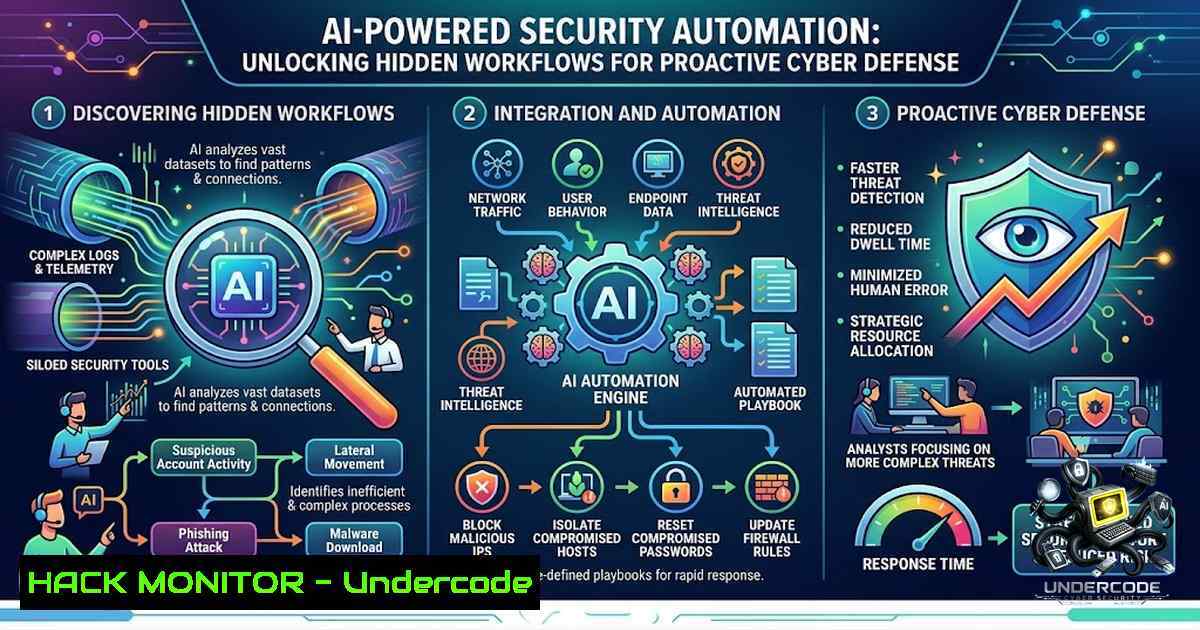
Introduction:
In the rapidly evolving landscape of cybersecurity, artificial intelligence (AI) is no longer a futuristic concept but a practical tool for daily operations. While many professionals use AI models like ChatGPT for simple queries, its true potential lies in automating complex workflows, from scheduled vulnerability scanning to parsing unstructured threat intelligence data. Integrating these AI-driven workflows into your security stack can drastically reduce response times and enhance the accuracy of your defensive measures.
Learning Objectives & Secrets:
- Objective 1: Master the creation of reusable AI prompts to automate the analysis of system logs and security alerts, turning raw data into actionable intelligence.
- Objective 2 Secret Tip: Leverage AI for screenshot analysis to rapidly extract configuration details from cloud dashboards, identifying misconfigurations without manual inspection.
- Objective 3 Secret Tip: Utilize AI’s natural language processing to convert verbose security advisories into structured tables, enabling quick risk assessment and prioritization.
You Should Know:
- Automating Log Analysis with AI and Native Commands
Extended insight: The post highlights turning “messy info into clean tables.” In a cybersecurity context, this is crucial for parsing firewall logs or system event logs. By using AI to structure this data, you can then feed it into native system tools for analysis.
Step‑by‑step guide:
- Step 1: Extract raw log data. On Linux, use `tail -f /var/log/auth.log` to monitor real-time authentication logs. On Windows, use `Get-EventLog -LogName Security | Select-Object -First 10` in PowerShell.
- Step 2: Copy the extracted log snippet and prompt your AI model: “Analyze the following log entries, identify failed login attempts, and organize the IP addresses and timestamps into a CSV table.”
- Step 3: Save the AI-generated structured output to a file (e.g.,
failed_logins.csv). - Step 4: Use Linux commands to process this further: `cat failed_logins.csv | sort | uniq -c` to count unique failed attempts.
- Step 5: Automate this entire process by creating a shell script that runs `grep “Failed password” /var/log/auth.log` and pipes the output to a Python script that integrates with the AI API for parsing.
2. Reusable Projects for Security Configuration Hardening
Extended insight: “Reusable projects” are akin to repeatable security playbooks. This section focuses on using AI to generate and maintain scripts for hardening configurations across multiple servers.
Step‑by‑step guide:
- Step 1: Create a master prompt for your AI: “You are a Senior Security Engineer. Generate an updated CIS benchmark script for Ubuntu 22.04 that disables IPv6 forwarding and sets secure umask values.”
- Step 2: Review the generated script and adjust it to your environment.
- Step 3: Convert the AI’s text output into an executable script. Save it as `hardening.sh` and run
chmod +x hardening.sh. - Step 4: For Windows, request the AI for a PowerShell script: “Create a PowerShell script to disable SMBv1 and enable Windows Defender real-time monitoring.”
- Step 5: Execute the script on test servers first, using `./hardening.sh` on Linux or `.\hardening.ps1` on Windows. Store these scripts in a version-controlled repository for reuse across all new deployments.
3. Screenshot Analysis for Cloud Security Posture
Extended insight: AI’s multimodal capabilities allow it to analyze screenshots of cloud consoles (AWS, Azure, GCP) to detect misconfigurations, such as overly permissive S3 buckets or exposed security groups.
Step‑by‑step guide:
- Step 1: Take a screenshot of your cloud provider’s networking dashboard showing security group rules.
- Step 2: Upload the screenshot to your AI tool and prompt: “Identify any rules that allow inbound traffic from 0.0.0.0/0 on ports 22 or 3389.”
- Step 3: Based on the AI’s analysis, identify potential vulnerabilities.
- Step 4: Remediate using the CLI: For AWS, use `aws ec2 revoke-security-group-ingress –group-id sg-12345 –protocol tcp –port 22 –cidr 0.0.0.0/0` to remove a risky rule.
- Step 5: Request the AI to generate a Terraform script that ensures these insecure rules are never provisioned, effectively “shifting left” on security.
4. Voice Planning for Incident Response (IR)
Extended insight: “Voice planning” can be transformed into a rapid IR checklist generator. This is vital for stress-free incident management where reading is impractical.
Step‑by‑step guide:
- Step 1: Initiate a voice-to-text AI session and speak: “Scenario: Ransomware detected in Segment A. List initial response steps.”
- Step 2: Allow the AI to transcribe and generate a Step‑by‑step response plan.
- Step 3: Use the Linux `curl` command to query an AI API to feed it real-time network connections: `curl -X GET http://localhost:8080/connections` and have the AI analyze the output for unusual connections.
– Step 4: On Windows, use `netstat -an` and pipe the output to a file, then have the AI cross-reference the established IP addresses against known threat intelligence feeds. - Step 5: Deploy the AI-generated plan immediately, documenting all actions via the AI’s versioned chat history for post-incident review.
5. API Security and Structured Data Transformation
Extended insight: The concept of turning messy info into tables applies perfectly to API security logs (e.g., from Nginx, Apache, or AWS API Gateway). This helps in detecting API abuse.
Step‑by‑step guide:
- Step 1: Access your API access logs. In Linux, view them with
cat /var/log/nginx/access.log. - Step 2: Extract specific fields using `awk` to isolate endpoints:
awk '{print $7}' /var/log/nginx/access.log. - Step 3: Prompt your AI: “Take this list of API endpoints and the corresponding status codes, organize them by endpoint, and provide a table highlighting 404 errors, which could indicate fuzzing or scanning attempts.”
- Step 4: To mitigate detected fuzzing, use Linux `iptables` to block the offending IP:
iptables -A INPUT -s [bash] -j DROP. - Step 5: Alternatively, for AWS WAF, generate an update rule using the CLI:
aws wafv2 update-ip-set --1ame Attackers --scope REGIONAL --addresses [bash].
6. Scheduled AI Tasks for Continuous Threat Monitoring
Extended insight: “Scheduled tasks” allow you to automate daily vulnerability checks. Combine cron jobs (Linux) or Task Scheduler (Windows) with AI to run health checks.
Step‑by‑step guide:
- Step 1: Write a script (
check_vulns.py) that runs a vulnerability scanner like `nmap` or `vuls` and outputs the data to a JSON file. - Step 2: In Linux, add a cron job:
0 8 /usr/bin/python3 /opt/check_vulns.py. This runs the scanner daily. - Step 3: Create a secondary script that reads the JSON output and sends it to an AI model for analysis, asking it to “Summarize new critical vulnerabilities and suggest patches.”
- Step 4: On Windows, use Task Scheduler to trigger a PowerShell script that runs `Invoke-Expression ‘nmap -sV 192.168.1.0/24’` and logs the output.
- Step 5: Have the AI email a daily summary report to the SecOps team, automating the first line of defense.
What Undercode Say:
- Key Takeaway 1: The power of AI in cybersecurity is not in ad-hoc queries but in the seamless integration of its outputs into existing system administration and scripting workflows.
- Key Takeaway 2: By leveraging AI for structured data transformation, security teams can move from reactive analysis to proactive automation, significantly reducing mean time to detection (MTTD) and response (MTTR).
Analysis (10 Lines):
The shift towards integrating AI like ChatGPT with native OS commands represents a new frontier in security workflow automation. By using AI to parse logs and generate structured data, security analysts can bypass the tedious manual review process and focus on strategic remediation. The combination of Linux’s `grep` and `awk` with AI’s natural language processing allows for a hybrid approach that retains the power of traditional scripting while adding a layer of intelligent summarization. This is particularly effective in incident response, where speed is critical, and the ability to quickly process screenshots or voice notes reduces the cognitive load on engineers during high-stress events. Furthermore, using AI to generate reusable hardening scripts ensures consistency across large infrastructures, preventing configuration drift. The practice of scheduling these AI-assisted checks enables continuous compliance monitoring, turning a static security policy into a dynamic, adaptive defense mechanism. As cyber threats become more automated, the security industry must adopt similar levels of automation to keep pace. The ability to turn verbose, unstructured data into actionable, structured data is arguably the greatest return on investment from AI tools today. Ultimately, the future lies in hybrid models where AI acts as a force multiplier for human analysts, not a replacement, but a facilitator of deeper, more efficient technical work.
Prediction:
- +1: We can expect to see a surge in open-source frameworks that natively integrate LLM APIs with common command-line utilities, enabling out-of-the-box automation for security analysts.
- +1: AI models will evolve to become more context-aware of network topologies, allowing them to suggest precise firewall and routing changes based on log analysis, drastically reducing human error.
- -1: This increased reliance on AI prompts exposes a new attack vector: “Prompt Injection” attacks targeting automated security scripts, potentially leading to false positives or the execution of malicious commands.
- -1: Over-reliance on AI for summarization without human oversight might lead to the overlooked detection of novel, sophisticated attacks that do not fit standard data patterns.
- +1: The continuous development of voice-to-action tools will revolutionize war-room meetings, allowing real-time translation of spoken risk into executable security policies.
- -1: As AI automation becomes standard, the demand for deep technical knowledge of Linux and Windows commands might decline, potentially leading to a skills gap in basic troubleshooting when the AI fails.
▶️ Related Video (88% Match):
🎯Let’s Practice For Free:
🎓 Live Courses & Certifications:
Join Undercode Academy for Verified Certifications
🚀 Request a Custom Project:
Secure, high-velocity infrastructure and disruptive technological engineering. Contact our engineering team for high-tier development and proprietary systems:
[email protected]
💎 Smart Architecture | 🛡️ Secure by Design | ⭐ Trusted by Thousands
IT/Security Reporter URL:
Reported By: https://lnkd.in/p/eMnthVNM – Hackers Feeds
Extra Hub: Undercode MoN
Basic Verification: Pass ✅


