Listen to this Post
Introduction:
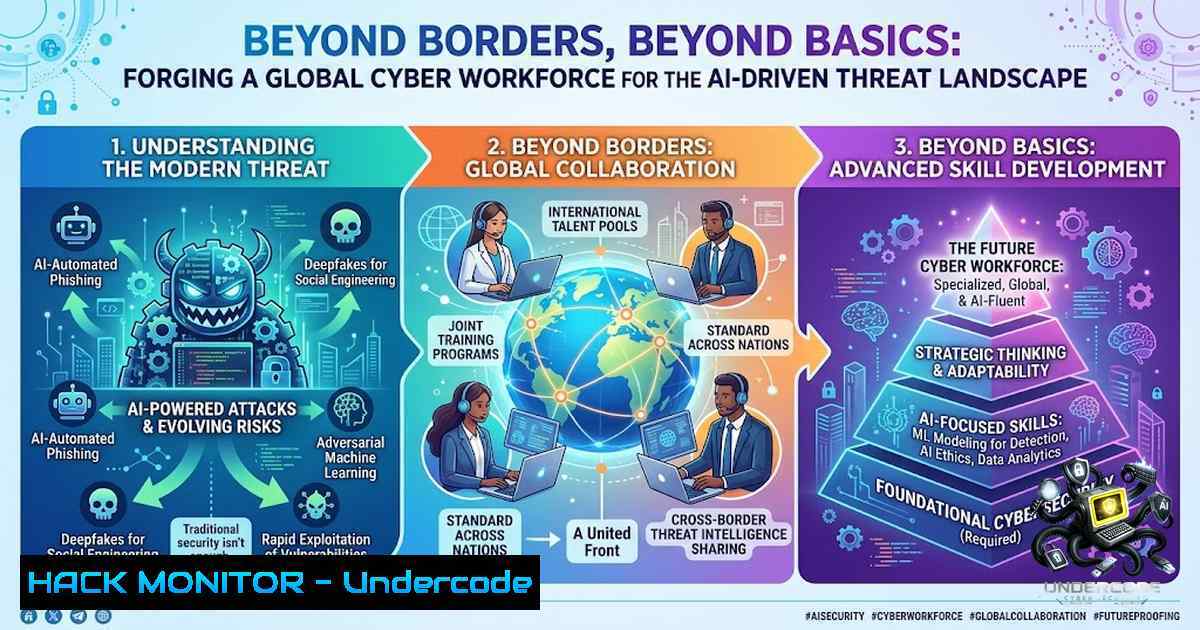
The digital economy of the Asia-Pacific region is expanding at an unprecedented rate, yet this growth is shadowed by an increasingly complex and borderless cyber threat landscape. Organizations from India to Japan face sophisticated attacks that do not discriminate based on geography, targeting critical infrastructure, financial services, and digital identities. In response, the industry demands a new breed of cybersecurity professional—one who possesses not only deep technical expertise across Cloud, AI, and SOC operations but also the strategic mindset to think like an attacker, defend like a professional, and communicate like a leader.
Learning Objectives:
- Master essential Linux and Windows command-line tools for security monitoring, log analysis, and incident response.
- Develop hands-on skills in Vulnerability Assessment and Penetration Testing (VAPT) using industry-standard frameworks.
- Understand cloud security hardening techniques and API security testing methodologies.
- Explore the emerging threat landscape of AI-powered attacks and defensive AI strategies.
You Should Know:
1. Linux Command-Line Arsenal for Security Professionals
For any cybersecurity professional, proficiency in the Linux command line is non-1egotiable. It is the foundation for penetration testing, log analysis, and system hardening. A solid grasp of Linux basics, including navigating the filesystem, managing users and permissions, and configuring firewalls, is essential.
Step-by-Step Guide: Essential Linux Commands for Security Analysts
1. Network Reconnaissance and Scanning:
- Use `nmap` for host discovery and port scanning. A basic scan to discover live hosts on a subnet:
nmap -sP 192.168.1.0/24
- For a more detailed scan to detect services and operating systems:
nmap -A 192.168.1.100
2. Log Analysis and Monitoring:
- Security analysts spend significant time reviewing logs. On Linux, system logs are primarily stored in
/var/log/. - To monitor authentication logs in real-time for failed login attempts (a key indicator of brute-force attacks):
tail -f /var/log/auth.log | grep "Failed password"
- To check for user account changes or privilege escalations, review the secure log:
cat /var/log/secure | grep "sudo"
3. Process and System Monitoring:
- Identifying suspicious processes is a core incident response task. Use `ps` to list running processes and `top` or `htop` for a real-time, interactive view of system resource usage.
ps aux | grep -i "suspicious_process_name"
- To check for listening network connections that might indicate a backdoor or reverse shell:
netstat -tulpn
4. Privilege Escalation Checks (for Pentesters):
- During a penetration test, identifying ways to escalate privileges is critical. A common command to find files with the SUID bit set (which can be exploited) is:
find / -perm -4000 -type f 2>/dev/null
2. Windows Security Toolkit and Command-Line Utilities
Windows environments are ubiquitous in enterprise networks, making them a prime target for attackers. Modern security professionals must be adept at using Windows command-line tools and PowerShell for threat hunting and incident response. Microsoft is integrating advanced tools like Sysmon directly into Windows to enhance monitoring capabilities.
Step-by-Step Guide: Windows Commands for SOC Analysts
1. Deploying Sysmon for Enhanced Logging:
- Sysmon (System Monitor) is a powerful tool that logs detailed system activity to the Windows Event Log, providing invaluable data for threat hunting.
- Once installed, you can enable it with a basic configuration for comprehensive monitoring:
sysmon -accepteula -i
2. Investigating Persistence Mechanisms:
- Attackers often establish persistence to maintain access after a reboot. Use PowerShell to query startup commands:
Get-WmiObject Win32_StartupCommand
- To check for scheduled tasks that might be malicious:
Get-ScheduledTask | Where-Object {$_.State -1e "Disabled"}
3. Network and Process Investigation:
- The `netstat` command is crucial for identifying active connections and listening ports.
netstat -ano
- Combine this with `tasklist` to map network connections to specific processes. For example, to find the process name for a PID (Process ID) from
netstat:tasklist | findstr <PID>
4. Leveraging PowerShell for Advanced Threat Hunting:
- PowerShell is a powerful scripting language for security automation. A script can be used to parse Windows Event Logs for specific security events, such as Event ID 4624 (successful logon) or 4720 (user account creation).
- To search the Security log for all logon events from a specific user:
Get-WinEvent -LogName Security | Where-Object { $<em>.Id -eq 4624 -and $</em>.Message -match "username" }
- Vulnerability Assessment and Penetration Testing (VAPT) in Practice
VAPT remains a cornerstone of proactive security. It involves a systematic approach to identifying and exploiting vulnerabilities in an organization’s infrastructure. A typical VAPT process involves using a suite of tools for scanning, exploitation, and reporting.
Step-by-Step Guide: A VAPT Workflow
1. Reconnaissance and Scanning:
- Begin with network scanning using Nmap to discover live hosts and open ports.
nmap -sV -sC -O 192.168.1.100
- For web applications, use Nikto to perform a comprehensive web server vulnerability scan.
nikto -h http://192.168.1.100
2. Vulnerability Identification:
- For more in-depth analysis, use OWASP ZAP or Burp Suite as an intercepting proxy to test web applications for flaws like SQL Injection and Cross-Site Scripting (XSS).
- Test for SQL Injection vulnerabilities using SQLmap. Once you identify a potential vulnerable parameter, run:
sqlmap -u "http://192.168.1.100/page?id=1" --dbs
3. Exploitation:
- The Metasploit Framework is the industry standard for developing and executing exploit code against a target.
- After identifying a vulnerability, you can use Metasploit to launch an exploit and gain a foothold on the system.
msfconsole
use exploit/windows/smb/ms17_010_eternalblue
set RHOSTS 192.168.1.100
exploit
4. Cloud Infrastructure Hardening
As organizations migrate to the cloud, securing infrastructure in AWS, Azure, and GCP is paramount. Hardening involves a combination of proper configuration, continuous monitoring, and adherence to best practices.
Step-by-Step Guide: Key Cloud Security Commands
1. AWS Security Hardening:
- Enable essential security services like GuardDuty for threat detection and CloudTrail for auditing API calls.
aws guardduty create-detector --enable
aws cloudtrail create-trail --1ame security-trail --s3-bucket-1ame your-log-bucket
- Enforce security best practices, such as ensuring the root account has Multi-Factor Authentication (MFA) enabled.
2. Azure Security Posture Management:
- Enable Azure Security Center to get a unified view of your security posture.
az security
- Apply resource locks to prevent accidental deletion of critical production resources.
AzResourceLock -LockName "ReadOnlyLock" -LockLevel CanNotDelete -ResourceGroupName "Production"
5. API Security Testing
With the proliferation of microservices and mobile applications, APIs have become a primary attack vector. Security testing must be integrated into the API development lifecycle. Automated tools can scan OpenAPI specifications for vulnerabilities.
Step-by-Step Guide: Scanning APIs for Vulnerabilities
1. Scanning OpenAPI Specifications:
- Use tools like RedPill Security CLI to analyze your API definition files for security misconfigurations.
npm install -g @redpillsec/cli
redpill scan openapi api.yaml
2. Dynamic API Security Testing (DAST):
- Tools like VulnAPI allow you to scan live API endpoints. You can use a cURL-like syntax to point the scanner at your API.
vulnapi scan curl https://api.example.com/v1/users
- For a more advanced, AI-powered fuzzing approach, tools like Indago use LLMs to generate intelligent payloads, uncovering complex vulnerabilities that traditional wordlists might miss.
indago scan --spec petstore.yaml --provider anthropic --use-llm-payloads
6. Navigating the AI Security Frontier
Artificial Intelligence is a double-edged sword in cybersecurity. While it empowers defenders with advanced threat detection, it also equips attackers with tools for automated vulnerability discovery and sophisticated social engineering. The industry is rapidly moving towards strategies of “bounded autonomy” for AI-driven security systems, balancing speed with control.
Mitigating AI-Specific Threats:
- Implement Robust GRC for AI: Governance, Risk, and Compliance (GRC) leaders must establish AI assurance channels, requiring model audits and agent sandboxing to contain potential risks.
- Adopt Industry Frameworks: Leverage established frameworks like the OWASP GenAI Security Project to guide the secure development and deployment of AI systems.
- Focus on AI-Ready Skills: The workforce must be upskilled to understand the unique challenges of securing AI models and data pipelines, as AI reshapes the required competencies for cybersecurity professionals.
What Undercode Say:
- Global Readiness is Non-1egotiable: Cybersecurity is a global challenge that requires a workforce capable of thinking beyond geographical and cultural borders. Training must prepare professionals for the international nature of cyber threats and the diverse regulatory landscapes they will encounter.
- Practical Application Trumps Theory: The modern security professional must be a practitioner. Hands-on experience with industry-standard tools, from Linux command lines to cloud hardening scripts, is far more valuable than theoretical knowledge alone. The ability to “think like an attacker and defend like a professional” is cultivated through rigorous, practical application.
Analysis: The post from Shree Shyam Institute of Technology (SSIT) effectively captures the urgent need for a globally competent cybersecurity workforce, particularly in the rapidly digitizing Asia-Pacific region. By emphasizing a curriculum that spans technical domains (SOC, VAPT, Cloud, AI) and soft skills (leadership, risk assessment), SSIT positions itself as a partner in developing future-ready professionals. The key differentiator highlighted is the focus on practical, real-world readiness over mere certification, acknowledging that the complexity of modern threats demands adaptable, skilled defenders who can operate across any environment—be it Linux, Windows, or the cloud. The institute’s vision aligns perfectly with the industry’s demand for professionals who can not only use tools but also strategize, communicate, and lead in the face of evolving cyber risks.
Prediction:
- +1 The demand for cybersecurity professionals in the APAC region will continue to outpace supply, creating a robust job market for those with practical, globally-oriented training. Institutions like SSIT that bridge the skills gap will become critical partners for both individuals and enterprises.
- +1 AI will become an indispensable tool for both attackers and defenders, leading to a new specialization in “AI Security.” Professionals who understand how to secure AI systems and use AI for defense will be among the most sought-after in the industry.
- -1 The increasing sophistication of AI-powered attacks will outpace the ability of traditional security controls to detect and respond, leading to a surge in costly data breaches and ransomware incidents targeting AI systems themselves.
- -1 A significant shortage of professionals with cloud and API security expertise will persist, leaving many organizations vulnerable as their digital transformation accelerates.
- +1 The integration of advanced logging and monitoring tools like Sysmon directly into operating systems will democratize threat hunting, enabling smaller security teams to achieve enterprise-grade visibility.
- +1 The focus on “bounded autonomy” in AI security will lead to the development of more resilient, self-healing systems that can contain and remediate threats with minimal human intervention.
▶️ Related Video (80% Match):
🎯Let’s Practice For Free:
🎓 Live Courses & Certifications:
Join Undercode Academy for Verified Certifications
🚀 Request a Custom Project:
Secure, high-velocity infrastructure and disruptive technological engineering. Contact our engineering team for high-tier development and proprietary systems:
[email protected]
💎 Smart Architecture | 🛡️ Secure by Design | ⭐ Trusted by Thousands
IT/Security Reporter URL:
Reported By: Ssit Cybersecurity – Hackers Feeds
Extra Hub: Undercode MoN
Basic Verification: Pass ✅


