Listen to this Post
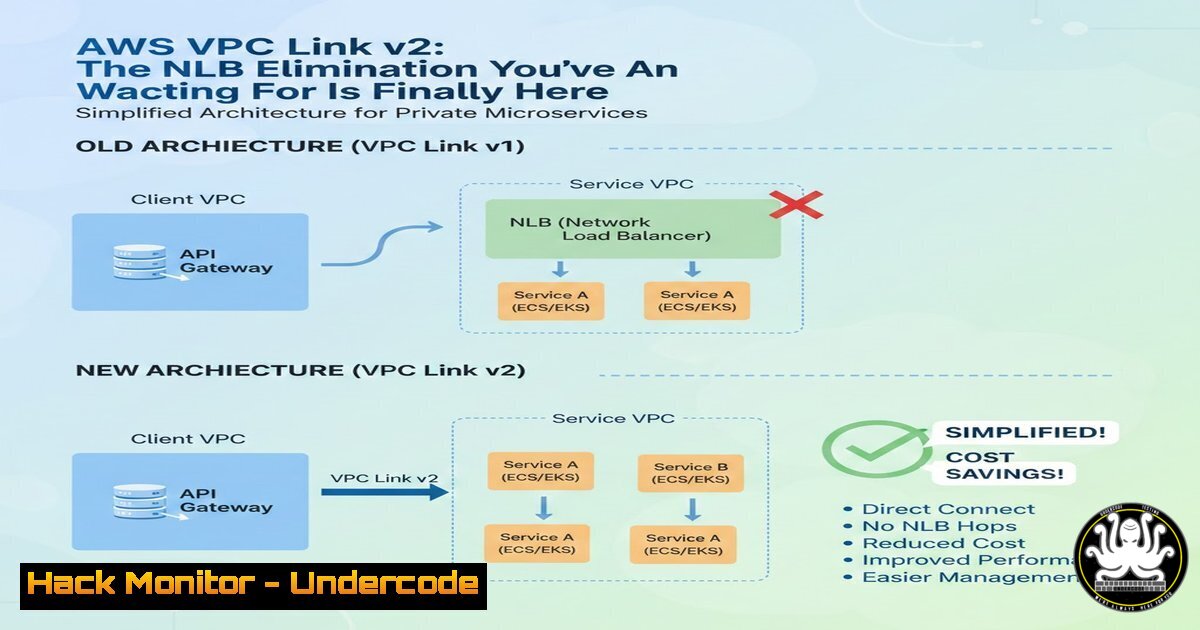
Introduction:
AWS has fundamentally streamlined microservices architecture with the quiet release of VPC Link v2 for API Gateway. This long-anticipated update allows for direct integration between an API Gateway and an internal Application Load Balancer (ALB), completely removing the mandatory Network Load Balancer (NLB) previously required. This architectural shift results in a simpler, more cost-effective, and performant design for modern applications, particularly those running on EKS or ECS within private VPCs.
Learning Objectives:
- Understand the architectural evolution from the legacy NLB-based design to the new direct API Gateway to ALB integration.
- Learn the step-by-step process to configure a VPC Link v2 and integrate it with an ALB for a production-ready setup.
- Implement security hardening and cost optimization measures specific to this new, simplified pattern.
You Should Know:
- The Architectural Shift: From Three Tiers to Two
The legacy pattern for exposing internal services via API Gateway was unnecessarily complex. It forced a data flow where API Gateway routed requests to a Network Load Balancer, which then forwarded traffic to the Application Load Balancer. This introduced an extra network hop, increased latency, added a separate NLB cost, and created more potential points of failure.
The new, streamlined architecture with VPC Link v2 is simple: API Gateway → ALB → Services. This reduces complexity, lowers latency, decreases costs, and simplifies the operational overhead for your DevOps and platform engineering teams.
- Step-by-Step Guide: Configuring VPC Link v2 and ALB Integration
This guide assumes you have an existing VPC, ALB, and target groups with registered services (e.g., EC2 instances or ECS tasks).
Step 1: Create a New VPC Link (Version 2)
Navigate to the AWS API Gateway console. Under “VPC Links,” create a new resource.
– Name: `prod-api-gw-to-alb`
– Target NLB: This field is no longer present for VPC Link v2.
– VPC: Select your application’s VPC.
– Security Groups: Assign security groups that allow inbound traffic on the ALB’s listener port (typically 80 or 443) from the VPC Link.
AWS CLI Command:
aws apigateway create-vpc-link \
--name 'prod-api-gw-to-alb' \
--target-arns 'arn:aws:elasticloadbalancing:us-east-1:123456789012:loadbalancer/app/my-alb/50dc6c495c0c9188' \
--no-tags
Note: The `–target-arns` now takes the ALB’s ARN directly, not an NLB’s ARN.
Step 2: Configure a Private Integration in API Gateway
In your API Gateway REST or HTTP API, create a new integration.
– Integration Type: HTTP Proxy / Private Integration
– VPC Link: Select the VPC Link created in Step 1 (prod-api-gw-to-alb).
– Endpoint URL: Enter the DNS name of your ALB (e.g., `http://internal-my-alb-1234567890.us-east-1.elb.amazonaws.com`), appended by the path your services expect.
Step 3: Create a New Route
Attach this new private integration to a route in your API (e.g., `ANY /api/{proxy+}`). This ensures all traffic to paths under `/api/` is forwarded directly to your ALB.
- Security Hardening: Locking Down the New Data Path
While the architecture is simpler, security remains paramount. The VPC Link creates a network interface in your VPC. You must control traffic with security groups.
- ALB Security Group (Ingress Rule): Allow traffic from the VPC Link’s security group on ports 80/443. Do not open the ALB to the entire VPC CIDR.
- VPC Link Security Group (Egress Rule): Should only allow outbound traffic to the ALB’s security group on ports 80/443. This follows the principle of least privilege.
Example Security Group Egress Rule for VPC Link (using AWS CLI):
aws ec2 authorize-security-group-egress \
--group-id sg-0vpcl1nks3cur1ty \
--ip-permissions 'IpProtocol=tcp,FromPort=80,ToPort=80,UserIdGroupPairs=[{GroupId=sg-0albsecgr0up}]'
4. Infrastructure as Code (IaC) Implementation with Terraform
To ensure reproducibility, implement this pattern using Terraform.
resource "aws_apigatewayv2_vpc_link" "main" {
name = "prod-vpc-link"
security_group_ids = [aws_security_group.vpc_link.id]
subnet_ids = var.private_subnet_ids  Use private subnets
}

resource "aws_apigatewayv2_integration" "alb_integration" {
api_id = aws_apigatewayv2_api.main.id
integration_type = "HTTP_PROXY"

connection_type = "VPC_LINK"
connection_id = aws_apigatewayv2_vpc_link.main.id
description = "Integration with ALB via VPC Link"
integration_method = "ANY"
integration_uri = aws_lb_listener.api.arn
passthrough_behavior = "WHEN_NO_MATCH"
}

resource "aws_security_group" "vpc_link" {
name_prefix = "vpc-link-sg-"
vpc_id = var.vpc_id

egress {
from_port = 80
to_port = 80
protocol = "tcp"
security_groups = [aws_security_group.alb.id]
}
}
5. Cost-Benefit Analysis and Performance Monitoring
The immediate financial benefit is the removal of the NLB cost. An NLB costs approximately $0.0225 per hour plus $0.006 per GB of data processed. For a high-traffic service, this can amount to hundreds of dollars in monthly savings.
To monitor performance, leverage Amazon CloudWatch. Key metrics for the new setup include:
– API Gateway: `IntegrationLatency` to confirm reduced latency.
– ALB: `TargetResponseTime` and RequestCount.
– Create a dashboard to compare these metrics pre- and post-migration to quantify the performance improvement.
6. Troubleshooting Common Integration Pitfalls
- Error 503 (Service Unavailable): This often indicates the VPC Link cannot reach the ALB. Verify the ALB’s security group allows ingress from the VPC Link’s security group. Also, ensure the ALB is in the same VPC and subnets as the VPC Link.
- Error 504 (Gateway Timeout): The ALB is reachable, but the backend targets (e.g., EC2/ECS) are not responding or are timing out. Check the health of the targets in the ALB’s target group and the security groups of the backend instances.
- Use VPC Flow Logs to investigate packet-level traffic between the VPC Link network interface and the ALB.
What Undercode Say:
- Simplification is a Security and Operational Win: Removing the NLB doesn’t just save money; it reduces the attack surface and the number of components that require monitoring, patching, and configuration management. A simpler architecture is inherently more secure and easier to defend.
- The Future is Direct Integration: This move by AWS signals a continued effort to reduce friction and “glue” components in their ecosystem. It paves the way for more direct, efficient, and cost-optimized patterns, pushing the industry towards leaner cloud-native designs.
This update is more than a quality-of-life improvement; it’s a corrective action that aligns AWS services with modern DevOps principles. By eliminating a redundant and costly component, AWS empowers teams to build more resilient and economical systems. The direct integration model enhances performance and forces a tighter, more secure coupling between the API gateway and the application layer, which is a best practice for any public-facing service.
Prediction:
The introduction of VPC Link v2 is a precursor to a broader industry shift towards eliminating redundant network layers in cloud architectures. We predict that within two years, the old NLB-based pattern will be considered a legacy anti-pattern. Furthermore, this will accelerate the adoption of GitOps and Infrastructure as Code, as the simplified topology is easier to model and automate. AWS and other cloud providers will continue to release similar “shortcut” integrations, particularly in their container and serverless offerings, to minimize latency and cost while maximizing developer productivity and system reliability.
🎯Let’s Practice For Free:
IT/Security Reporter URL:
Reported By: Aman Devops – Hackers Feeds
Extra Hub: Undercode MoN
Basic Verification: Pass ✅


