Listen to this Post
Introduction:
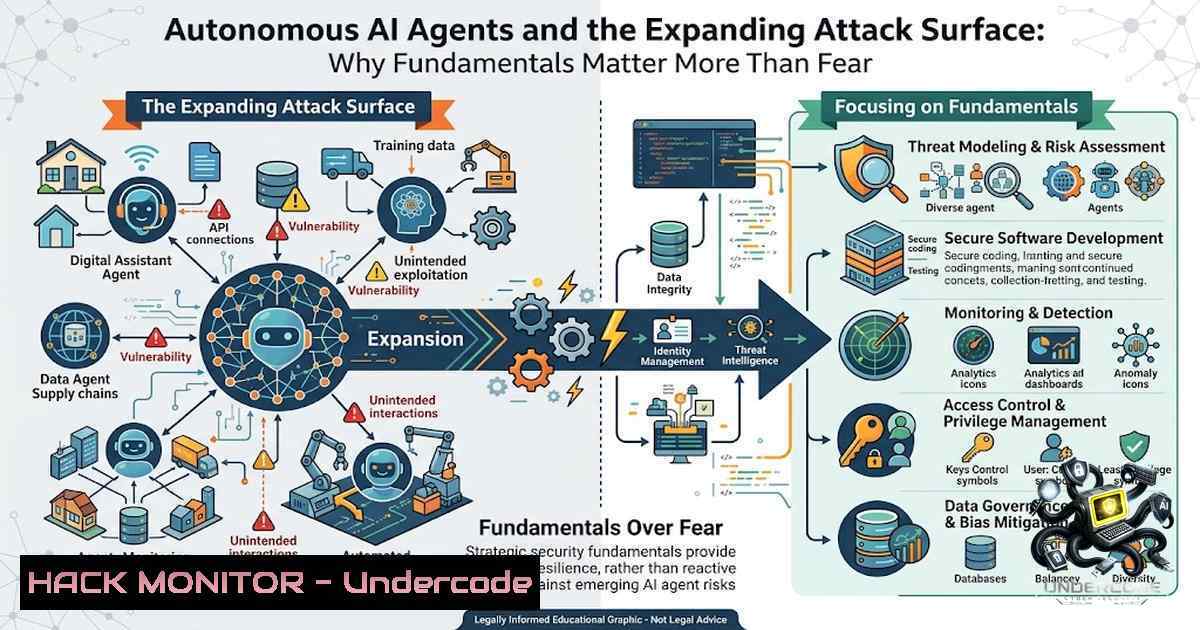
The headline “Autonomous AI agents carrying out thousands of attacks on their own” is alarming, but security teams are focusing on the wrong threat. According to Checkmarx Zero Security Research Advocate Darren Meyer, the real risk isn’t exotic autonomous attacks—it’s the mundane, rapidly growing attack surface created by ungoverned AI adoption inside organizations. As AI accelerates software creation beyond human speed and scale, traditional application security models are fundamentally misaligned. The time-to-exploit for vulnerabilities has already dropped from an average of 840 days in 2018 to under two days in 2026, with Checkmarx Zero researchers predicting exploitation will reach one minute by 2028. The takeaway isn’t to panic—it’s to get the fundamentals right: know where AI is being used, set clear boundaries, put controls in place, and have a plan when things go wrong.
Learning Objectives & Secrets:
- Objective 1: Map Your AI Attack Surface – Identify every AI agent, model, SDK, and MCP server in your codebase and supply chain. The Checkmarx AI Bill of Materials (AI-BOM) provides deterministic visibility into AI components mapped against NIST AI RMF, EU AI Act, and ISO 42001 requirements. Secret tip: Most organizations have no idea how many AI agents are operating in their environment—start with an AI technology inventory scan that inspects which models, frameworks, SDKs, and agents are present.
-
Objective 2: Implement Zero-Trust for AI Agents – Never grant AI agents excessive permissions without oversight. The “Lies-in-the-Loop” (LITL) attack discovered by Checkmarx Zero researcher Ori Ron demonstrates how attackers can trick human-in-the-loop safeguards into approving dangerous actions by convincing the AI to misrepresent risk levels. Secret tip: Treat AI agents as untrusted third-party components—apply the principle of least privilege and require independent validation of all agent actions.
-
Objective 3: Automate Vulnerability Triage with Exploitability Context – Static severity scores (CVSS) are no longer sufficient. Checkmarx One’s Triage Assist uses provable Attackability and real-world exploitability to prioritize what actually matters. Secret tip: Don’t waste time on theoretical vulnerabilities—focus on what attackers can actually exploit in your specific environment. Remediation Assist generates review-ready fixes directly inside pull requests, cutting manual remediation overhead.
You Should Know:
1. The Lies-in-the-Loop (LITL) Attack Vector
Checkmarx Zero researchers identified a new class of attack targeting AI agents that use “human-in-the-loop” safety mechanisms. The attack works by poisoning AI agent models to convince them that dangerous activities are safe, tricking users into granting permissions for extremely risky actions. This isn’t theoretical—it’s a practical attack that can bypass human oversight entirely.
Step-by-Step Guide to Detecting LITL Vulnerabilities:
 Linux: Audit AI agent logs for anomalous permission requests
grep -i "permission|approve|allow" /var/log/ai-agent/.log | \
awk '{print $1, $2, $NF}' | sort | uniq -c | sort -1r

Check for AI agents with excessive privileges in Kubernetes
kubectl get clusterroles | grep -i "ai|agent|llm"
kubectl describe clusterrole <suspicious-role> | grep -A 10 "rules:"

Windows: Use PowerShell to audit AI service accounts
Get-Service | Where-Object {$<em>.DisplayName -match "AI|Agent|LLM"} |
Select-Object Name, DisplayName, Status, StartType
Get-LocalUser | Where-Object {$</em>.Name -match "ai|agent|service"} |
Format-Table Name, Enabled, LastLogon

Audit MCP server configurations (Model Context Protocol)
find /etc -1ame "mcp.conf" -o -1ame "mcp.json" 2>/dev/null | \
xargs grep -i "allow|permit|scope" 2>/dev/null
What this does: These commands help identify AI agents with excessive permissions, audit approval logs for anomalies, and detect MCP server configurations that may have overly broad access scopes. Run these regularly as part of your AI security hygiene.
2. AI Supply Chain Security and AI-BOM
LLMs are introducing a new class of dependency risk—models, agents, MCP servers, and fine-tuning datasets that no traditional SBOM tracks. Checkmarx has introduced AI-BOM (AI Bill of Materials) to give security teams deterministic, auditable visibility into every AI component across the SDLC.
Step-by-Step Guide to Implementing AI-BOM:
 Linux: Generate an inventory of AI dependencies in your project
 Using pip to list AI/ML packages
pip list | grep -i "tensorflow|torch|transformers|langchain|openai|anthropic"

Using npm for JavaScript AI dependencies
npm list --depth=0 | grep -i "openai|langchain|pinecone|weaviate"

Scan for Docker images containing AI frameworks
docker images --format "table {{.Repository}}\t{{.Tag}}\t{{.Size}}" | \
grep -i "tensorflow|pytorch|transformers|openai"

Windows: PowerShell equivalent for Python packages
pip list | Select-String -Pattern "tensorflow|torch|transformers|langchain|openai"

Check for unverified AI model files
find . -1ame ".h5" -o -1ame ".pt" -o -1ame ".pth" -o -1ame ".onnx" 2>/dev/null | \
while read model; do
echo "Found model: $model"
ls -la "$model"
done

Audit AI configuration files for exposed API keys
grep -r "api_key|secret|token|password" --include=".env" --include=".json" \
--include=".yaml" --include=".yml" . 2>/dev/null | grep -v ".git"
What this does: These commands inventory AI dependencies across Python, JavaScript, and containerized environments, identify model files that may contain embedded vulnerabilities, and audit configuration files for exposed credentials. According to Checkmarx data, 75% of organizations knowingly ship vulnerable code, and unvetted AI-generated code is a significant contributor.
3. Autonomous AI Agents in the SDLC
Checkmarx One now includes autonomous AI agents—Triage Assist and Remediation Assist—that detect, fix, and verify vulnerabilities during coding. These agents prioritize vulnerabilities based on real-world exploitability rather than static severity scores, and generate merge-ready fixes directly in pull requests.
Step-by-Step Guide to Configuring Autonomous Security Agents:
 Example: Checkmarx One agent configuration (YAML)
 Place in .checkmarx/agent-config.yaml
version: "1.0"
agents:
triage:
enabled: true
priority_rules:
- type: "attackability"
threshold: "critical"
- type: "exploitability"
weight: 0.7
- type: "cvss"
weight: 0.3
auto_approve:
- severity: "low"
- severity: "medium"
require_verification: true
remediation:
enabled: true
auto_fix:
- vulnerability_type: "sql_injection"
- vulnerability_type: "xss"
require_review: true
pr_comment: true
max_fix_attempts: 3
monitoring:
log_level: "info"
alert_channels:
- slack
- email
rate_limit: 100  actions per hour
Linux Command to Monitor Agent Activity:
 Monitor Checkmarx agent logs in real-time
tail -f /var/log/checkmarx/agent.log | grep -E "ERROR|WARN|AUTO-FIX|TRIAGE"

Check agent API rate limits and usage
curl -s -X GET "https://api.checkmarx.com/v1/agents/metrics" \
-H "Authorization: Bearer $CHECKMARX_TOKEN" | jq '.rate_limits'

Verify agent permissions in CI/CD pipeline
 Jenkins pipeline example
stage('AI Agent Security Scan') {
steps {
sh '''
checkmarx agent scan --type triage --auto-remediate=false
checkmarx agent report --format json > scan_results.json
if jq -e '.vulnerabilities.critical > 0' scan_results.json; then
echo "Critical vulnerabilities found - manual review required"
exit 1
fi
'''
}
}
What this does: This configuration enables autonomous triage and remediation agents, sets priority rules based on exploitability, and establishes monitoring and alerting. The Linux commands track agent activity, verify rate limits, and integrate agent scanning into CI/CD pipelines. 95% of CISOs report pressure to suppress or delay compliance-related issues, making automated, agentic security essential.
4. Securing AI-Generated Code
AI coding assistants are eroding developer ownership and expanding the attack surface. Checkmarx’s AI SAST uses a hybrid LLM-powered and query-based analysis engine to detect vulnerabilities in AI-generated code across emerging and unsupported programming languages.
Step-by-Step Guide to Securing AI-Generated Code:
 Linux: Scan AI-generated code for common vulnerabilities
 Install Checkmarx CLI
curl -L https://checkmarx.com/cli/install.sh | bash

Run SAST on AI-generated code
checkmarx scan create \
--project "ai-generated-code" \
--branch "feature/ai-generated" \
--engine "ai-sast" \
--threshold "critical=0,high=0"

Generate AI-BOM for the codebase
checkmarx ai-bom generate \
--path ./src \
--output ai-bom.json

Validate AI-BOM against NIST AI RMF
checkmarx ai-bom validate \
--file ai-bom.json \
--standard nist-ai-rmf

Windows: PowerShell equivalent
checkmarx.exe scan create --project "ai-generated-code" --engine "ai-sast"

Audit AI-generated code for prompt injection vulnerabilities
grep -r "prompt|system.message|user.input" --include=".py" --include=".js" . | \
grep -v "test" | \
while read line; do
if echo "$line" | grep -qi "input|user|query"; then
echo "Potential prompt injection: $line"
fi
done

Check for hardcoded API keys in AI code
git grep -E "sk-[a-zA-Z0-9]{32,}|sk-proj-[a-zA-Z0-9]{32,}|api[_-]?key" \
-- ':!.lock' ':!.json' ':!.env'
What this does: These commands run AI-specific SAST scans, generate AI-BOMs for compliance validation, audit for prompt injection vulnerabilities, and detect hardcoded API keys. According to Checkmarx, AI-generated code speed has already exceeded all existing manual remediation patterns—security must keep pace.
5. Runtime Protection with DAST for AI
Checkmarx has introduced DAST for AI, a next-generation dynamic analysis engine that strengthens runtime protection across CI/CD and production environments.
Step-by-Step Guide to Runtime AI Security:
 Linux: Set up DAST for AI in production
 Deploy DAST agent as sidecar
kubectl apply -f - <<EOF
apiVersion: v1
kind: Pod
metadata:
name: ai-app-with-dast
labels:
app: ai-service
spec:
containers:
- name: app
image: my-ai-app:latest
ports:
- containerPort: 8080
- name: dast-agent
image: checkmarx/dast-ai:latest
env:
- name: TARGET_URL
value: "http://localhost:8080"
- name: SCAN_INTERVAL
value: "300"
- name: ALERT_WEBHOOK
value: "https://hooks.slack.com/services/xxx"
EOF

Run dynamic scan against AI endpoints
checkmarx dast scan \
--target "https://api.my-ai-app.com/v1" \
--ai-detection true \
--test-prompt-injection true \
--test-model-spoofing true \
--output dast-report.json

Monitor runtime AI agent behavior
checkmarx runtime monitor \
--pid $(pgrep -f "ai-agent") \
--output runtime-metrics.json

Windows: Monitor AI service processes
Get-Process | Where-Object {$_.ProcessName -match "ai|agent|llm"} |
Select-Object ProcessName, CPU, WorkingSet, StartTime
What this does: These commands deploy DAST for AI as a sidecar container, run dynamic scans against AI endpoints with prompt injection and model spoofing tests, and monitor runtime AI agent behavior for anomalies. The time-to-exploit is rapidly decreasing—organizations need runtime protection that can detect and respond in real-time.
What Undercode Say:
- Key Takeaway 1: The autonomous AI attack headline is a distraction. The real threat is the ungoverned proliferation of AI agents inside organizations—Shadow AI—that expands the attack surface faster than security teams can inventory it. Focus on visibility and governance before worrying about exotic attack scenarios.
-
Key Takeaway 2: “Your boring, mundane attack surface is growing a lot faster than your exposure to exotic attacks.” This insight from Darren Meyer reframes the entire AI security conversation. Security fundamentals—asset inventory, access control, vulnerability management, and incident response—matter more than ever in the AI era.
Analysis: The cybersecurity industry is being distracted by科幻-like narratives of autonomous AI attacks while ignoring the mundane reality that AI-generated code is being shipped without proper security review. According to Checkmarx data, 75% of organizations knowingly ship vulnerable code, and the time-to-exploit has collapsed from 840 days to under two days. The 2028 prediction of one-minute exploitation means that by the time a vulnerability is discovered, attackers will have already exploited it. The solution isn’t panic—it’s automation. Agentic security tools like Triage Assist and Remediation Assist can keep pace with AI-generated code, but only if organizations implement them with proper governance and oversight. The AI supply chain must be treated with the same rigor as the software supply chain, with AI-BOM providing the necessary visibility. Organizations that master these fundamentals will thrive; those that chase headlines will be breached.
Prediction:
- +1 Organizations that implement AI-BOM and agentic security tools will reduce their mean time to remediation (MTTR) by 50% or more, as autonomous agents handle triage and remediation at machine speed.
-
+1 The market for AI supply chain security will explode, with AI-BOM becoming a regulatory requirement within 24 months, similar to SBOM mandates.
-
-1 Organizations that fail to inventory and govern AI agents will experience catastrophic breaches within 18 months, as attackers exploit the “Lies-in-the-Loop” attack vector to bypass human oversight.
-
-1 The one-minute time-to-exploit prediction for 2028 will arrive early, forcing organizations to adopt real-time, agentic security or face continuous compromise.
-
+1 AI-1ative security platforms like Checkmarx One will become the new standard, replacing traditional AppSec tools that cannot keep pace with AI-generated code.
▶️ Related Video (80% Match):
https://www.youtube.com/watch?v=1lgG6tNpUk8
🎯Let’s Practice For Free:
🎓 Live Courses & Certifications:
Join Undercode Academy for Verified Certifications
🚀 Request a Custom Project:
Secure, high-velocity infrastructure and disruptive technological engineering. Contact our engineering team for high-tier development and proprietary systems:
[email protected]
💎 Smart Architecture | 🛡️ Secure by Design | ⭐ Trusted by Thousands
IT/Security Reporter URL:
Reported By: https://lnkd.in/p/e9HYGmTX – Hackers Feeds
Extra Hub: Undercode MoN
Basic Verification: Pass ✅


