Listen to this Post
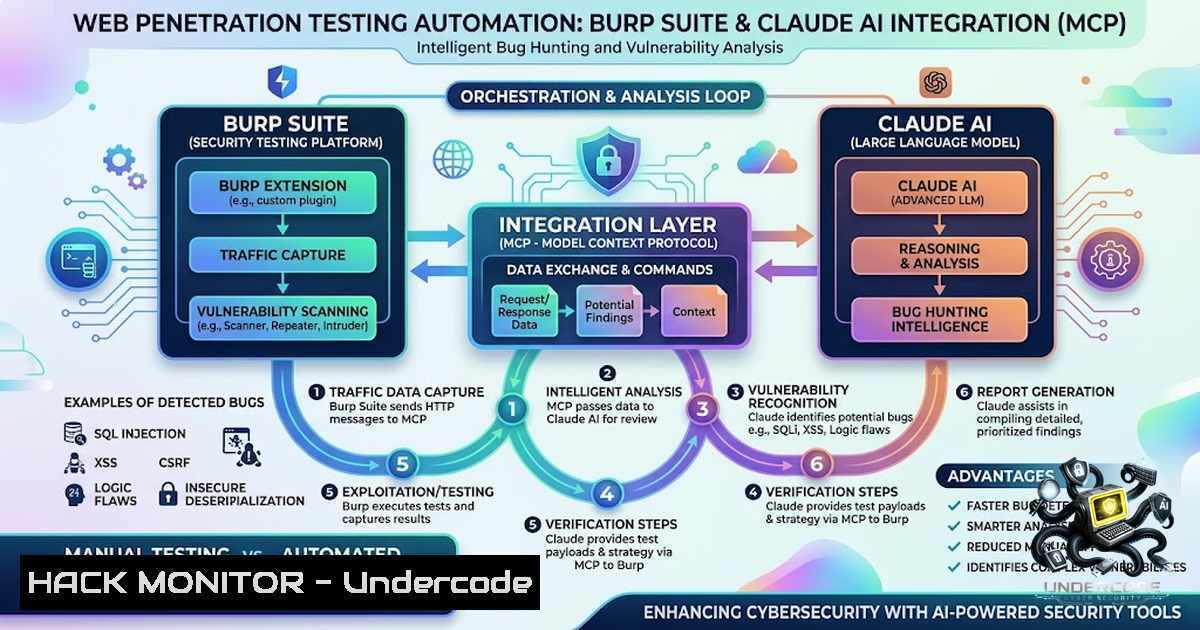
Introduction:
The integration of Large Language Models (LLMs) with traditional security testing tools marks a paradigm shift in vulnerability discovery. The Model Context Protocol (MCP) serves as a universal bridge, enabling AI assistants like Claude to directly control and interact with security software such as Burp Suite. This technical convergence transforms the bug hunting workflow from a manual, repetitive process into an intelligent, automated pipeline that captures traffic, maps attack surfaces, executes tests, and generates comprehensive reports with minimal human intervention. By leveraging MCP, security researchers can now delegate tedious tasks to AI while maintaining expert oversight over complex logical flaws.
Learning Objectives & Secrets:
- Objective 1: Master the MCP integration architecture to establish a bidirectional communication channel between Burp Suite and Claude, enabling real-time data exchange and command execution.
- Objective 2 Secret Tip: Use wildcard target configurations (e.g.,
.target.com) in the MCP extension to bypass manual approval prompts, allowing for truly automated scanning across multiple subdomains without interruption. - Objective 3 Secret Tip: Craft “one-shot” prompts that chain all five phases of the workflow (capture, analyze, map, test, report) into a single command, reducing cognitive overhead and ensuring consistency in testing methodology.
You Should Know:
- Phase 1: Configuring the MCP Bridge and Traffic Collection Pipeline
Setting up the MCP extension is the foundation. Within Burp Suite, navigate to the BApp Store and install the “MCP” extension. Once installed, the extension exposes a local API endpoint (typically on port `8081` or as defined in the extension settings) that Claude Desktop can connect to. Before deploying the AI, configure the “Auto-Approved Targets” section by adding your target’s base domain (e.g.,example.com) or using a wildcard (.example.com). This step is critical for headless operation. For traffic collection, initiate your browsing session while Burp Proxy is active. To crawl additional endpoints, use Burp’s Engagement Tools → Discover Content. For a more programmatic approach, you can use Burp’s REST API or command-line options. On Linux, you can start Burp with a project file and predefined options:java -jar -Xmx4g /path/to/burpsuite.jar --project-file=project.burp --config-file=config.json. On Windows, use:java -jar -Xmx4g "C:\Program Files\BurpSuite\burpsuite.jar" --project-file=project.burp. Ensure the MCP extension is loaded to capture all traffic, including API calls and WebSocket messages.
2. Phase 2: AI-Powered Traffic Analysis and Deduplication
Once traffic is captured, Claude uses the MCP tools to read Burp’s HTTP history. The AI parses raw requests and responses, filtering out noise from static assets (images, CSS, JS) and deduplicating identical requests. To replicate this manually or verify the AI’s logic, you can use the Burp Extender API or write a Python script. For instance, using the `requests` library to fetch and parse history: import requests; response = requests.get('http://localhost:8081/history', headers={'Authorization': 'Bearer token'}). However, the MCP integration automates this. On Linux, you can use `grep` and `awk` to clean logs: cat burp_log.txt | grep -v "\.css\|\.js" | sort | uniq. Claude organizes these requests into logical groups (e.g., authentication endpoints, data submission forms, API endpoints) and identifies parameters. The secret lies in Claude’s ability to recognize patterns—it can differentiate between a session token and a static parameter, providing a structured summary table of all unique endpoints and their methods.
- Phase 3: Attack Surface Mapping and Vulnerability Class Identification
With organized traffic, Claude maps the attack surface by correlating endpoints with potential vulnerability classes. For instance, endpoints with user-controllable numeric IDs are flagged for IDOR (Insecure Direct Object References); form submission endpoints are flagged for SQLi or XSS. The AI uses a knowledge base of OWASP Top 10 to classify risk areas. A practical command to extract all parameterized endpoints from Burp’s target site map is:curl -X GET "http://localhost:8081/target/sitemap". For Linux systems, you can use `jq` to parse JSON responses:curl -s "http://localhost:8081/target/sitemap" | jq '.endpoints[].url'. The MCP extension simplifies this, as Claude can issue a query like “list all endpoints with parameter names” and receive a structured list. This mapping phase is crucial as it determines which tests to run; it ensures efficient use of AI resources by prioritizing high-risk areas. -
Phase 4: Automated Vulnerability Testing and Payload Delivery
Claude executes automated tests based on the vulnerability classes identified. For XSS, it injects common payloads like<script>alert(1)</script>; for SQLi, it uses' OR '1'='1. The AI can perform parameter fuzzing by iterating through values and analyzing response variations. To implement this manually with tools likeffuf, use:ffuf -u http://target.com/FUZZ -w payloads.txt. For authorization bypass, Claude may manipulate headers (e.g.,X-Forwarded-For) or change HTTP methods. A key secret is that Claude can chain vulnerabilities—detecting an IDOR that leads to an XSS in a profile page. To monitor the process, you can check Burp’s Extender → Output. On Windows, use PowerShell to monitor logs:Get-Content -Path burp_automation.log -Wait. Claude’s prompt can be refined to stop testing upon finding a high-severity issue to avoid alerting WAFs (Web Application Firewalls) excessively. The AI also handles rate-limiting by inserting delays: `time.sleep(2)` between requests. -
Phase 5: Professional Report Generation and Remediation Guidance
The final phase culminates in the generation of a professional bug bounty report. Claude structures the report with sections for vulnerability name (e.g., “IDOR in User Profile”), severity (based on CVSS scoring), affected endpoint, technical evidence (including raw request/responses), business impact, and remediation recommendations (e.g., implement proper access controls). The prompt for this might be: “Generate a report in Markdown format with the following sections.” For custom reporting, you can export Burp’s findings to XML and transform it using XSLT:xsltproc burp_report.xsl burp_issues.xml > report.html. On Linux, you can use `pandoc` to convert Markdown to PDF:pandoc report.md -o report.pdf. The MCP integration automates this, but the secret tip for better reports is to include a “Proof of Concept” section with screenshots or cURL commands, which Claude can generate automatically from the captured request data.
6. Advanced Prompt Engineering and Continuous Refinement
The efficacy of the MCP-driven automation hinges on prompt engineering. A generic prompt yields generic results, while a specific prompt with constraints (e.g., “Only test endpoints containing ‘api/v2’”, “Do not test for CSRF”) yields precision. For instance, the one-shot prompt: “Analyze all traffic for ‘target.com’. Remove duplicate requests. Map to vulnerability classes. Test for XSS, SQLi, and IDOR. If any vulnerability is found, attempt to chain it. Generate a detailed report with remediation.” To automate prompt refinement, you can create a feedback loop where Claude assesses its own output and re-runs tests. This can be managed by scheduling a script to run every few hours using `cron` on Linux: 0 /2 /usr/bin/python3 auto_hunt.py. On Windows, use Task Scheduler to trigger a PowerShell script. Monitoring the process involves checking Claude’s output logs, which can be redirected to a file for auditing.
7. API Security Hardening and Cloud Considerations
When automating against cloud-hosted applications, consider API rate limits and IP reputation. Use rotating proxies or cloud functions to distribute requests. The MCP extension can be configured to use a SOCKS5 proxy to route traffic through different IPs. A Linux command for setting up a proxy chain: `ssh -D 1080 user@proxy-server` and configure Burp to use `localhost:1080` as a SOCKS proxy. For Windows, use `plink` to establish a similar tunnel. For API security, Claude can be instructed to test for GraphQL introspection or REST API misconfigurations. Implementing a `health` check endpoint in your automation script ensures the test environment is stable: `curl -f http://target.com/health`. Additionally, use cloud providers’ APIs to spin up disposable test environments, integrating with Terraform: `terraform apply -auto-approve`.
What Undercode Say:
- Key Takeaway 1: MCP effectively transforms Claude from a conversational AI into a proactive security assistant that reduces the manual burden of repetitive testing while maintaining analytical depth.
- Key Takeaway 2: The true power lies in combining the AI’s pattern recognition with traditional security tools, enabling the identification of complex, multi-step vulnerabilities that are often missed by standalone scanners.
Prediction:
- +1 This integration will democratize advanced penetration testing, enabling junior security analysts to perform sophisticated tests with AI guidance, thereby raising the overall security posture of small to medium-sized enterprises.
- +1 The adoption of MCP will accelerate the development of autonomous security agents that can operate continuously, providing real-time vulnerability detection in CI/CD pipelines.
- -1 Over-reliance on AI automation may lead to a false sense of security, as AI might miss context-specific business logic vulnerabilities that require deep human understanding.
- -1 Widespread use of automated AI testing could increase the volume of low-quality, noisy vulnerability reports, overwhelming development teams and potentially degrading trust in automated findings.
- +1 The trend will push bug bounty platforms to adopt AI-assisted triage, reducing the time from submission to payout and improving the efficiency of the entire ecosystem.
- +1 Advanced prompt engineering will emerge as a specialized skill, creating a new niche for cybersecurity professionals who can curate effective AI prompts for security testing.
- -1 Malicious actors could leverage similar MCP integrations to automate attack campaigns at scale, lowering the barrier to entry for cybercrime and increasing the speed of exploitation.
- +1 The evolution of AI-driven testing will catalyze the development of more robust defense mechanisms, including AI-powered WAFs and anomaly detection systems, fostering an AI arms race in cybersecurity.
- +1 Educational institutions will incorporate MCP and AI automation into their curricula, producing a new generation of security professionals adept at AI-human collaboration.
- -1 The automation of report generation might lead to standardized, yet less insightful, vulnerability disclosures, reducing the narrative quality that often helps developers understand the root cause of a flaw.
▶️ Related Video (78% Match):
🎯Let’s Practice For Free:
🎓 Live Courses & Certifications:
Join Undercode Academy for Verified Certifications
🚀 Request a Custom Project:
Secure, high-velocity infrastructure and disruptive technological engineering. Contact our engineering team for high-tier development and proprietary systems:
[email protected]
💎 Smart Architecture | 🛡️ Secure by Design | ⭐ Trusted by Thousands
IT/Security Reporter URL:
Reported By: https://lnkd.in/p/ewA6ZvEA – Hackers Feeds
Extra Hub: Undercode MoN
Basic Verification: Pass ✅


