Listen to this Post
Introduction
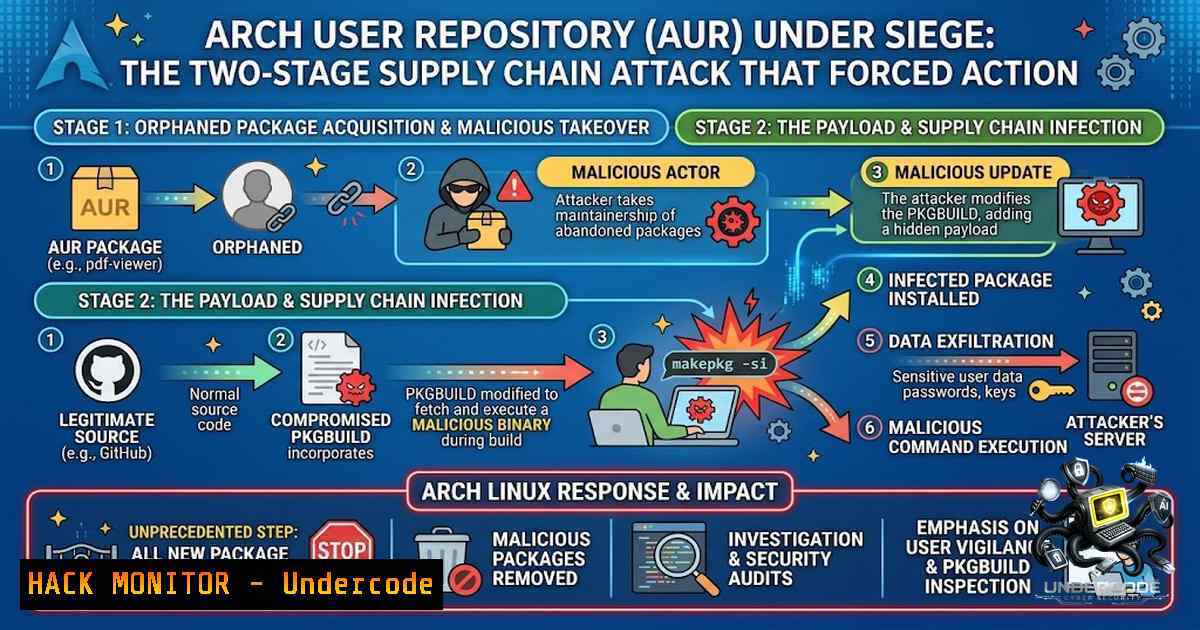
The Arch User Repository (AUR)—the lifeblood of Arch Linux’s vast software ecosystem—has become the latest battleground in an escalating wave of software supply chain attacks. In late July 2026, threat actors launched a sophisticated campaign targeting orphaned AUR packages, hijacking maintainer accounts and injecting multi-stage malware that combines a Tor-powered downloader, a Rust-based infostealer, and an SSH-propagating worm. The attack forced the Arch Linux team to temporarily disable package transfers and adoptions, highlighting a critical vulnerability in community-driven repository models.
Learning Objectives
- Understand the technical mechanics of the two-stage AUR malware campaign, including the Tor-based C2 infrastructure and anti-analysis techniques.
- Learn to identify indicators of compromise (IOCs) and detect malicious PKGBUILD modifications in the AUR.
- Implement practical defensive measures, including PKGBUILD auditing, systemd and cron persistence detection, and network monitoring for Tor processes masquerading as legitimate services.
You Should Know
- The Anatomy of the Attack: Orphaned Package Takeover and Two-Stage Malware Deployment
The attack leverages a fundamental feature of the AUR: the ability for registered users to adopt orphaned packages—abandoned projects that no longer have a maintainer. By claiming these packages, attackers gain full commit access to their Git repositories, allowing them to modify `PKGBUILD` files without raising immediate suspicion.
The infection chain unfolds in two distinct stages:
Stage 1 – The Downloader: The modified `PKGBUILD` triggers the installation of a 43,640-byte ELF64 loader (sha256: 2d25d2ea313767fae5808164224cf6ad610ab09546d1e5a6f033eedbfd98a281). This loader performs extensive environment checks before proceeding:
- Reads `/proc/self/status` to detect `TracePid` (debugger presence)
- Compares the hostname against a blocklist of 16 analysis strings:
malware,vmware,sandbox,cuckoo,honeypot,remnux,flare,anyrun, and others - Scans for 25 CI/CD environment variables including
GITHUB_ACTIONS,GITLAB_CI,JENKINS_URL, and `CIRCLECI` to evade automated analysis pipelines
Once the environment is deemed safe, the loader:
- Copies itself to `/var/lib/
/` (as root) or `$HOME/./ /` (as user) - Establishes persistence via systemd services (
/etc/systemd/system/<random>.servicewithRestart=always) and crontab entries (@reboot) - Downloads the Tor bundle (version 16.0a7) from `archive.torproject.org`
4. Launches Tor with `argv="dbus-daemon"` to disguise the process, using a custom `torrc` with `AllowSingleHopCircuits 1` 5. Fetches the stage 2 payload from a .onion address: `p4ayykxcrxfyzrgfbbkazernntjbz43hgclrheguylzd7kijmtce6zqd.onion` 6. Saves the payload to `/dev/shm/.agent.bin` (or `/tmp` as fallback), extracts it, and launches the stage 2 agent</li> </ol> Stage 2 – The Infostealer and RAT: The second-stage component is a 3.6 MB Rust-based ELF64 binary (<code>sha256: 06c857c8ca798d50c765b4de39e6c4f272ecb57bc8316a8ed4c0fdf02fb59502</code>) that functions as an infostealer, interactive RAT, and SSH worm. It uses ChaCha20-Poly1305 encryption for string obfuscation and performs additional anti-analysis checks before executing its malicious routines. The stealer targets an extensive array of sensitive data: <ul> <li>Browser credentials: Cookies, Login Data, <code>key4.db</code>, <code>logins.json</code>, and Safe Storage keychain entries from Chromium, Edge, Brave, Vivaldi, Yandex, Firefox, LibreWolf, and Tor</li> <li>Cryptocurrency wallets: Exodus (patches `app.asar` to inject JavaScript that leaks the seed phrase), Electrum, Ledger, Trezor, Monero, Wasabi, Phantom/MetaMask extensions, <code>kwallet</code>, and `sui.keystore` - Password managers: 1Password, Bitwarden (including FIDO2/cardholder/passport fields), and LastPass</li> <li>Messaging platforms: Telegram <code>tdata</code>, Discord API tokens, and Slack tokens (<code>xoxc</code>/<code>xoxd</code>)</li> <li>Cloud and development credentials: AWS (<code>.aws/</code>), Azure (<code>.azure/</code>), Kubernetes (<code>.kube/</code>), GCloud, ArgoCD, Helm, Terraform, <code>.npmrc</code>, <code>.pypirc</code>, <code>.netrc</code>, <code>.git-credentials</code>, <code>.env</code>, GitHub/GitLab tokens, OpenAI/Anthropic/Gemini API keys, and HashiCorp Vault tokens</li> <li>Cloud metadata: IMDS at <code>169.254.169.254</code>, ECS at <code>169.254.170.2</code>, GCE metadata, and AWS STS `GetCallerIdentity` - SSH keys: <code>id_rsa</code>, <code>id_ecdsa</code>, <code>id_ed25519</code>, and `known_hosts` The SSH worm component enables lateral movement: it uses stolen SSH keys to copy itself to remote systems with `scp` or <code>ssh</code>, setting `StrictHostKeyChecking=no` and <code>BatchMode=yes</code>, then executes with <code>nohup</code>.</li> </ul> <h2 style="color: yellow;">Step-by-Step: Detecting AUR Malware Infection</h2> <h2 style="color: yellow;">1. Check for suspicious systemd services:</h2> [bash] List all systemd services and look for randomly named ones systemctl list-unit-files --type=service | grep -E '^[a-z0-9]{8,}.service' Check for services with Restart=always that you don't recognize grep -r "Restart=always" /etc/systemd/system/ /etc/systemd/user/ ~/.config/systemd/user/2. Identify Tor processes masquerading as dbus-daemon:
 Look for Tor processes with argv[bash] set to dbus-daemon
ps aux | grep -E "dbus-daemon.tor" | grep -v grep

Check for Tor-related network connections
sudo ss -tulpn | grep -E "9050|9051|9150"
3. Examine crontab entries for suspicious @reboot tasks:
 Check system crontab
sudo crontab -l

Check user crontabs
for user in $(cut -f1 -d: /etc/passwd); do
sudo crontab -u "$user" -l 2>/dev/null
done

Check /etc/cron.d for suspicious files
ls -la /etc/cron.d/
4. Review PKGBUILD files for malicious patterns:
 For each AUR package, inspect the PKGBUILD
cd ~/.cache/yay//  or your AUR helper's cache directory
grep -r "curl.|.sh" . --include="PKGBUILD"
grep -r "wget.-O.|.sh" . --include="PKGBUILD"
grep -r "source=.onion" . --include="PKGBUILD"
5. Check for the anti-reinfection marker (security.selinux xattr):
 Look for files with security.selinux extended attributes
find / -xattr -exec getfattr -d {} \; 2>/dev/null | grep -l security.selinux
2. The C2 Infrastructure: Tor-Encrypted Command and Control
The malware employs a sophisticated Tor-based communication channel that is resistant to traditional network monitoring. Both stages download the Tor bundle from `archive.torproject.org` and launch it with
argv="dbus-daemon"</code>—a technique that hides the process in plain sight. The stage 2 agent establishes a secure channel using X25519 key exchange with HKDF-SHA256 key derivation and ChaCha20-Poly1305 authenticated encryption. The embedded server public key for this campaign is: [bash] 2d15205b422f6137ab08c728e2ae0ca38d07b5153723b373d12532d8bebb6a48
The C2 protocol includes:
- Hello beacon: Sends hardware ID, hostname, username, CPU info, OS, Tor port, locale, public IP, and agent name
- Keepalive: `{"t":"ping"}` / `{"t":"pong"}`
- Command execution: `{"t":"cmd"}` withid/command/shell/cap→ executes viabash_run,python_run,python3_run, or `ps_run` (PowerShell, cross-platform) - Loot exfiltration: Uploads stolen data as `{t, loot, type, meta, ts, seq, source, pid, data}`
Step-by-Step: Blocking Tor-Based C2 Communication
- Block Tor exit nodes at the network level:
 Download and apply Tor exit node blocklist (using iptables)
curl -s https://check.torproject.org/torbulkexitlist | \
while read ip; do
sudo iptables -A OUTPUT -d "$ip" -j DROP
done
2. Monitor for unauthorized Tor processes:
 Create a monitoring script that alerts on Tor processes
!/bin/bash
while true; do
if ps aux | grep -v grep | grep -E "tor|dbus-daemon.-f" > /dev/null; then
echo "WARNING: Potential Tor process detected at $(date)"
ps aux | grep -E "tor|dbus-daemon.-f" | grep -v grep
fi
sleep 60
done
- Restrict outbound connections to .onion addresses (using eBPF or firewall):
 Block DNS resolution for .onion domains (requires dnsmasq configuration)
echo "server=/onion/" >> /etc/dnsmasq.conf
echo "address=/onion/0.0.0.0" >> /etc/dnsmasq.conf
systemctl restart dnsmasq
4. Detect the stage 1 downloader's file placement:
 Check for randomly named binaries in /var/lib/ and $HOME/./
find /var/lib/ -maxdepth 2 -type f -executable -size 40k-50k 2>/dev/null
find ~/ -maxdepth 2 -type f -executable -size 40k-50k 2>/dev/null
3. Persistence Mechanisms: Systemd, Cron, and Xattr Markers
The malware employs redundant persistence mechanisms to ensure survival across reboots and to resist removal attempts:
- Systemd services: Creates `.service` files in `/etc/systemd/system/` (system-wide) and `~/.config/systemd/user/` (user-level) with `Restart=always` and `RestartSec=30`
- User linger: Enables `loginctl enable-linger` to allow user services to run without an active session - Cron jobs: Adds entries to `/etc/cron.d/` with `/5 root ...` and `@reboot` in user crontabs
- Anti-reinfection marker: Writes a `security.selinux` extended attribute to a single file; on subsequent runs, the malware checks for this marker and exits immediately if present
- Self-defense: Scans `/etc/systemd/system` and `/etc/cron.d` for services matching its own signature and removes them (disables competing malware)
Step-by-Step: Removing Malware Persistence
1. Disable and remove malicious systemd services:
 Identify suspicious services (random names, recently created)
sudo systemctl list-unit-files --type=service --state=enabled | grep -E '^[a-z0-9]{8,}.service'

For each suspicious service:
sudo systemctl stop <service_name>
sudo systemctl disable <service_name>
sudo rm /etc/systemd/system/<service_name>.service
sudo rm ~/.config/systemd/user/<service_name>.service
sudo systemctl daemon-reload
2. Clean crontab entries:
 Edit system crontab
sudo crontab -e
 Remove suspicious @reboot or /5 entries

Check and clean user crontabs
for user in $(cut -f1 -d: /etc/passwd); do
sudo crontab -u "$user" -l 2>/dev/null | grep -v "@reboot" | sudo crontab -u "$user" -
done

Remove suspicious files from /etc/cron.d
sudo rm -f /etc/cron.d/<random_name>
3. Remove the anti-reinfection marker:
 Find files with security.selinux xattr
find / -xattr -exec getfattr -d {} \; 2>/dev/null | grep -B1 "security.selinux" | grep "^" | cut -d: -f1 | while read file; do
sudo setfattr -x security.selinux "$file"
done
4. Kill the malware processes:
 Kill Tor processes masquerading as dbus-daemon
pkill -f "dbus-daemon.tor"

Kill the stage 2 agent (look for high-memory ELF64 processes)
ps aux | grep -E "[0-9]{8,}.(agent|bin)" | grep -v grep | awk '{print $2}' | xargs kill -9
4. Package Verification and Safe AUR Usage
The AUR's trust model relies on community vigilance. With over 200 packages already compromised in this campaign—including popular ones like
icloudpd,windscribe-cli-v2-bin,stirling-pdf-desktop-bin,openconnect-sso, andpgadmin4-server—users must adopt rigorous verification practices.Step-by-Step: Verifying PKGBUILD Integrity
1. Use AUR helper hooks (yay v13+):
 Configure yay to use AURPreInstall hooks
 Create ~/.config/yay/config.json with:
{
"aurpreinstall": "/path/to/verify-pkgbuild.sh"
}

Example verification script:
!/bin/bash
 verify-pkgbuild.sh
PKGBUILD="$1"
if grep -qE "(curl|wget).|.sh" "$PKGBUILD"; then
echo "WARNING: PKGBUILD contains pipe-to-shell pattern!"
exit 1
fi
if grep -qE "source=..onion" "$PKGBUILD"; then
echo "WARNING: PKGBUILD references .onion source!"
exit 1
fi
exit 0
2. Manually review PKGBUILD before installation:
 Download PKGBUILD without installing
yay -G <package_name>
cd <package_name>
less PKGBUILD

Look for:
 - curl/wget with piped execution (curl ... | sh)
 - Dynamic URLs built from variables
 - Unusual source URLs (especially .onion or suspicious domains)
 - post_install() or pre_install() functions with network calls
3. Use automated AUR scanning tools:
 Install aur-scanner (Rust-based)
cargo install aur-scanner-cli

Scan a package before installation
aur-scan check <package_name>

Scan all installed AUR packages
aur-scan system

Or use the community script
git clone https://github.com/lenucksi/aur-malware-check.git
cd aur-malware-check
sudo ./aur_check-v2.sh --full
4. Enable PGP signature verification in strict mode:
 In /etc/makepkg.conf, ensure:
PGPCHECK=("sig" "b2sums" "sha512sums")
 This enforces PGP validation for packages that provide signatures
5. Restrict package sources to trusted domains:
 Use a firewall to block connections to untrusted domains during build
 Example: block all outbound except to known mirrors
sudo iptables -A OUTPUT -d 0.0.0.0/0 -j DROP
sudo iptables -A OUTPUT -d <trusted_mirror_ip> -j ACCEPT
 Build the package, then restore firewall rules
5. Indicators of Compromise and Forensics
Security researchers at IFIN have identified the following IOCs associated with this campaign:
Process-based:
- Tor process with `argv
="dbus-daemon"`
- Randomly named binary under `/var/lib/postfix/` or similar system directories</li>
<li>High-memory ELF64 processes with random names</li>
</ul>

<h2 style="color: yellow;">File-based:</h2>

- `.done` marker file parallel to the stage 1 binary
- `security.selinux` extended attribute on anchor files
- Stage 1 binary: `sha256 2d25d2ea313767fae5808164224cf6ad610ab09546d1e5a6f033eedbfd98a281`
- Stage 2 binary: `sha256 06c857c8ca798d50c765b4de39e6c4f272ecb57bc8316a8ed4c0fdf02fb59502`


<h2 style="color: yellow;">Network-based:</h2>

- `.onion` C2 domain: `p4ayykxcrxfyzrgfbbkazernntjbz43hgclrheguylzd7kijmtce6zqd.onion`
- Tor SOCKS5 proxy on localhost (typically ports 9050 or 9150)
- Outbound connections to Tor exit nodes

<h2 style="color: yellow;">Account-based (suspicious AUR adoptions):</h2>

<ul>
<li>Accounts created with disposable email addresses (e.g., <code>zelmaandersen</code>)</li>
<li>Packages adopted without immediate updates or with minimal changes</li>
</ul>

<h2 style="color: yellow;">Step-by-Step: Forensic Investigation</h2>

<h2 style="color: yellow;">1. Collect system artifacts:</h2>

[bash]
 Collect process list
ps auxwf > process_list.txt

Collect network connections
sudo ss -tulpn > network_connections.txt
sudo netstat -tulpn >> network_connections.txt

Collect systemd services
systemctl list-unit-files --type=service > systemd_services.txt

Collect crontabs
sudo crontab -l > system_crontab.txt
for user in $(cut -f1 -d: /etc/passwd); do
sudo crontab -u "$user" -l 2>/dev/null > "user_crontab_${user}.txt"
done

Collect file system changes from the last 7 days
find / -type f -mtime -7 -ls 2>/dev/null > files_changed.txt
2. Check for known malicious packages:
 List all installed AUR packages
yay -Qm > installed_aur_packages.txt

Cross-reference with known malicious package list
curl -s https://raw.githubusercontent.com/lenucksi/aur-malware-check/master/data/lists/package_list.txt | \
while read pkg; do
if yay -Q "$pkg" 2>/dev/null; then
echo "WARNING: Potentially compromised package: $pkg"
fi
done
3. Analyze system logs for suspicious activity:
 Check journal for Tor-related entries
sudo journalctl | grep -i tor

Check for service creation events
sudo journalctl | grep -i "created.service"

Check auth logs for unusual SSH activity
sudo grep -E "ssh.Accepted|ssh.Failed" /var/log/auth.log
What Undercode Say
- The AUR's orphaned package adoption model is a systemic vulnerability. The attack exposes a fundamental trust deficit in community-driven repositories: orphaned packages inherit the trust of their original maintainers without any security review. This is not a bug but a feature—and that feature is now a weapon.
-
Defense requires a shift from trust to verification. Users cannot rely on AUR maintainers or community reputation alone. Every PKGBUILD must be treated as potentially malicious until proven otherwise. Tools like
aur-scanner,traur, and `pkgwatch` represent the new frontier of AUR security—automated, static analysis that doesn't execute untrusted code. -
The Tor-based C2 infrastructure is both a strength and a weakness. While Tor provides anonymity and resilience against takedown, it also creates detectable patterns: processes masquerading as
dbus-daemon, outbound connections to Tor exit nodes, and local SOCKS proxies. Network defenders who know what to look for can identify infections before data exfiltration occurs. -
This attack is a harbinger of things to come. The sophistication of this campaign—anti-debugging, CI/CD evasion, encrypted strings, redundant persistence, and lateral movement—indicates a well-resourced adversary. As open-source ecosystems continue to grow, supply chain attacks will only become more frequent and more sophisticated. The Arch Linux team's decision to disable package adoptions is a temporary fix; the long-term solution requires fundamental changes to how we secure community repositories.
Prediction
-
-1 The AUR will face at least two more large-scale supply chain attacks within the next 12 months, as threat actors continue to refine their techniques and capitalize on the repository's open nature. The orphaned package adoption mechanism will remain a primary attack vector until Arch Linux implements mandatory multi-factor authentication for package adoption and introduces a mandatory review period for orphaned package transfers.
-
+1 The security community will respond with a new generation of automated PKGBUILD analysis tools, leveraging LLMs and static analysis to detect malicious patterns before they reach users. Tools like
aur-sleuth—which uses LLM-powered auditing—represent the beginning of this trend. -
-1 The financial impact of credential theft from this campaign will be substantial, with cryptocurrency wallets, cloud API keys, and AI service credits being the primary targets. The exfiltration of SSH keys will enable widespread lateral movement, potentially compromising enterprise networks where developers use Arch Linux workstations.
-
+1 Arch Linux will accelerate its roadmap for AUR security improvements, potentially including mandatory PGP signing for all package updates, a community-driven security review team, and integration with external vulnerability databases. These changes, while disruptive in the short term, will ultimately strengthen the entire Arch Linux ecosystem.
-
-1 The trust erosion caused by this attack will push some users toward alternative distributions or containerized development environments, reducing the AUR's active contributor base and creating a vicious cycle where fewer eyes on packages leads to more vulnerabilities.
▶️ Related Video (74% Match):
https://www.youtube.com/watch?v=3PFexlbx_HQ
🎯Let’s Practice For Free:
🎓 Live Courses & Certifications:
Join Undercode Academy for Verified Certifications
🚀 Request a Custom Project:
Secure, high-velocity infrastructure and disruptive technological engineering. Contact our engineering team for high-tier development and proprietary systems:
[email protected]
💎 Smart Architecture | 🛡️ Secure by Design | ⭐ Trusted by ThousandsIT/Security Reporter URL:
Reported By: https://lnkd.in/p/ez_6avUw - Hackers Feeds
Extra Hub: Undercode MoN
Basic Verification: Pass ✅🔐JOIN OUR CYBER WORLD [ CVE News • HackMonitor • UndercodeNews ]
📢 Follow UndercodeTesting & Stay Tuned:


