
Listen to this Post
Introduction:
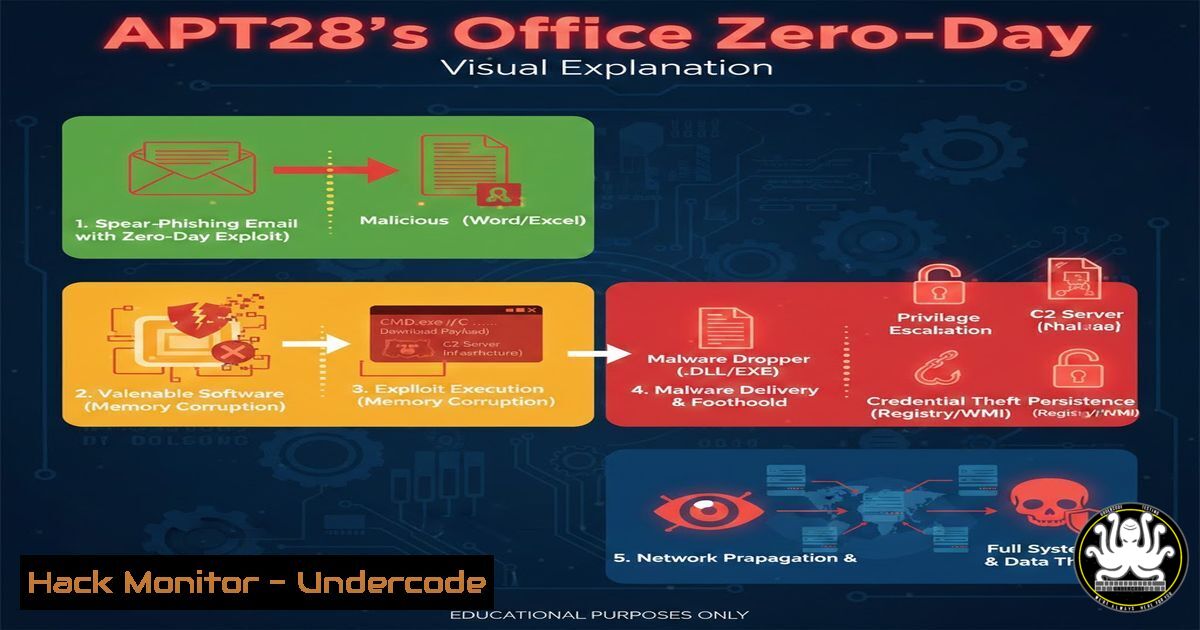
The Russian‑linked threat group APT28 (also known as Fancy Bear or Sofacy) has escalated its cyber‑espionage campaigns by weaponizing a critical zero‑day vulnerability in Microsoft Office, tracked as CVE‑2026‑21509. This flaw allows attackers to execute arbitrary code simply when a victim opens a specially crafted document, bypassing most user‑facing security warnings. The subsequent deployment of MiniDoor and Covenant Grunt malware establishes a persistent, remote command‑and‑control channel, enabling data exfiltration and lateral movement within targeted networks.
Learning Objectives:
- Understand the technical delivery mechanism of the CVE‑2026‑21509 exploit via Office documents.
- Learn to detect and analyze indicators of compromise (IoCs) associated with MiniDoor and Covenant Grunt malware.
- Implement immediate hardening steps for Microsoft Office and network environments to mitigate such attacks.
You Should Know:
1. Deconstructing the Document Exploit Delivery
The attack chain begins with a socially engineered email containing a malicious Office document (.doc, .xls, or .rtf). The document exploits CVE‑2026‑21509, a memory corruption vulnerability, to bypass Protected View and execute shellcode without requiring macros or explicit user permission beyond opening the file.
Step‑by‑step guide:
Step 1: Initial Analysis with Oletools: Security analysts can use the Python `oletools` suite to inspect suspicious documents without opening them in Office.
 Install oletools
pip install oletools
 Analyze a document for structure and potential exploits
oleid malicious_document.docx
 Extract embedded macros or suspicious streams (even if disabled)
oleobj malicious_document.docx
Step 2: Static Shellcode Extraction: The exploit payload is often embedded within document properties or objects. Use `oledump.py` (part of oletools) to list streams and extract suspicious binary data.
 List all streams in the document
oledump.py malicious_document.docx
 Extract a specific stream (e.g., stream 9) for further analysis
oledump.py -s 9 -d malicious_document.docx > stream9.bin
Step 3: Network Traffic Pattern Recognition: The initial shellcode typically retrieves the next‑stage payload (MiniDoor). In a sandbox, monitor for DNS requests to suspicious, algorithmically generated domains (DGA) or connections to known APT28 infrastructure IPs on ports 443 or 8080.
2. Detecting MiniDoor & Covenant Grunt Persistence
Once executed, the shellcode downloads and installs the MiniDoor backdoor, which may act as a loader for the more full‑featured Covenant Grunt implant. Both establish persistence and beacon to a C2 server.
Step‑by‑step guide:
Step 1: Process and Connection Analysis: On a potentially compromised Windows system, use command‑line tools to look for anomalous processes and network connections.
 Windows: List established connections with process names (Run as Admin)
netstat -ano | findstr ESTABLISHED
Get-NetTCPConnection -State Established | Select-Object LocalAddress,LocalPort,RemoteAddress,RemotePort,OwningProcess | ft
 Cross‑reference the PID with the process
tasklist /svc /FI "PID eq <suspicious_pid>"
Step 2: Hunting for Persistence Mechanisms: APT28 frequently uses scheduled tasks, service registration, or registry run keys.
 Check for suspicious scheduled tasks
Get-ScheduledTask | Where-Object {$_.TaskPath -notlike "\Microsoft"} | Select-Object TaskName, TaskPath, Actions
 Check common auto‑run registry locations
reg query HKLM\Software\Microsoft\Windows\CurrentVersion\Run
reg query HKCU\Software\Microsoft\Windows\CurrentVersion\Run
Step 3: File System IoCs: Search for recently dropped executables in %AppData%, %LocalAppData%, or `%Temp%` with nonsensical names.
 Windows CMD search for recent executable creations in user directories
dir /s /b /od %AppData%.exe
dir /s /b /od %Temp%.exe
3. Hardening Microsoft Office Against Unknown Exploits
While a patch for CVE‑2026‑21509 is awaited, defense‑in‑depth configurations can severely limit the attack surface.
Step‑by‑step guide:
Step 1: Enforce Macro & Protected View Policies via GPO: The most effective control is to block Office applications from editing files from the internet.
Navigate to Computer Configuration > Administrative Templates > Microsoft <App> <version> > Security Settings.
Enable “Block opening of files from the Internet in Protected View” and set to “Block editing in Protected View for files from the Internet”.
Set “Block all macros without notification” in the Trust Center settings.
Step 2: Apply Attack Surface Reduction (ASR) Rules: In Windows Defender Exploit Guard, enable the rule “Block all Office applications from creating child processes”. This can prevent the exploit from spawning `powershell.exe` or cmd.exe.
 Verify ASR rules are enabled
Get-MpPreference | Select-Object AttackSurfaceReductionRules_Ids, AttackSurfaceReductionRules_Actions
Step 3: Deploy Microsoft Office Viewer Mode (for specific use cases): For kiosks or non‑editorial workstations, deploy Office in a restricted “Viewer Mode” via Group Policy to prevent all editing and execution.
4. Implementing Network Segmentation & Egress Filtering
Lateral movement and data theft require network access. Containing the breach is critical.
Step‑by‑step guide:
Step 1: Enforce Micro‑Segmentation: Use host‑based firewalls (Windows Firewall with Advanced Security) to restrict workstations from initiating SMB, RDP, or WinRM connections to other workstations or critical servers.
 Create a firewall rule to block outbound SMB from a workstation subnet
New-NetFirewallRule -DisplayName "Block Workstation-to-Workstation SMB" -Direction Outbound -Protocol TCP -RemoteAddress 192.168.1.0/24 -RemotePort 445 -Action Block
Step 2: Proxy and Filter All Egress Traffic: Ensure all user workstation traffic passes through an authenticated web proxy. Implement SSL/TLS inspection where legally permissible and block connections to unknown domains, newly registered domains, and IP addresses not associated with sanctioned cloud services.
Step 3: Deploy Network Detection Rules (Snort/Suricata): Create rules to alert on traffic patterns matching Covenant C2, such as specific HTTP headers or unusual beaconing intervals.
 Example Suricata rule for Covenant-like HTTP POST beaconing
alert http $HOME_NET any -> $EXTERNAL_NET any (msg:"Suspicious POST to Non-Standard Port"; flow:established,to_server; http.method; content:"POST"; nocase; http.uri; content:"/api/"; depth:5; classtype:bad-unknown; sid:1000001; rev:1;)
5. Building an Effective Incident Response Playbook
A predefined, actionable response plan is essential for minimizing damage.
Step‑by‑step guide:
Step 1: Immediate Isolation: The first action upon detecting a compromise is to isolate the affected host from the network. This can be done manually or via Network Access Control (NAC) integration.
 Linux example: Block a host at the network switch via SNMP (using community string)
snmpset -v2c -c <community> <switch_ip> .1.3.6.1.2.1.2.2.1.7.<interface_index> i 2
Step 2: Forensic Triage & Memory Capture: Before wiping the system, capture volatile data for analysis.
 Capture RAM using built-in Windows tool (requires WinPMEM driver)
reg add "HKLM\SOFTWARE\Microsoft\Windows\CurrentVersion\App Paths\winpmem.ami" /f
 Use a tool like DumpIt or FTK Imager CLI for a full memory dump
Step 3: Password Reset & Credential Auditing: Assume credentials on the compromised host are breached. Force password resets for all users who logged onto that machine and audit privileged account logon events (Event ID 4624 and `4672` on Windows DCs) for signs of lateral movement.
What Undercode Say:
- The Blurred Line Between User Action and Exploit: This attack demonstrates a critical shift where the simple, often‑permitted action of “opening a document” is now a complete compromise vector, rendering traditional user‑focused warnings obsolete. Defense must move to application hardening and assume documents are malicious until proven otherwise.
- Persistence Over Stealth: APT28’s use of layered, persistent implants like Covenant Grunt indicates their objective is long‑term access for espionage, not immediate disruption. This means detection efforts must focus not just on the initial breach but on low‑volume, periodic C2 traffic and subtle changes to system configurations over weeks or months.
Prediction:
The successful exploitation of CVE‑2026‑21509 by a state‑sponsored group will catalyze a dangerous trend. Within the next 12‑18 months, we predict a significant increase in the commoditization of “zero‑click” or “one‑click” Office and PDF exploits in the cyber‑criminal underground, moving beyond elite APT groups. This will lead to a surge in highly targeted ransomware and data‑theft campaigns against businesses, where the initial infection requires minimal user interaction. Consequently, the security industry’s focus will urgently pivot towards default‑deny application isolation technologies (like containerized document opening) and AI‑driven behavioral analysis of document‑born processes, as signature‑based detection will be ineffective against these novel, file‑based exploits.
▶️ Related Video (78% Match):
🎯Let’s Practice For Free:
IT/Security Reporter URL:
Reported By: Alex Dervenis – Hackers Feeds
Extra Hub: Undercode MoN
Basic Verification: Pass ✅


