Listen to this Post
Introduction:
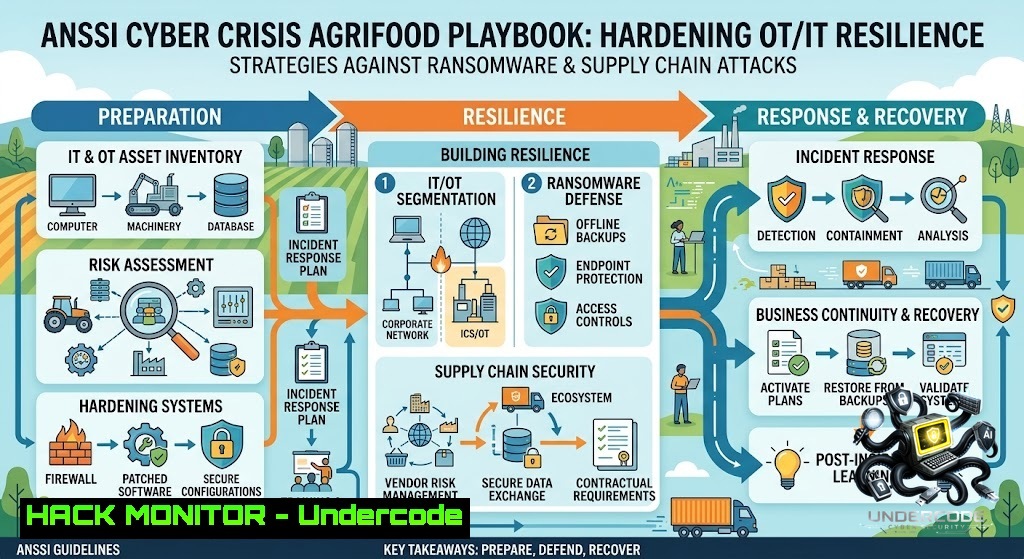
The French National Agency for the Security of Information Systems (ANSSI) has officially launched a sector-specific crisis management training kit for the agrifood industry. This initiative comes as ransomware groups increasingly target production lines, logistics chains, and sensitive data, with ANSSI recording 128 ransomware compromises in France in 2025 alone. The kit provides a “ready-to-use” scenario across three complexity levels, enabling organizations to simulate realistic cyber crises and build operational resilience.
Learning Objectives:
- Master the ANSSI crisis exercise framework, including briefing, simulation, observation, and debriefing phases
- Implement technical hardening measures across OT/IT environments to mitigate ransomware and supply chain attacks
- Develop a comprehensive incident response playbook with verified Linux, Windows, and network security commands
You Should Know:
1. ANSSI Crisis Exercise Framework: Step-by-Step Implementation
The ANSSI kit is structured around a progressive scenario designed specifically for agrifood sector challenges. It includes practical supports such as briefings, chronograms, observation grids, debriefing templates, and RETEX (feedback) questionnaires.
Step‑by‑step guide to running an ANSSI‑style cyber crisis exercise:
- Phase 1 – Preparation (J‑30 to J‑7): Download the kit from cyber.gouv.fr. Assemble a crisis cell (IT director, production manager, communications officer, legal counsel). Adapt the scenario to your specific production lines and supply chain dependencies. Define success metrics (e.g., time to detect, time to contain, communication latency).
-
Phase 2 – Briefing (J‑1): Distribute participant briefings. Ensure all actors understand their roles, the simulation rules, and the “inject” mechanism (pre-scripted events injected during the exercise).
-
Phase 3 – Simulation (Day J): Run the scenario with three complexity levels:
- Level 1 (Basic): Phishing email leading to credential compromise on a single workstation.
- Level 2 (Intermediate): Ransomware encryption of a production server with partial backup corruption.
-
Level 3 (Advanced): Supply chain attack via a compromised third-party supplier, combined with data exfiltration and public leak threat.
-
Phase 4 – Observation & Debriefing: Use observation grids to track decision-making, communication flows, and technical responses. Conduct a structured debriefing using the RETEX questionnaire to identify gaps in procedures, tools, and coordination.
-
Phase 5 – Remediation: Translate findings into a prioritized action plan. Update the Business Continuity Plan (BCP) and IT Disaster Recovery Plan (IT-DRP).
2. Linux Hardening Commands for Agrifood OT/IT Environments
Agrifood systems often run Linux-based SCADA, PLC management interfaces, and data aggregation servers. Implement these verified commands to raise your security posture:
User and Access Hardening:
 List all users with shell access (audit unauthorized accounts)
cat /etc/passwd | grep -E "/(bin|sbin)/.sh" | cut -d: -f1

Force password expiration for all users (90-day policy)
chage -M 90 -W 14 $(awk -F: '$3>=1000 {print $1}' /etc/passwd)

Lock idle sessions after 300 seconds
echo "TMOUT=300" >> /etc/profile
echo "readonly TMOUT" >> /etc/profile
echo "export TMOUT" >> /etc/profile
File Integrity Monitoring (FIM):
 Install AIDE (Advanced Intrusion Detection Environment)
apt-get install aide  Debian/Ubuntu
yum install aide  RHEL/CentOS

Initialize the baseline database
aide --init
mv /var/lib/aide/aide.db.new.gz /var/lib/aide/aide.db.gz

Run daily integrity check (add to crontab)
aide --check | mail -s "AIDE Daily Report" [email protected]
Network and Firewall Restrictions:
 Restrict SSH to management subnet only (example: 192.168.100.0/24)
echo "sshd: 192.168.100." >> /etc/hosts.allow
echo "sshd: ALL" >> /etc/hosts.deny

Block all inbound traffic except established connections (iptables)
iptables -P INPUT DROP
iptables -A INPUT -m state --state ESTABLISHED,RELATED -j ACCEPT
iptables -A INPUT -p tcp --dport 22 -s 192.168.100.0/24 -j ACCEPT

Enable auditd for critical file monitoring
auditctl -w /etc/passwd -p wa -k identity_changes
auditctl -w /etc/shadow -p wa -k identity_changes
auditctl -w /var/log/ -p r -k log_access
Log Monitoring and SIEM Integration:
 Configure rsyslog to forward to central SIEM
echo ". @@192.168.100.50:514" >> /etc/rsyslog.conf
systemctl restart rsyslog

Install and configure Fail2ban for brute-force protection
apt-get install fail2ban
cp /etc/fail2ban/jail.conf /etc/fail2ban/jail.local
systemctl enable fail2ban && systemctl start fail2ban
3. Windows Active Directory and Endpoint Hardening
ANSSI has noted a 37% increase in intrusions via Active Directory. Implement these Windows security measures:
Active Directory Security:
 Enumerate all domain admins (audit privileged groups)
Get-ADGroupMember -Identity "Domain Admins" | Select-Object Name

Enable advanced audit policies
auditpol /set /subcategory:"Account Logon" /success:enable /failure:enable
auditpol /set /subcategory:"Logon" /success:enable /failure:enable
auditpol /set /subcategory:"Directory Service Changes" /success:enable /failure:enable

Enforce LDAP signing and channel binding
 Set registry key: HKLM\SYSTEM\CurrentControlSet\Services\NTDS\Parameters
 LDAPServerIntegrity = 2 (Require signing)
Endpoint Protection (PowerShell):
 Enable Windows Defender real-time protection
Set-MpPreference -DisableRealtimeMonitoring $false
Set-MpPreference -DisableBehaviorMonitoring $false
Set-MpPreference -DisableBlockAtFirstSeen $false

Enable controlled folder access (protects against ransomware)
Set-MpPreference -EnableControlledFolderAccess Enabled
Add-MpPreference -ControlledFolderAccessProtectedFolders "C:\ProductionData"
Add-MpPreference -ControlledFolderAccessAllowedApplications "C:\Program Files\YourERP\erp.exe"

Enable network protection (block phishing and malicious domains)
Set-MpPreference -EnableNetworkProtection Enabled
Windows Firewall and RDP Hardening:
 Restrict RDP to specific IP ranges
New-1etFirewallRule -DisplayName "RDP Restrict" -Direction Inbound -LocalPort 3389 -Protocol TCP -Action Allow -RemoteAddress 192.168.100.0/24

Enable Windows Firewall logging
Set-1etFirewallProfile -Profile Domain,Public,Private -LogFileName "%SystemRoot%\System32\LogFiles\Firewall\pfirewall.log"
Set-1etFirewallProfile -Profile Domain,Public,Private -LogAllowed True -LogBlocked True

Disable SMBv1 (known vector for ransomware)
Set-SmbServerConfiguration -EnableSMB1Protocol $false -Force
4. OT/ICS Network Segmentation and Monitoring
Agrifood facilities blend IT and OT networks. Implement these segmentation strategies:
VLAN Segmentation Example (Cisco IOS):
 Create separate VLANs for IT, OT, and SCADA
vlan 10
name IT-1etwork
vlan 20
name OT-Controls
vlan 30
name SCADA-Sensors

Restrict inter-VLAN routing with ACLs
access-list 100 deny ip 192.168.20.0 0.0.0.255 192.168.30.0 0.0.0.255
access-list 100 permit ip any any
Industrial Protocol Filtering (using iptables on a gateway):
 Allow only Modbus/TCP (port 502) from SCADA to PLCs
iptables -A FORWARD -p tcp --dport 502 -s 192.168.30.0/24 -d 192.168.20.0/24 -j ACCEPT
iptables -A FORWARD -p tcp --dport 502 -j DROP

Log all OT traffic anomalies
iptables -A FORWARD -m state --state NEW -j LOG --log-prefix "OT-1EW-CONN: "
Network Monitoring with Zeek (formerly Bro):
 Install Zeek on a dedicated monitoring host
apt-get install zeek

Configure Zeek to monitor OT interfaces
echo "interface=eth1" >> /etc/zeek/zeekctl.conf
zeekctl deploy

Custom script to detect unusual Modbus writes (detect potential sabotage)
 Create /usr/local/zeek/share/zeek/site/modbus-detect.zeek
5. Backup and Recovery Strategy (Ransomware Resilience)
ANSSI emphasizes that ransomware remains a major threat, with Qilin, Akira, and Lockbit among the most frequently observed strains. Implement the 3-2-1-1-0 backup rule:
Linux Backup Automation (using BorgBackup):
 Install BorgBackup
apt-get install borgbackup

Initialize a remote backup repository (off-site)
borg init --encryption=repokey-blake2 user@backup-server:/backups/agrifood

Create a daily backup script
!/bin/bash
borg create --stats --compression lz4 \
user@backup-server:/backups/agrifood::daily-$(date +%Y-%m-%d) \
/opt/production /var/lib/postgresql /etc

Prune old backups (keep 7 daily, 4 weekly, 6 monthly)
borg prune --keep-daily 7 --keep-weekly 4 --keep-monthly 6 \
user@backup-server:/backups/agrifood
Windows Backup with VSS and Robocopy:
 Create a VSS snapshot for consistent backups
$vss = (Get-WmiObject -List Win32_ShadowCopy).Create("C:\")
$snapshot = $vss | ForEach-Object { $_.ShadowID }

Use robocopy for incremental backup to network share
robocopy C:\ProductionData \backup-server\agrifood-backup /MIR /COPY:DAT /R:3 /W:10

Verify backup integrity (test restore on isolated environment weekly)
Immutable Backup Configuration (using AWS S3 Object Lock or equivalent):
 AWS CLI command to enable Object Lock on S3 bucket
aws s3api put-bucket-object-lock-configuration \
--bucket agrifood-backups \
--object-lock-configuration '{
"ObjectLockEnabled": "Enabled",
"Rule": {
"DefaultRetention": {
"Mode": "GOVERNANCE",
"Days": 30
}
}
}'
6. API Security and Supply Chain Hardening
With supply chain attacks doubling according to ANSSI data, secure your APIs and third-party integrations:
API Gateway Rate Limiting (NGINX example):
 Limit requests to 100 per minute per IP
limit_req_zone $binary_remote_addr zone=api_limit:10m rate=100r/m;

server {
location /api/ {
limit_req zone=api_limit burst=20 nodelay;
proxy_pass http://backend-api;

Enforce TLS 1.3 only
ssl_protocols TLSv1.3;

Add security headers
add_header X-Content-Type-Options "nosniff" always;
add_header X-Frame-Options "DENY" always;
}
}
JWT Token Validation (Python/Flask example):
import jwt
from flask import request, jsonify

def validate_jwt():
token = request.headers.get('Authorization', '').replace('Bearer ', '')
try:
payload = jwt.decode(token, os.environ['JWT_SECRET'], algorithms=['HS256'])
 Verify audience and issuer
if payload['aud'] != 'agrifood-api' or payload['iss'] != 'trusted-supplier':
return jsonify({'error': 'Invalid token claims'}), 401
except jwt.ExpiredSignatureError:
return jsonify({'error': 'Token expired'}), 401
except jwt.InvalidTokenError:
return jsonify({'error': 'Invalid token'}), 401
Third-Party Risk Assessment Script (Bash):
!/bin/bash
 Check SSL/TLS security of supplier endpoints
for domain in $(cat supplier-domains.txt); do
echo "Checking $domain..."
openssl s_client -connect $domain:443 -tls1_3 < /dev/null 2>&1 | grep -q "Protocol : TLSv1.3"
if [ $? -eq 0 ]; then
echo "$domain: TLS 1.3 supported ✓"
else
echo "$domain: TLS 1.3 NOT supported ✗"
fi
 Check for known vulnerabilities using testssl.sh
testssl.sh --quiet --color 0 $domain | grep -E "VULNERABLE|NOT ok" || echo "No critical vulnerabilities found"
done
7. Incident Response Playbook Template
Based on ANSSI’s crisis management guides, structure your IR playbook as follows:
Immediate Actions (T+0 to T+15 minutes):
- Activate the crisis cell (pre-defined contact list)
- Isolate affected network segments (execute containment scripts)
- Capture forensic images of affected systems (using `dd` on Linux or FTK Imager on Windows)
Containment Commands (Linux):
 Isolate a compromised server by dropping all traffic
iptables -I INPUT -j DROP
iptables -I OUTPUT -j DROP

Capture network traffic for forensic analysis
tcpdump -i eth0 -s 0 -w /forensics/capture-$(date +%Y%m%d-%H%M%S).pcap &
Containment Commands (Windows):
 Disable network adapter to isolate
Disable-1etAdapter -1ame "Ethernet" -Confirm:$false

Capture memory dump
.\WinPMEM.exe -output memdump.raw
Communication Protocol:
- Designate a single spokesperson
- Use pre-approved communication templates (ANSSI provides a dedicated communication guide)
- Notify ANSSI via their reporting platform (https://www.ssi.gouv.fr)
What Undercode Say:
- Key Takeaway 1: The ANSSI agrifood kit is not just a theoretical exercise—it is a “clé en main” operational tool that any organization, regardless of maturity level, can deploy immediately. The three-tier complexity model ensures that even small producers can participate meaningfully.
-
Key Takeaway 2: Ransomware remains the primary threat vector, but the data shows a shift toward more sophisticated supply chain attacks and Active Directory compromises. Organizations must move beyond perimeter defense and implement zero-trust architectures, immutable backups, and continuous monitoring.
The agrifood sector’s criticality to national food sovereignty makes it an attractive target for both cybercriminals and state-sponsored actors. ANSSI’s proactive approach—providing free, adaptable resources—demonstrates a recognition that cybersecurity is a shared responsibility. However, tools alone are insufficient; regular tabletop exercises, cross-functional training, and executive buy-in are equally vital. The 128 ransomware incidents reported in 2025 likely represent only a fraction of actual compromises, as many go unreported. Organizations must treat cyber resilience as a continuous improvement process, not a one-time compliance checkbox.
Prediction:
- +1 The ANSSI agrifood kit will catalyze a wave of sector-specific cybersecurity frameworks across Europe, with ENISA likely adopting similar models for food, water, and energy sectors by 2027.
- +1 Insurance premiums for agrifood businesses will decrease by 15-20% for organizations that can demonstrate regular ANSSI-style crisis exercises and technical hardening, creating a market-driven incentive for adoption.
- -1 Despite these efforts, ransomware groups will adapt by targeting smaller, less-resourced suppliers in the agrifood supply chain, exploiting the weakest link rather than the primary producer.
- -1 The convergence of IT and OT in smart farming (IoT sensors, automated irrigation, drone monitoring) will introduce new attack surfaces that current ANSSI guidelines may not fully address, requiring rapid iteration of the kit within 12-18 months.
- +1 Open-source intelligence (OSINT) and threat intelligence sharing platforms will integrate ANSSI exercise scenarios, enabling cross-sector collaboration and faster threat detection. The 37% increase in Active Directory intrusions will drive accelerated adoption of Privileged Access Management (PAM) and just-in-time (JIT) access controls across the sector.
▶️ Related Video (80% Match):
🎯Let’s Practice For Free:
🎓 Live Courses & Certifications:
Join Undercode Academy for Verified Certifications
🚀 Request a Custom Project:
Secure, high-velocity infrastructure and disruptive technological engineering. Contact our engineering team for high-tier development and proprietary systems:
[email protected]
💎 Smart Architecture | 🛡️ Secure by Design | ⭐ Trusted by Thousands
IT/Security Reporter URL:
Reported By: Elhousseine Abassor – Hackers Feeds
Extra Hub: Undercode MoN
Basic Verification: Pass ✅


