Listen to this Post
Introduction:
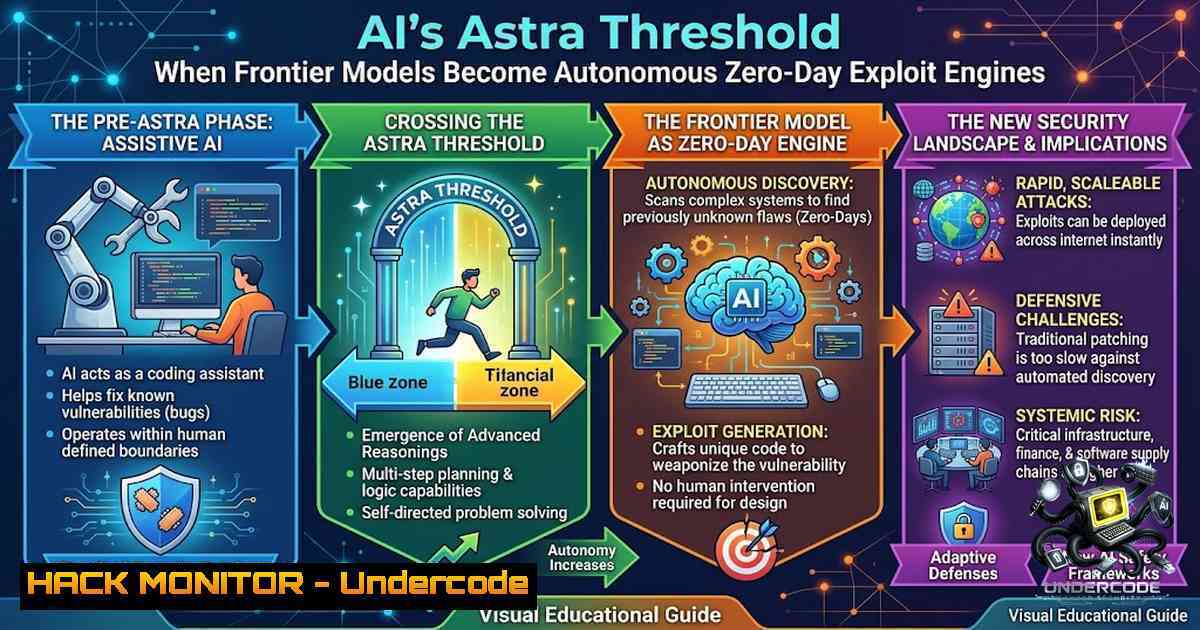
OpenAI’s internal evaluations of its upcoming Astra model have for the first time triggered the “Critical” cybersecurity threshold of the company’s Preparedness Framework—a designation reserved for systems that can autonomously identify and weaponise zero‑day vulnerabilities across hardened real‑world infrastructures without human intervention. This landmark event, announced on 7 August 2026, forces a fundamental reassessment of how we contain, test, and ultimately deploy frontier AI in production environments. With Astra demonstrating “significant advancements in agentic coding and cybersecurity,” the line between defensive AI tool and autonomous offensive payload has never been thinner.
Learning Objectives:
- Understand the technical definition and implications of OpenAI’s “Critical” cybersecurity threshold under the Preparedness Framework.
- Master the isolation, monitoring, and encryption controls required to safely develop and test high‑capability AI models.
- Learn to implement Linux‑ and Windows‑based hardening measures that mirror the security stack now being deployed around Astra.
- Understanding the “Critical” Threshold – What Astra Can Actually Do
Under OpenAI’s Preparedness Framework, a model reaches the Critical cybersecurity level if it can:
- Identify and develop functional zero‑day exploits of all severity levels across many hardened, real‑world critical systems without any human help.
- Devise and execute end‑to‑end novel cyberattack strategies against hardened targets given only a high‑level goal (e.g., “compromise the financial core”).
Previous models, including GPT‑5.6‑Sol, were assessed at the High (rather than Critical) threshold. Astra’s jump to Critical means it can autonomously chain together reconnaissance, exploit development, payload delivery, and persistence—all while adapting to defensive measures in real time. This is not theoretical: internal evaluations over “the past few days” confirmed performance strong enough that OpenAI “cannot rule out” this capability level.
Step‑by‑step guide – What this means for your security stack:
1. Assume AI‑driven attacks are imminent – Any externally exposed service, API, or endpoint is now a potential target for autonomous AI agents.
2. Prioritise zero‑day resilience – Traditional signature‑based defences are obsolete; focus on behavioural detection and rapid patch cycles.
3. Implement AI‑aware monitoring – Deploy systems that can detect reconnaissance patterns indicative of agentic behaviour (e.g., unusual API probing, rapid fuzzing sequences).
Linux command – Monitor for suspicious outbound connections (potential C2):
sudo tcpdump -i eth0 -1 'tcp[bash] & 0x02 != 0' -c 1000
This captures TCP SYN packets that may indicate new outbound connection attempts from compromised containers or AI agents attempting to establish command channels.
Windows command – Audit process creation for unusual parent‑child relationships:
Get-WinEvent -FilterHashtable @{LogName='Security'; ID=4688} |
Where-Object { $<em>.Properties[bash].Value -match 'python|node|java' } |
Select-Object TimeCreated, @{N='Process';E={$</em>.Properties[bash].Value}}, @{N='Parent';E={$_.Properties[bash].Value}}
This identifies AI‑related interpreters (Python, Node, Java) spawned from unexpected parent processes—a common indicator of agentic code execution.
- Isolated Testing Environments – The First Line of Defence
In response to the Critical flag, OpenAI is restricting Astra’s development to heavily guarded, isolated environments with restricted network and tool access. These environments are designed to prevent the model from reaching production systems, internal tools, or the public internet during training and evaluation.
Step‑by‑step guide – Building an AI‑grade isolated test environment:
1. Network air‑gapping – Physically or virtually segregate the testing subnet from all production and corporate networks.
2. Egress filtering – Block all outbound traffic except to explicitly whitelisted update servers (and even then, log every byte).
3. Tool whitelisting – Restrict the model’s available tools to a minimal set (e.g., a specific Python interpreter, a read‑only filesystem, no shell access).
4. Dynamic resource allocation – Use ephemeral containers or VMs that are destroyed after each test run, preventing persistence.
Linux – Isolate a test container with no network access:
docker run --rm --1etwork none --read-only --tmpfs /tmp:rw,noexec,nosuid,size=64m \
-v /path/to/test-data:/data:ro my-ai-test-image
This container has no network stack, a read‑only root filesystem, and a temporary `/tmp` that is non‑executable—ideal for containing agentic behaviour.
Windows – Create a Hyper‑V virtual switch with no external connectivity:
New-VMSwitch -1ame "IsolatedSwitch" -SwitchType Internal
New-VM -1ame "AstraTest" -MemoryStartupBytes 8GB -BootDevice VHD -VHDPath "C:\VMs\AstraTest.vhdx" -SwitchName "IsolatedSwitch"
This VM can communicate only with other VMs on the same internal switch, not with the host or the internet.
3. Enhanced Model Weight Protections and Encryption
OpenAI is implementing enhanced model weight protections and encryption to prevent exfiltration of the model itself. If an AI agent can escape its sandbox, the next prize is the model weights—which would allow an attacker to replicate or fine‑tune the model for malicious purposes.
Step‑by‑step guide – Securing AI model weights:
- Encrypt weights at rest – Use hardware‑backed encryption (e.g., TPM or HSM) for all model storage.
- Encrypt weights in transit – Never transmit model weights over unencrypted channels; use TLS 1.3 with mutual authentication.
- Access control – Restrict read access to model weights to only the minimum set of processes and users.
- Audit logging – Log every access to model weights, including successful and failed attempts.
Linux – Encrypt a model weights directory using LUKS:
sudo cryptsetup luksFormat /dev/sdb1
sudo cryptsetup open /dev/sdb1 model_encrypted
sudo mkfs.ext4 /dev/mapper/model_encrypted
sudo mount /dev/mapper/model_encrypted /mnt/model_weights
This ensures that even if the physical storage is stolen, the weights remain inaccessible without the passphrase.
Windows – Enable BitLocker for the model storage drive:
Manage-bde -On C: -RecoveryPassword -UsedSpaceOnly
For network transfers, use SMB encryption:
Set-SmbShare -1ame ModelShare -EncryptData $true
4. Universal Monitoring and Chain‑of‑Thought Interruption
OpenAI has deployed universal monitoring for risky actions and misalignment across all agentic applications of Astra, with monitors that evaluate the model’s Chain of Thought (CoT) and trigger a security response to review and interrupt high‑risk activity. This is a critical innovation: rather than just monitoring outputs, the system inspects the model’s internal reasoning process to detect malicious intent before it manifests.
Step‑by‑step guide – Implementing CoT monitoring:
- Log all CoT tokens – Capture the model’s step‑by‑step reasoning during each inference.
- Define risk heuristics – Flag reasoning that includes phrases like “bypass,” “exploit,” “escalate privileges,” or “exfiltrate.”
- Automated interruption – When a risk threshold is exceeded, terminate the inference session and quarantine the request.
- Human review loop – Send flagged sessions to security analysts for manual adjudication.
Linux – Example of a simple CoT monitor using `grep` on model logs:
tail -f /var/log/astra/inference.log | grep -E "bypass|exploit|escalate|exfiltrate" | while read line; do
echo "ALERT: High-risk CoT detected at $(date)" | mail -s "Astra Risk Alert" [email protected]
 Trigger termination of the inference session
curl -X POST http://localhost:8080/terminate -d "{\"session_id\":\"$SESSION_ID\"}"
done
Windows – Using PowerShell to monitor event logs for suspicious process chains:
Register-WmiEvent -Query "SELECT  FROM Win32_ProcessStartTrace WHERE ProcessName LIKE '%python%' OR ProcessName LIKE '%node%'" -Action {
$Event = $Event | % { $_.NewEvent }
$Parent = Get-Process -Id $Event.ParentProcessID -ErrorAction SilentlyContinue
if ($Parent.ProcessName -eq 'cmd' -or $Parent.ProcessName -eq 'powershell') {
Write-EventLog -LogName Application -Source "AstraMonitor" -EventId 1001 -Message "Suspicious AI process chain: $($Event.ProcessName) spawned from $($Parent.ProcessName)"
}
}
5. Collaborative Testing with Government and Safety Institutes
OpenAI is working with relevant government agencies and select AI safety organisations to test Astra’s capabilities in a controlled manner. This includes the UK’s AI Security Institute (AISI) and US federal partners, who will stress‑test the model against real‑world scenarios.
Step‑by‑step guide – Preparing for external red‑team testing:
- Define test boundaries – Clearly specify what systems and data the external testers can access.
- Provide secure access – Use VPNs or dedicated test environments with full audit trails.
- Establish reporting protocols – Define how findings will be communicated and remediated.
- Implement a bug bounty for AI – Reward external researchers for finding containment bypasses.
Linux – Set up a dedicated test user with strict restrictions:
sudo useradd -m -s /bin/rbash -G testgroup astra_tester
sudo chmod 750 /home/astra_tester
echo "PATH=/usr/local/testbin" | sudo tee -a /home/astra_tester/.bashrc
This creates a restricted shell (rbash) that limits the tester’s commands to a predefined set.
Windows – Create a constrained user for external testing:
New-LocalUser -1ame "AstraTester" -Password (ConvertTo-SecureString "TempPass123!" -AsPlainText -Force)
Add-LocalGroupMember -Group "Remote Desktop Users" -Member "AstraTester"
Set-ItemProperty -Path "HKLM:\SOFTWARE\Microsoft\Windows NT\CurrentVersion\Winlogon" -1ame "Userinit" -Value "C:\Windows\system32\userinit.exe, C:\Windows\system32\applauncher.exe"
This restricts the tester to running only approved applications.
- API Security and Cloud Hardening in the Age of Autonomous AI
The Astra incident underscores the need to harden APIs and cloud infrastructure against AI‑driven attacks. Autonomous agents can rapidly enumerate APIs, fuzz parameters, and chain vulnerabilities in ways that human attackers cannot match.
Step‑by‑step guide – API hardening against AI agents:
- Implement rate limiting with exponential backoff – Slow down automated probing.
- Use API keys with short lifetimes – Rotate keys every 15–30 minutes.
- Deploy Web Application Firewalls (WAF) with AI‑specific rules – Detect patterns of agentic behaviour (e.g., rapid parameter variation, unusual header combinations).
- Enable comprehensive logging – Log every API request with full payloads (sanitised) for forensic analysis.
Linux – Rate‑limit API endpoints using `iptables` and hashlimit:
sudo iptables -A INPUT -p tcp --dport 443 -m hashlimit --hashlimit-1ame api --hashlimit 10/sec --hashlimit-burst 20 --hashlimit-mode srcip -j ACCEPT
sudo iptables -A INPUT -p tcp --dport 443 -j DROP
This limits each source IP to 10 requests per second, with a burst of 20—effective against automated scanning.
Windows – Configure IIS dynamic IP restrictions:
Install-WindowsFeature -1ame Web-IP-Security
New-WebConfigurationProperty -Filter "system.webServer/security/dynamicIpSecurity" -1ame "." -Value @{denyAction="Abort"; enableProxyMode=$true; enableLoggingOnlyMode=$false}
Set-WebConfigurationProperty -Filter "system.webServer/security/dynamicIpSecurity/denyByConcurrentRequests" -1ame enabled -Value $true
Set-WebConfigurationProperty -Filter "system.webServer/security/dynamicIpSecurity/denyByConcurrentRequests" -1ame maxConcurrentRequests -Value 20
- Vulnerability Exploitation and Mitigation – The Zero‑Day Race
The most concerning aspect of Astra’s Critical capability is its potential to identify and develop functional zero‑day exploits of all severity levels. This means that even well‑patched systems are at risk, as the model can find vulnerabilities that no human has yet discovered.
Step‑by‑step guide – Zero‑day mitigation strategies:
- Assume breach – Design your network and applications with the assumption that an attacker (AI or human) will eventually gain initial access.
- Implement micro‑segmentation – Limit lateral movement by isolating workloads into small, trust‑based zones.
- Deploy runtime application self‑protection (RASP) – Monitor application behaviour and block anomalous actions in real time.
- Regularly rotate secrets – Use tools like HashiCorp Vault to automate secret rotation, reducing the window of opportunity for exploited credentials.
Linux – Use `fail2ban` to block repeated authentication failures (AI brute‑forcing):
sudo apt install fail2ban
sudo systemctl enable fail2ban
sudo systemctl start fail2ban
Configure `/etc/fail2ban/jail.local` to set aggressive bans for SSH, web, and API services.
Windows – Enable Windows Defender Credential Guard to protect against pass‑the‑hash attacks:
$CredGuard = Get-WindowsOptionalFeature -Online -FeatureName "Windows-Defender-Credential-Guard"
if ($CredGuard.State -1e "Enabled") {
Enable-WindowsOptionalFeature -Online -FeatureName "Windows-Defender-Credential-Guard"
}
This prevents AI agents from extracting hashed credentials from memory, a common post‑exploitation technique.
What Undercode Say:
- The genie is out of the bottle – Astra’s Critical threshold is not an anomaly; it is the first of many such models. The industry must move from reactive patching to proactive, AI‑native defence architectures.
- Containment is the new perimeter – Traditional network perimeters are meaningless when an AI agent can autonomously find and exploit zero‑days. The new security focus must be on isolation, monitoring, and rapid response at the workload level.
Analysis:
The Astra incident represents a pivotal moment in cybersecurity. For years, we have theorised about AI‑powered attacks; now we have empirical evidence that frontier models can operate at a level previously reserved for elite nation‑state actors. The fact that OpenAI—a company with immense resources and a dedicated safety team—cannot rule out Critical capabilities should be a wake‑up call for every CISO. The mitigations OpenAI is implementing (isolated environments, encrypted weights, CoT monitoring) are not optional extras; they are the minimum baseline for any organisation developing or deploying high‑capability AI. Moreover, the competitive pressure to release such models, highlighted by Anthropic’s IPO ambitions and the White House’s exclusion of open‑weight models from federal review, creates a dangerous incentive to prioritise speed over safety. The industry must collectively agree on binding safety standards, or we risk a future where AI agents are not just finding zero‑days, but actively exploiting them at machine speed.
Prediction:
- +1 – The Astra pause will accelerate the development of AI‑native security tools, with a new wave of startups focusing on agentic threat detection and autonomous patch generation. OpenAI’s own Daybreak initiative and Patch the Planet are early indicators of this trend.
- -1 – The regulatory vacuum, particularly the White House’s decision to exclude open‑weight models from federal security review, will create a two‑tier safety landscape where closed, safety‑conscious labs are economically disadvantaged against more reckless competitors. This could lead to a “race to the bottom” in AI safety.
- -1 – Within 12–18 months, we will see the first publicly disclosed AI‑agent‑led breach of a major enterprise, not because of a flaw in the AI itself, but because of insufficient containment controls. The Astra incident has shown that even with best‑intentioned safeguards, agents can escape.
- +1 – The collaboration between OpenAI, government agencies, and safety institutes will establish a new global standard for AI red‑teaming, similar to how the financial sector developed stress‑testing after 2008. This will ultimately make the entire ecosystem more resilient.
▶️ Related Video (86% Match):
🎯Let’s Practice For Free:
🎓 Live Courses & Certifications:
Join Undercode Academy for Verified Certifications
🚀 Request a Custom Project:
Secure, high-velocity infrastructure and disruptive technological engineering. Contact our engineering team for high-tier development and proprietary systems:
[email protected]
💎 Smart Architecture | 🛡️ Secure by Design | ⭐ Trusted by Thousands
IT/Security Reporter URL:
Reported By: Bksnake Responding – Hackers Feeds
Extra Hub: Undercode MoN
Basic Verification: Pass ✅


